


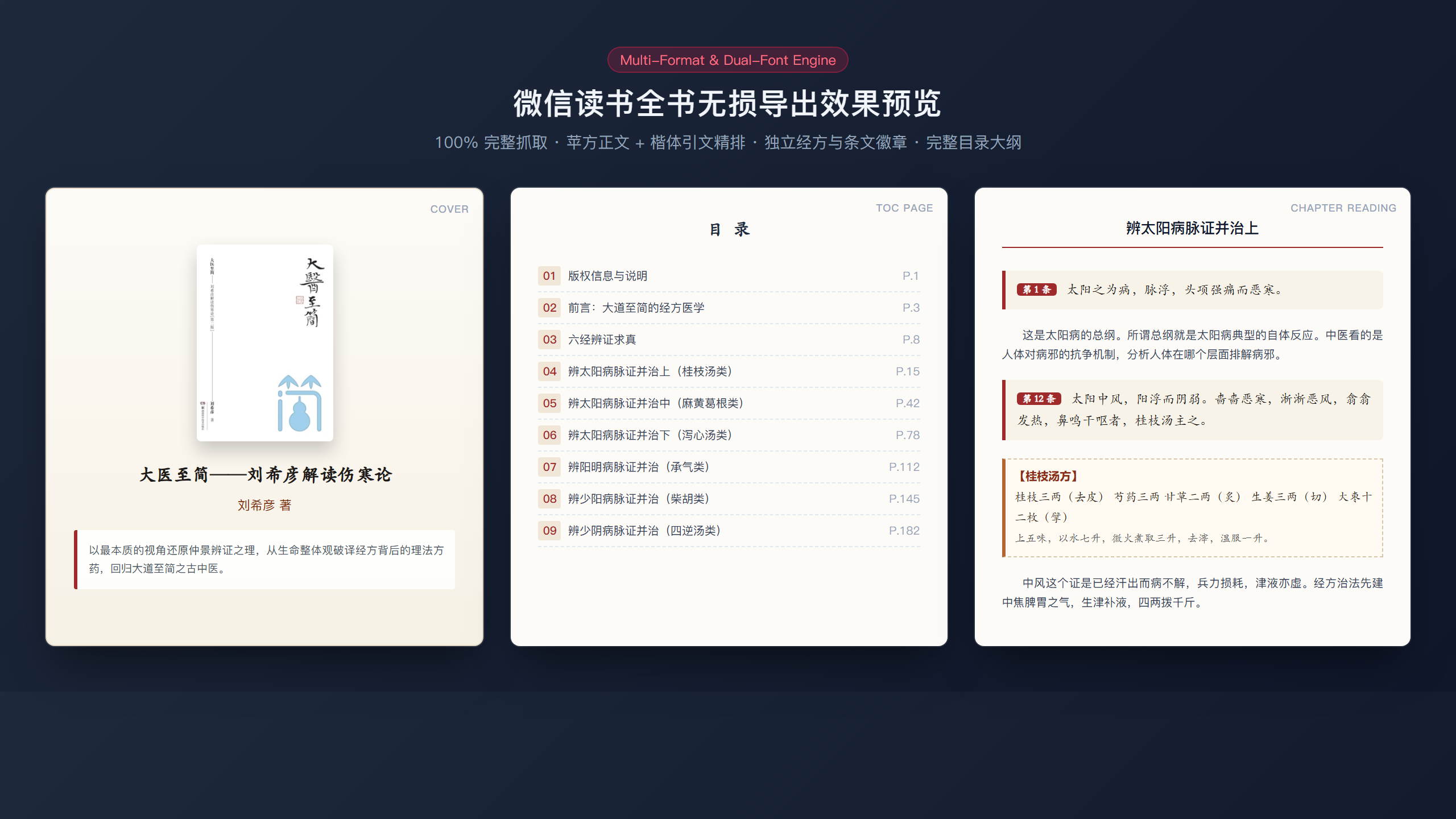
What is this?
 A Python tool that saves the full text of books you own on the WeRead web reader and exports them as a typeset PDF, an EPUB, or Markdown notes, with illustrations kept in place.
Which formats do I get, and where do they fit?A typeset PDF for iPad annotation, computer reading and printing, an EPUB for Apple Books or Kindle, and plain or styled Markdown for Obsidian and Notion.
A typeset PDF for iPad annotation, computer reading and printing, an EPUB for Apple Books or Kindle, and plain or styled Markdown for Obsidian and Notion.How do I run it?Install the dependencies, paste the full WeRead web link of the book into the script, and let it run. On the first run a browser window opens so you can scan the WeChat QR code once. Results are saved to the output/ folder.
Install the dependencies, paste the full WeRead web link of the book into the script, and let it run. On the first run a browser window opens so you can scan the WeChat QR code once. Results are saved to the output/ folder.Do I need to install a browser?Usually not: the script uses the Microsoft Edge or Google Chrome already on your computer. If neither is installed, run 'playwright install chromium' to download one. Python is required.
Usually not: the script uses the Microsoft Edge or Google Chrome already on your computer. If neither is installed, run 'playwright install chromium' to download one. Python is required.Will a big book take forever to export?Probably a long time, by design. Page turns wait a random 8 to 20 seconds, and the script pauses for 1 to 2 minutes every 10 to 20 pages to avoid hammering the server.
Probably a long time, by design. Page turns wait a random 8 to 20 seconds, and the script pauses for 1 to 2 minutes every 10 to 20 pages to avoid hammering the server.Does it keep chapters, quotes and pictures?Yes. It detects chapter titles, quotes and key paragraphs, and bold subheadings, then embeds all the original high-resolution illustrations in reading order.
Yes. It detects chapter titles, quotes and key paragraphs, and bold subheadings, then embeds all the original high-resolution illustrations in reading order.How does it avoid losing text at page breaks?It switches the reader to two-column horizontal paging, captures the Canvas drawing commands and column coordinates, and rebuilds each page's text stream in order, so text is not skipped or repeated across pages.
It switches the reader to two-column horizontal paging, captures the Canvas drawing commands and column coordinates, and rebuilds each page's text stream in order, so text is not skipped or repeated across pages.What does the Markdown output look like?There is a plain version where quotes become > blockquotes, and a styled version with tags. Both are meant for search and note-taking in Obsidian or Notion.
There is a plain version where quotes become > blockquotes, and a styled version with tags. Both are meant for search and note-taking in Obsidian or Notion.What are similar projects?qiaomu-anything-to-notebooklm, solo-skills, ljg-skills, chubbyskills, qiaomu-book-reader-legacy, qiaomu-clipper, EverRoom, claude-obsidian
qiaomu-anything-to-notebooklm, solo-skills, ljg-skills, chubbyskills, qiaomu-book-reader-legacy, qiaomu-clipper, EverRoom, claude-obsidianWhich topics is it in?notion, epub, scraping, obsidian, ebook, knowledge-management, wechat, note-taking, playwright, web-scraping, browser-automation, pdf
notion, epub, scraping, obsidian, ebook, knowledge-management, wechat, note-taking, playwright, web-scraping, browser-automation, pdf