



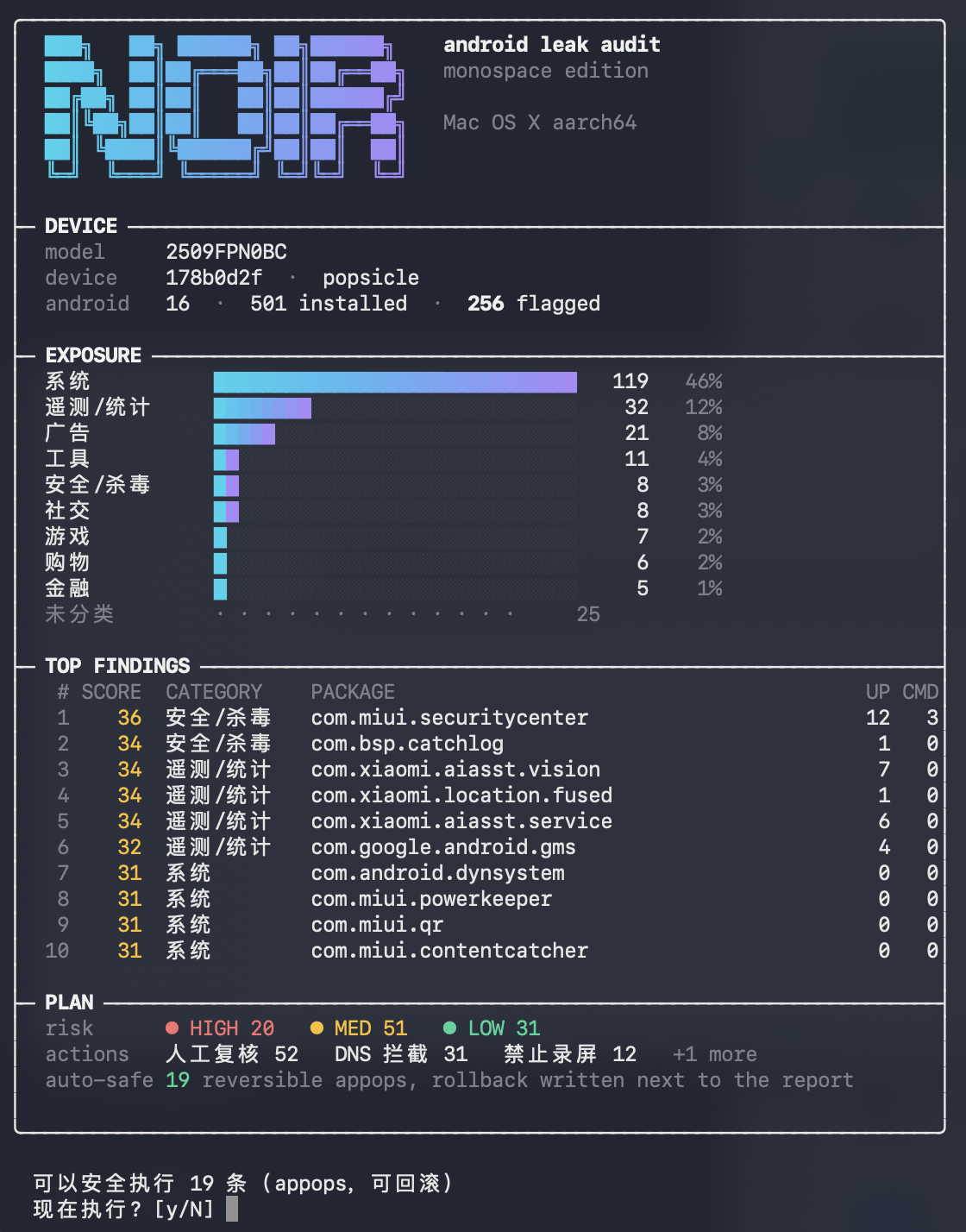
What is this?
 NOIR is a desktop audit tool for Android. Over adb it reads each installed app's permissions and the network endpoints inside its APK, then gives categories, risk scores and reversible fix suggestions.
Is it an app I install on my phone or a tool on my computer?A tool on your computer. It reads the connected phone over USB through adb, so it is not an app you install on the phone.
A tool on your computer. It reads the connected phone over USB through adb, so it is not an app you install on the phone.How do I get it running?Download the portable package for your system from Releases, unzip it and double-click the launcher. Run without arguments and a wizard checks adb, asks you to plug in the phone with USB debugging on (up to 180 seconds), then offers to scan and to apply the suggested fixes.
Download the portable package for your system from Releases, unzip it and double-click the launcher. Run without arguments and a wizard checks adb, asks you to plug in the phone with USB debugging on (up to 180 seconds), then offers to scan and to apply the suggested fixes.Do I need Java or adb installed first?Not for the portable package, since it bundles its own runtime. adb and jadx are not included: the first run asks whether to download adb to ~/.noir/tools, and jadx is only needed for the deep command.
Not for the portable package, since it bundles its own runtime. adb and jadx are not included: the first run asks whether to download adb to ~/.noir/tools, and jadx is only needed for the deep command.Does a finding prove that data was actually sent?No. A finding shows what an app can do and which endpoints its code contains. Proving a real transfer needs network-level evidence, which you would have to collect yourself.
No. A finding shows what an app can do and which endpoints its code contains. Proving a real transfer needs network-level evidence, which you would have to collect yourself.Is it only meant for my own phone?It is meant for your own devices and apps, or devices you have explicit permission to audit. Its output is static evidence: an app has a capability and its code contains an endpoint.
It is meant for your own devices and apps, or devices you have explicit permission to audit. Its output is static evidence: an app has a capability and its code contains an endpoint.Which computers can run it?macOS (Intel and Apple Silicon), Windows 10 and 11, and Debian or Ubuntu Linux are listed as supported.
macOS (Intel and Apple Silicon), Windows 10 and 11, and Debian or Ubuntu Linux are listed as supported.What does the deep command do?It pulls one app's APK to your computer, decompiles it with jadx and searches for risky calls such as Runtime.exec, DexClassLoader and MediaProjection. It also checks the manifest for exported components, cleartext traffic, backups and debuggable flags.
It pulls one app's APK to your computer, decompiles it with jadx and searches for risky calls such as Runtime.exec, DexClassLoader and MediaProjection. It also checks the manifest for exported components, cleartext traffic, backups and debuggable flags.Why does it only export DNS block lists?Changing DNS across platforms can easily cut off the phone's network, so NOIR exports domain lists instead: trackers, other and functional. Functional domains cover push, login, updates, payments and app store traffic, so blocking them breaks features.
Changing DNS across platforms can easily cut off the phone's network, so NOIR exports domain lists instead: trackers, other and functional. Functional domains cover push, login, updates, payments and app store traffic, so blocking them breaks features.How is the risk score calculated?It combines the app's permissions with the endpoints found in its APK and with vendor and category classification. It also links permissions to the data they could expose and to the domains the app reports to.
It combines the app's permissions with the endpoints found in its APK and with vendor and category classification. It also links permissions to the data they could expose and to the domains the app reports to.What are similar projects?Mobile-Security-Framework-MobSF, dumbtv, rea, ASC, universal-android-debloater, komi-store, android-reverse-engineering-skill, OhMyKeymint
Mobile-Security-Framework-MobSF, dumbtv, rea, ASC, universal-android-debloater, komi-store, android-reverse-engineering-skill, OhMyKeymintWhich topics is it in?bloatware, kotlin-multiplatform, mobile-security, data-privacy, terminal-ui, debloat, security-audit, adb, telemetry, apk, privacy-tools, static-analysis
bloatware, kotlin-multiplatform, mobile-security, data-privacy, terminal-ui, debloat, security-audit, adb, telemetry, apk, privacy-tools, static-analysis