
executor README

The project's README from github.com/UsefulSoftwareCo/executor. As one markdown file: README.md.

Executor

Connect any agent to everything.

Executor is an open-source integration layer for AI agents. Configure every integration once (MCP servers, OpenAPI specs, GraphQL APIs) with authentication and per-tool policies, then use that one catalog from any MCP-compatible agent.

Website · Documentation · Discord

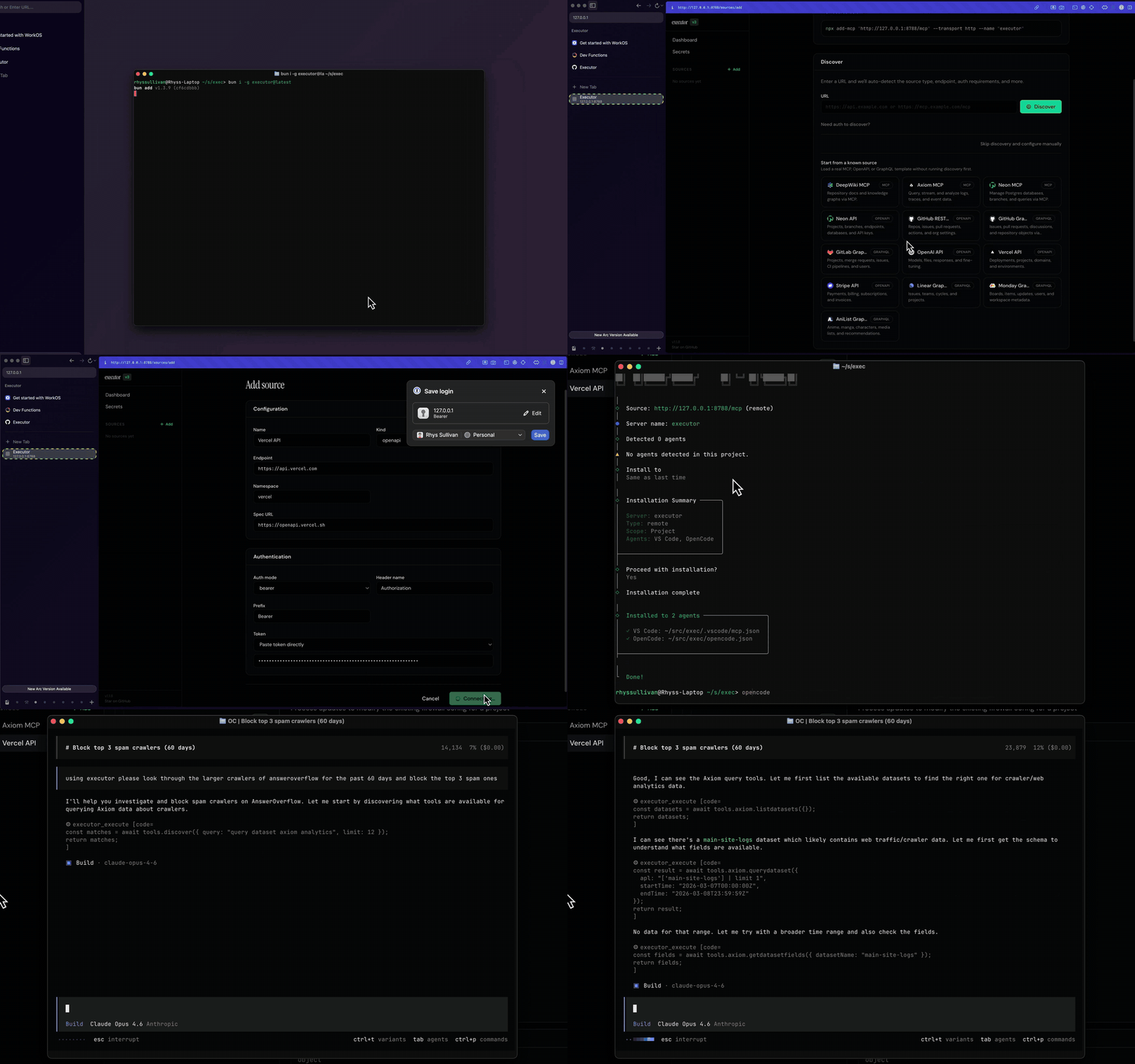
Executor demo

Why Executor

Every agent you use (Claude Code, Cursor, ChatGPT, and the rest) needs its own copy of every integration: the same API keys pasted in three places, the same MCP servers wired up again, no shared idea of what each tool is allowed to do.

Executor is the layer in between. Add a tool once, give it credentials once, set its policy once, and every agent shares it over MCP. Your integrations, auth, and policies live in one place instead of being scattered across each client.

How it works

  1. Add an integration: an MCP server, an OpenAPI spec, or a GraphQL API.
  2. Create a connection: one configured (optionally authenticated) instance of that integration. An integration can have many connections.
  3. Set policies: decide whether each tool is always allowed, needs approval, or is blocked.
  4. Point your agents at Executor over MCP. They all share the same catalog.

See Concepts for the full model.

Quick start

The fastest path is Executor Cloud: sign in, add an integration, and point your agents at the hosted MCP endpoint. Nothing to install.

To run it locally instead (Node.js 20+):

npm install -g executor   # or: pnpm add -g / bun add -g / yarn global add
executor install          # install the durable background service
executor web              # open the web UI in your browser

executor install keeps the service running across restarts. For a throwaway foreground runtime, use executor web --foreground. From the web UI, add your first integration and connect an agent.

Set up with your agent

Prefer to let your coding agent do the setup? Copy the setup prompt from the docs and paste it into Claude, Cursor, or any MCP-capable agent. It will help you pick how to run Executor, install it, connect over MCP, and get your first integration working end to end.

Ways to run

Every form exposes the same functionality, just packaged differently.

Form Best for Docs
Executor Cloud The fastest start. Use it from many agents (including cloud agents like ChatGPT) with nothing running locally. Free tier. Cloud
CLI A headless or server environment. Runs a local background service. CLI
Desktop app A regular desktop (Mac, Windows, Linux). The same runtime, as a native app. Desktop
Self-host (Docker) Your own infrastructure, full control. Docker
Self-host (Cloudflare) Deploy as a Cloudflare Worker. Cloudflare

Connect an agent over MCP

Add Executor to any MCP client (Claude Code, Cursor, OpenCode) with add-mcp, which detects the client and writes its config for you:

# Over HTTP (the running service serves a streamable-HTTP endpoint)
npx add-mcp http://127.0.0.1:4788/mcp --transport http --name executor

# Or over stdio, with the executor CLI on your PATH
npx add-mcp "executor mcp" --name executor

The Connect card in the web UI shows the exact command (and port, if it differs) already filled in. Most MCP clients only load servers at startup, so you may need to restart the client or open a new chat before the Executor tools appear.

Add an integration

From the web UI, click Add Integration, paste an OpenAPI, GraphQL, or MCP URL, and Executor detects the type, indexes the tools, and handles auth. Or add one from the CLI:

executor call executor openapi addIntegration '{
  "spec": "https://petstore3.swagger.io/api/v3/openapi.json",
  "namespace": "petstore",
  "baseUrl": "https://petstore3.swagger.io/api/v3"
}'

Use baseUrl when the OpenAPI document has relative servers entries (for example "/api/v3"). Confirm it is live with executor tools integrations.

Using tools

From the CLI

executor tools search "send email"      # find tools by intent
executor call github issues --help      # browse a namespace
executor call github issues create '{"owner":"octocat","repo":"Hello-World","title":"Hi"}'

executor call, executor resume, and executor tools ... auto-start the local daemon if needed, and pick a free port if the default is busy. If an execution pauses for auth or approval, resume it:

executor resume --execution-id exec_123

From your own code

Embed Executor with the TypeScript SDK (a Promise API; an Effect-native API is also available):

import { createExecutor } from "@executor-js/sdk/promise";
import { openApiPlugin } from "@executor-js/plugin-openapi/promise";

const executor = await createExecutor({ plugins: [openApiPlugin()] });

// add an integration, create a connection, then list and call tools
const tools = await executor.tools.list({ integration: "inventory" });
const schema = await executor.tools.schema(tools[0].address);

await executor.close();

See examples/ for runnable end-to-end scripts.

CLI reference

executor install                    # install/start the durable background service
executor web                        # open the running web UI
executor web --foreground           # start a temporary foreground runtime + web UI
executor daemon run                 # start persistent local daemon in background
executor daemon status              # show daemon status
executor daemon stop                # stop daemon
executor daemon restart             # restart daemon
executor mcp                        # start MCP endpoint (stdio)
executor call <path...> '{"k":"v"}' # invoke a tool by path segments
executor call <path...> --help      # browse namespaces/resources/methods
executor call <path...> --help --match "<text>" --limit <n> # narrow huge namespaces
executor resume --execution-id <id> # resume paused execution
executor tools search "<query>"     # search tools by intent
executor tools integrations         # list configured integrations + tool counts
executor tools describe <path>      # show tool TypeScript/JSON schema

Project layout

Executor is a Bun + Turborepo monorepo.

apps/
  cli/             the `executor` CLI and local background service
  desktop/         the desktop app (Mac, Windows, Linux)
  local/           the local runtime shared by the CLI and desktop
  cloud/           Executor Cloud (the hosted product)
  host-selfhost/   self-hosted server (Docker)
  host-cloudflare/ Cloudflare Worker deployment
  marketing/       the executor.sh site
  docs/            the docs at executor.sh/docs
packages/
  core/            contracts, plugin wiring, scopes, policies, SDK, API, CLI core
  kernel/          execution runtimes (QuickJS, Deno subprocess, dynamic worker)
  plugins/         integration and provider plugins (openapi, graphql, mcp, google,
                   microsoft, 1password, keychain, encrypted/file secrets, ...)
  hosts/           host adapters (MCP surface, Cloudflare)
  react/           shared React UI
  app/             the web app UI
examples/          runnable SDK examples
e2e/               full-stack end-to-end tests

Develop locally

bun install
bun run bootstrap   # idempotent: install deps, build required artifacts, fetch Playwright
bun run dev         # start the dev servers (defaults to http://127.0.0.1:4788)

bun run bootstrap is required in a fresh checkout: its build step produces artifacts the dev servers fail without. See RUNNING.md for dev servers, ports, and environment gotchas, and AGENTS.md for the contributor contract.

Tests

bun run test       # unit + integration suites
bun run test:e2e   # full-stack e2e: boots the cloud and self-host apps and drives them

The browser e2e scenarios need Playwright's Chromium once per machine: bunx playwright install chromium.

Community

Join the Discord. To learn more, visit executor.sh or Ask DeepWiki.

License

MIT

Attribution

References

As part of my coding process, I give my agent access to references to other codebases to understand patterns and how other people have implemented systems. A non-exhaustive list:

You are also encouraged to use this codebase as a reference to understand how it is implemented.

executor (UsefulSoftwareCo/executor)

Searching Database…

Что это такое?Открытый слой интеграций для AI-агентов: каждую интеграцию (MCP-серверы, OpenAPI-спецификации, GraphQL API) вы настраиваете один раз — с авторизацией и политиками для каждого инструмента, — и любой MCP-совместимый агент пользуется общим каталогом вместо своей собственной копии.
Это облачный сервис, десктопное приложение или утилита для командной строки?И то, и другое, и третье: один и тот же рантайм поставляется как облачный Executor Cloud, как фоновый локальный CLI-сервис, как нативное приложение для Mac, Windows и Linux, а также для самостоятельного размещения на Docker или Cloudflare Workers.
Что нужно установить для локального запуска или self-hosted варианта?Для облака ничего устанавливать не нужно. Для локального запуска требуется Node.js 20+, а сам код — это монорепозиторий на Bun + Turborepo; для self-hosting подойдут Docker или Cloudflare Worker.
Есть ли подводные камни при подключении агента?Большинство MCP-клиентов загружают серверы только при запуске, поэтому, возможно, придётся перезапустить клиент или открыть новый чат, прежде чем появятся инструменты Executor. Приостановленные для авторизации или подтверждения запуски продолжаются командой 'executor resume'.
Чем интеграция отличается от подключения?Интеграция — это источник: MCP-сервер, OpenAPI-спецификация или GraphQL API. Подключение — это один настроенный, при необходимости авторизованный экземпляр этого источника, и у одной интеграции может быть много подключений.
Что я могу сделать из командной строки?'executor call' запускает инструмент, 'executor resume' продолжает приостановленный запуск, а 'executor tools' показывает интеграции; эти команды при необходимости сами запускают локальный демон и подбирают свободный порт, если стандартный занят.
Зачем автор создал этот проект?Обычно каждый агент хранит свою копию каждой интеграции: одни и те же API-ключи вставлены в трёх местах, одни и те же MCP-серверы настраиваются заново, и нет общего контроля над тем, что может делать каждый инструмент. Executor собирает интеграции, авторизацию и политики в одном месте.
Executor Cloud бесплатный?Да, есть бесплатный тариф, и это самый быстрый способ начать — в том числе из облачных агентов вроде ChatGPT, без запуска чего-либо локально. CLI, десктопное приложение и self-hosting — открытый код под лицензией MIT.
Size
116.7 MB
Stars
4.2K
Age
8mo
Commits · 90 Days