Mouser — Logitech Mouse Remapper

English | 中文文档
A lightweight, open-source, fully local alternative to Logitech Options+ for
remapping Logitech HID++ mice. The current best experience is on the MX Master
and MX Anywhere families, with detection and fallback UI support for additional
Logitech models.
No telemetry. No cloud. No Logitech account required.
Contents
Download & Run
No install required. Just download, extract, and double-click.


)
- Open the latest release page.
- Download the zip for your platform:
- Windows —
Mouser-Windows.zip
- macOS (Apple Silicon) —
Mouser-macOS.zip
- macOS (Intel) —
Mouser-macOS-intel.zip
- Linux —
Mouser-Linux.zip
- Extract it anywhere (Desktop, Documents,
/Applications, wherever).
- Run the executable:
Mouser.exe, Mouser.app, or ./Mouser.
That's it. The app opens, drops a tray / menu-bar icon, and starts remapping immediately.
What to expect on first launch
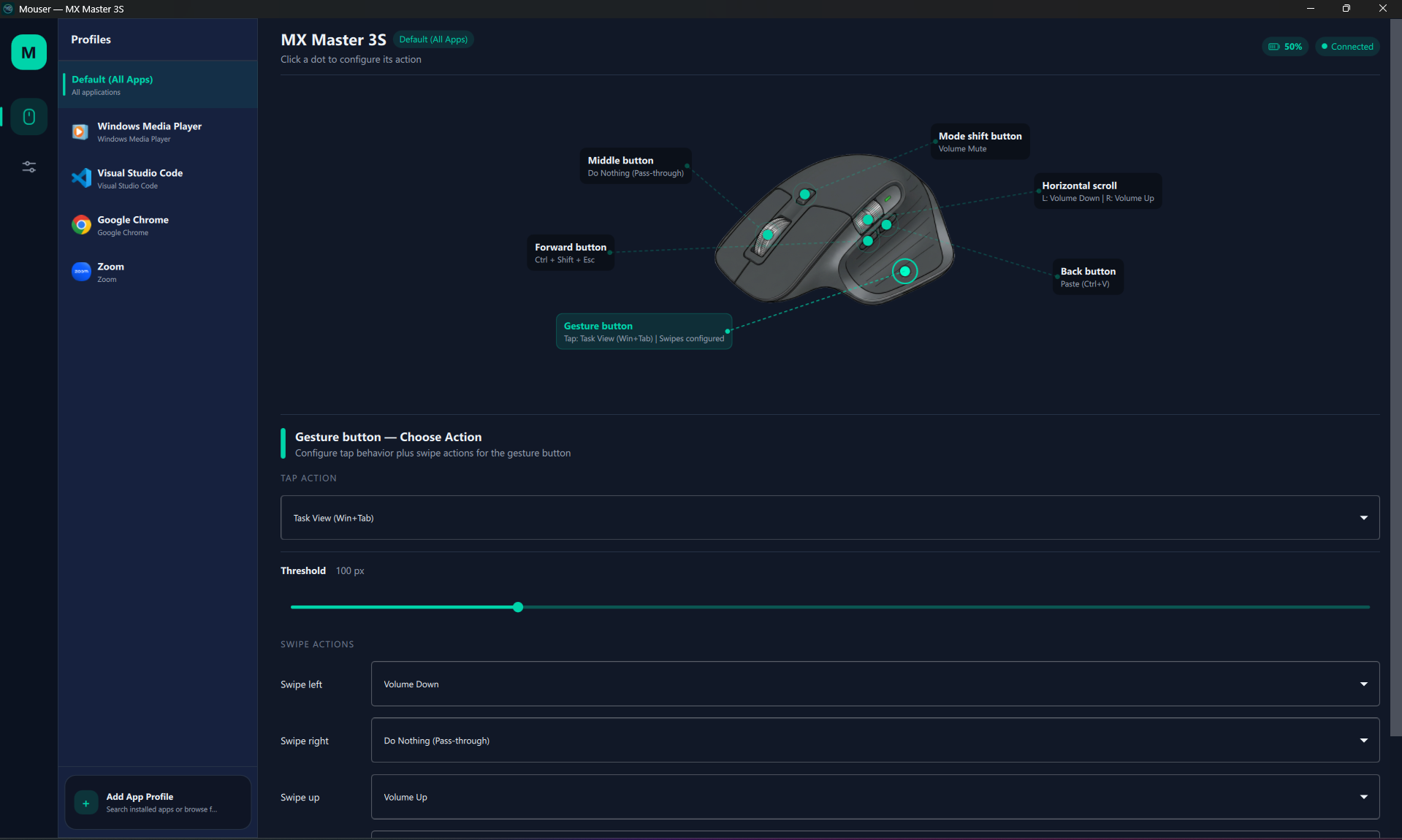
- The settings window opens to the device-aware Mouse & Profiles page.
- A tray icon appears (next to the clock on Windows / Linux, in the menu bar on macOS).
- Closing the window keeps Mouser running in the tray. Right-click the tray icon → Quit Mouser to fully exit.
- Mouser remembers language and startup behavior between runs.
First-time notes
Screenshots
| Mouse & Profiles |
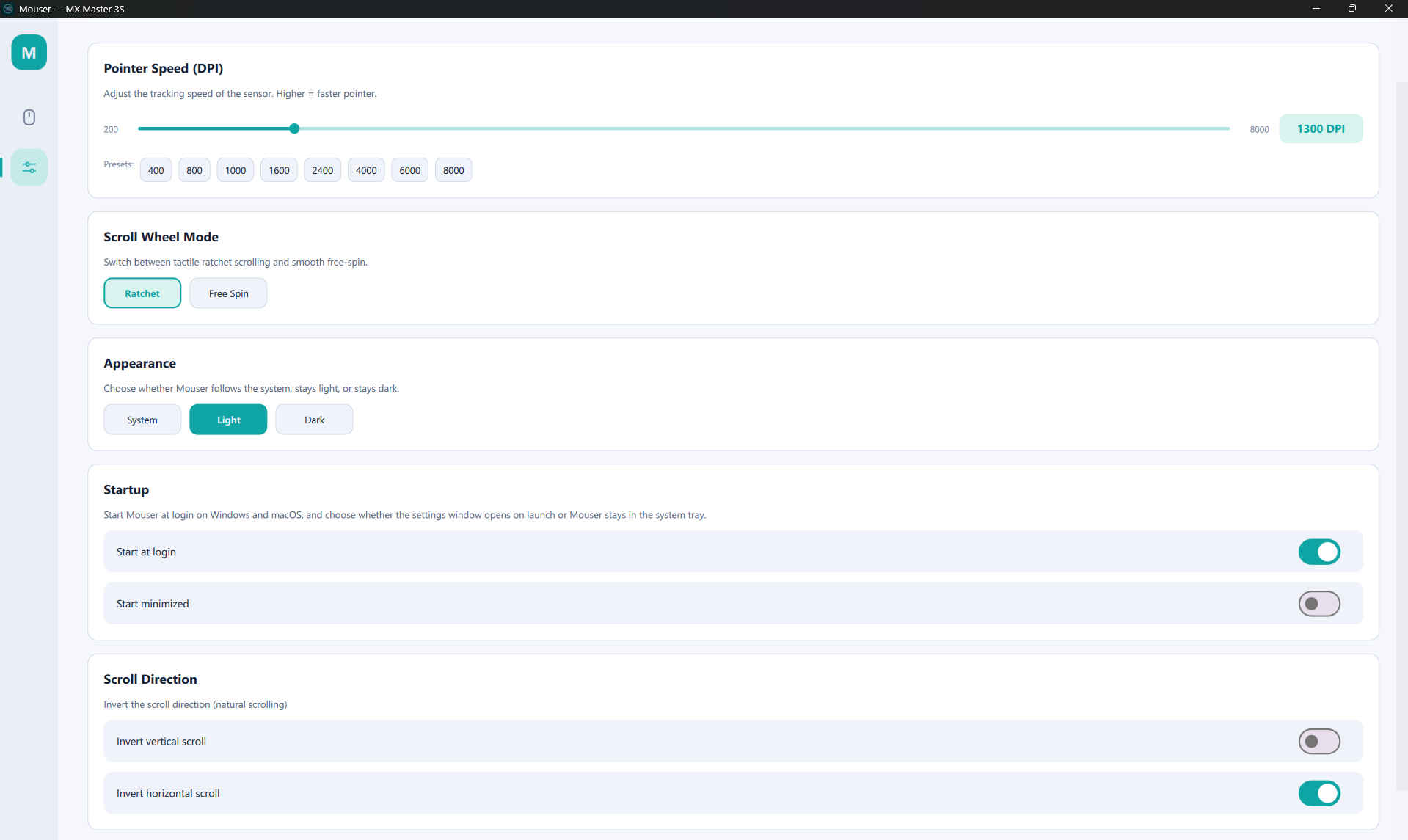
Point & Scroll |
 |
 |
Features
- Remap any programmable button — middle click, gesture button, back, forward, mode shift, DPI switch (MX Vertical), and horizontal scroll.
- Mouse-to-mouse remap — bind any button to act as left, right, middle, back, or forward click.
- Per-application profiles — Mouser auto-switches mappings when the foreground app changes (e.g. Chrome vs. VS Code).
- Custom keyboard shortcuts — record any key combination (e.g.
Ctrl+Shift+P) directly in the UI.
- 40+ built-in actions — navigation, browser, editing, media, scroll-mode, and DPI shortcuts that adapt per platform.
Device control
- DPI / pointer speed — slider from 200 to the device max (8000 on MX Master) with quick presets, plus a
Cycle DPI Presets action you can map to a button.
- Smart Shift — toggle Logitech's ratchet ↔ free-spin scroll mode (HID++
0x2111), with a sensitivity threshold and a mappable Toggle SmartShift action.
- Switch scroll mode — bind a button to flip ratchet / free-spin without opening the UI; defaults to mode-shift.
- Scroll direction inversion — independent toggles for vertical and horizontal scroll.
- Gesture button + swipe actions — tap for one action, swipe up/down/left/right for four others.
- Windows, macOS, and Linux — native hooks per platform (
WH_MOUSE_LL, CGEventTap, evdev + uinput).
- Native Intel and Apple Silicon macOS builds — separate
Mouser-macOS-intel.zip and Mouser-macOS.zip artifacts; the menu-bar app runs as LSUIElement (no Dock icon).
- Resizable UI — main window starts at 1060 × 700 with a 920 × 620 minimum; the mouse diagram and controls reflow as you resize.
- Start at login — Windows registry key, macOS LaunchAgent, and Linux XDG autostart, with an independent Start minimized option that boots straight into the tray. Linux autostart intentionally waits about 15 seconds after login so Bluetooth / HID devices are usually ready before Mouser restores device settings.
- Single-instance guard — launching a second copy brings the existing window to the front instead of starting a duplicate.
Smart connectivity
- Bluetooth and Logi Bolt — both transports are supported on all three platforms; the UI labels the live connection (
Logi Bolt only when the receiver PID is positively identified).
- Auto-reconnection — Mouser watches for power-off / on cycles and rebinds HID++ + the OS mouse hook without a restart; SmartShift settings are replayed on every reconnect (including wake-from-sleep).
- Live connection status — real-time Connected / Not Connected badge, model name, and active layout in the UI.
- Device-aware UI — interactive MX Master and MX Anywhere diagrams with clickable hotspots; generic fallback card for other models, with an experimental layout-override picker.
Multi-language UI
- English / Simplified Chinese / Traditional Chinese — switch instantly, no restart required.
- Language preference is saved to
config.json and restored on next launch.
- Covers nav, mouse page, settings page, dialogs, system tray / menu bar, and permission prompts.
Privacy first
- Fully local — config is a plain JSON file, all processing happens on your machine.
- System tray / menu bar — runs quietly in the background.
- Zero telemetry, zero cloud, zero account required.
Device coverage
| Family / model |
Detection + HID++ probing |
UI support |
| MX Master 4 / 3S / 3 / 2S / MX Master |
Yes |
Dedicated interactive per-model layouts |
| MX Anywhere 3S / 3 / 2S |
Yes |
Dedicated interactive per-model layouts |
| MX Vertical |
Yes |
Generic fallback card (with DPI switch button support) |
| Unknown Logitech HID++ mice |
Best effort by PID/name |
Generic fallback card |
MX Master and MX Anywhere devices have dedicated visual overlays. Other devices are still detected, show their model name, and can opt into an experimental layout override — button positions just may not line up until a real overlay lands. See CONTRIBUTING_DEVICES.md to add yours.
Default mappings
| Button |
Default action |
| Back button (XButton1) |
Alt + Tab (Switch Windows) |
| Forward button (XButton2) |
Alt + Tab (Switch Windows) |
| Middle click |
Pass-through |
| Gesture button |
Pass-through |
| Gesture swipes (up / down / left / right) |
Pass-through |
| Mode shift (scroll click) |
Switch Scroll Mode (Ratchet / Free Spin) |
| Horizontal scroll left |
Browser Back |
| Horizontal scroll right |
Browser Forward |
| DPI switch (MX Vertical) |
Pass-through |
Available actions
Action labels adapt per platform. Windows exposes Win+D and Task View; macOS exposes Mission Control, Show Desktop, App Exposé, and Launchpad; Linux falls back to compositor-native equivalents.
| Category |
Actions |
| Navigation |
Alt+Tab, Alt+Shift+Tab, Show Desktop, Previous Desktop, Next Desktop, Task View (Windows), Mission Control / App Exposé / Launchpad (macOS), Page Up / Page Down / Home / End |
| Browser |
Back, Forward, Close Tab (Ctrl+W), New Tab (Ctrl+T), Next Tab (Ctrl+Tab), Previous Tab (Ctrl+Shift+Tab) |
| Editing |
Copy, Paste, Cut, Undo, Select All, Save, Find |
| Media |
Volume Up, Volume Down, Volume Mute, Play / Pause, Next Track, Previous Track |
| Scroll |
Switch Scroll Mode (Ratchet / Free Spin), Toggle SmartShift, Cycle DPI Presets |
| Mouse |
Left Click, Right Click, Middle Click, Back (Mouse Button 4), Forward (Mouse Button 5) |
| Custom |
User-defined keyboard shortcuts (any key combination, captured in the UI) |
| Other |
Do Nothing (pass-through) |
Build from source
You only need this if you want to hack on Mouser or run a development build. Most users should grab a release zip — see Download & Run.
Common prerequisites
- Windows 10/11, macOS 12+ (Monterey), or Linux (X11; KDE Wayland for app detection)
- Python 3.10+ (tested up to 3.14)
- A supported Logitech HID++ mouse paired via Bluetooth or a USB receiver
- Logitech Options+ must NOT be running — it conflicts with HID++ access
git and a working build toolchain
git clone https://github.com/TomBadash/Mouser.git
cd Mouser
python -m venv .venv
Windows
.\.venv\Scripts\activate
pip install -r requirements.txt

# Run from source
python main_qml.py

# Or start straight into the tray
python main_qml.py --start-hidden

# Build a portable zip
build.bat                # standard
build.bat --clean        # force clean rebuild
build.bat installs requirements, verifies that hidapi is importable, and packages with PyInstaller. The output lives in dist\Mouser\ — zip the folder and ship it.
To launch a source checkout without a console window, create a shortcut that uses pythonw.exe; see DEVELOPMENT.md.
macOS
source .venv/bin/activate
pip install -r requirements.txt

# Run from source
python main_qml.py
python main_qml.py --start-hidden     # launch directly to menu bar

# Build the native menu-bar bundle
pip install pyinstaller
./build_macos_app.sh
The output is dist/Mouser.app. The script reuses images/AppIcon.icns when present, otherwise generates one from images/logo_icon.png. Signing depends on whether MOUSER_SIGN_IDENTITY is set in the environment:
- Unset (default): ad-hoc signs with
codesign --sign -. Convenient for one-off builds, but the bundle's code identity can change on rebuild, so macOS may ask for Accessibility permission again.
- Set to a codesigning identity (
security find-identity -v -p codesigning to list them — SHA-1 form preferred): signs every nested .dylib / .so / .framework with hardened runtime options, then signs the outer app with the hardened-runtime exceptions at build_resources/Mouser.entitlements. This is a local developer signing path for repeated builds; stable macOS permission behavior depends on keeping the same source, resolved Python interpreter, dependency versions, architecture, signing identity, entitlements, and timestamp policy. A failing codesign --verify --deep --strict check aborts the build.
MOUSER_SIGN_IDENTITY="ABCD1234..." ./build_macos_app.sh # local signed build
- This is not a notarized release-signing flow. Public macOS release zips remain ad-hoc signed until a separate Developer ID signing, secure timestamp, notarization, stapling, and Gatekeeper validation workflow exists.
- Build on the architecture you want to ship: an
arm64 Python produces an Apple Silicon bundle, an x86_64 Python produces an Intel bundle. Set PYINSTALLER_TARGET_ARCH=arm64|x86_64|universal2 to override.
- Release CI publishes both
Mouser-macOS.zip (Apple Silicon) and Mouser-macOS-intel.zip (Intel) automatically on tag pushes.
- Accessibility permission is required. See readme_mac_osx.md for the full grant flow and platform-specific notes.
Linux
source .venv/bin/activate
pip install -r requirements.txt

# Run from source
python main_qml.py

# Install device permissions (only needed once, then reconnect the mouse)
./packaging/linux/install-linux-permissions.sh

# Build a portable bundle
sudo apt-get install libhidapi-dev
pip install pyinstaller
pyinstaller Mouser-linux.spec --noconfirm
The helper installs 69-mouser-logitech.rules, reloads udev, and tries to modprobe uinput. After a successful run, reconnect the mouse, fully quit Mouser, and launch normally — no sudo. On systems without logind / uaccess, adding the user to the input group is the distro-specific fallback.
The first normal Linux launch creates or refreshes:
~/.local/share/applications/io.github.tombadash.mouser.desktop
The generated launcher uses absolute paths for the current portable app or source checkout, and syncs Mouser's app icon into the per-user hicolor icon theme when possible. If you move the checkout, launch Mouser once from the new path to refresh the app-menu entry. Enabling Start at login also manages:
~/.config/autostart/io.github.tombadash.mouser.desktop
That Linux autostart entry includes a short GNOME startup delay so Mouser does not race Bluetooth / HID initialization immediately after login.
xdotool enables per-app profile switching on X11; kdotool adds KDE Wayland support. Other Wayland compositors fall back to the default profile.
Automated releases: pushing a v* tag triggers .github/workflows/release.yml, which builds Windows, macOS (Apple Silicon + Intel), and Linux artifacts in CI and uploads them to the GitHub Release.
For project layout, the architecture diagram, the HID++ gesture detector, the Engine + reconnection flow, debug CLI flags (--hid-backend=iokit|hidapi|auto), and how to run the test suite, see DEVELOPMENT.md. To add a new device, see CONTRIBUTING_DEVICES.md.
Limitations
- Per-device mappings aren't fully separated yet — layout overrides are stored per detected device, but profile mappings are still global.
- Conflicts with Logitech Options+ — both apps fight over HID++ access. Quit Options+ before running Mouser.
- Scroll inversion uses coalesced post-injection on Windows to avoid LL-hook deadlocks; it's stable in mainstream apps but may misbehave in some games or low-level drivers.
- Admin not required — but injected keystrokes may not reach elevated windows or some games. Run Mouser elevated if you need that path.
- Linux app detection is partial — X11 works via
xdotool, KDE Wayland works via kdotool, GNOME / other Wayland compositors still fall back to the default profile.
- Linux device permissions — Mouser needs access to
/dev/hidraw*, /dev/input/event*, and /dev/uinput. Use install-linux-permissions.sh once instead of running as root.
Roadmap
- Dedicated overlays for more devices — real hotspot maps and artwork for MX Vertical and other Logitech families
- True per-device config — separate mappings cleanly when multiple Logitech mice are used on the same machine
- Dynamic button inventory — build button lists from discovered
REPROG_CONTROLS_V4 controls instead of the current fixed sets
- Improved scroll inversion — explore driver-level or interception-driver approaches
- Gesture swipe tuning — improve swipe reliability and defaults across more devices
- Per-app profile auto-creation — detect new apps and prompt to create a profile
- Export / import config — share configurations between machines
- Tray icon badge — show the active profile name in the tray tooltip
- Broader Wayland support — extend app detection beyond X11 / KDE and validate across more distros
- Plugin system — allow third-party action providers
Contributing
Contributions are welcome.
- Code, fixes, and features: fork → branch → PR. The dev setup, architecture overview, debug flags, and test instructions live in DEVELOPMENT.md.
- Adding a new Logitech mouse: follow the discovery-dump walkthrough in CONTRIBUTING_DEVICES.md. Even a partial dump helps.
- Help wanted:
- Testing with other Logitech HID++ devices
- Scroll inversion improvements
- Broader Linux / Wayland validation
- UI/UX polish, accessibility, and translations
Support the project
If Mouser saves you from installing Logitech Options+, consider supporting development:

Every bit helps keep the project going — thank you.
Acknowledgments
- @andrew-sz — macOS port: CGEventTap mouse hooking, Quartz key simulation, NSWorkspace app detection, and NSEvent media key support.
- @thisislvca — significant expansion of the project including macOS compatibility improvements, multi-device support, new UI features, and active triage of open issues.
- @awkure — cross-platform login startup (Windows registry + macOS LaunchAgent), single-instance guard, start-minimized option, and MX Master 4 detection.
- @hieshima — Linux support (evdev + HID++ + uinput), mode-shift mapping, Smart Shift toggle, custom keyboard shortcut support, Linux connection-state stabilization, and macOS CGEventTap reliability fixes (auto re-enable on timeout, trackpad scroll filtering).
- @pavelzaichyk — Next Tab / Previous Tab browser actions, persistent rotating log file storage, Smart Shift enhanced support (HID++
0x2111) with sensitivity control and scroll-mode sync.
- @nellwhoami — Multi-languag

 Mouser 是一款轻量、开源、完全本地运行的应用,用于重新映射罗技 HID++ 鼠标(如 MX Master 和 MX Anywhere 系列),是 Logitech Options+ 的免费替代品。