

11.1K ·GitHub
What is this?
 A macOS app that makes cheap third-party mice feel as good as an Apple Trackpad or a Logitech MX Master - smoother scrolling, remappable buttons and click-and-drag gestures. The author wants it to become the best mouse driver ever.
A macOS app that makes cheap third-party mice feel as good as an Apple Trackpad or a Logitech MX Master - smoother scrolling, remappable buttons and click-and-drag gestures. The author wants it to become the best mouse driver ever.Is there an easy way to install it?Download the latest version from the website, or install it via Homebrew with 'brew install --cask mac-mouse-fix'. Older versions are available on the GitHub Releases page.
Download the latest version from the website, or install it via Homebrew with 'brew install --cask mac-mouse-fix'. Older versions are available on the GitHub Releases page.Will my mouse work with it?Most likely - it works very well with most mice. Exceptions: mice that talk to the Mac over a proprietary protocol, like ones designed for Logitech Options, may not get all their buttons recognized, and the Apple Magic Mouse is not affected by the app at all for now.
Most likely - it works very well with most mice. Exceptions: mice that talk to the Mac over a proprietary protocol, like ones designed for Logitech Options, may not get all their buttons recognized, and the Apple Magic Mouse is not affected by the app at all for now.Does it work on Windows or Linux, and which macOS versions are supported?It is Mac-only. Version 3 requires macOS 11 Big Sur or later; older systems (10.11-10.15) should run Mac Mouse Fix 2 instead. On Apple Silicon Macs it runs 100% native.
It is Mac-only. Version 3 requires macOS 11 Big Sur or later; older systems (10.11-10.15) should run Mac Mouse Fix 2 instead. On Apple Silicon Macs it runs 100% native.Does it collect any of my data?No ads, and no personal information is collected. The only exception: when you buy a license, the sales provider Gumroad collects info like your email address, which the developer can see - needed to issue license keys and refunds.
No ads, and no personal information is collected. The only exception: when you buy a license, the sales provider Gumroad collects info like your email address, which the developer can see - needed to issue license keys and refunds.The app is monetized now - is it still open source?Yes. Versions 3 and later use the custom MMF License: you are encouraged to use the source code in your own projects, as long as you do not release a simple copy of the app.
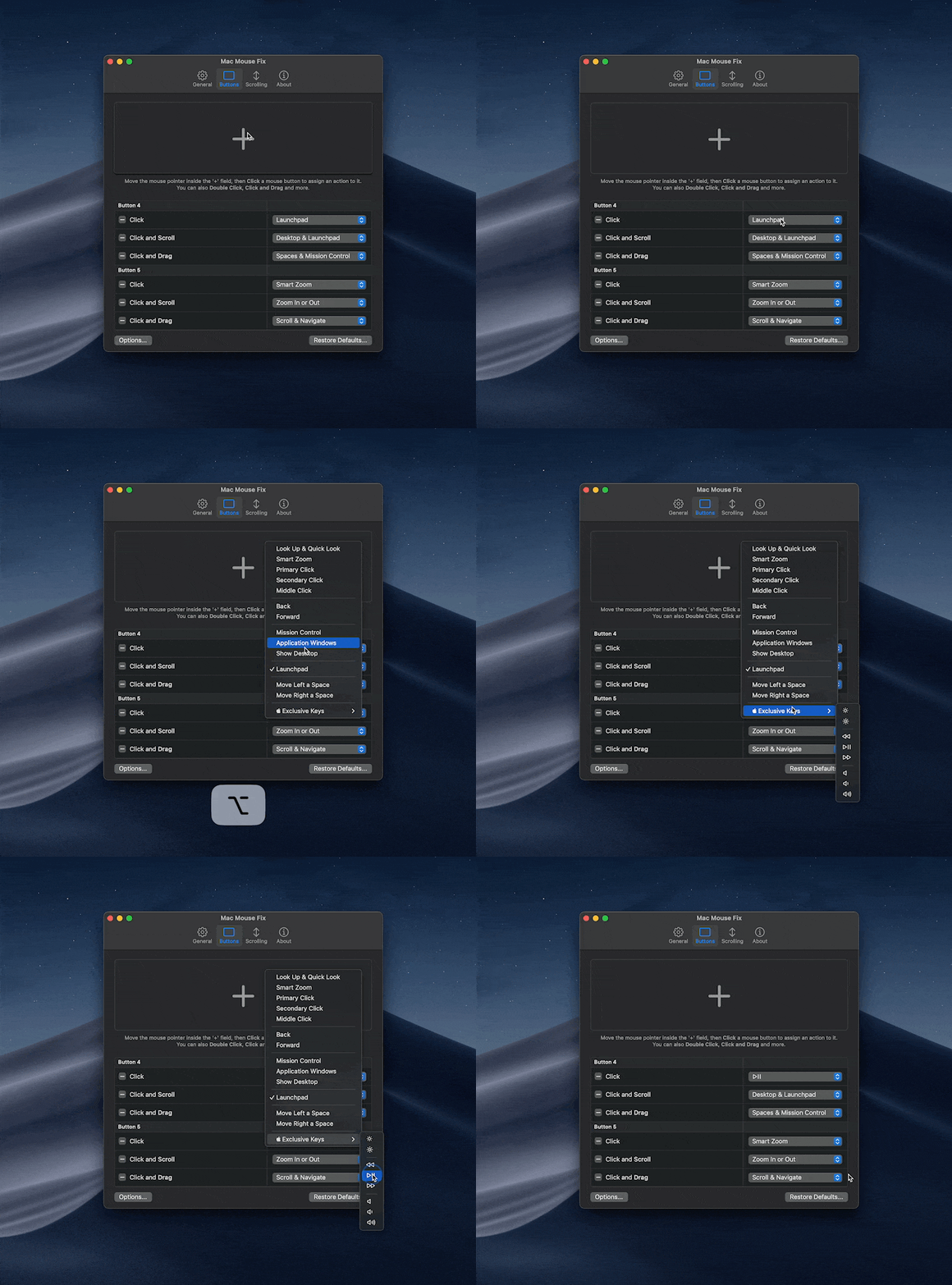
Yes. Versions 3 and later use the custom MMF License: you are encouraged to use the source code in your own projects, as long as you do not release a simple copy of the app.What can I make my mouse buttons do besides a normal click?Buttons can get Click and Drag actions like 'Scroll & Navigate', which mimics two-finger trackpad swipes - so with a window manager like Swish you can snap windows to half or quarter screens by clicking and dragging - or 'Spaces & Mission Control' for App Exposé. You can also trigger any keyboard key from the mouse, including special Apple keys for brightness, volume and media (hold Option to pick those).
Buttons can get Click and Drag actions like 'Scroll & Navigate', which mimics two-finger trackpad swipes - so with a window manager like Swish you can snap windows to half or quarter screens by clicking and dragging - or 'Spaces & Mission Control' for App Exposé. You can also trigger any keyboard key from the mouse, including special Apple keys for brightness, volume and media (hold Option to pick those).Why is there a short delay when I click?The app may be waiting to see whether you are about to double click. To remove the delay for a button, delete any 'Double Click' actions assigned to that button.
The app may be waiting to see whether you are about to double click. To remove the delay for a button, delete any 'Double Click' actions assigned to that button.Can I configure it differently per app or per mouse?Mac Mouse Fix 2 has app-specific settings under More... > App-specific settings. Version 3 does not have this feature yet - app-specific and mouse-specific settings are planned with no timeline. Workaround: enable 'Show in Menu Bar' and toggle features like Smooth Scrolling right from the menu bar.
Mac Mouse Fix 2 has app-specific settings under More... > App-specific settings. Version 3 does not have this feature yet - app-specific and mouse-specific settings are planned with no timeline. Workaround: enable 'Show in Menu Bar' and toggle features like Smooth Scrolling right from the menu bar.What is the right way to uninstall it?Just move the app to the bin - but leftover files will stay on your system, because macOS apps cannot delete their own files. The author recommends running AppCleaner by FreeMacSoft to remove them.
Just move the app to the bin - but leftover files will stay on your system, because macOS apps cannot delete their own files. The author recommends running AppCleaner by FreeMacSoft to remove them.What are similar projects?Mos, Mouser, BetterDisplay, mactap-app, Doll, OpenYoink, rumps, kinesis
Mos, Mouser, BetterDisplay, mactap-app, Doll, OpenYoink, rumps, kinesis