Thurbox




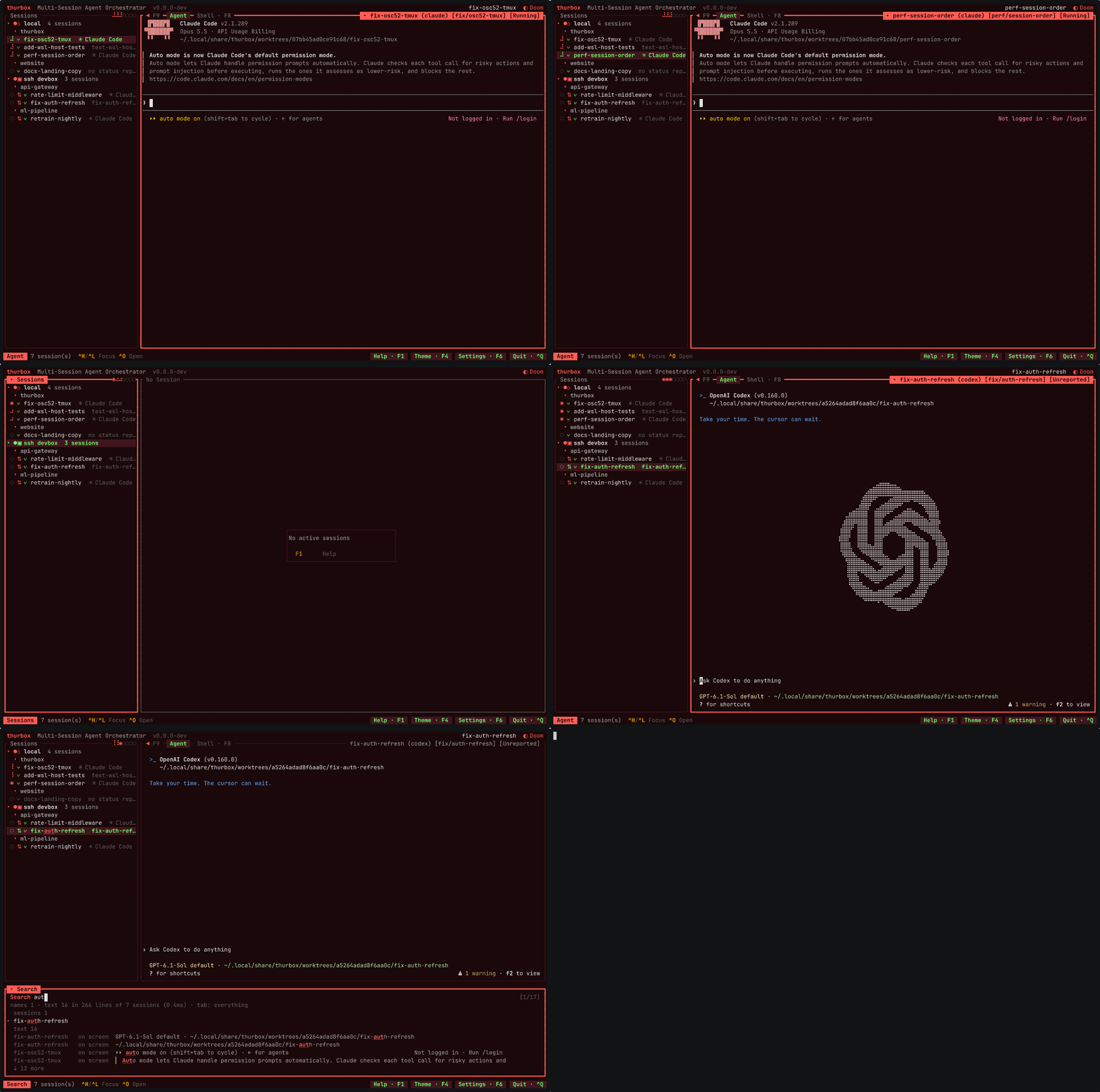
- Several coding agents at once, side by side in one terminal — Claude Code and Codex
today, and any agent Fleet gains a harness profile for.
- A persistent multiplexer session behind every agent — they survive crashes, restarts
and reboots, so quit thurbox and every agent keeps working.
- Agents on other machines too — a session on another Fleet host sits in the same
list under its own host, beside the ones running here.
- A worktree per session — Fleet gives each session on this machine a git worktree of its
own, so agents never fight over your checkout. The repository is mapped once in Fleet's config.
- Agent-neutral — thurbox launches the vendor CLI unmodified and knows nothing about its
model, prompts or tools, so new agent features arrive the day that CLI ships them.
- An interface that is not compiled in — every pane, the session list included, is a Lua
file in a directory you own; move it, turn it off, rewrite it, or install one somebody else
wrote.
Installation
Linux / macOS:
curl -fsSL https://raw.githubusercontent.com/Thurbeen/thurbox/main/scripts/install.sh | sh
Windows (PowerShell):
irm https://raw.githubusercontent.com/Thurbeen/thurbox/main/scripts/install.ps1 | iex
That installs both binaries — thurbox (the TUI) and thurbox-cli (the
headless one) — with checksum verification and platform auto-detection.
You also need tmux ≥ 3.2 (or psmux ≥ 3.3.8
on native Windows), git, and at least one coding-agent CLI.
RMUX ≥ 0.10.0 is an opt-in alternative,
tested with thurbox on Linux. Install it separately, then select RMUX
after tmux in the new-session picker (Ctrl+N); it appears locally when
rmux is on PATH. See multiplexer requirements and setup
for verified versions, config defaults, host support, and limits.
Nix / NixOS:
nix run github:Thurbeen/thurbox                # try it
nix profile install github:Thurbeen/thurbox    # install it
On NixOS, add github:Thurbeen/thurbox as a flake input and import
thurbox.nixosModules.default with programs.thurbox.enable = true;. The
Installation page
has the full snippet, the overlay and the Home Manager module.
Homebrew, the AUR, winget, Chocolatey, building from source, pinning a version
and changing the install directory are all on the
Installation page.
Uninstall: removing the binaries is not enough — sessions keep running in
the selected multiplexer. Follow the
uninstall steps.
Your first session
thurbox
First launch seeds ~/.config/thurbox/ — the themes and the interface itself —
and starts Fleet, which runs every session. It then draws a session list on the left and an agent
terminal on the right.
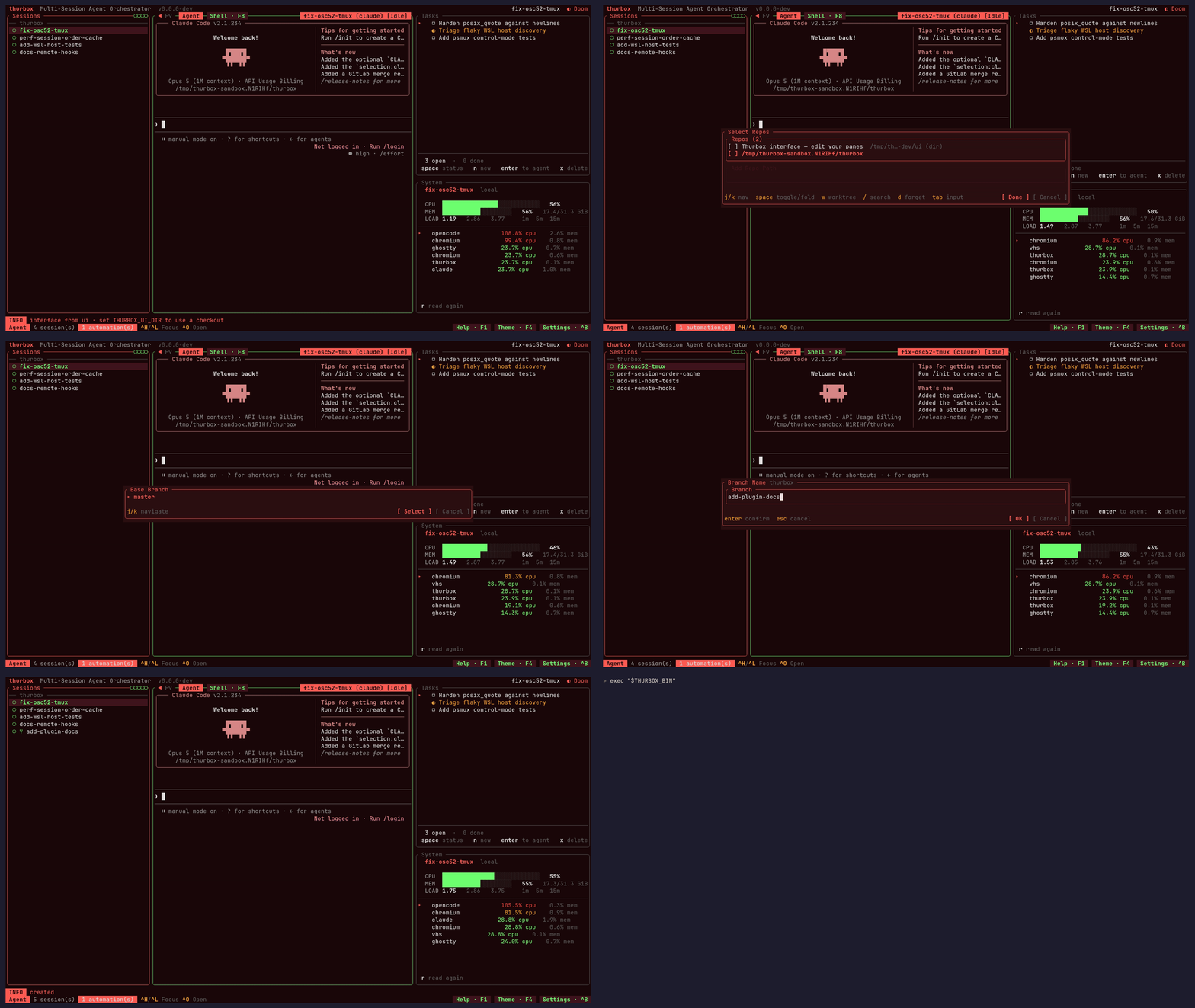
Ctrl+N opens the new-session flow. Pick a repository, name the
session, then pick an agent from the harnesses Fleet offers. Fleet gives the
session a worktree of its own.- Talk to it. The right pane is a live agent CLI; every key goes to it.
Ctrl+N again for a second agent, on the same repository or another. Ctrl+J / Ctrl+K
move between sessions — the one you are not looking at keeps working.Ctrl+Q leaves the TUI without killing anything. Run thurbox again and
both agents are still mid-task, or attach to one with fleet attach <task>.
That is the whole product in four steps: parallel work that keeps going when you
stop watching it.
F1 lists every key and is rendered from the live registry, so it cannot drift
from what is running; Ctrl+P is a command palette over the same actions.
For the same walkthrough with screenshots, see the
tutorial.
What else it does
- Global search
(
Ctrl+/) — find a session by name, agent, branch or repo, and by the text
on its screen, which is the half that finds it by the error in it.
- Sessions on other machines
— Fleet's config names the hosts and the runtime that runs each; the TUI
stays local and reads this machine only.
- A headless CLI
— every session is a Fleet Task, so
fleet creates, drives and deletes
sessions from a script while the TUI shows them. thurbox-cli covers the
interface's own files.
- Automations
— scheduled sends, spawns and commands in
automations.json, fired by the
interface or by thurbox-cli automation tick from an OS timer.
- Messages between sessions
—
fleet send queues a message for a session's agent, and Fleet delivers it,
so one agent hands another a payload instead of scraping its terminal.
- OS notifications,
36 themes
(
Ctrl+Y) and full mouse support.
Starting a session per package of a monorepo from one script is the
monorepo recipe.
Make it yours
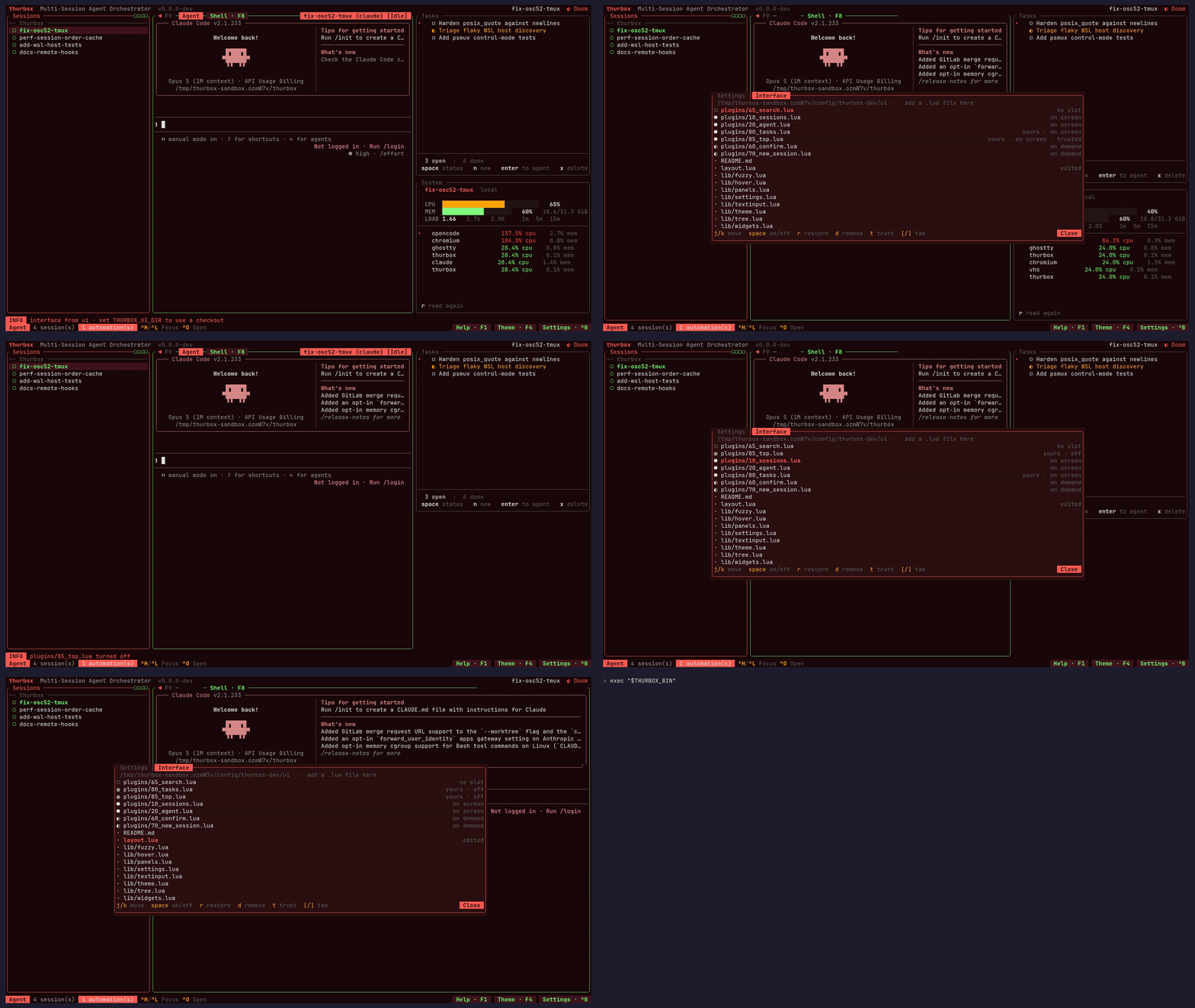
The binary boots a kernel, reads a directory, and draws whatever Lua it finds
there. Panes live in ui/plugins/*.lua, the arrangement in ui/layout.lua, and
F10 reloads both from disk. Hosts, themes, chords and settings
are each a file under ~/.config/thurbox/.
You do not have to learn Lua for any of it. The interface directory ships an
AGENTS.md that teaches whichever CLI you run how the interface is put
together, so from a session opened there you can just ask:
Add a pane on the left with CPU and RAM usage. Move the search strip to the
bottom and make the session column 30% wide.
Press F10 and the change is on your screen. If a pane breaks, Ctrl+, then
] is chrome rather than a pane, so it cannot be edited away — r restores a
shipped file, space turns yours off.
The Interface → ·
Writing a pane → ·
Configuration →
Plugins → — official and community
panes and other add-ons, with install commands and submission details.
Documentation
thurbox.thurbeen.eu/docs is the manual:
installation,
tutorial,
features,
keybindings,
configuration,
agents,
the interface,
orchestration,
architecture,
a comparison with similar tools
and an FAQ.
The rationale behind the decisions is in this repository, under
docs/: constitution (non-negotiable
principles), ARCHITECTURE, FEATURES,
CONFIG, KERNEL,
PLUGINS, ORCHESTRATION,
DEVELOPMENT and RELEASING.
Contributing
CONTRIBUTING.md is the full guide — the Nix dev shell, the
just tasks, the test discipline, and the conventional-commit rules that decide
what gets released.
git clone https://github.com/Thurbeen/thurbox.git
cd thurbox
nix develop          # or ./scripts/install-dev-tools.sh
just build && just test && just lint
- Discord — questions, setup help, and
showing off your interface. Ask in
#help, one thread per problem.
- GitHub Issues — confirmed
bugs and concrete feature requests.
License
MIT — see LICENSE. Built on
ratatui,
tui-term,
vt100 and
tmux.


 Thurbox 是一个终端界面,可以并排运行多个编程智能体,包括 Claude Code、Codex、Antigravity、opencode、aider,或你自己描述的任何命令行工具。每个智能体都运行在自己的持久会话中,退出 TUI 后会话仍会继续运行。