This repository contains the open-source PR Agent Project.
It is not the Qodo offering for open-source projects.
PR-Agent is an open-source, AI-powered code review agent and a community-maintained legacy project of Qodo. It is distinct from Qodo's primary AI code review offering, which provides a feature-rich, context-aware experience. Qodo offers a free version for open-source projects and integrates seamlessly with GitHub, GitLab, Bitbucket, and Azure DevOps for high-quality automated reviews.
Sponsors
PR-Agent is a community-maintained open-source project, with its ongoing development supported by our sponsors. If you'd like to support the project, consider becoming a sponsor.
[!NOTE]
Docker Hub namespace migration. Releases 0.34.2 and later are published under pragent/pr-agent. Older releases (up to and including v0.31) remain available at the legacy codiumai/pr-agent namespace as a frozen archive — no new images are pushed there. Update any pinned image: / docker pull / uses: docker:// references when upgrading to 0.34.2+.
🚀 Quick Start for PR-Agent
1. GitHub Action (Recommended)
Add automated PR reviews to your repository with a simple workflow file:
AI Models: OpenAI GPT, Anthropic Claude, Google Gemini, DeepSeek, Mistral, and any other model reachable through LiteLLM (Azure OpenAI, AWS Bedrock, Vertex AI, Databricks, OpenRouter, Ollama, and more) — see Changing a model
Open Source Benefits:
Full control over your data and infrastructure
Customize prompts and behavior for your team's needs
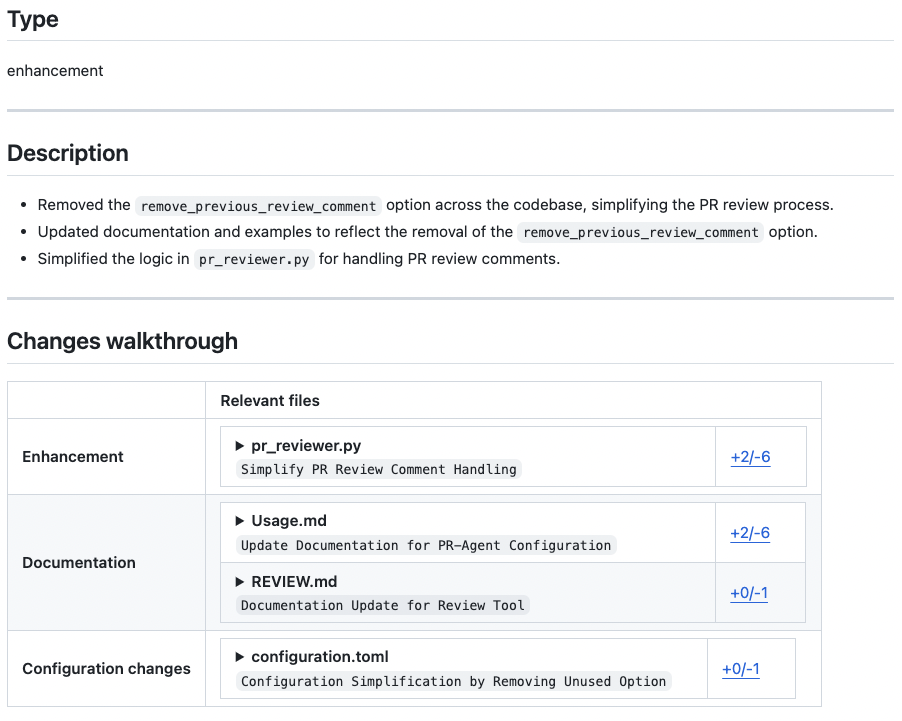
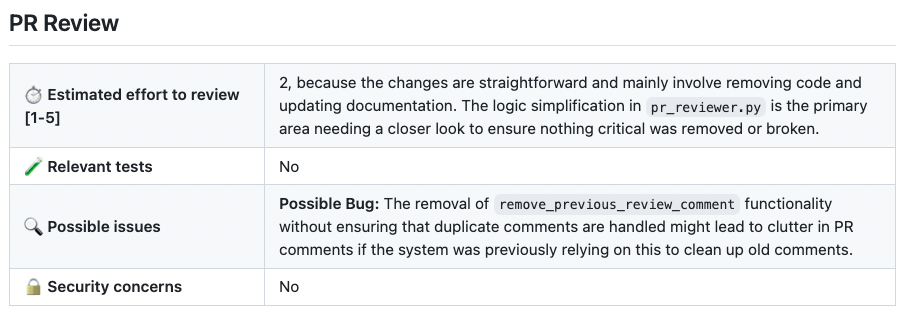
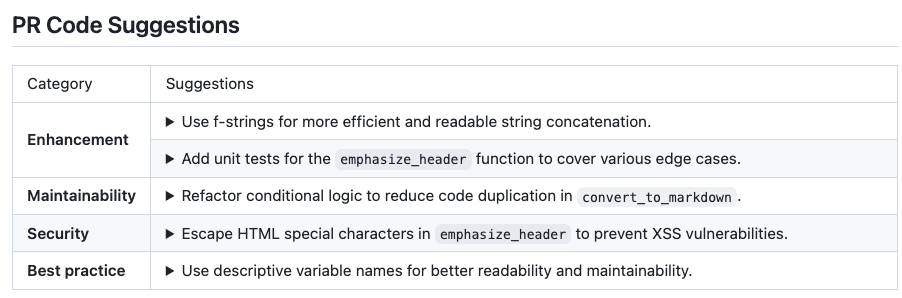
PR-Agent tools run as a comment on a PR or from the CLI. A few common ones:
# Comment on a PR (GitHub/GitLab/Bitbucket/…):
/describe
/review
/improve
/ask "What does this PR change?" # free-text Q&A about the PR

# Or locally via the CLI:
pr-agent --pr_url <PR_URL> review
See the Tools docs for the full list of tools with example commands, and each tool's page for screenshots and options.
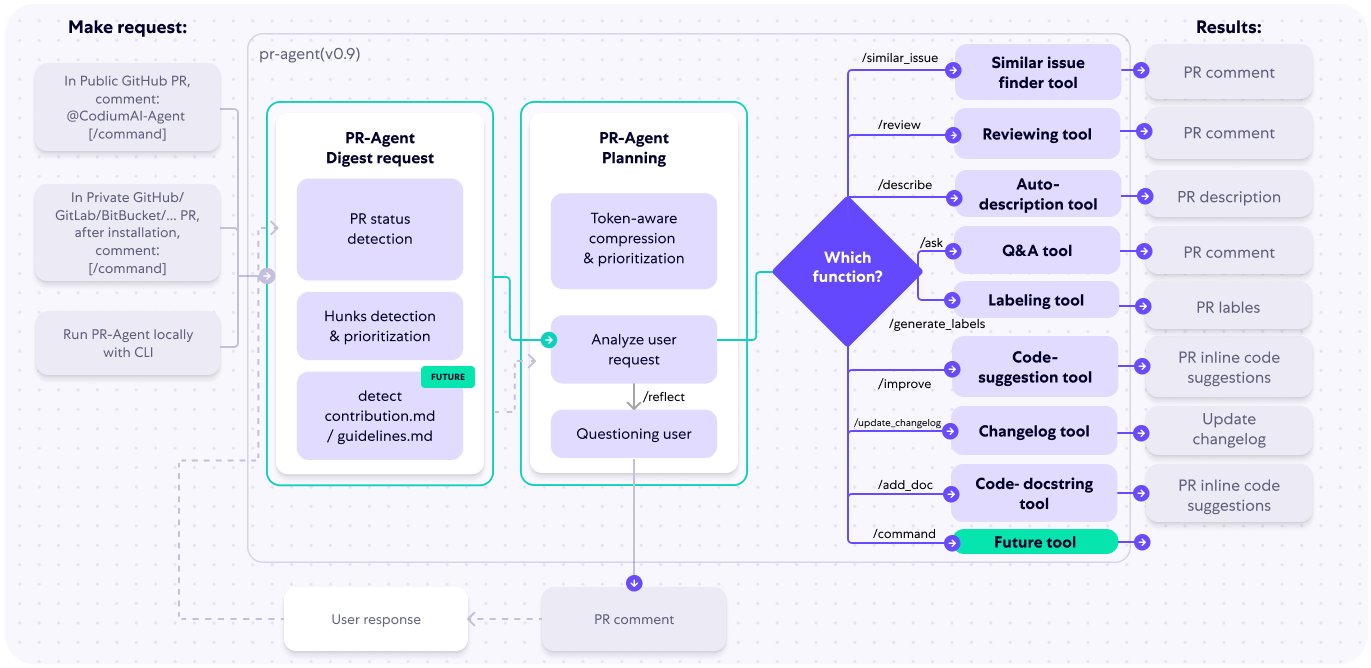
How It Works
The following diagram illustrates PR-Agent tools and their flow:
Data Privacy
Self-hosted PR-Agent
If you host PR-Agent with your OpenAI API key, it is between you and OpenAI. You can read their API data privacy policy here:
https://openai.com/enterprise-privacy
Contributing
To contribute to the project, get started by reading our Contributing Guide.
For local verification, run PYTHONPATH=. uv run pytest from the repository root; it discovers the unit-test suite under tests/unittest by default. End-to-end tests under tests/e2e_tests require provider credentials and should be invoked explicitly, for example PYTHONPATH=. uv run pytest tests/e2e_tests/test_github_app.py.
Big News for PR-Agent
PR-Agent has a new home!
After years of building this tool alongside the community, Qodo has donated PR-Agent to the open-source community - and we couldn't be more excited about what comes next.
The project now lives in the PR-Agent org on GitHub, is fully community-owned, and is open for contributions and additional maintainers.
Qodo Merge (Qodo 1.0), the hosted URL, which was the enterprise version of PR-Agent, has been rebranded and evolved into Qodo (Qodo 2.0), a full AI code review platform.
❤️ Community
This open-source release remains here as a community contribution from Qodo — the origin of modern AI-powered code collaboration. We’re proud to share it and inspire developers worldwide.
The project now has its first external maintainer, Naor (@naorpeled), and is currently in the process of being donated to an open-source foundation.
pr-agent (The-PR-Agent/pr-agent)
Choose a tag and it will appear here. With no tags selected, all catalog projects are shown.
Searching Database…
Choose a tag and it will appear here. With no tags selected, all catalog projects are shown.




 一个开源的 AI 拉取请求(PR)代码审查工具——最早的开源 PR 审查助手,由 Qodo 捐赠给社区后,现在由社区维护。