这是什么?
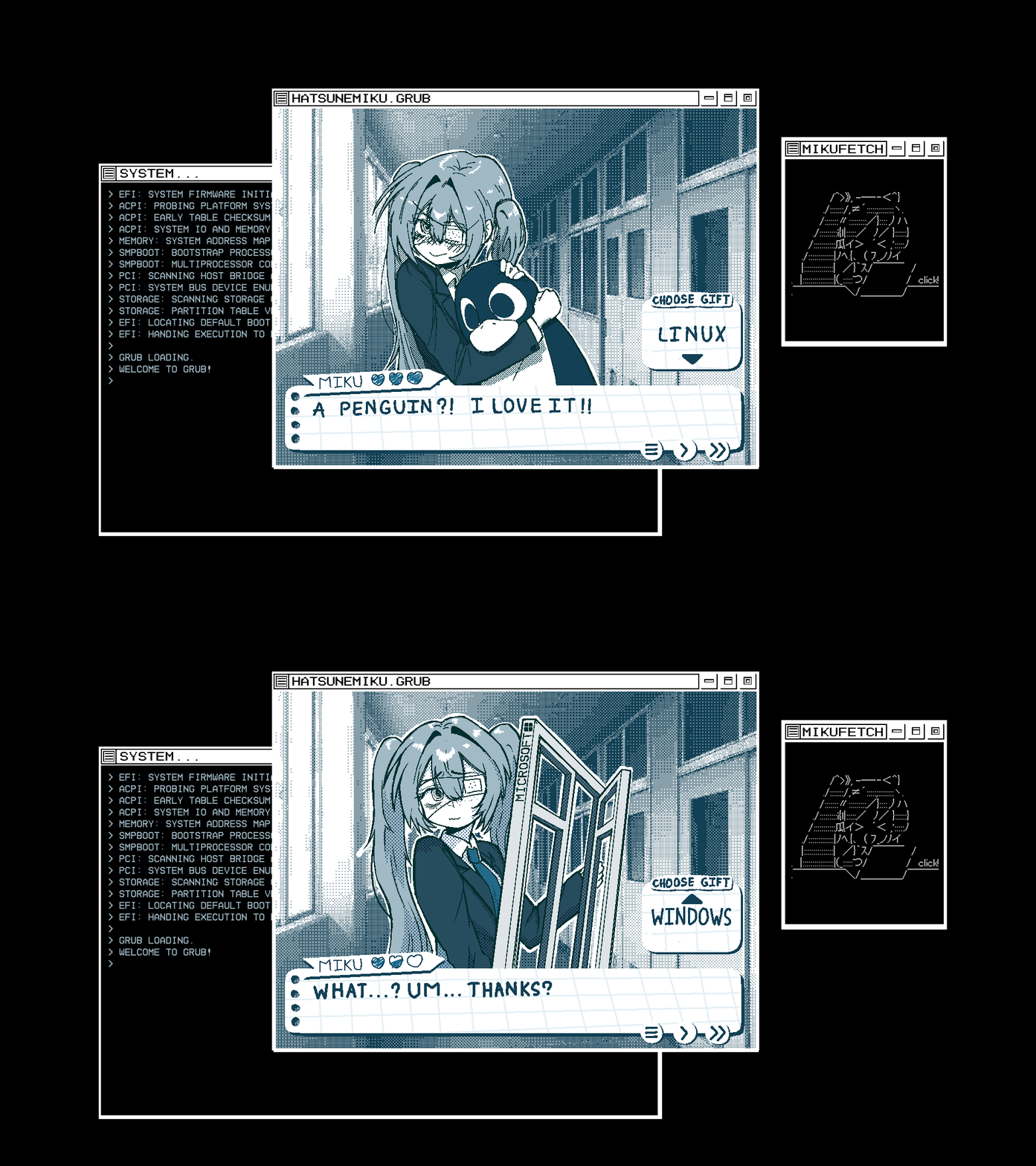
 一款仿照初音未来恋爱模拟游戏风格的 GRUB 引导程序主题,改编自 Matrix Morpheus GRUB Theme。
这是完整的主题包,还是只有几张图片?这是一个 GRUB 主题包,只包含两张背景图:一张用于 Linux 启动项,一张用于 Windows。
这是一个 GRUB 主题包,只包含两张背景图:一张用于 Linux 启动项,一张用于 Windows。除了 GRUB 本身,还需要别的东西吗?不需要额外工具,只要标准的 GRUB2 环境,并具备管理员/root 权限,即可运行安装脚本或编辑 /etc/default/grub。
不需要额外工具,只要标准的 GRUB2 环境,并具备管理员/root 权限,即可运行安装脚本或编辑 /etc/default/grub。进入“高级选项”或“快照”等其他 GRUB 界面时,显示效果正常吗?不正常。这个主题只绘制了 Linux 和 Windows 的主启动图片,“高级选项”和“快照”菜单会显示黑屏,因为没有为它们设计图片。
不正常。这个主题只绘制了 Linux 和 Windows 的主启动图片,“高级选项”和“快照”菜单会显示黑屏,因为没有为它们设计图片。这个主题只适用于某个特定的 Linux 发行版吗?不是,但你需要把自带的 arch.png 重命名为 grub.cfg 中找到的你所用发行版的 class 名称,因为仓库里只提供了 arch 和 windows 的图片。
不是,但你需要把自带的 arch.png 重命名为 grub.cfg 中找到的你所用发行版的 class 名称,因为仓库里只提供了 arch 和 windows 的图片。这也会影响我的 Windows 双系统启动项吗?会的。主题包含专用的 windows.png,因此与 Linux 并存的 Windows 启动项,会在启动菜单中显示专属的主题图片。
会的。主题包含专用的 windows.png,因此与 Linux 并存的 Windows 启动项,会在启动菜单中显示专属的主题图片。安装后主题为什么完全不显示?在 Fedora 或 openSUSE 上,默认的 GRUB_TERMINALOUTPUT=console 设置会让 GRUB 完全忽略 GRUB_THEME;安装脚本会自动将其改为 gfxterm,但手动安装需要自行修改这一项。
在 Fedora 或 openSUSE 上,默认的 GRUB_TERMINALOUTPUT=console 设置会让 GRUB 完全忽略 GRUB_THEME;安装脚本会自动将其改为 gfxterm,但手动安装需要自行修改这一项。如果不喜欢,可以撤销安装吗?可以。安装脚本在修改前会先把你原来的 /etc/default/grub 备份为 .bak 文件。卸载时只需删除 GRUB_THEME= 那一行并重新生成配置,也可以先恢复备份再操作。
可以。安装脚本在修改前会先把你原来的 /etc/default/grub 备份为 .bak 文件。卸载时只需删除 GRUB_THEME= 那一行并重新生成配置,也可以先恢复备份再操作。如何解决 Linux/Windows 以外启动选项的黑屏问题?你可以编辑 grub.cfg,在进入“高级选项”或“快照”等子菜单时切换到其他主题,因为本主题没有为这些界面提供图片。
你可以编辑 grub.cfg,在进入“高级选项”或“快照”等子菜单时切换到其他主题,因为本主题没有为这些界面提供图片。这些美术作品从哪里来?初音未来的美术作品由作者原创,作者还分享了分层的 PSD/clip 源文件,并要求你在二次创作时注明署名。
初音未来的美术作品由作者原创,作者还分享了分层的 PSD/clip 源文件,并要求你在二次创作时注明署名。有哪些类似的项目?Stela, nv-uefi-unlocker, ohmyzsh, nerd-fonts, powerlevel10k, omarchy, iTerm2-Color-Schemes, .tmux
Stela, nv-uefi-unlocker, ohmyzsh, nerd-fonts, powerlevel10k, omarchy, iTerm2-Color-Schemes, .tmux它属于哪些主题?bootloader, shell, customization, linux
bootloader, shell, customization, linux