

Что это такое?
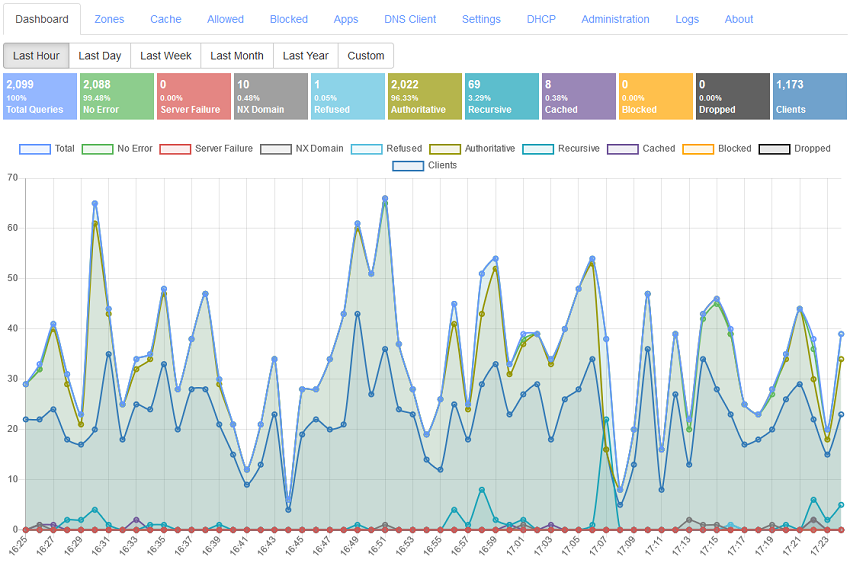
 Technitium DNS Server — это DNS-сервер с открытым исходным кодом, который размещается на собственном оборудовании и работает и как авторитативный сервер, и как рекурсивный резолвер. Главное его применение — блокировка рекламы и вредоносных сайтов на уровне DNS сразу для всей домашней или корпоративной сети, а настраивается всё через веб-консоль.
Technitium DNS Server — это DNS-сервер с открытым исходным кодом, который размещается на собственном оборудовании и работает и как авторитативный сервер, и как рекурсивный резолвер. Главное его применение — блокировка рекламы и вредоносных сайтов на уровне DNS сразу для всей домашней или корпоративной сети, а настраивается всё через веб-консоль.Его нужно ставить на каждое устройство или достаточно запустить один раз на всю сеть?Он запускается один раз на машине, которая обслуживает вашу сеть, — работает на Windows, Linux, macOS и Raspberry Pi, есть и образ Docker, — после чего достаточно указать его DNS на своих устройствах. Всем управляют через консоль администратора в браузере.
Он запускается один раз на машине, которая обслуживает вашу сеть, — работает на Windows, Linux, macOS и Raspberry Pi, есть и образ Docker, — после чего достаточно указать его DNS на своих устройствах. Всем управляют через консоль администратора в браузере.Как его запустить?Для Windows есть установщик, Linux и Raspberry Pi используют скрипт установки из упомянутого поста в блоге, пользователи Docker скачивают официальный образ с Docker Hub, а портативная сборка работает где угодно. Установка занимает около минуты, и всё работает сразу без какой-либо настройки.
Для Windows есть установщик, Linux и Raspberry Pi используют скрипт установки из упомянутого поста в блоге, пользователи Docker скачивают официальный образ с Docker Hub, а портативная сборка работает где угодно. Установка занимает около минуты, и всё работает сразу без какой-либо настройки.Нужно ли сначала установить .NET?Только для портативной кроссплатформенной сборки, которая работает на любой платформе с установленным .NET 10. Установщик Windows, скрипт установки для Linux и образ Docker не требуют этого.
Только для портативной кроссплатформенной сборки, которая работает на любой платформе с установленным .NET 10. Установщик Windows, скрипт установки для Linux и образ Docker не требуют этого.Провайдер по-прежнему будет видеть и контролировать, какие сайты я посещаю?Нет, если перенаправлять запросы через зашифрованный DNS: сервер может использовать DNS-over-TLS, DNS-over-HTTPS или DNS-over-QUIC для публичных резолверов вроде Cloudflare, Google, Quad9 или AdGuard и даже пускать DNS-трафик через Tor по SOCKS5-прокси.
Нет, если перенаправлять запросы через зашифрованный DNS: сервер может использовать DNS-over-TLS, DNS-over-HTTPS или DNS-over-QUIC для публичных резолверов вроде Cloudflare, Google, Quad9 или AdGuard и даже пускать DNS-трафик через Tor по SOCKS5-прокси.Не замедлит ли собственный DNS-сервер мой интернет?В README утверждается обратное: большинство повторных запросов отвечаются из DNS-кэша, поэтому сайты открываются быстрее. Кэширование включает Serve Stale, Prefetch и постоянный кэш, который сохраняется на диск между перезапусками; под нагрузкой сервер показал более 100 000 запросов в секунду на Intel i7-8700 через Gigabit Ethernet.
В README утверждается обратное: большинство повторных запросов отвечаются из DNS-кэша, поэтому сайты открываются быстрее. Кэширование включает Serve Stale, Prefetch и постоянный кэш, который сохраняется на диск между перезапусками; под нагрузкой сервер показал более 100 000 запросов в секунду на Intel i7-8700 через Gigabit Ethernet.Сможет ли он блокировать рекламу на устройствах, куда блокировщик не поставить, например на телевизоре?Да — блокировка происходит на уровне DNS, поэтому охватывается каждое устройство, использующее этот сервер. Вы добавляете один или несколько URL со списками блокировки, DNS App «Advanced Blocking» добавляет списки на основе REGEX с разными правилами для отдельных IP-адресов или подсетей клиентов, а CNAME cloaking отлавливает домены, прячущиеся за заблокированными.
Да — блокировка происходит на уровне DNS, поэтому охватывается каждое устройство, использующее этот сервер. Вы добавляете один или несколько URL со списками блокировки, DNS App «Advanced Blocking» добавляет списки на основе REGEX с разными правилами для отдельных IP-адресов или подсетей клиентов, а CNAME cloaking отлавливает домены, прячущиеся за заблокированными.Можно ли размещать на нём свои собственные домены?Да, он может работать и как авторитативный nameserver: основные, вторичные, stub-зоны и условные пересыльщики (conditional forwarder), wildcard-поддомены, подпись DNSSEC с RSA, ECDSA и EdDSA, динамические обновления DNS и передача зон по TCP, TLS или QUIC. Отдельные зоны и записи можно отключать для тестирования.
Да, он может работать и как авторитативный nameserver: основные, вторичные, stub-зоны и условные пересыльщики (conditional forwarder), wildcard-поддомены, подпись DNSSEC с RSA, ECDSA и EdDSA, динамические обновления DNS и передача зон по TCP, TLS или QUIC. Отдельные зоны и записи можно отключать для тестирования.Что ещё встроено помимо разрешения DNS?Встроенный DHCP-сервер, работающий сразу в нескольких сетях, кластеризация для управления несколькими экземплярами DNS-сервера из одной консоли администратора, многопользовательский доступ с ролями, двухфакторная аутентификация TOTP и единый вход через OpenID Connect или LDAP, а также подключаемые DNS Apps для split horizon, ответов с учётом геолокации, DNS64 и многого другого.
Встроенный DHCP-сервер, работающий сразу в нескольких сетях, кластеризация для управления несколькими экземплярами DNS-сервера из одной консоли администратора, многопользовательский доступ с ролями, двухфакторная аутентификация TOTP и единый вход через OpenID Connect или LDAP, а также подключаемые DNS Apps для split horizon, ответов с учётом геолокации, DNS64 и многого другого.What are similar projects?smartdns, xdp-dns-evadeproxy, AdGuardHome, coredns, pi-hole, portmaster, MasterDnsVPN, dnscrypt-proxy
smartdns, xdp-dns-evadeproxy, AdGuardHome, coredns, pi-hole, portmaster, MasterDnsVPN, dnscrypt-proxyWhich topics is it in?dns-over-tls, dns-server, dns-over-https, ipv6, 2fa, adblock, homelab, self-hosting, privacy-tools, caching, dns, raspberry-pi
dns-over-tls, dns-server, dns-over-https, ipv6, 2fa, adblock, homelab, self-hosting, privacy-tools, caching, dns, raspberry-pi