SoulX-Podcast: Towards Realistic Long-form Podcasts with Dialectal and Paralinguistic Diversity
Overview
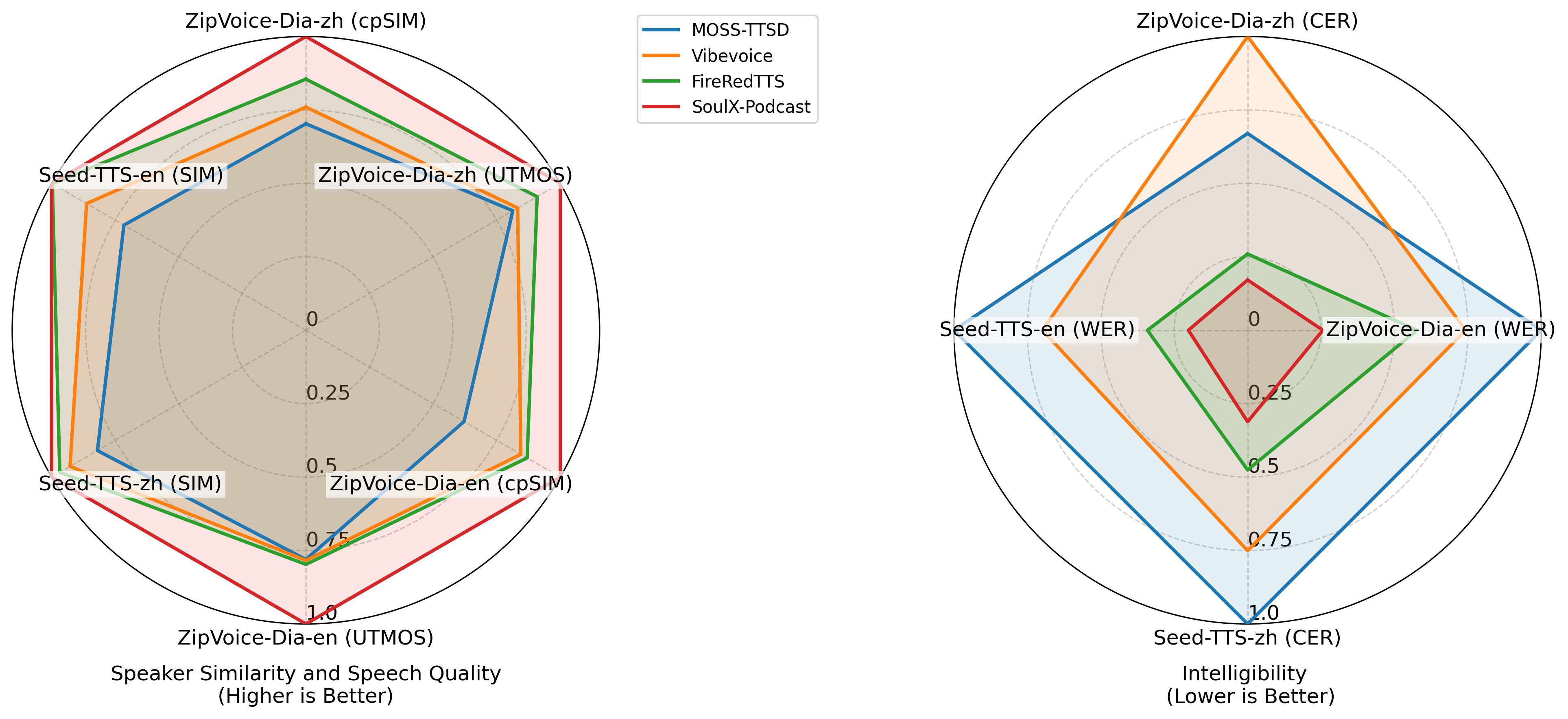
SoulX-Podcast is designed for podcast-style multi-turn, multi-speaker dialogic speech generation, while also achieving superior performance in the conventional monologue TTS task.
To meet the higher naturalness demands of multi-turn spoken dialogue, SoulX-Podcast integrates a range of paralinguistic controls and supports both Mandarin and English, as well as several Chinese dialects, including Sichuanese, Henanese, and Cantonese, enabling more personalized podcast-style speech generation.
Key Features 🔥
Long-form, multi-turn, multi-speaker dialogic speech generation: SoulX-Podcast excels in generating high-quality, natural-sounding dialogic speech for multi-turn, multi-speaker scenarios.
Cross-dialectal, zero-shot voice cloning: SoulX-Podcast supports zero-shot voice cloning across different Chinese dialects, enabling the generation of high-quality, personalized speech in any of the supported dialects.
Paralinguistic controls: SoulX-Podcast supports a variety of paralinguistic events, as as laugher and sighs to enhance the realism of synthesized results.
Paralinguistic tags: <|laughter|>, <|sigh|>, <|breathing|>, <|coughing|>, <|throat_clearing|> .
Demo Examples
Zero-Shot Podcast Generation
Cross-Dialectal Zero-Shot Podcast Generation
🎙️ All prompt audio samples used in the following generations are in Mandarin.
🎙️ 以下音频生成采用的参考音频全部为普通话。
For more examples, see demo page.
🚀 News
[2025-11-03] Support vllm with docker.
[2025-10-31] Deploy an online demo on Hugging Face Spaces.
[2025-10-30] Add example scripts for monologue TTS and support a WebUI for easy inference.
[2025-10-29] We are excited to announce that the latest SoulX-Podcast checkpoint is now available on Hugging Face! You can access it directly from SoulX-Podcast-hugging-face.
[2025-10-28] Our paper on this project has been published! You can read it here: SoulX-Podcast.
Install
Clone and Install
Here are instructions for installing on Linux.
git clone [email protected]:Soul-AILab/SoulX-Podcast.git
cd SoulX-Podcast
conda create -n soulxpodcast -y python=3.11
conda activate soulxpodcast
pip install -r requirements.txt
# If you are in mainland China, you can set the mirror as follows:
pip install -r requirements.txt -i https://mirrors.aliyun.com/pypi/simple/ --trusted-host=mirrors.aliyun.com
- [Optional] VLLM accleration(Modified version from vllm 0.10.1)
cd runtime/vllm
docker build -t soulxpodcast:v1.0 .
# Mounts the host directory at LOCAL_RESOURCE_PATH to CONTAINER_RESOURCE_PATH in the container, enabling file sharing between the host system and container. To access the web application, add -p LOCAL_PORT:CONTAINER_PORT
# example: docker run -it --runtime=nvidia  --name soulxpodcast  -v /mnt/data:/mnt/data -p 7860:7860 soulxpodcast:v1.0
docker run -it --runtime=nvidia  --name soulxpodcast  -v LOCAL_RESOURCE_PATH:CONTAINER_RESOURCE_PATH soulxpodcast:v1.0
Model Download
pip install -U huggingface_hub

# base model
huggingface-cli download --resume-download Soul-AILab/SoulX-Podcast-1.7B --local-dir pretrained_models/SoulX-Podcast-1.7B

# dialectal model
huggingface-cli download --resume-download Soul-AILab/SoulX-Podcast-1.7B-dialect --local-dir pretrained_models/SoulX-Podcast-1.7B-dialect
Download via python:
from huggingface_hub import snapshot_download

# base model
snapshot_download("Soul-AILab/SoulX-Podcast-1.7B", local_dir="pretrained_models/SoulX-Podcast-1.7B")

# dialectal model
snapshot_download("Soul-AILab/SoulX-Podcast-1.7B-dialect", local_dir="pretrained_models/SoulX-Podcast-1.7B-dialect")
Download via git clone:
mkdir -p pretrained_models

# Make sure you have git-lfs installed (https://git-lfs.com)
git lfs install

# base model
git clone https://huggingface.co/Soul-AILab/SoulX-Podcast-1.7B pretrained_models/SoulX-Podcast-1.7B

# dialectal model
git clone https://huggingface.co/Soul-AILab/SoulX-Podcast-1.7B-dialect pretrained_models/SoulX-Podcast-1.7B-dialect
Basic Usage
You can simply run the demo with the following commands:
# dialectal inference
bash example/infer_dialogue.sh
WebUI
You can simply run the webui with the following commands:
# Base Model:
python3 webui.py --model_path pretrained_models/SoulX-Podcast-1.7B

# If you want to experience dialect podcast generation, use the dialectal model:
python3 webui.py --model_path pretrained_models/SoulX-Podcast-1.7B-dialect
TODOs
- Add example scripts for monologue TTS.
- Publish the technical report.
- Develop a WebUI for easy inference.
- Deploy an online demo on Hugging Face Spaces.
- Dockerize the project with vLLM support.
- Add support for streaming inference.
Citation
@misc{SoulXPodcast,
  title        = {SoulX-Podcast: Towards Realistic Long-form Podcasts with Dialectal and Paralinguistic Diversity},
  author       = {Hanke Xie and Haopeng Lin and Wenxiao Cao and Dake Guo and Wenjie Tian and Jun Wu and Hanlin Wen and Ruixuan Shang and Hongmei Liu and Zhiqi Jiang and Yuepeng Jiang and Wenxi Chen and Ruiqi Yan and Jiale Qian and Yichao Yan and Shunshun Yin and Ming Tao and Xie Chen and Lei Xie and Xinsheng Wang},
  year         = {2025},
  archivePrefix={arXiv},
  url          = {https://arxiv.org/abs/2510.23541}
}
License
We use the Apache 2.0 license. Researchers and developers are free to use the codes and model weights of our SoulX-Podcast. Check the license at LICENSE for more details.
Acknowledge
Usage Disclaimer
This project provides a speech synthesis model for podcast generation capable of zero-shot voice cloning, intended for academic research, educational purposes, and legitimate applications, such as personalized speech synthesis, assistive technologies, and linguistic research.
Please note:
Do not use this model for unauthorized voice cloning, impersonation, fraud, scams, deepfakes, or any illegal activities.
Ensure compliance with local laws and regulations when using this model and uphold ethical standards.
The developers assume no liability for any misuse of this model.
We advocate for the responsible development and use of AI and encourage the community to uphold safety and ethical principles in AI research and applications. If you have any concerns regarding ethics or misuse, please contact us.
If you are interested in leaving a message to our work, feel free to email [email protected] or [email protected] or [email protected] or [email protected]
You’re welcome to join our WeChat group for technical discussions, updates.

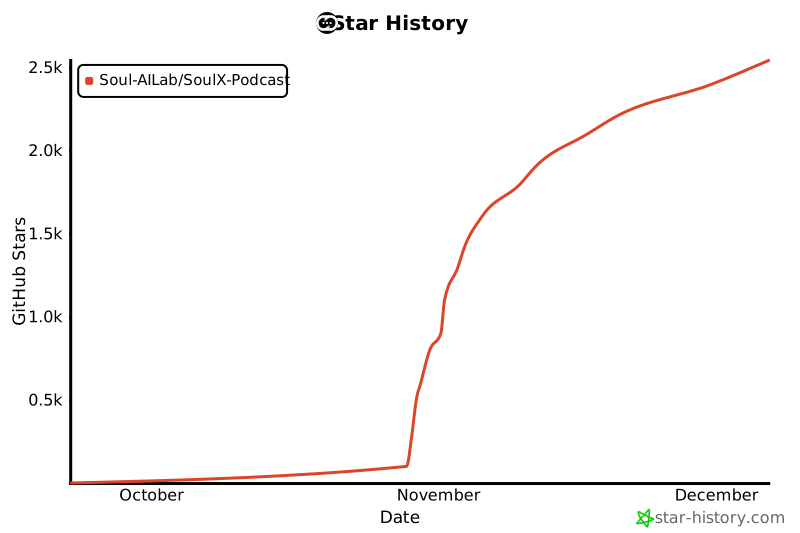
Star History







 SoulX-Podcast 是一个推理代码库,能从文本生成逼真的长篇多说话人播客式对话,包括副语言效果和多种中文方言。