RubricTrail
English · 简体中文
Turn the brief into a plan you can prove.
RubricTrail is a local-first assignment planner that connects an uploaded or
pasted brief and rubric to confirmed requirements, scheduled work, draft
evidence and final human checks.
Try the public browser demo — no
account, API key or paid service is required. Selected file contents, filenames
and project state stay in the browser; GitHub Pages still receives ordinary page
and asset request metadata. Use trusted documents only.
Demo · Quick start ·
Contribute · Good first issues
It is designed for students who need more than a document summary. Every
criterion can retain a short source excerpt recorded during intake, and every plan
task has a definition of done. RubricTrail does not write a submission, invent a
criterion, or predict a grade.
Project status: early-stage open-source project. There are no public
usage or adoption claims yet. The complete local workflow and fictional sample
are runnable without an account, API key or paid service. The public demo is a
separately built static export with no Live API routes.
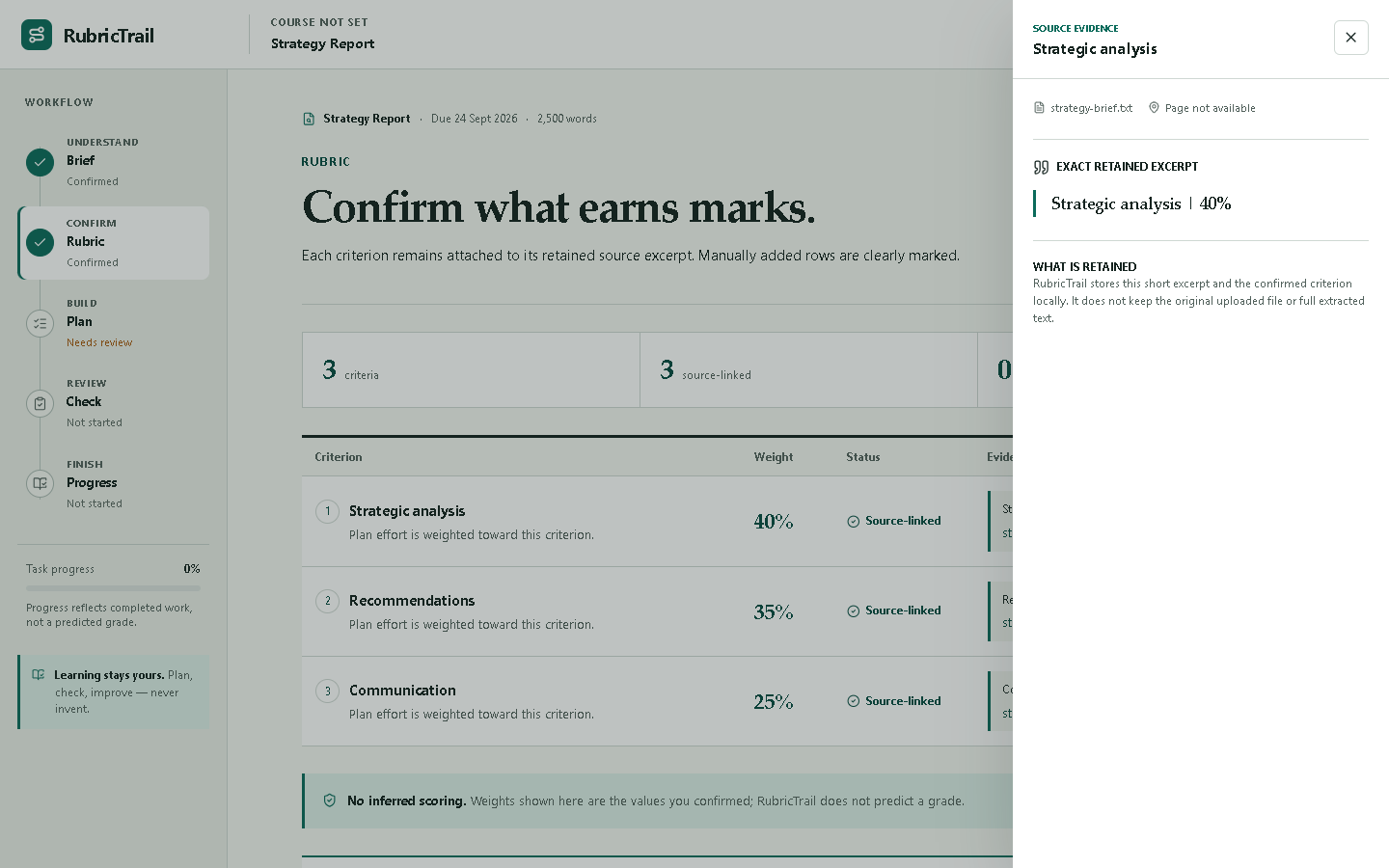
The screenshot above and the saved mobile viewport are historical
assignment-workspace references. They predate the v0.8 My Assignments
Dashboard, v0.8.1 date semantics and v0.8.2 mobile/recovery polish, so they are
not current visual certification. See the
visual QA report for that
historical scope and the verification report for
current functional and responsive evidence.
What works today
v0.8.2: sharing, recovery and mobile reliability
v0.8.2 lets an explicit New assignment or Restore as new operation
reactivate a strictly cleared workspace without reviving deleted projects. It
also keeps the Project Tracker summary readable at 320 px in English and
Simplified Chinese.
The GitHub Pages demo now publishes one exact canonical URL, same-origin Open
Graph/Twitter preview image and favicon, project-level robots guidance, and a
one-URL sitemap. These Pages-only files do not add a false canonical to the
self-hostable application, send project content to another service, or
guarantee indexing, ranking, link-preview refresh or adoption.
v0.8.2 is published. Its annotated tag object
9424dd50a73fa63bf6565c4994f9e50b71c3ba49 resolves to exact commit
e1b6ff6e7fd12096411e450335220383d9d4a22c, and the
GitHub Release
records the released state. That exact tagged revision passed
final main CI,
final Pages deployment,
and an independent public Chromium smoke using fictional data. The release
adds no persistence migration, backup-format change, dependency upgrade,
analytics, account or remote storage. Dated Firefox and Playwright WebKit
evidence remains limited to its recorded revision; WebKit is not Safari and
is not blanket browser certification. See the
verification report for the complete chronology and
evidence boundaries.
v0.8.1: real-time Calendar status
v0.8.1 separates the stable date used to generate an Action Plan from the
browser-local date used for live status. Today now advances with the
browser's local calendar date, while Calendar, Project Tracker, Dashboard and
Up Next classify incomplete targets against that same transient date.
Existing task target dates do not slide as time passes: the fictional sample
uses its fixed sample baseline, and an uploaded project normalizes its already
supported persisted creation instant to a stable UTC calendar date. The
original creation timezone was never persisted.
v0.8.1 is published. Its annotated tag resolves to
39eedac6a04a0b955184e26a7148ccb21efb742d, and the
GitHub Release
records the released state. That exact tagged revision passed
final main CI
and final Pages deployment.
These release facts remain tied to the tag even if the default branch later
advances. See the verification report for the initial
main failure, test-only correction and complete chronology.
v0.8.0: multi-assignment workspace
v0.8.0 makes My Assignments the product home. Assignment
cards show real deadlines, progress, next targets, and blocked/overdue counts;
Up Next orders actionable work derived from the assignments' existing
Action Plans. New assignment starts an upload, pasted-details flow, or a
single-project backup restore as a new independent assignment.
Opening a card enters that assignment's unchanged five-stage workflow. Brief,
Rubric, Plan, Check, Progress, Project Tracker, Calendar, .ics, drafts,
sources, manual locators, and backup remain assignment-level. The Dashboard is
not a sixth workflow stage, and this release adds neither manual tasks nor a
global Calendar.
Existing valid v0.7.1 browser data is migrated into one assignment through a
journaled, verified operation. The legacy values remain untouched until the
user explicitly confirms cleanup. Each assignment then uses an isolated local
record beneath a small workspace index; Web Locks remain mandatory for
authoritative mutation, and conflicting older-tab writes fail visibly.
v0.8.0 passed exact-head and exact-main CI, exact-SHA Pages deployment and
independent public-demo verification before the annotated tag and
GitHub Release
were published on 20 August 2026. See the
verification report for exact revisions, runs and
evidence boundaries.
v0.7.1: Project Tracker, source editing and local ICS
The v0.7.1 release promotes Calendar into a project-level Project
Tracker that stays available across Brief, Rubric, Plan, Check and Progress.
It shows the next target, deadline, incomplete/blocked/overdue counts, the
existing Calendar and selected-week agenda, and the browser-local .ics
export. Open in task list closes the Tracker, returns to Plan and focuses
the exact task. The Tracker is transient UI state: it is derived from the
existing Action Plan and is not added to project navigation, backups or saved
project state.
Plan remains focused on weekly hours, planning depth, rebalance, dependencies
and task completion. Calendar dates remain target completion dates, not
appointments, and .ics import may be stored by an external calendar
provider. The v0.7.1 exact-main CI, Pages and public-smoke evidence remains
recorded in the verification report; the public demo
now follows the later verified v0.8.2 product revision described above.
v0.7.0: source editing, Calendar and local ICS
The v0.7.0 package adds:
- post-creation Add / Edit / Remove for manual source locators;
- a Plan Calendar of target completion dates;
- a browser-local
.ics snapshot of remaining tasks and the deadline.
The verified v0.7.0 release introduced the source-locator editor, Plan Calendar
and browser-local .ics export. Calendar dates are not appointments, and
.ics import may be stored by an external calendar provider.
v0.6.0: English and Simplified Chinese interface
v0.6.0 adds Interface language / 界面语言 on the
welcome screen and in the workspace header. It supports English and Simplified
Chinese on one URL, remembers the choice in the separate
rubrictrail.preferences.v1 browser preference and updates the document
language, title, controls, errors, dates and numbers without reopening or
rewriting the project. On the first visit, Simplified Chinese browser
preferences select Chinese; other language preferences default to English. The
v0.6.0 public demo first shipped this bilingual interface.
The switch changes product interface text only. RubricTrail never translates
uploaded or pasted source content, project titles, course names, rubric
criteria, excerpts or student draft notes. Automatic field detection remains
optimized for English assignment materials; Chinese materials can be uploaded
or pasted locally but every detected field and criterion must be checked against
the original before saving. There is one canonical URL rather than separate
/en and /zh-CN pages, so static crawlers and share previews do not receive a
language-specific page.
Use your own assignment
- Upload up to 10 TXT, DOCX, text-based PDF, PNG, JPEG or WebP files (10 MiB
each, 25 MiB combined), or paste the brief and optional rubric from a course
page, email or scan. Image text recognition runs locally with English and
Simplified Chinese models. A PDF can contain up to 200 pages, with 400 PDF pages allowed across
the complete selection. Every selected PDF whose page-count metadata can be
read contributes to that 400-page total, even if the PDF is later explicitly
omitted because it exceeds the 200-page per-file limit.
- If one file has a recoverable per-file problem, explicitly choose whether to
continue with the readable files, replace the complete selection or paste all
text instead. This includes a PDF that exceeds its 200-page file limit.
- Review fields found in the included sources and fill anything missing.
- Confirm the rubric names and whether the official rubric provides a complete
percentage breakdown. Complete weighting requires every criterion to have a
published percentage and the total to equal 100%.
- If the breakdown is incomplete, keep any official percentages and leave
unknown values blank. RubricTrail stores those criteria as
number | null
and uses the same neutral planning baseline for every criterion; this is not
a claim that they earn equal marks.
- Create a compact assignment saved only in the current browser. Use New
assignment from the Dashboard to add another independent assignment.
- Open an assignment and work through Brief → Rubric → Plan → Check →
Progress.
The custom workflow includes:
- deterministic browser-local file extraction and plain-text paste intake;
- bounded parsing with file-count, per-file and combined byte limits, PDF page
limits, and merged extracted-text limits of 2,000,000 normalized characters,
50,000 merged lines and 100,000 merged whitespace-delimited words;
- explicit mixed-batch recovery that requires a decision before omitting a file
with a recoverable per-file problem;
- retained rubric excerpts with recorded filename and PDF page when available;
- strict UTF-8 decoding for TXT files, with malformed text rejected instead of
silently inserting replacement characters;
- lazy, browser-local OCR for PNG, JPEG and WebP images, using pinned English
and Simplified Chinese Tesseract assets served from the same origin;
- a generic dependency-aware plan linked only to confirmed criteria;
focused, standard, thorough and extended planning-depth choices that
adjust task scope and time allowance only; they do not correspond to or
predict a grade;- explicit
complete, incomplete and none weighting states that never
estimate missing percentages; only a complete 100% breakdown weights the
plan, while the other states use a neutral planning baseline;
- capacity warnings based on deadline and weekly study time;
- task completion that respects prerequisites;
- criterion-by-criterion self-checks for visible, explained and traceable
evidence;
- a final human submission checklist;
- a revisioned, namespaced browser record per assignment containing the v3
state payload, with journaled migration from the v0.7.1 single-project record
and validated legacy migration from v2 and the earlier sample-state format;
- deep local-state validation, recovery messaging and visible storage failures;
- exclusive Web Locks coordination so concurrent current-version writes from the
same observed revision cannot both win;
- compatibility-key fingerprints that surface a parseable older-tab change as
a recovery candidate instead of silently selecting it, plus a verified privacy
purge when the user explicitly resets the project;
- versioned project backups that can be restored without retaining original files.
Original files, image pixels and full uploaded, OCR-derived or pasted source text are not written to
localStorage. Pasted intake is limited to 100,000 characters and 10,000 lines
before it enters the same bounded TXT parser. Confirmed fields, weighting status,
rubric percentages or null, short source excerpts, pasted self-check text and
progress are stored until the user resets the project. Names and error details
for files omitted from a partial batch stay only in the current intake flow and
are not added to the saved project or backup. Selection-wide PDF-page and merged
text limits stop the complete batch; they do not omit later files according to
selection order. The PDF-page total includes every selected PDF with readable
page-count metadata, including a per-file over-limit PDF offered for omission.
Saved evidence must include a canonical source id and a filename from the
project source list; the same source id cannot claim different filenames, and
excerpt offsets must match the retained text. Because full source text is
discarded, a restored excerpt remains a recorded aid rather than independently
verified proof—compare the original before relying on it.
Back up or restore a project
Use Project backup → Download backup inside an assignment to save one
*.rubrictrail.json file. The Dashboard can restore that file as a new
assignment, while assignment storage management can explicitly replace only
the selected assignment. RubricTrail previews the project name, export time and
exact scope before restoring it, validates both file and project versions, and
writes the imported state before changing authority. There is no
whole-workspace backup in v0.8.0.
State-v3 backups remain separate from the outer backup-format version. Valid v2
uploaded custom projects and backups migrate to v3 with their complete numeric
weights preserved; sample and empty state migrate without an uploaded rubric.
For backward compatibility, state v3 still stores the planning-depth choice in
its existing numeric targetGrade field. Those legacy numbers are an internal
plan-profile encoding only; they are not a requested, estimated or predicted
mark. The four values previously exposed by the interface keep the same task
gates and time multipliers, so this wording correction does not silently
reschedule an existing supported profile.
Newer unsupported versions still fail with an upgrade message rather than being
guessed at. Browser persistence now uses rubrictrail.workspace.index.v1 plus
one strict record per assignment under the authoritative workspace ID and
generation. Cross-key membership and destructive changes use a bounded digest
journal; content edits replace only the affected assignment record. A
content-free storage reserve is maintained for recovery operations, and the
last-opened preference is best effort rather than authority. All authoritative
mutations take the exclusive rubrictrail.project.store.v1 Web Lock and recheck
exact index, project, and legacy baselines after acquisition.
The previous authoritative record plus rubrictrail.project.v3,
rubrictrail.project.v2, and proofline.project.v1 values are retained during
first migration. The workspace index fingerprints their exact bytes. If an
older tab later changes one, RubricTrail pauses affected mutations and offers
explicit import-as-new, replace-selected, baseline acceptance, or privacy
cleanup choices as appropriate; it never silently selects a winner. This is an
application recovery protocol over Web Storage, not a claim that a Web Lock or
localStorage makes multiple keys transactional.
If Web Locks are unavailable or lock acquisition fails, RubricTrail fails closed:
it can still read validated assignments, but it does not mutate workspace state.
New edits remain only in that tab, and the interface asks the user to keep one tab
open and download a backup before closing. Autosave waits 250 ms; hidden-page and
pagehide handlers make an additional best-effort flush attempt, but an immediate
close or force-kill can still lose the final uncommitted edit.
A backup contains the compact saved project: course details, source labels or
original filenames, short source excerpts, pasted draft or self-check text, task
progress and final checks. It does not contain the original uploaded
documents or the full uploaded/pasted intake text, and it is not encrypted. Keep
the downloaded file private.
Derived sample Draft Check results are intentionally omitted and must be rerun
after restore; user-authored draft text remains in the backup.
Explore the fictional sample
The included LumaLane operations assignment demonstrates deeper source mapping
and deterministic coaching. Its Draft Check uses simple surface signals and is
explicitly labelled as neither semantic evaluation nor a predicted grade.
The sample workspace includes a direct Use my assignment handoff back to real
file or pasted-text intake.
All files in samples/ are original fictional material:
lumalane-assignment-brief.txtlumalane-rubric.txtlumalane-student-draft.txt
Product principles
- Traceable: a criterion or requirement should point back to source text.
- Actionable: rubric language should become work, dependencies and a clear
definition of done.
- Local-first: the useful default should not need an account, cloud service
or API key.
- Integrity-aware: prompts support student judgment and authorship; they do
not replace either.
- Honest states: navigation, task completion, self-checks and readiness are
separate signals.
Quick start
Requirements:
- Node.js 24 or newer
- pnpm 11
git clone https://github.com/Sion612/rubrictrail.git
cd rubrictrail
pnpm install --frozen-lockfile
pnpm dev
Open http://localhost:3000. No .env file is required.
To produce the browser-only static demo at the same /rubrictrail subpath used
by its CI checks:
PAGES_BASE_PATH=/rubrictrail pnpm build:demo
pnpm audit:demo
The output is written to demo/out. It excludes the Node-only Live API routes;
the same boundary is published at
https://sion612.github.io/rubrictrail/ after the exact main revision passes
all required CI checks.
Canonical, Open Graph/Twitter, favicon, crawler and sitemap metadata belongs
only to that GitHub Pages demo. The social image is generated locally from the
repository's fictional sample screenshot; no analytics, tracking or remote
asset was added. The self-hostable Node application does not inherit the Pages
canonical. Because this project is published beneath /rubrictrail/, its
generated /rubrictrail/robots.txt cannot replace or control the user site's
origin-root https://sion612.github.io/robots.txt.
Verification
Run the non-browser gate:
pnpm check
It runs ESLint, TypeScript, Vitest and a production build. Then run the desktop
and narrow responsive browser suite:
pnpm test:e2e --workers=1
Local browser runs use the development server for faster iteration. The CI
browser job creates a separate production build and sets
PLAYWRIGHT_PRODUCTION=true, causing Playwright to exercise that artifact
through next start.
Historical

 RubricTrail — локальный планировщик заданий, который превращает загруженное или вставленное описание задания и рубрику в подтверждённые требования, план с расписанием, черновые подтверждающие материалы и финальную человеческую проверку — и всё это без сервера и аккаунта.