







🇺🇸 English | 🇨🇳 简体中文
🎮 Results & Demos |
⚡ Quickstart |
💻 Run locally |
🤗 Models |
📊 Benchmarks |
📚 Docs
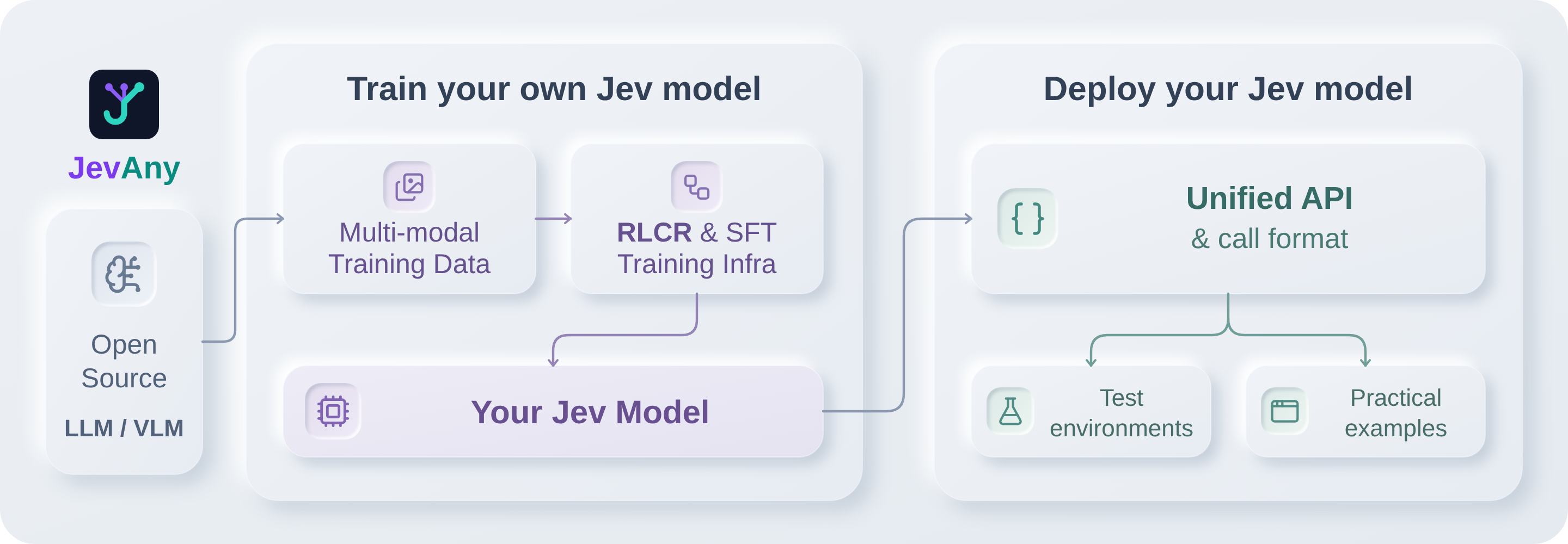
JevAny is open infra for System 1 decision model training and deployment,
covering data preparation, model adaptation and evaluation. Use a released
model or train on your own data to route support tickets, select tools, or
choose a robot's next action. One API takes the state, question and candidate
options, then directly returns a choice and its probabilities.
🎮 Results and Demos
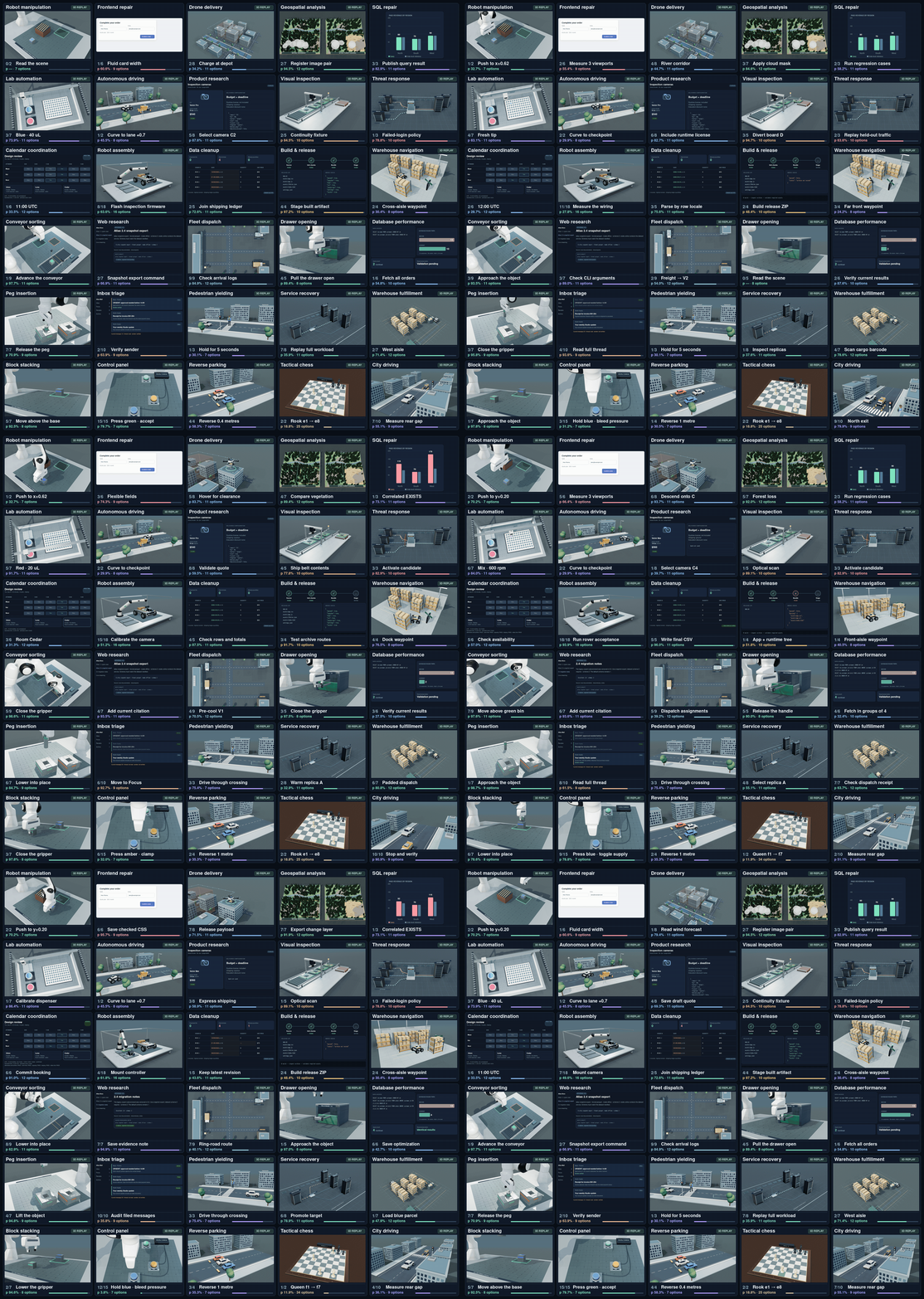
Interactive benchmark results.
The following 30 examples are archived replays from an earlier compatible
JevAny checkpoint. The current default release is
JevAny-Qwen3.8-27B.
Explore the cases, or run a model locally to
try your own inputs and see its choices and probabilities.
⚡ Jev inside LLM agent loops
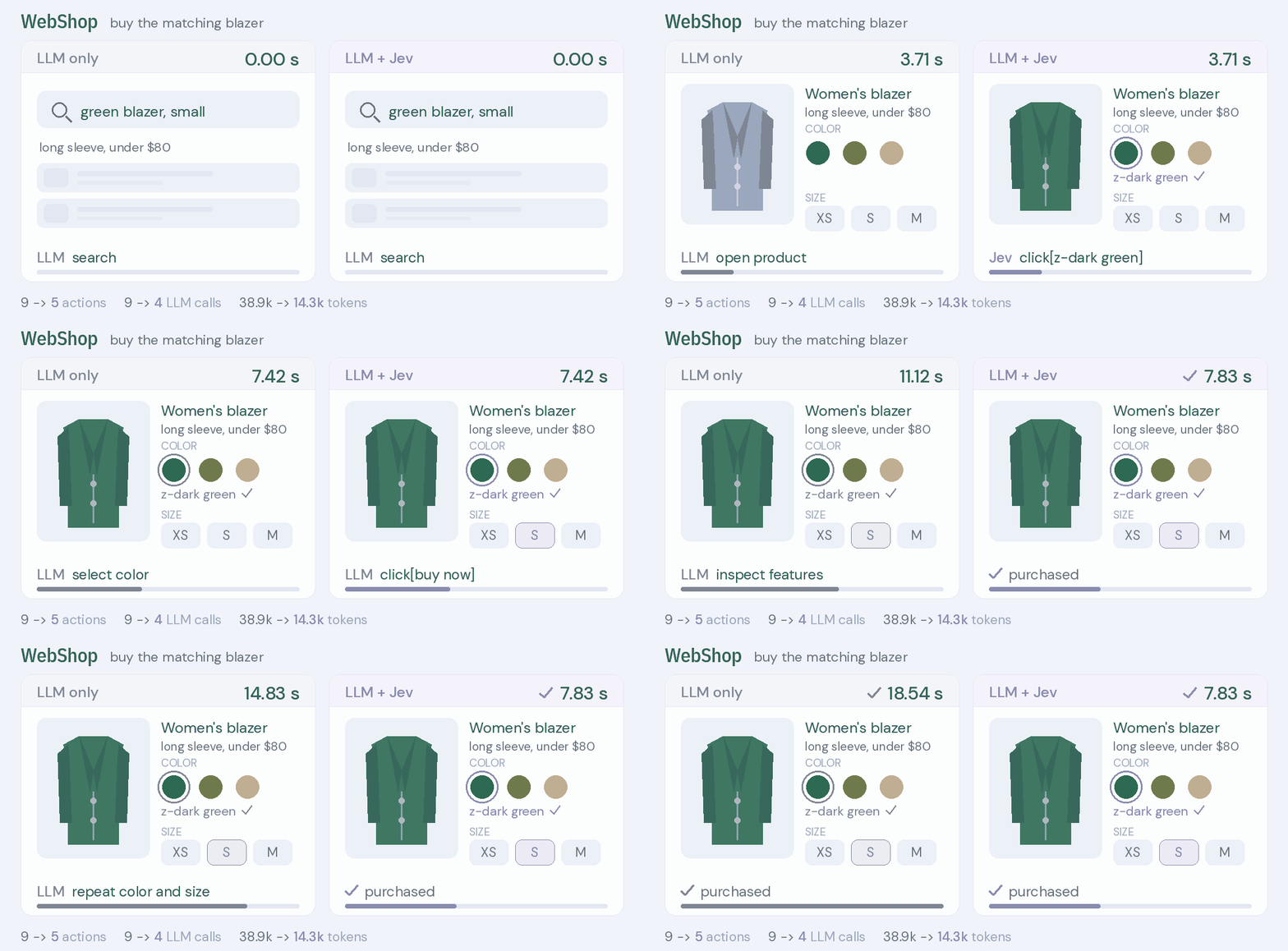
The LLM plans, recovers and finishes the task; Jev picks the next action
wherever the loop offers a bounded set of candidates. Each animation replays
one recorded pair, LLM only on the left and LLM + Jev on the right, with the
measured totals on the clocks and schematic step artwork.
1. WebShop.
Jev picks the requested color and size from menus the LLM generated, and the
LLM buys the product.
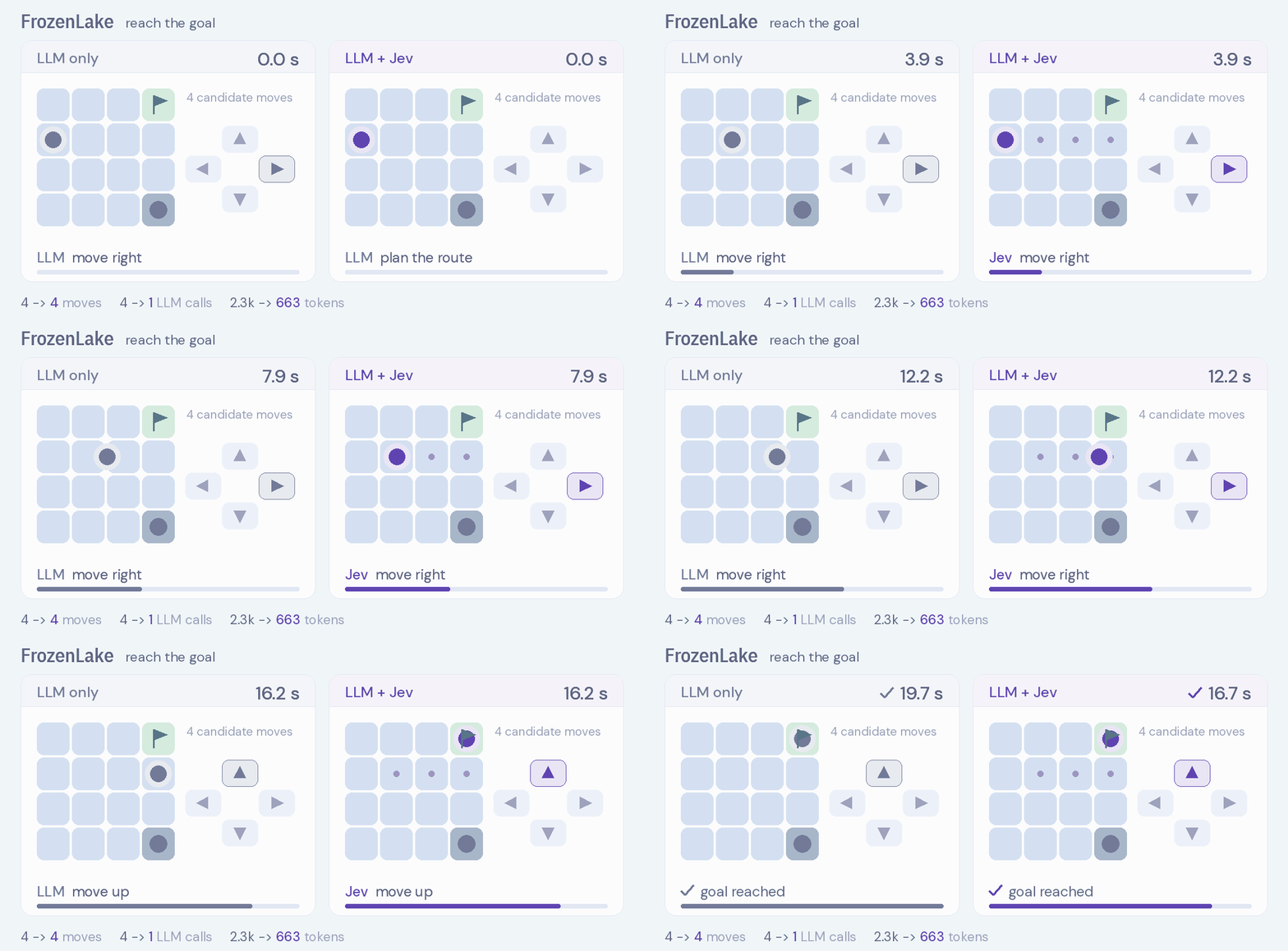
2. FrozenLake.
One LLM plan, then Jev compares the four moves at each new state.
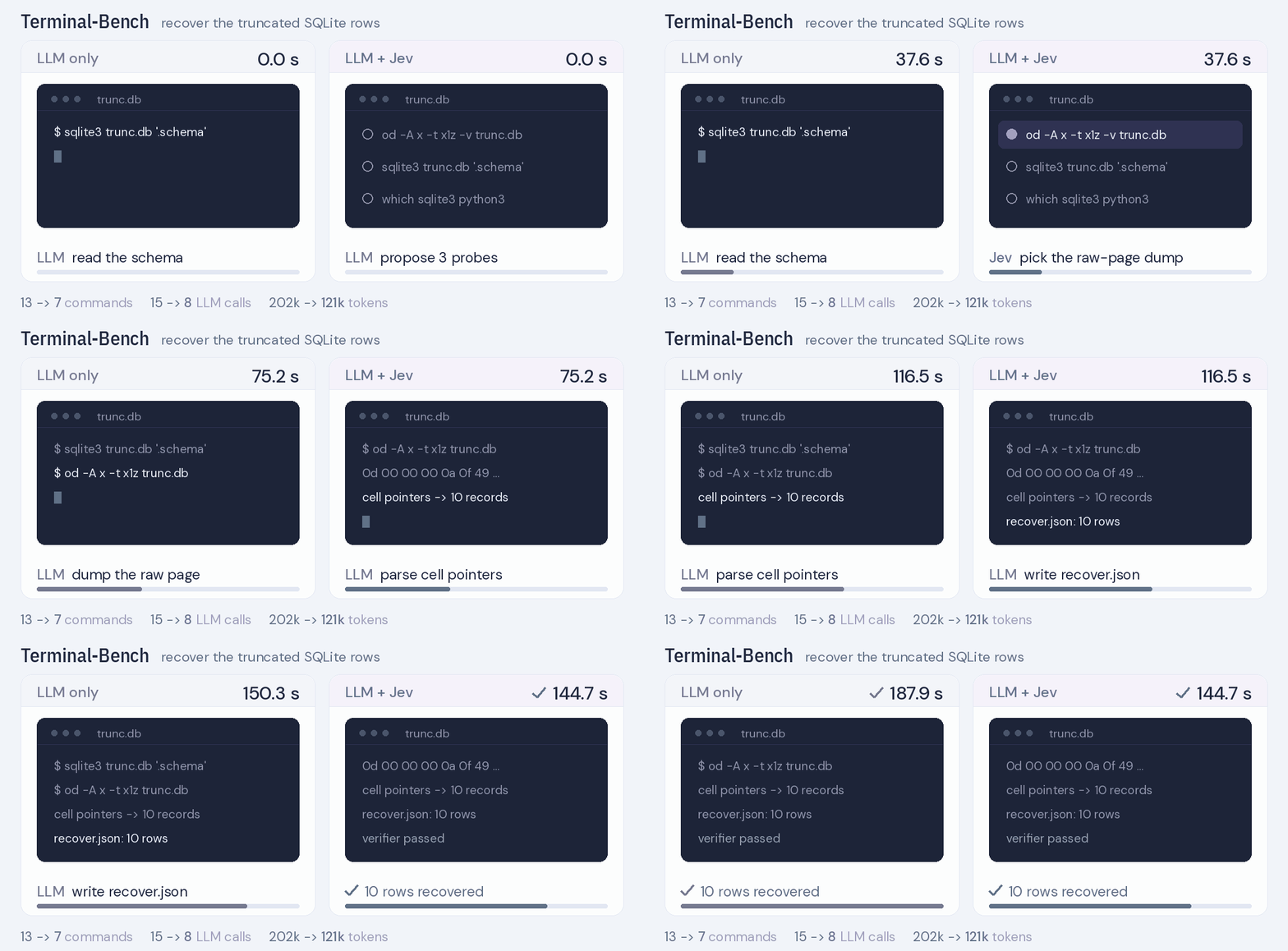
3. Terminal-Bench.
On sqlite-db-truncate, Jev picks raw-page inspection out of three probes, and
the LLM recovers and verifies ten rows.
Overview · All demos
Full results,
delegation protocol
and technical report.
📑 Table of Contents
⚡ 1. Quickstart
Use Python 3.12 or newer. Clone the repository and install the lightweight package:
git clone https://github.com/SimpleJev/JevAny.git
cd JevAny
python3.12 -m venv .venv
source .venv/bin/activate
python -m pip install -e .
Keep this environment active and work from the repository root. Start with a
local demo, then train on your own data or use the API.
💻 1.1 Run locally
Choose a model that fits your computer:
The local model guide covers preparation and loading.
Released models download on first use and reuse the local cache. With the model
server running, open a second terminal in the same checkout:
source .venv/bin/activate
jevany demo --base-url http://127.0.0.1:8008 --text-only
Open http://127.0.0.1:8090, choose Test and connect, then edit
Try your own decision and press Ask the model. Change the state or options
to see how its decision changes. Games, robotics and replays
are available in the same playground.
🛠️ 1.2 JevAny Training
Train your own System 1 model on the same state and questions you send at
inference, with a label for each question. Start with the bundled synthetic
support tickets, then train on your own labelled data. The starter recipe uses
Qwen3.5-0.8B on CUDA with BF16 and writes runs/my-jev:
python -m pip install -e '.[train]'
jevany data init --out data/starter
jevany data validate data/starter/train.jsonl
jevany train --config recipes/sft.toml --dry-run
jevany train --config recipes/sft.toml
After training, try the checkpoint on the included ticket request:
jevany decide examples/request.json --checkpoint runs/my-jev
Pass --data to train on your own JSONL data, or use
recipes/finetune.toml to adapt the released 27B model.
See the training guide for CPU settings, multimodal data and
standard torchrun launches. For image/video training or fine-tuning the released
27B model, install .[train,multimodal].
After SFT, you can continue with experimental RLCR,
which rewards correctness and probability calibration:
jevany train --config recipes/rlcr.toml
🚀 1.3 JevAny Deployment
Install the serving dependencies and start the released Qwen 4B model on a CUDA
GPU. See the hardware and loading guide
for memory requirements.
python -m pip install -e '.[serve,multimodal]'
jevany serve --checkpoint SimpleJev/JevAny-Qwen3.5-4B-LoRA \
  --device cuda --dtype bf16 --port 8008
The default path favors reproducibility. CUDA deployments can opt into BF16
LoRA merging, SDPA and torch.compile; the useful settings differ between 4B
and 27B. See the inference acceleration guide
for commands, H200 measurements and accuracy caveats.
To serve your training output, replace the checkpoint ID with runs/my-jev.
Keep the server running. In a Python session using the same environment, send
a ticket and the departments that can handle it:
from jevany import Choice, JevClient

jev = JevClient("http://127.0.0.1:8008")
result = jev.system_one(
    state={"ticket": "I was charged twice. Please help."},
    questions={
        "department": Choice(
            instructions="Which team should handle this?",
            criteria={"billing": "Payment problems", "shipping": "Delivery problems"},
        ),
    },
)
answer = result["answers"]["department"]
print("Selected team:", answer["choice"])
print("Probabilities:", answer["probabilities"])
choice is one of the department names; probabilities maps each name to its
probability. Your application can use these fields to route the ticket or ask
for review when the decision is uncertain. Use Noul for yes/no questions,
such as whether a ticket needs urgent review,
and Score for ordered levels, such as low, normal and high priority.
See the API reference for all three question types.
For in-process inference, load a model in Python
and use the same interface. For image and video inputs, follow the
media setup.
🤗 2. Pretrained Models
For a first local run, choose a model and hardware in Run locally.
These LoRA adapters were trained with SFT on 1,772,725 text records containing
2,180,242 labelled decisions; see training compute and experiments
for the setup. Full-parameter SFT and further post-training improvements are planned.
The corresponding base model is loaded separately and its license and access
terms apply. Allow roughly twice the base parameter count in bytes for BF16
weights, plus runtime memory. See the
hardware and loading guide.
Pointer and direct-token models share the same API. Pointer supports up to
4,096 options within the context limit; direct-token supports up to 255.
See readout choices for
training and accuracy tradeoffs.
Training-free choice-token readout
Choice-token is a training-free readout for up to 52 options: label them with
the one-token IDs A–Z, a–z, score the answer-position logits, and renormalize.
It works on a frozen base or with a Pointer/Direct-Token checkpoint; unlike
temperature calibration, it can change the selected answer.
jevany eval --run SimpleJev/JevAny-Qwen3.5-4B-Direct-Token-LoRA \
  --suite /path/to/suite --out runs/choice --device cuda --readout choice
Method, commands and full results ·
Machine-readable results
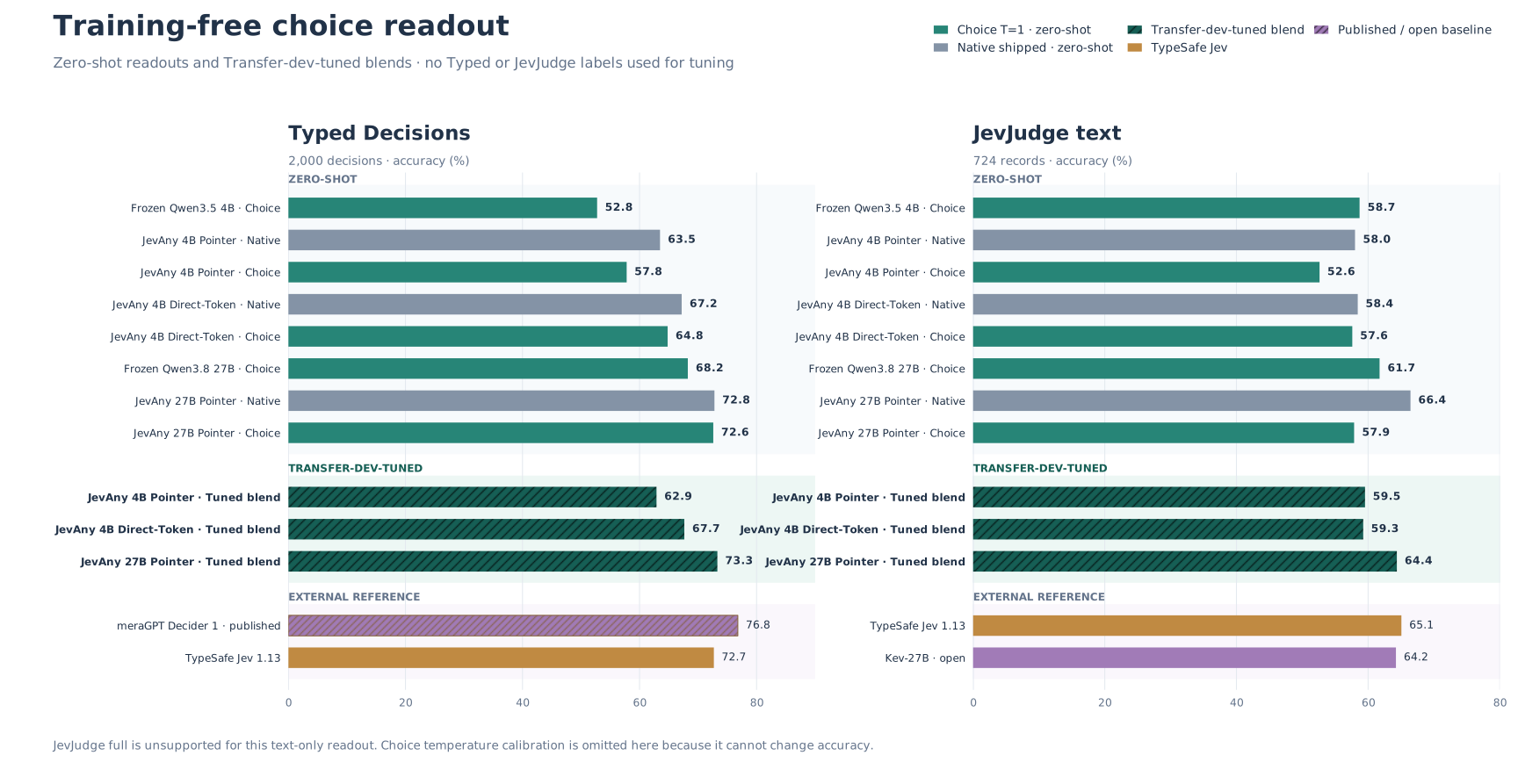
- Best 4B blend: Direct-Token reaches 79.83% Transfer, 67.65% Typed,
and 59.25% JevJudge text—+0.96, +0.45, and +0.83 points over native.
- Best 27B blend: Pointer reaches 89.10% Transfer and 73.30% Typed,
but falls from 66.44% to 64.36% on JevJudge text.
- Training still matters: on Typed, the frozen 4B path scores 52.75%;
Direct-Token raises it to 64.80%.
Tune one blend weight on development data, freeze it before evaluation, and
blend only when native and choice errors are complementary. Temperature changes
confidence, not argmax.
Metric note: Cygnet's 73.70 is a v1.5.4 composite over 1,624 open and
sealed items—not accuracy. Its comparable public-development accuracy is
203/231 (87.9%).
Key takeaway: Choice-token helps when extracting the decision—not reasoning
ability—is the bottleneck; keep a blend only when it improves target-like
held-out data.
📊 3. Benchmark Results
The release table below uses each checkpoint's native readout.
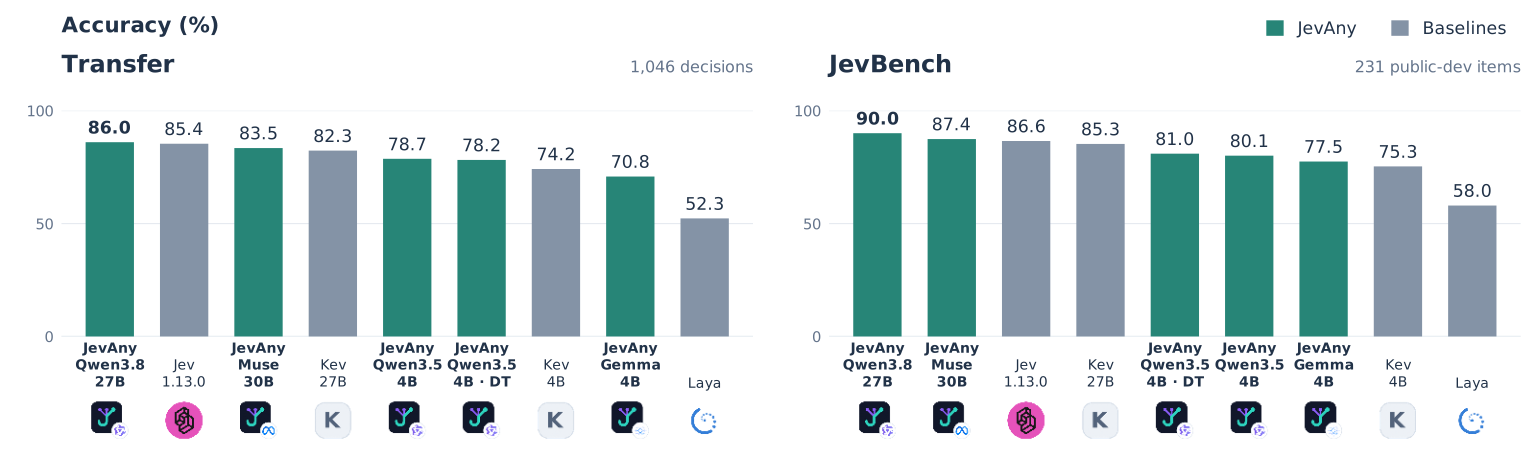
JevAny-Qwen3.8-27B leads both benchmarks and has the lowest NLL and Brier.
Among 4B releases, direct-token leads on JevBench; pointer leads on Transfer.
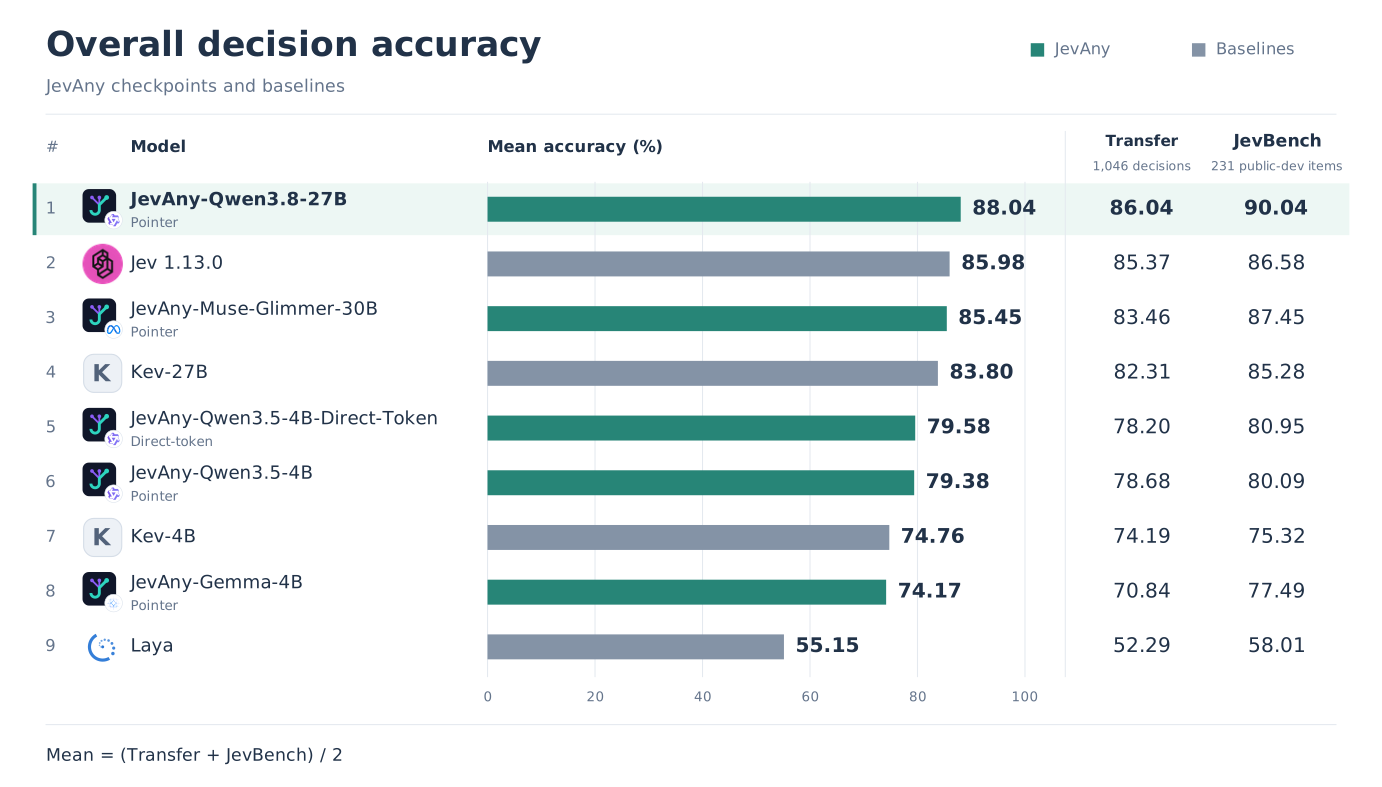
NLL, Brier and ECE are measured on Transfer.
Full results and protocols ·
Machine-readable results ·
Method and ablation report
The same 13-model cohort is compared by accuracy on Typed Decisions, JevJudge
full (3,220 multimodal records), and its 724-record text subset. — means
unsupported input or no matching result.
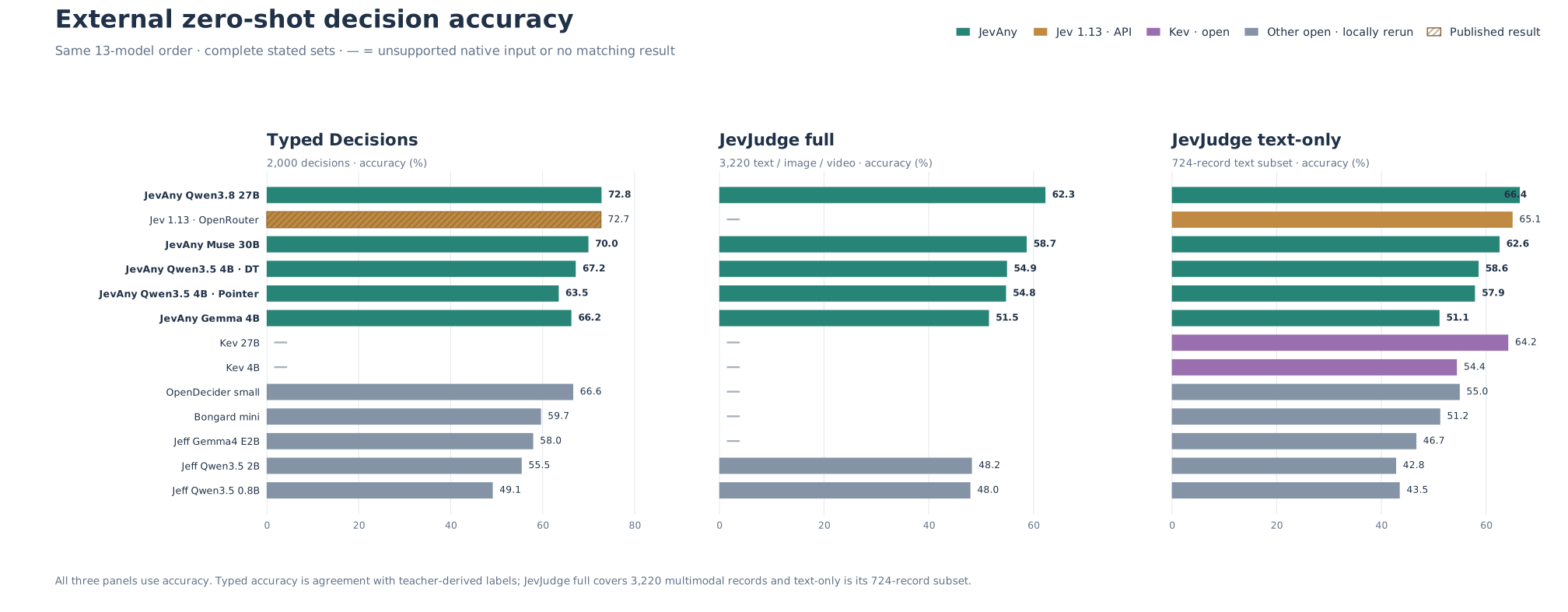
- JevAny-Qwen3.8-27B: 72.8% Typed, 62.3% JevJudge full, and 66.4% text;
the best other model with a full result is Jeff-Qwen3.5-2B at 48.2%.
- Other baselines: Jev 1.13 scores 72.7% Typed and 65.1% text; Kev-27B
scores 64.2% text. Published Decider 1 and Liquid d1 lead Typed at 76.8% and
74.2%, but have no comparable full-suite result.
Full external tables and reproducibility notes ·
Machine-readable chart results
⏱️ 3.1 Inference efficiency
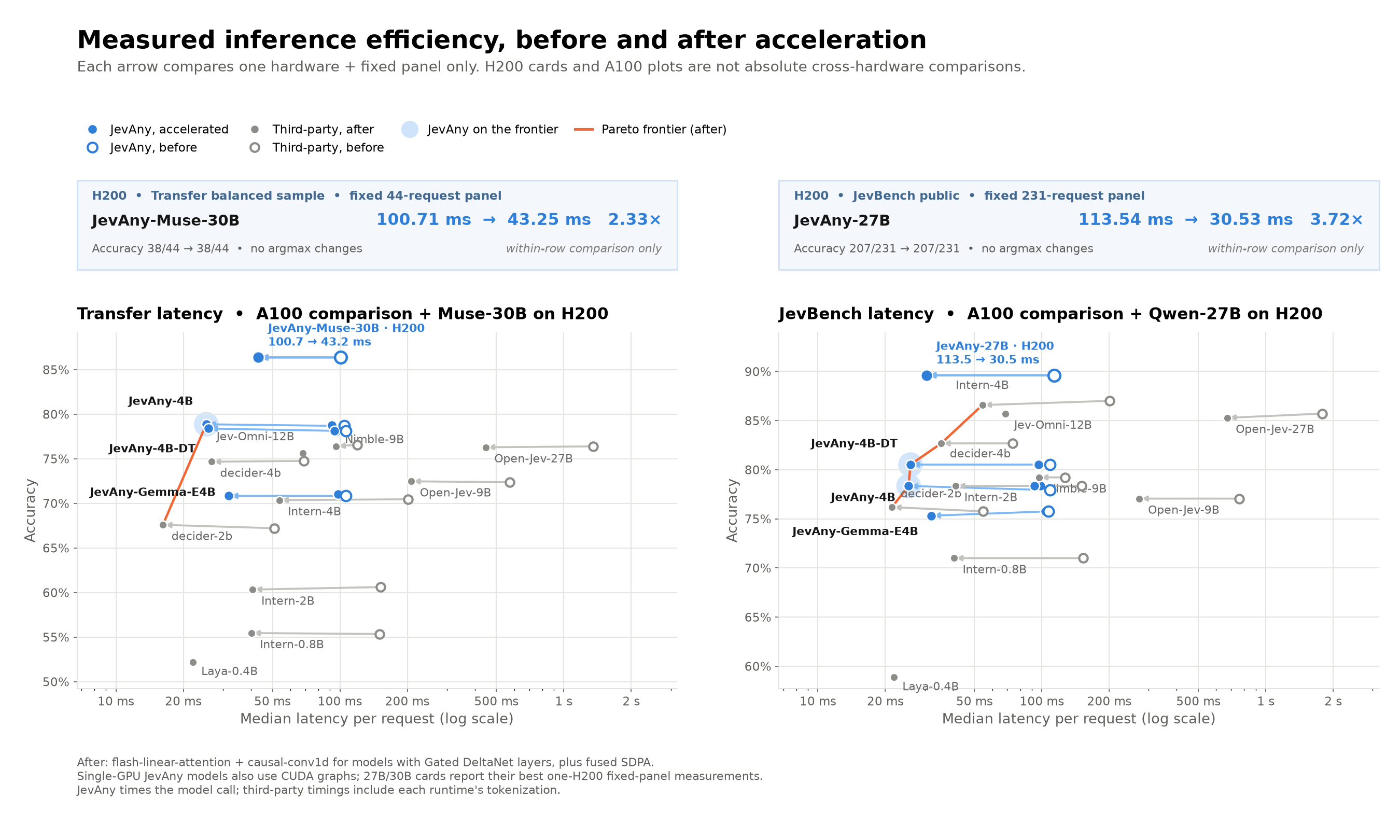
On H200, CUDA acceleration cuts Qwen3.8-27B median latency from 113.54 to
30.53 ms (3.72×) and Muse-Glimmer-30B from 100.71 to 43.25 ms (2.33×),
with identical decisions (207/231 and 38/44). Each speedup is a within-row
comparison; H200 and A100 rows use different fixed panels, so absolute latency
is not compared across hardware.
| Model |
Hardware |
Before |
After |
Speed-up |
Accuracy check |
Fixed panel |
| JevAny-Qwen3.5-4B |
A100 |
104.6 ms |
25.3 ms |
4.1× |
78.68% → 78.87% |
Transfer, 1,046 |
| JevAny-Qwen3.5-4B-Direct-Token |
A100 |
106.4 ms |
25.9 ms |
4.1× |
78.11% → 78.39% |
Transfer, 1,046 |
| JevAny-Gemma-4B |
A100 |
106.3 ms |
31.9 ms |
3.3× |
70.84% → 70.84% |
Transfer, 1,046 |
| JevAny-Muse-Glimmer-30B |
H200 |
100.71 ms |
43.25 ms |
2.33× |
86.36% → 86.36% |
Transfer sample, 44 |
| JevAny-Qwen3.8-27B |
H200 |
113.54 ms |
30.53 ms |
3.72× |
89.61% → 89.61% |
JevBench public, 231 |
Median model-call latency, serial batch size 1. See the full report for the
apples-to-apples A100 comparison and panel limitations.
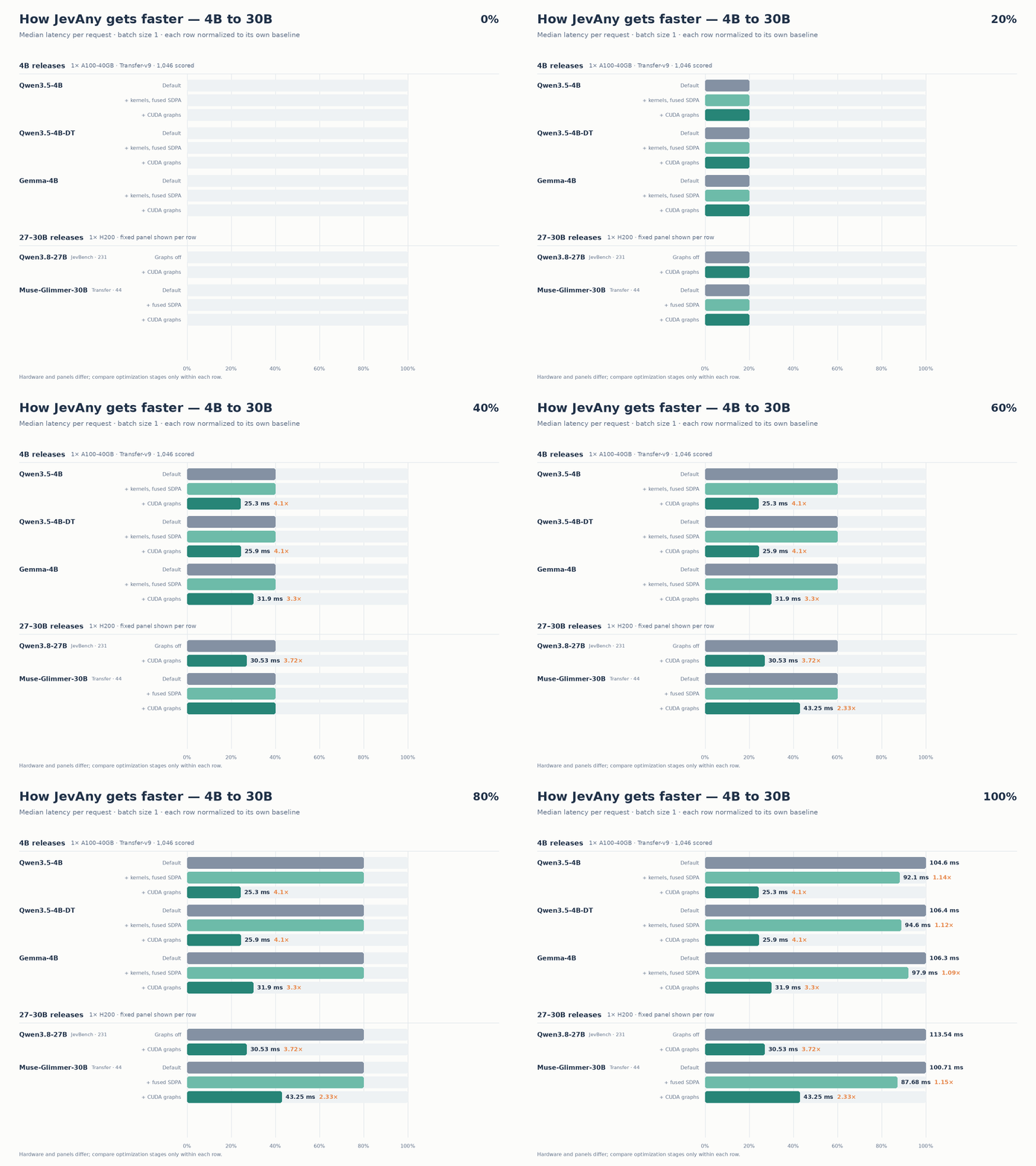
4B on A100 and 27–30B on H200. Each row is normalized to its own baseline; compare stages only within that row.
Full tables, setup and other models ·
How to enable ·
H200 results ·
A100 results
🕹️ 4. Examples & Test Environments
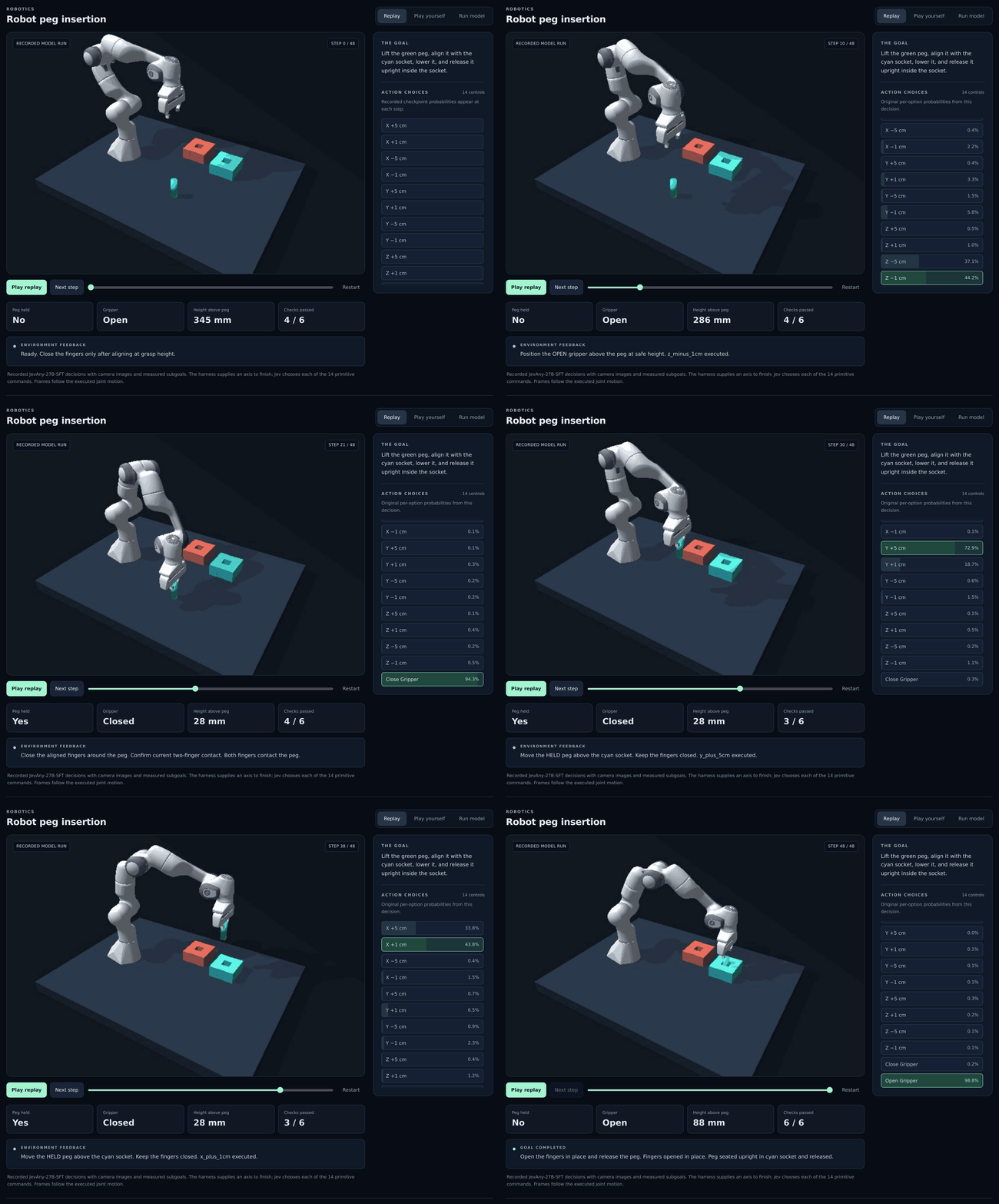
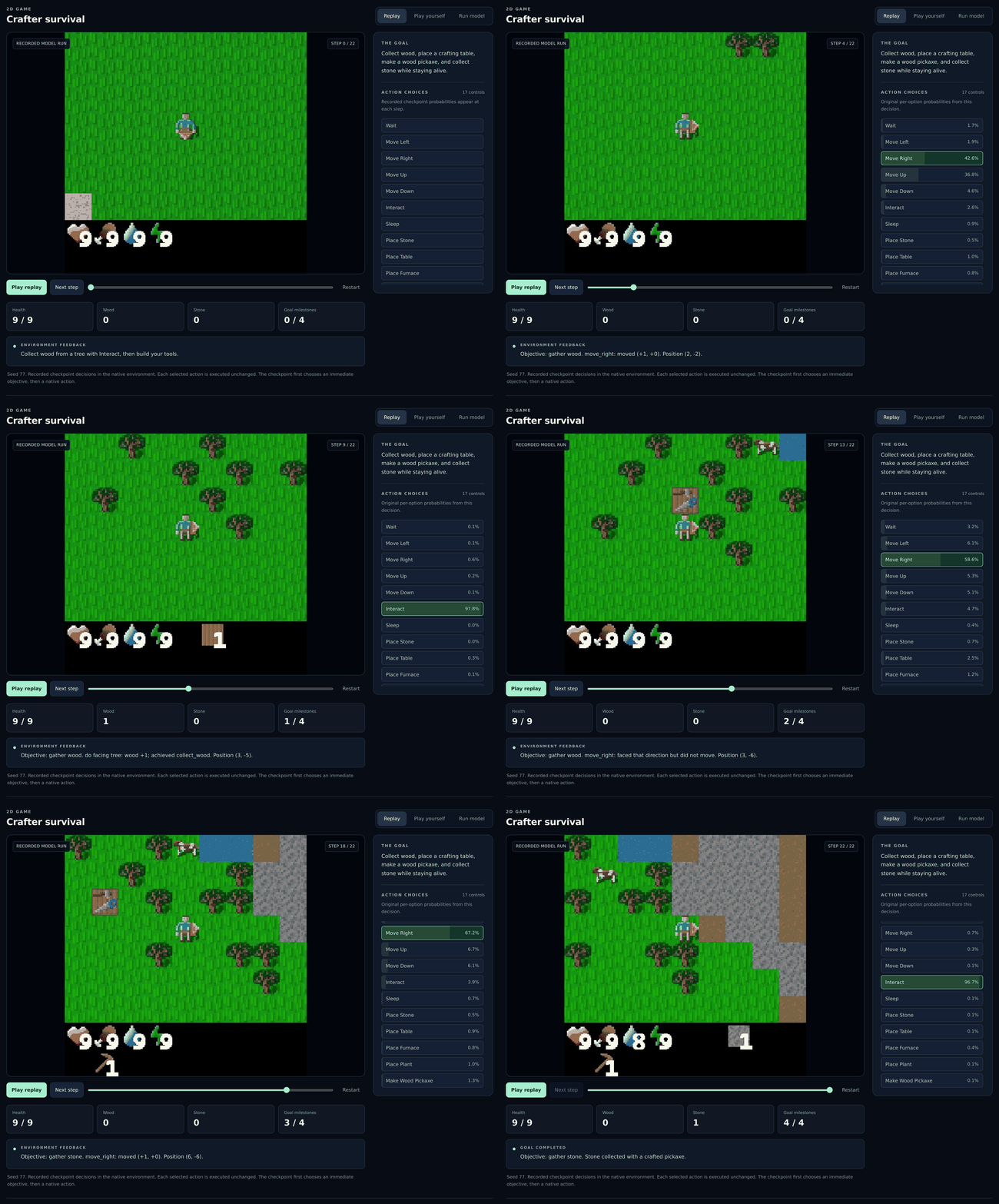
The playground includes the three environments below. These GIFs preserve
historical model actions and option probabilities; run the current
JevAny-Qwen3.8-27B
checkpoint with the commands in the playground guide.
Use a Franka gripper to grasp, align and insert a peg, checked by PyBullet contact physics.
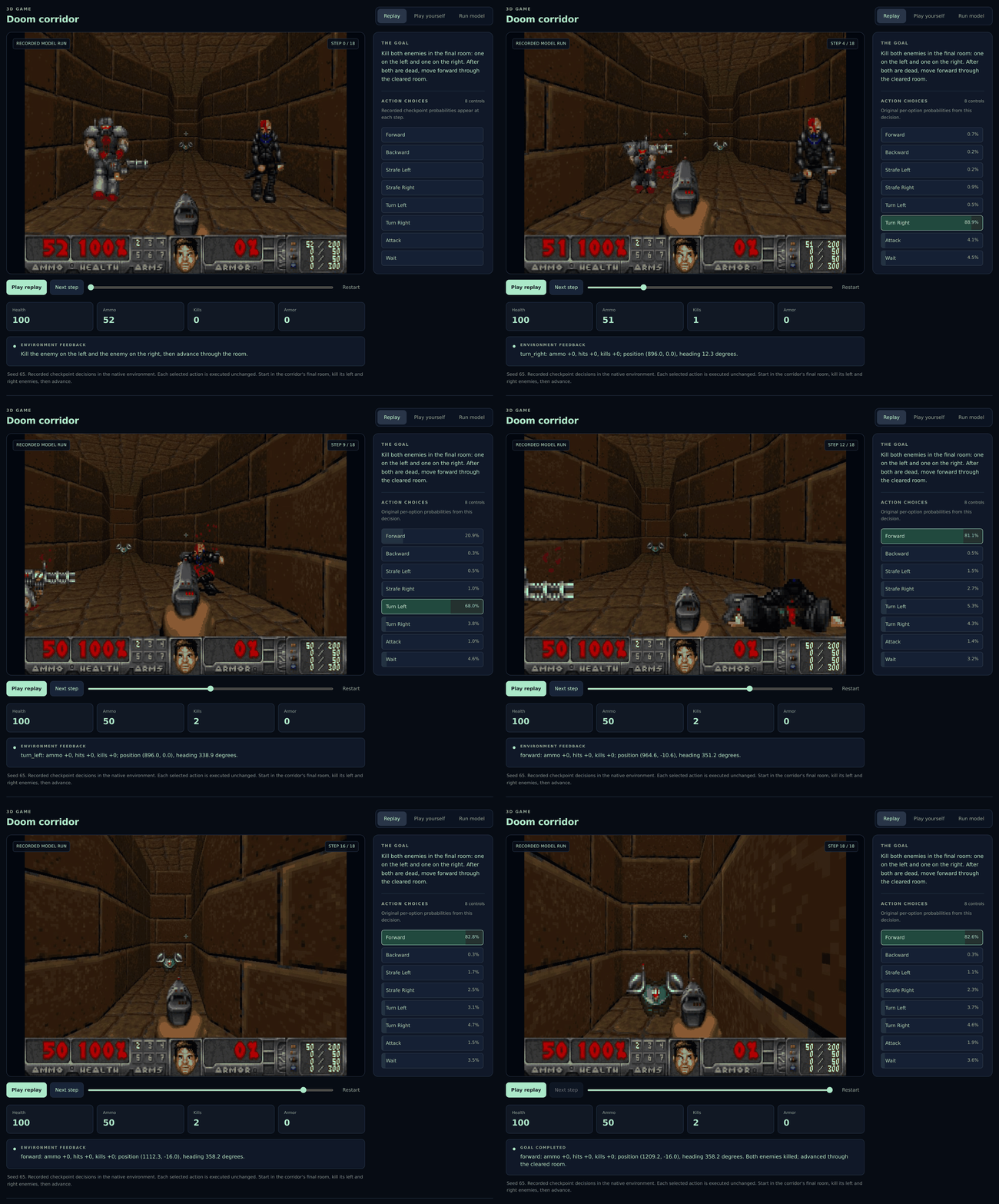
Clear the final room by defeating the enemies on the left and right, then move
forward. The environment uses ViZDoom and the included Freedoom assets.
Gather wood, craft tools and mine stone while managing health and supplies.
🎮 4.4 Try the playground
With a model running from Run locally, open the playground:
jevany demo --base-url http://127.0.0.1:8008 --text-only
Open http://127.0.0.1:8090, choose Test and connect, and try your own
decision. To let the model control a game, install the optional engines and
restart the playground:
python -m pip install -e '.[demo]'
jevany demo --base-url http://127.0.0.1:8008 --text-only
Choose Run model, then One decision or Run automatically.
Play yourself lets you control the game. Live control sends text state to the
model; robot control uses the .[robotics] extra.
For the bundled recordings, run jevany demo and choose Replay.
Playback works on CPU without model weights.
See the playground guide for platform
requirements and environment APIs, or integrations to
combine JevAny decisions with an LLM planner.
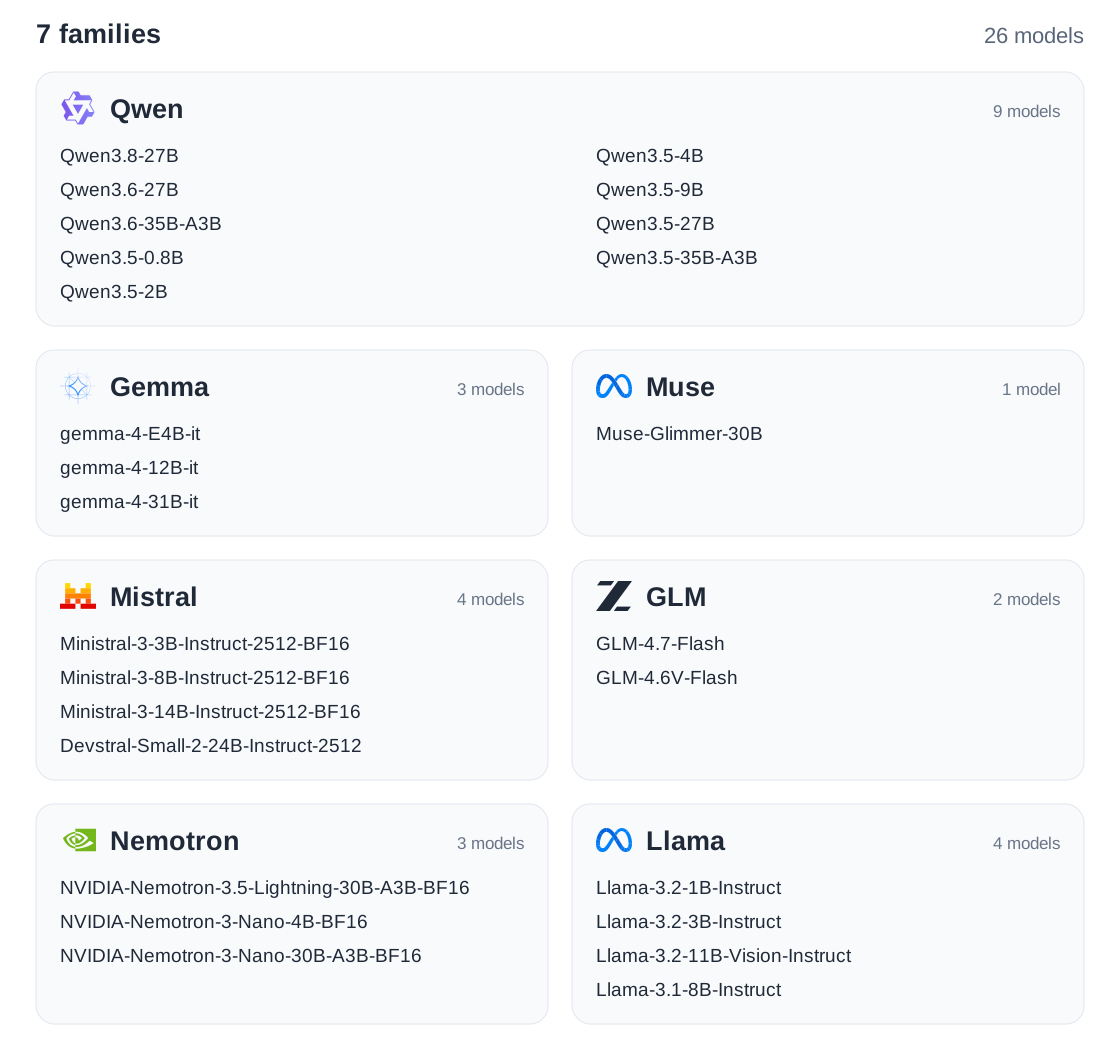
🧩 5. Supported Model Families
Model IDs, supported inputs and setup requirements.
📚 6. Documentation and Contributing
Documentation hub · Training · Deployment · API · Data · Evaluation · Agent harness protocol · Contributing
The technical report describes model design,
multimodal support, the agent-harness study and appendix, negative results, and
open questions.
Code and starter data are Apache-2.0. Some components are adapted from
Kev; see NOTICE and
acknowledgements. Base models and upstream datasets retain their own terms.
🤝 Contributing
We're building open infrastructure for System 1 decision models, and we'd
love your help. Small improvements are welcome. Here are a few ways to get
involved:
- Docs and translations: clarify a setup step, add troubleshooting tips, or
translate a guide.
- Bug fixes and tests: share a reproducible issue, fix a bug, or add a
regression test.
- Applications and integrations: show JevAny choosing tools, routing tickets,
or taking actions in a game or robot environment.
- Models, training and inference: add a model adapter, improve a training
recipe, or make inference faster with reproducible measurements.
- Data and evaluation: contribute a public-data converter, add a benchmark
case, or document where a model makes the wrong decision.
CI checks and automated AI code review provide feedback on PRs, with
maintainers handling review and merging. Small fixes can go straight to a
PR; for larger changes, open an issue to discuss the approach first.
Read the contribution guide
for setup and development steps, or browse the issues
to find a place to start.
 JevAny-Gemma-4B
 JevAny-Qwen3.5-4B
 JevAny-Muse-Glimmer-30B
 Kev-4B
 Jev 1.13.0
 Laya

 JevAny 是一套开放的基础设施,用于训练、评估和部署“System 1”决策模型。这类模型根据给定的状态和问题,从有限的候选集合中选出一个操作,并返回选择结果及其概率。