




folding-cell README

The project's README from github.com/Ramotion/folding-cell. As one markdown file: README.md.

FOLDING CELL

Expanding content cell with animation inspired by folding paper card material design.


We specialize in the designing and coding of custom UI for Mobile Apps and Websites.

Stay tuned for the latest updates:


CocoaPods CocoaPods Twitter Travis codebeat badge Carthage compatible Swift 4.0 Analytics Donate

Requirements

Installation

Just add the FoldingCell.swift file to your project.

or use CocoaPods with Podfile:

pod 'FoldingCell'

or Carthage users can simply add Mantle to their Cartfile:

github "Ramotion/folding-cell"

or Swift Package Manager by adding:

dependencies: [
.package(url: "https://github.com/Ramotion/folding-cell.git", from: "5.0.2")
]

to Package.swift

or just drag and drop FoldingCell.swift file to your project

Solution

Solution

Usage

  1. Create a new cell inheriting from FoldingCell

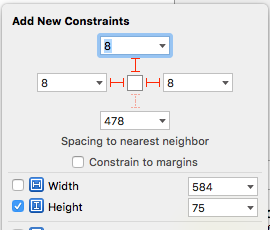
  2. Add a UIView to your cell in your storyboard or nib file, inheriting from RotatedView. Connect the outlet from this view to the cell property foregroundView. Add constraints from this view to the superview, as in this picture:

1.1

(constants of constraints may be different). Connect the outlet from this top constraint to the cell property foregroundViewTop . (This view will be shown when the cell is in its normal state).

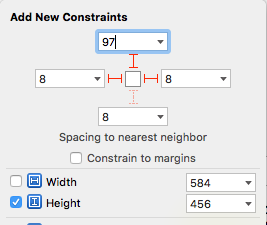
  1. Add other UIViews to your cell, connect the outlet from this view to the cell property containerView. Add constraints from this view to the superview like in the picture:

1.2

(constants of constraints may be different). Connect the outlet from this top constraint to the cell property containerViewTop. (This view will be shown when the cell is opened)

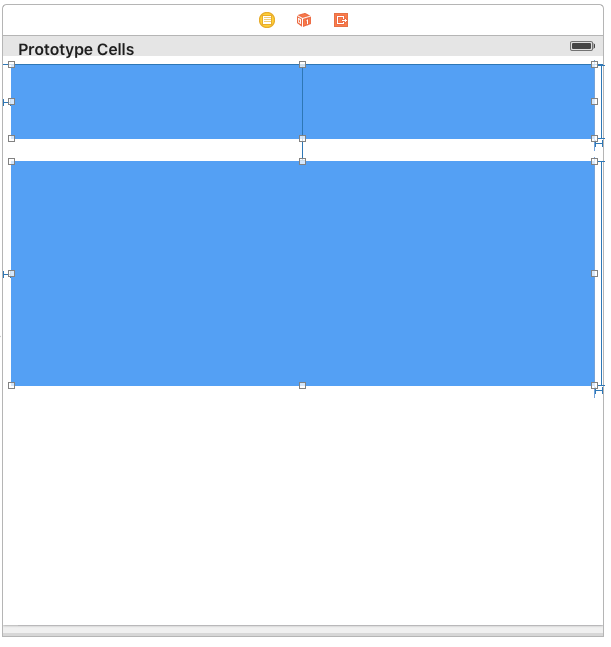
Your result should be something like this picture:

1.3

  1. Set @IBInspectable var itemCount: NSInteger property is a count of folding (it IBInspectable you can set in storyboard). range 2 or greater. Default value is 2

Ok, we've finished configuring the cell.

  1. Adding code to your UITableViewController

5.1) Add constants:

fileprivate struct C {
  struct CellHeight {
    static let close: CGFloat = *** // equal or greater foregroundView height
    static let open: CGFloat = *** // equal or greater containerView height
  }
}

5.2) Add property for calculate cells height

     var cellHeights = (0..<CELLCOUNT).map { _ in C.CellHeight.close }

5.3) Override method:

    override func tableView(tableView: UITableView, heightForRowAtIndexPath indexPath: NSIndexPath) -> CGFloat {
        return cellHeights[indexPath.row]
    }

5.4) Added code to method:

    override func tableView(tableView: UITableView, didSelectRowAtIndexPath indexPath: NSIndexPath) {
        guard case let cell as FoldingCell = tableView.cellForRowAtIndexPath(indexPath) else {
          return
        }

        var duration = 0.0
        if cellIsCollapsed {
            cellHeights[indexPath.row] = Const.openCellHeight
            cell.unfold(true, animated: true, completion: nil)
            duration = 0.5
        } else {
            cellHeights[indexPath.row] = Const.closeCellHeight
            cell.unfold(false, animated: true, completion: nil)
            duration = 0.8
        }

        UIView.animateWithDuration(duration, delay: 0, options: .CurveEaseOut, animations: { _ in
            tableView.beginUpdates()
            tableView.endUpdates()
        }, completion: nil)
    }

5.5) Control if the cell is open or closed

  override func tableView(tableView: UITableView, willDisplayCell cell: UITableViewCell, forRowAtIndexPath indexPath: NSIndexPath) {

        if case let cell as FoldingCell = cell {
            if cellHeights![indexPath.row] == C.cellHeights.close {
                foldingCell.selectedAnimation(false, animated: false, completion:nil)
            } else {
                foldingCell.selectedAnimation(true, animated: false, completion: nil)
            }
        }
    }
  1. Add this code to your new cell class
    override func animationDuration(itemIndex:NSInteger, type:AnimationType)-> NSTimeInterval {

        // durations count equal it itemCount
        let durations = [0.33, 0.26, 0.26] // timing animation for each view
        return durations[itemIndex]
    }

if don't use storyboard and xib files

Create foregroundView and containerView from code (steps 2 - 3) look example: Folding-cell-programmatically

🗂 Check this library on other language:

📄 License

Folding cell is released under the MIT license. See LICENSE for details.

This library is a part of a selection of our best UI open-source projects.

If you use the open-source library in your project, please make sure to credit and backlink to https://www.ramotion.com/

📱 Get the Showroom App for iOS to give it a try

Try this UI component and more like this in our iOS app. Contact us if interested.

folding-cell (Ramotion/folding-cell)

Searching Database…

这是什么?FoldingCell 是 Ramotion 开源的一个 iOS UI 组件:它是一个表格单元格(table view cell),展开时带有折纸动画效果,灵感来自 Material Design。
这是一个完整的 App,还是可以放进我自己项目里的一个组件?它是一个 UI 库,不是 App:你需要继承它的 FoldingCell 类,然后把结果添加到你自己的 iOS 项目中的表格视图(table view)里。
我怎么把它添加到我的项目里?把 FoldingCell.swift 文件添加到你的项目中,或者通过 CocoaPods、Carthage 或 Swift Package Manager 安装;README 里会一步步讲解单元格的配置方法。
我需要哪个 iOS 和 Xcode 版本?需要 iOS 8.0 或更新版本,以及 Xcode 10.2 或更新版本。README 中没有提到任何第三方依赖。
配置单元格时,我被锁定必须用 storyboard 吗?单元格通常是在 storyboard 或 nib 里布局的:你需要连接 foregroundView 和 containerView 这两个 outlet 及其顶部约束,并在你的 table view controller 中添加跟踪高度的代码。README 里也包含一个纯代码的示例,供你不用 storyboard 时参考。
MIT 许可证就是全部条款了吗,还是有什么附加条件?是 MIT 许可证。Ramotion 只是要求使用这个开源库的项目注明出处并附上指向他们的链接。
展开动画用了几道折痕?这是可以配置的:折叠次数是一个 IBInspectable 属性,可以在 storyboard 里直接设置,必须大于或等于 2,默认值是 2。
单元格收起和展开时分别显示什么?收起状态显示的是你的 foregroundView,也就是顶部一张紧凑的卡片;打开单元格时会播放折纸动画,展开显示出包含完整内容的 containerView。
我能不能在写任何代码之前先试用一下?可以。Ramotion 发布了一个 iOS 上的 Showroom App,你可以在里面实际体验这个组件和其他类似组件。
Creator
Ramotion
Size
23 MB
Stars
10.2K
Age
10y
Commits · 90 Days