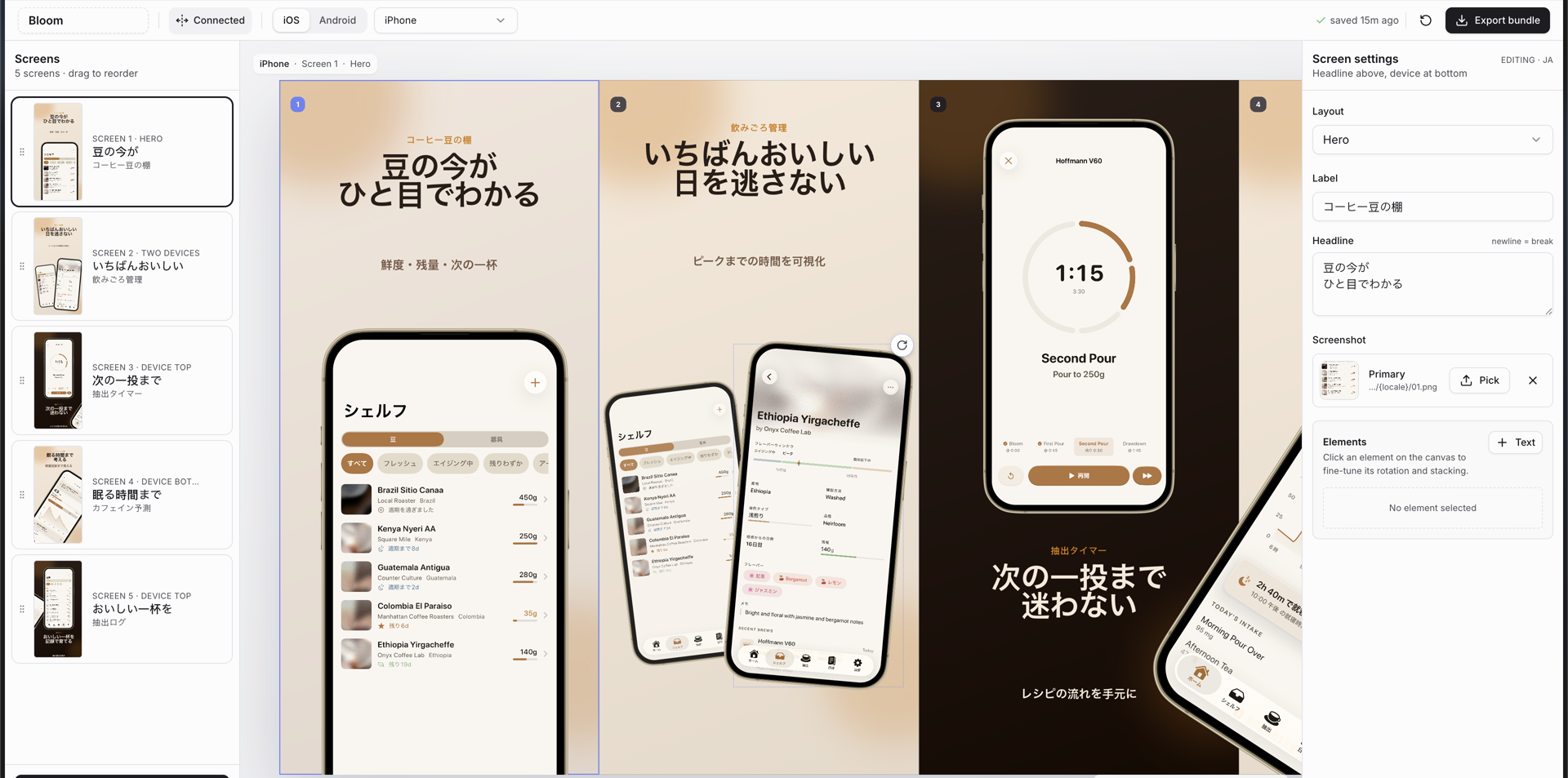
Что это?
 Скилл для ИИ-агентов кодинга (таких как Claude Code, Cursor, Windsurf, OpenCode и Codex), который разворачивает полноценный редактор на Next.js для создания маркетинговых скриншотов в App Store и Google Play — с рамками устройств, связанным холстом и экспортом пакетов в один клик в размерах, требуемых каждым стором.
Скилл для ИИ-агентов кодинга (таких как Claude Code, Cursor, Windsurf, OpenCode и Codex), который разворачивает полноценный редактор на Next.js для создания маркетинговых скриншотов в App Store и Google Play — с рамками устройств, связанным холстом и экспортом пакетов в один клик в размерах, требуемых каждым стором.Это готовое приложение или то, что мой кодинг-агент соберёт для меня?Это скилл для агента, а не самостоятельное приложение: после установки ваш кодинг-агент сможет развернуть полный проект на Next.js с редактором скриншотов прямо в вашем репозитории, который вы затем сами запускаете и настраиваете.
Это скилл для агента, а не самостоятельное приложение: после установки ваш кодинг-агент сможет развернуть полный проект на Next.js с редактором скриншотов прямо в вашем репозитории, который вы затем сами запускаете и настраиваете.Как его установить и использовать?Установите его глобально или для конкретного агента командой 'npx skills', затем просто попросите кодинг-агента сделать стор-скриншоты — он развернёт проект редактора на Next.js, который вы запустите локально.
Установите его глобально или для конкретного агента командой 'npx skills', затем просто попросите кодинг-агента сделать стор-скриншоты — он развернёт проект редактора на Next.js, который вы запустите локально.Что должно быть на компьютере заранее?Node.js 18 или новее, плюс один пакетный менеджер на выбор — bun, pnpm, yarn или npm — чтобы запустить сгенерированный проект редактора.
Node.js 18 или новее, плюс один пакетный менеджер на выбор — bun, pnpm, yarn или npm — чтобы запустить сгенерированный проект редактора.Поддерживаются обе платформы, iOS и Android, или только одна?Обе: он генерирует наборы для iOS, iPad, Android-телефонов, Android-планшетов и промо-графики Play Store, а экспорт идёт в точных PNG-размерах, требуемых каждым стором.
Обе: он генерирует наборы для iOS, iPad, Android-телефонов, Android-планшетов и промо-графики Play Store, а экспорт идёт в точных PNG-размерах, требуемых каждым стором.Что происходит с данными проекта между сессиями?Всё — имя приложения, платформы, устройства, локали, тема, слайды, пути к скриншотам и трансформации — сохраняется в app-store-screenshots.json, так что набор можно версионировать в git и продолжить позже, а localStorage используется для быстрой перезагрузки.
Всё — имя приложения, платформы, устройства, локали, тема, слайды, пути к скриншотам и трансформации — сохраняется в app-store-screenshots.json, так что набор можно версионировать в git и продолжить позже, а localStorage используется для быстрой перезагрузки.Чем отличаются режимы холста Connected и Isolated?Режим Connected позволяет телефонам, подписям и декоративным элементам пересекать соседние скриншоты по всей ленте перед экспортом точных кропов, а режим Isolated защищает старые наборы, чтобы элементы за кадром никогда не просачивались в соседние экспорты.
Режим Connected позволяет телефонам, подписям и декоративным элементам пересекать соседние скриншоты по всей ленте перед экспортом точных кропов, а режим Isolated защищает старые наборы, чтобы элементы за кадром никогда не просачивались в соседние экспорты.Можно ли настроить визуальную тему скриншотов?Да, пользовательские темы задаются в src/lib/constants.ts, а любой нераспознанный id темы просто откатывается к стандартной теме clean-light.
Да, пользовательские темы задаются в src/lib/constants.ts, а любой нераспознанный id темы просто откатывается к стандартной теме clean-light.Кто-нибудь реально публиковал в App Store скриншоты, сделанные с этим скиллом?Да — в README отмечено, что примеры скриншотов, созданных с этим скиллом, были приняты для приложения Bloom Coffee Shelf Recipe в App Store.
Да — в README отмечено, что примеры скриншотов, созданных с этим скиллом, были приняты для приложения Bloom Coffee Shelf Recipe в App Store.What are similar projects?ai-website-cloner-template, evondevKit, ui-ux-pro-max-skill, design-extract, ChunUI, appllama-skills, SwiftUI-Agent-Skill, stitch-skills
ai-website-cloner-template, evondevKit, ui-ux-pro-max-skill, design-extract, ChunUI, appllama-skills, SwiftUI-Agent-Skill, stitch-skillsWhich topics is it in?automate, appstore, skills-sh, shadcn-ui, screenshot, ios-app, marketing, swiftui, agent-skill, tailwindcss, apple, design
automate, appstore, skills-sh, shadcn-ui, screenshot, ios-app, marketing, swiftui, agent-skill, tailwindcss, apple, design