





Tkinter-Designer README

The project's README from github.com/ParthJadhav/Tkinter-Designer. As one markdown file: README.md.

bloom-banner-01-light-tags-1500x500

logo

Tkinter Designer

Drag & Drop GUI Creator

Tkinter Designer - No-code solution for Python GUI's | Product Hunt


Translations


💡 Introduction

Tkinter Designer was created to speed up the GUI development process in Python. It uses the well-known design software Figma to make creating beautiful Tkinter GUIs in Python a piece of cake 🍰.

Tkinter Designer uses the Figma API to analyze a design file and create the respective code and files needed for the GUI. Even Tkinter Designer's GUI is created using Tkinter Designer.

Tkinter Designer GUI

📢 Announcement

🎉 Multi frame support is here! 🎉

You can now create multiple frames in a single design file and Tkinter Designer will create the respective code and files for each frame. This is a huge step for Tkinter Designer and I'm really excited to see what you guys create with it.

Feel free to share your creations with the community on Discord.

If you encounter any bugs or have any suggestions, please create an issue here.

☄️ Advantages of Tkinter Designer

  1. Interfaces with drag and drop.
  2. A great deal quicker than writing code by hand
  3. Produce more gorgeous interfaces

⚡️ Read the instruction here

View the YouTube video or read the instructions below.

Instructions Youtube Tutorial

Requirements

Tkinter Designer supports Python 3.9 and newer. Install it with:

pip install tkdesigner

The CLI accepts both current figma.com/design/... links and legacy figma.com/file/... links. If you select a specific frame before copying the Figma link, Tkinter Designer will generate that selected frame. Always wrap Figma URLs in quotes when running from a shell, because Figma links often include ? and & query parameters.

tkdesigner "$FILE_URL" "$FIGMA_TOKEN"

To generate a class-based Tkinter app:

tkdesigner --template class $FILE_URL $FIGMA_TOKEN

To generate one app with Back/Next navigation across multiple Figma frames:

tkdesigner --template pages $FILE_URL $FIGMA_TOKEN

Generated apps can also apply a ttk theme:

tkdesigner --theme clam $FILE_URL $FIGMA_TOKEN

Generated gui.py files can be imported from another Python file without starting mainloop() automatically, so you can attach commands separately and regenerate the UI later. Use -f when you want the CLI to clear and regenerate an existing build directory.

🦋 Supporting Tkinter Designer

Consider making a donation to the Tkinter Designer project if you or your business have benefited from it. This will accelerate Tkinter Designer's development! Making coffee is simple; I'll be happy to enjoy one.

Buy Me A Coffee Paypal

🔵 Discord server & Linkedin

Click the button below to join the discord server or Linkedin

Join Discord Server Connect on Linkedin

📐 How it Works

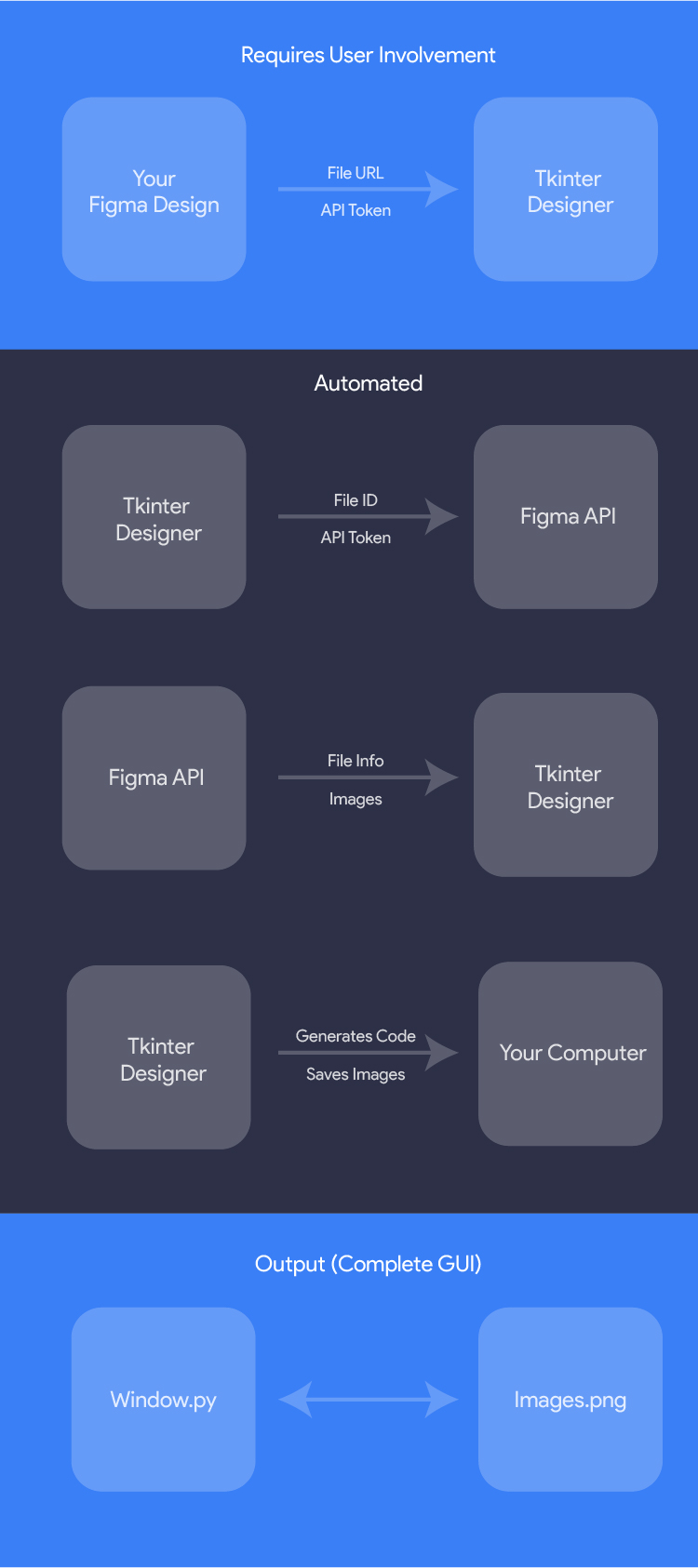
The only thing the user needs to do is design an interface with Figma, and then paste the Figma file URL and API token into Tkinter Designer.

Tkinter Designer will automatically generate all the code and images required to create the GUI in Tkinter.

How it Works

🎯 Examples

The possibilities are endless with Tkinter Designer, but here are a couple of GUIs that can be perfectly replicated in Tkinter.

The following are not my creations.

HotinGo (More Info)

Example 3

CodTubify (More Info)

Example 3

BeAnonymous (More Info)

Example 1

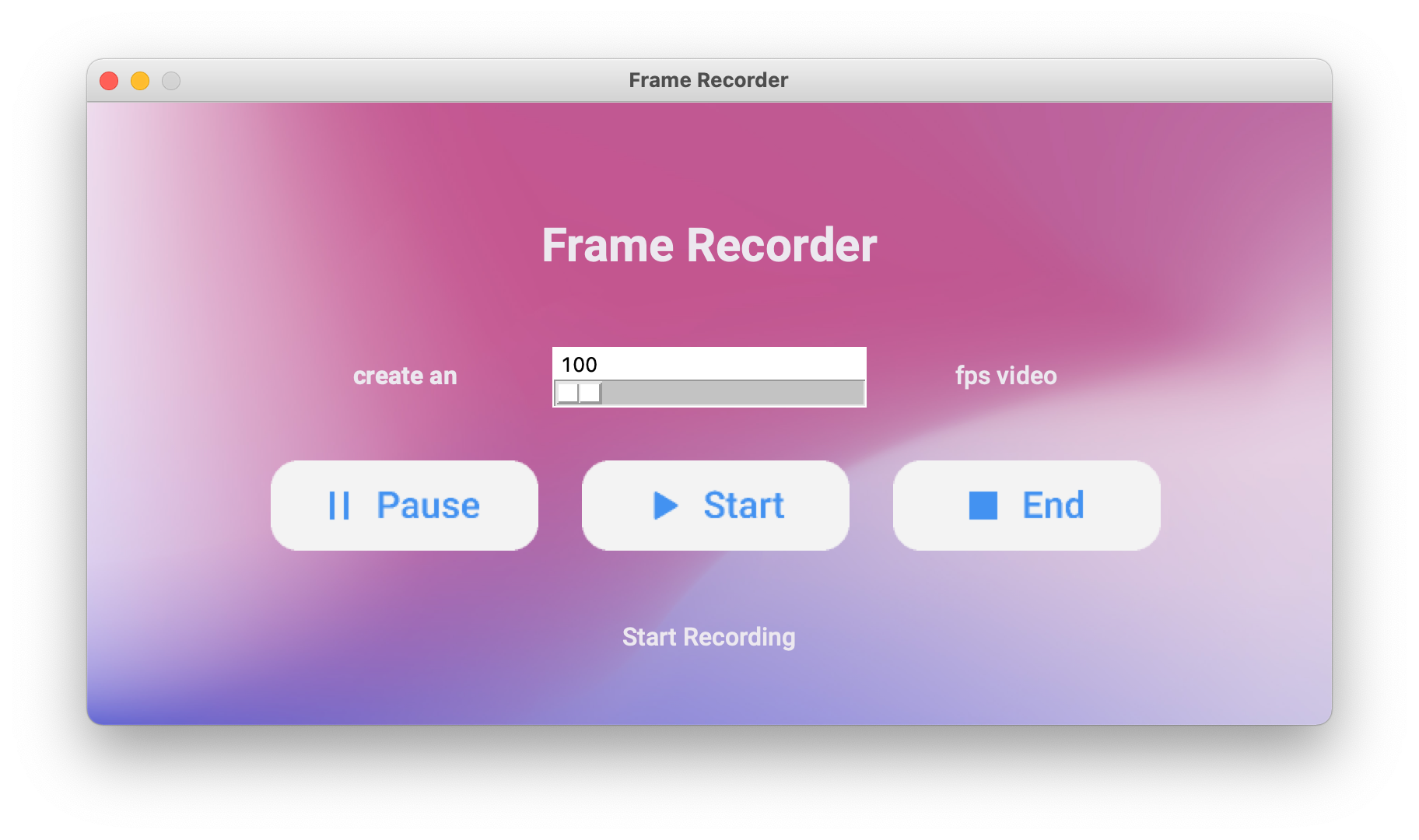
Frame Recorder (More Info)

Example 3

WhatBulk (More Info)

Example 3

Atarbals-Modern-Antivirus (More Info)

Example 3

🔥 Showcase

Please let me know if Tkinter Designer was used to create your app. More illustrations will be beneficial for other people!

(See: Contact Me) or use Show and Tell section in Discussions.

📄 License

Tkinter Designer is licensed under the BSD 3-Clause "New" or "Revised" License.
View Here.

Permissions Restrictions Conditions
✓ Commercial Use × Liability 🛈 License and Copyright Notice
✓ Modification × Warranty
✓ Distribution
✓ Private Use

Contribute

All contributions from the open-source community, individuals, and partners are welcomed. Our achievement is a result of your active participation.

Contributing guidelines

Code of conduct

LEARN.md

Connect with me on Linkedin

Author

Created by Parth Jadhav.

Tkinter-Designer (ParthJadhav/Tkinter-Designer)

Searching Database…

这是干什么的?Tkinter Designer 是一个能把 Figma 设计稿变成可运行的 Python Tkinter 图形界面的工具:它通过 Figma API 读取你的设计文件,然后生成图形界面所需的全部代码和图片。
所以我在 Figma 里画好界面,它就能帮我写出 Python 代码?没错——它是一个代码生成器,不是库。你粘贴 Figma 文件的 URL 和一个 API 令牌,它会分析设计稿,然后生成 Tkinter 代码以及图片文件。你可以通过命令行来使用它,它也自带一个图形界面。
我该怎么把它跑起来?先用 pip 安装这个包(需要 Python 3.9 或更高版本),然后运行 Tkinter Designer,粘贴你的 Figma 文件 URL 和 API 令牌。
除了设计稿,我在 Figma 里还需要准备什么吗?只需要一个 Figma 账号,里面放着你的设计稿——工具会用 Figma API 令牌来验证身份并读取文件。除此之外你只需要 Python 3.9+。
粘贴 Figma 链接时有什么坑吗?有——在终端里要给 URL 加引号,因为 Figma 链接通常带有 ? 和 & 之类的参数,不加引号会导致命令出错。另外,如果你在复制链接前选中了某个特定的画框,那么生成出来的就是那个被选中的画框。
它能生成有多个页面的应用吗?可以。除了输出单个画框,它还能生成基于类的 Tkinter 应用,或者一个带“上一步/下一步”导航、横跨多个 Figma 画框的应用;生成的应用还可以应用 ttk 主题。
我怎么把自己的逻辑接上生成的界面?生成的 gui.py 可以从其他 Python 文件导入,而不会自动启动主循环,所以你可以给各个控件绑定自己的命令,之后再重新生成界面。
我修改了 Figma 设计稿,怎么刷新生成好的界面?带上 -f 参数重新运行命令行即可:它会清空现有的构建目录,并根据更新后的设计重新生成全部内容。
Tkinter Designer 本身是用 Tkinter Designer 做出来的吗?是的——README 里特别指出,Tkinter Designer 自己的图形界面就是用 Tkinter Designer 做的,这也算是这个工具产出的一个实际展示。
Size
10.1 MB
Stars
10.3K
Age
5y
Commits · 90 Days
