





109 ·GitHub
Что это?
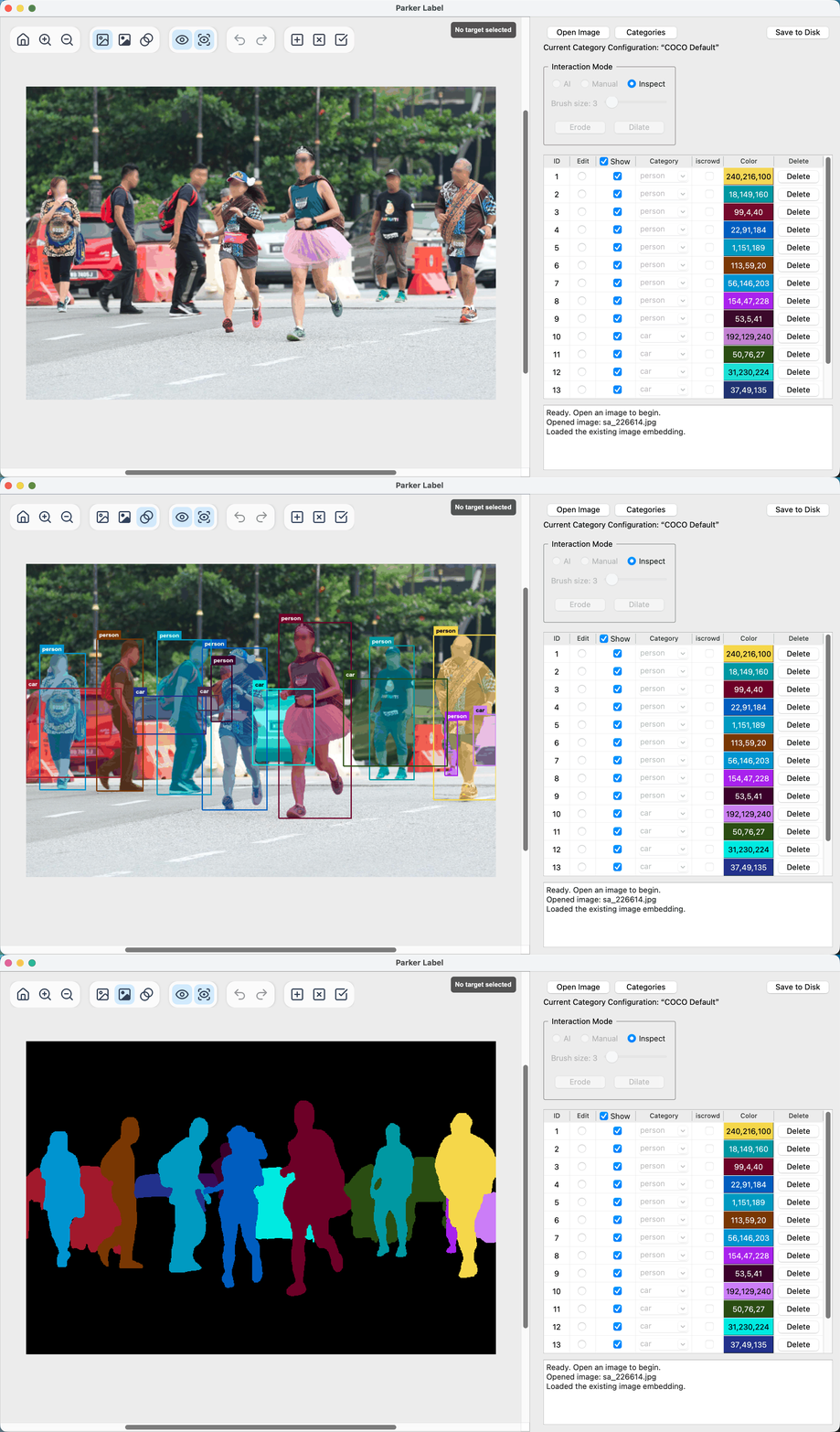
 ParkerLabel — лёгкий интерактивный инструмент разметки с помощью AI для детекции объектов и instance-сегментации: он использует MobileSAM, чтобы генерировать маски по кликам.
ParkerLabel — лёгкий интерактивный инструмент разметки с помощью AI для детекции объектов и instance-сегментации: он использует MobileSAM, чтобы генерировать маски по кликам.Это десктоп-приложение или библиотека для импорта в код?Это самостоятельное десктопное GUI-приложение с интерфейсом PyQt5, распространяемое портативными релиз-пакетами, а не библиотека.
Это самостоятельное десктопное GUI-приложение с интерфейсом PyQt5, распространяемое портативными релиз-пакетами, а не библиотека.Как это запустить?Либо скачайте портативный пакет приложения для своей ОС с GitHub Releases (или Baiduyun), либо склонируйте репозиторий, создайте окружение Conda с Python 3.11, установите зависимости и запустите из исходников.
Либо скачайте портативный пакет приложения для своей ОС с GitHub Releases (или Baiduyun), либо склонируйте репозиторий, создайте окружение Conda с Python 3.11, установите зависимости и запустите из исходников.Есть ли подводные камни при установке на macOS или Windows?На macOS пакет подписан ad-hoc, но не нотаризован, поэтому первый запуск заблокирован, пока вы не разрешите его в настройках Privacy & Security; на Windows SmartScreen может предупредить и потребовать нажать 'Run anyway'.
На macOS пакет подписан ad-hoc, но не нотаризован, поэтому первый запуск заблокирован, пока вы не разрешите его в настройках Privacy & Security; на Windows SmartScreen может предупредить и потребовать нажать 'Run anyway'.Какие операционные системы поддерживаются?Портативные пакеты выпускаются для macOS и Windows, а из исходников его можно запустить на любой платформе с Conda (например, Linux).
Портативные пакеты выпускаются для macOS и Windows, а из исходников его можно запустить на любой платформе с Conda (например, Linux).Отправляются ли куда-то мои данные или изображения?Нет, всё работает локально на CPU; данные разметки хранятся в локальных файлах .npy, .json и .mask.png рядом с каждым исходным изображением.
Нет, всё работает локально на CPU; данные разметки хранятся в локальных файлах .npy, .json и .mask.png рядом с каждым исходным изображением.Как именно работает разметка с помощью AI?В AI-режиме вы ставите на изображении положительные и отрицательные клики, и MobileSAM в реальном времени генерирует маску инстанса по этим подсказкам (около 20 мс на вывод на современных CPU).
В AI-режиме вы ставите на изображении положительные и отрицательные клики, и MobileSAM в реальном времени генерирует маску инстанса по этим подсказкам (около 20 мс на вывод на современных CPU).Какие наборы категорий можно использовать для разметки?ParkerLabel поставляется со встроенной конфигурацией 80 стандартных категорий COCO, доступной только для чтения; можно создавать новые конфигурации категорий или копировать существующие, каждая отслеживается по UUID и хешу SHA-256.
ParkerLabel поставляется со встроенной конфигурацией 80 стандартных категорий COCO, доступной только для чтения; можно создавать новые конфигурации категорий или копировать существующие, каждая отслеживается по UUID и хешу SHA-256.В каком формате сохраняются файлы разметки?Для каждого изображения создаётся JSON-файл с категорией, bounding box, площадью и несжатой сегментацией COCO RLE для каждого инстанса, плюс кешированный эмбеддинг изображения (.npy) и цветная маска-превью (.mask.png); JSON использует поля в стиле COCO, но не является полноценным экспортом датасета COCO.
Для каждого изображения создаётся JSON-файл с категорией, bounding box, площадью и несжатой сегментацией COCO RLE для каждого инстанса, плюс кешированный эмбеддинг изображения (.npy) и цветная маска-превью (.mask.png); JSON использует поля в стиле COCO, но не является полноценным экспортом датасета COCO.Какие языки поддерживает интерфейс?Интерфейс ParkerLabel поддерживает упрощённый и традиционный китайский, английский, японский, корейский, немецкий, французский, итальянский и испанский; переключается в настройках.
Интерфейс ParkerLabel поддерживает упрощённый и традиционный китайский, английский, японский, корейский, немецкий, французский, итальянский и испанский; переключается в настройках.What are similar projects?X-AnyLabeling, label-studio, cvat, labelImg, supervision, albumentations, ingetrazo, labelme
X-AnyLabeling, label-studio, cvat, labelImg, supervision, albumentations, ingetrazo, labelmeWhich topics is it in?bounding-boxes, image-annotation, data-labeling, cpu-inference, annotation, image-segmentation, qt, object-detection, onnx, offline, computer-vision, pytorch
bounding-boxes, image-annotation, data-labeling, cpu-inference, annotation, image-segmentation, qt, object-detection, onnx, offline, computer-vision, pytorch