PDFCraft

Professional PDF Tools
Free, Private & Browser-Based
Merge, split, compress, convert, and edit PDF files online without uploading to servers.
📖 About
PDFCraft is a comprehensive suite of PDF tools designed for privacy and performance. Unlike many online converters, PDFCraft processes your files entirely within your browser using WebAssembly technology. Your documents never leave your device, ensuring maximum security for your sensitive data.
This project is built with modern web technologies to provide a slick, app-like experience directly in the browser.
✨ Key Features
- 🔒 100% Private: All processing happens client-side. No file uploads to external servers.
- 🚀 Fast & Responsive: Powered by Next.js and WebAssembly for near-native performance.
- 🛠️ Comprehensive Toolset: Over 80+ tools to handle any PDF task.
- 🎨 Modern UI: Clean, accessible, and responsive design built with Tailwind CSS.
- 🌐 Multi-language: Supports English, Spanish, French, German, Portuguese, Japanese, Korean, and Chinese.
🔄 Workflow Editor (Beta)
⚠️ Early Development Notice: This feature is currently in early development stage. You may encounter bugs or incomplete functionality. We appreciate your feedback and patience!
PDFCraft includes a powerful visual workflow editor that allows you to chain multiple PDF operations together, creating automated processing pipelines.
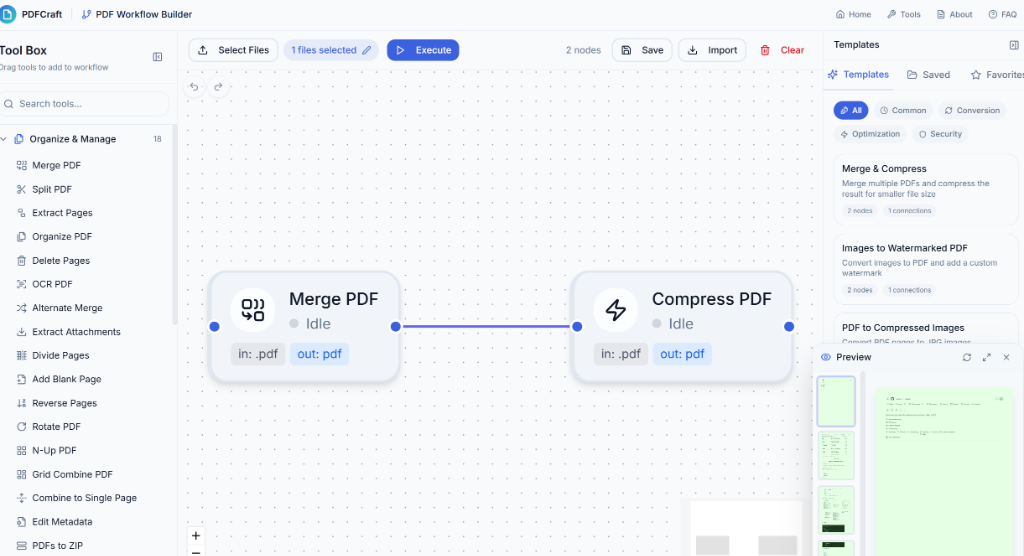
Visual workflow editor with drag-and-drop interface
Key Capabilities
- 🔗 Visual Node-Based Editor: Drag and drop tools onto a canvas and connect them to create processing pipelines
- 📋 23+ Pre-built Templates: Common workflows like "Merge & Compress", "Secure PDF", "Document Preparation", etc.
- 💾 Save & Reuse: Save your custom workflows for future use
- 🎯 Real-time Validation: Automatic format compatibility checking between connected tools
- 📁 Batch Processing: Process multiple files through the same workflow
- ↔️ Collapsible Panels: Maximize canvas workspace with collapsible tool and library sidebars
Available Templates
| Category |
Templates |
| Common |
Merge & Compress, Document Preparation, Split & Watermark, Batch Watermark, Report Assembly, Invoice Processing |
| Conversion |
Images to PDF, PDF to Images, Office to PDF, eBook to PDF, Photo Album Creator |
| Optimization |
Optimize for Web, Full Optimization, Grayscale & Compress, Archive Preparation |
| Security |
Create Secure PDF, Confidential Document, Unlock & Edit |
How to Access
Navigate to /workflow or click on "Workflow Editor" in the navigation menu.
| Tool |
Description |
| PDF Multi Tool |
All-in-one PDF editor for merge, split, organize, delete, rotate, and extract |
| Merge PDF |
Combine multiple PDFs into one document |
| Split PDF |
Separate specific pages or divide by page ranges |
| Extract Pages |
Extract specific pages to a new file |
| Organize PDF |
Reorder, duplicate, and delete pages with drag-and-drop |
| Delete Pages |
Remove unwanted pages from PDF files |
| Rotate PDF |
Rotate pages by 90°, 180°, or 270° |
| Rotate by Custom Degrees |
Rotate pages by any angle for straightening scans |
| Reverse Pages |
Reverse the page order of a PDF |
| Add Blank Page |
Insert blank pages at any position |
| Divide Pages |
Split pages horizontally or vertically |
| N-up PDF |
Combine multiple pages on a single sheet (2-up, 4-up, etc.) |
| Combine to Single Page |
Stitch all pages into one continuous page |
| Alternate Merge |
Interleave pages from multiple PDFs |
| OCR PDF |
Make scanned PDFs searchable with text recognition |
| Add Attachments |
Embed files into PDF documents |
| Extract Attachments |
Download embedded files from PDFs |
| Edit Attachments |
View, rename, or remove embedded files |
| View Metadata |
View PDF properties, author, dates, and keywords |
| Edit Metadata |
Modify PDF title, author, subject, and keywords |
| PDF to ZIP |
Package multiple PDFs into a ZIP archive |
| Compare PDFs |
Compare two PDFs side-by-side with difference highlighting |
| Posterize PDF |
Split large pages into multiple printable sheets |
| Grid Combine |
Combine multiple PDFs into a grid layout with custom spacing |
| PDF Booklet |
Arrange pages for booklet printing (saddle stitch) |
| PDF Reader |
Read and view PDF documents in a clean interface |
| Tool |
Description |
| Edit PDF |
Add text, images, annotations, highlights, and shapes |
| Sign PDF |
Draw, type, or upload electronic signatures |
| Crop PDF |
Trim margins and remove unwanted areas |
| Edit Bookmarks |
Add, edit, and manage PDF navigation bookmarks |
| Table of Contents |
Generate clickable table of contents from bookmarks |
| Page Numbers |
Add customizable page numbering |
| Add Watermark |
Apply text or image watermarks |
| Header & Footer |
Add headers and footers with page numbers and dates |
| Invert Colors |
Create dark mode versions of documents |
| Background Color |
Change or add page background colors |
| Change Text Color |
Modify the color of all text content |
| Add Stamps |
Apply preset or custom stamps (Approved, Rejected, etc.) |
| Remove Annotations |
Strip comments, highlights, and markup |
| Form Filler |
Complete interactive PDF forms |
| Form Creator |
Add text fields, checkboxes, and dropdowns to create forms |
| Remove Blank Pages |
Auto-detect and remove empty pages |
| Deskew PDF |
Automatically straighten skewed scanned pages |
| OCG Manager |
Manage Optional Content Groups (layers) in PDFs |
| Tool |
Description |
| Image to PDF |
Convert any image format to PDF |
| JPG to PDF |
Convert JPEG images to PDF |
| PNG to PDF |
Convert PNG images with transparency support |
| WebP to PDF |
Convert modern WebP images to PDF |
| SVG to PDF |
Convert vector graphics to PDF |
| BMP to PDF |
Convert bitmap images to PDF |
| HEIC to PDF |
Convert iPhone/iPad photos to PDF |
| TIFF to PDF |
Convert multi-page TIFF to PDF |
| TXT to PDF |
Convert plain text files to PDF |
| JSON to PDF |
Convert JSON data with syntax highlighting |
| PSD to PDF |
Convert Photoshop files to PDF |
| Word to PDF |
Convert Microsoft Word documents to PDF |
| Excel to PDF |
Convert Excel spreadsheets to PDF |
| PowerPoint to PDF |
Convert PowerPoint presentations to PDF |
| XPS to PDF |
Convert XPS documents to PDF |
| RTF to PDF |
Convert Rich Text Format files to PDF |
| EPUB to PDF |
Convert EPUB ebooks to PDF |
| MOBI to PDF |
Convert MOBI ebooks to PDF |
| Markdown to PDF |
Convert Markdown files to PDF with styling |
| Email to PDF |
Convert email files (EML/MSG) to PDF |
| CBZ to PDF |
Convert comic book archives to PDF |
| DjVu to PDF |
Convert DjVu documents to PDF |
| Tool |
Description |
| PDF to JPG |
Extract pages as JPEG images |
| PDF to PNG |
Export pages as PNG with transparency |
| PDF to WebP |
Convert to modern WebP format |
| PDF to BMP |
Export as bitmap images |
| PDF to TIFF |
Convert to high-quality TIFF |
| PDF to Greyscale |
Convert colorful PDFs to black and white |
| PDF to JSON |
Extract text and metadata as JSON |
| PDF to DOCX |
Convert PDF to editable Word document |
| PDF to PowerPoint |
Convert PDF to editable slides |
| PDF to Excel |
Extract tables to spreadsheet format |
| Extract Images |
Extract all images embedded in a PDF file |
| PDF to PDF/A |
Convert PDF to archival PDF/A format |
| Extract Tables |
Extract tables from PDF as structured data |
| Tool |
Description |
| Compress PDF |
Reduce file size while maintaining quality |
| Fix Page Size |
Standardize page dimensions |
| Page Dimensions |
Analyze and view page sizes |
| Linearize PDF |
Optimize for fast web viewing |
| Repair PDF |
Fix corrupted or damaged PDF files |
| Remove Restrictions |
Remove editing/printing restrictions |
| Rasterize PDF |
Convert vector elements to images for compatibility |
| Font to Outline |
Convert text fonts to vector outlines |
| Tool |
Description |
| Encrypt PDF |
Add password protection and encryption |
| Decrypt PDF |
Remove password from PDFs |
| Sanitize PDF |
Remove metadata, scripts, and hidden data |
| Flatten PDF |
Merge annotations and form fields into content |
| Remove Metadata |
Strip author, dates, and other metadata |
| Change Permissions |
Set print, copy, and edit permissions |
💻 Tech Stack
🚀 Getting Started
To run this project locally, follow these steps:
Prerequisites
- Node.js 18.17 or later
- npm, yarn, or pnpm
Installation
Clone the repository
git clone https://github.com/PDFCraftTool/pdfcraft.git
cd pdfcraft
Install dependencies
npm install
# or
yarn install
# or
pnpm install
Start the development server
npm run dev
# or
yarn dev
# or
pnpm dev
Open your browser
Navigate to http://localhost:3000 to see the application running.
🐳 Docker
PDFCraft provides both pre-built Docker images and Docker Compose for flexible deployment options.
Option 1: Use Pre-built Image (Recommended)
The easiest way to run PDFCraft is using our pre-built image from GitHub Container Registry:
# Pull the latest image
docker pull ghcr.io/pdfcrafttool/pdfcraft:latest

# Run the container
docker run -d -p 8080:80 --name pdfcraft ghcr.io/pdfcrafttool/pdfcraft:latest
Open http://localhost:8080 to access PDFCraft.
Available tags:
| Tag |
Description |
latest |
Latest stable release from main branch |
v1.0.0 |
Specific version (semantic versioning) |
sha-abc1234 |
Specific commit |
Option 2: Build from Source with Docker Compose
If you want to build from source or need to modify the code:
⚠️ Note: This method requires cloning the repository first.
# Clone the repository
git clone https://github.com/PDFCraftTool/pdfcraft.git
cd pdfcraft

# Development mode (with hot reload)
docker compose --profile dev up

# Production mode (static build + Nginx)
docker compose --profile prod up --build
To stop containers:
docker compose down
🌐 Subpath Deployment (basePath Support)
PDFCraft supports deployment under a subpath (e.g., https://your-domain.com/pdfcraft/). To enable this, you must specify the base path during the build process.
Using Docker Build:
docker build --build-arg BASE_PATH=/pdfcraft -t pdfcraft .
Using Docker Compose:
services:
  pdfcraft:
    build:
      context: .
      args:
        - BASE_PATH=/pdfcraft
    environment:
      - BASE_PATH=/pdfcraft
Note: Since the app is statically exported, the BASE_PATH must be provided during the build stage.
📜 Scripts
npm run dev: Starts the development server with Turbopack. Automatically runs predev to decompress LibreOffice WASM files.npm run build: Builds the application for production. Automatically runs postbuild to decompress WASM files in out/.npm run start: Starts the production server.npm run lint: Lints the code using ESLint.npm run test: Runs tests using Vitest.
🚀 Production Deployment Guide
PDFCraft is configured for static export (output: 'export'), which means it can be deployed to any service that supports static website hosting without requiring a Node.js server.
📖 For comprehensive deployment instructions, see DEPLOYMENT.md
Quick Start
Build the project:
npm run build
All static files will be generated in the out directory.
Deploy to your preferred platform:
- Vercel (Recommended):
vercel --prod
- Netlify:
netlify deploy --prod --dir=out
- GitHub Pages: Push to
main branch (uses GitHub Actions)
- Cloudflare Pages:
wrangler pages deploy out
- Docker + Nginx:
docker compose --profile prod up --build
Deployment Files Included
| File |
Platform |
vercel.json |
Vercel |
netlify.toml |
Netlify |
.github/workflows/deploy.yml |
GitHub Pages |
public/_headers |
Cloudflare Pages / Netlify |
docker-compose.yml + nginx.conf |
Docker / Self-hosted |
.htaccess |
Apache |
Important Notes
- Headers Configuration: Security and caching headers are pre-configured in all deployment files.
- Image Optimization: Static export uses
images: { unoptimized: true }.
- WASM Support: All deployment configs include proper MIME types for WebAssembly.
- Subpath Support: Set
BASE_PATH environment variable during build to deploy under a subdirectory.
Verify Deployment
After deployment, please check the following features to ensure everything is working correctly:
- Multi-language routing (e.g.,
/en, /zh)
- Tool page loading
- WebAssembly (PDF processing) functionality
🤝 Contributing
Contributions are welcome! Please feel free to submit a Pull Request.
- Fork the project
- Create your feature branch (
git checkout -b feature/AmazingFeature)
- Commit your changes (
git commit -m 'Add some AmazingFeature')
- Push to the branch (
git push origin feature/AmazingFeature)
- Open a Pull Request
🤝 Acknowledgements
PDFCraft stands on the shoulders of giants. We gratefully acknowledge BentoPDF for their pioneering work in privacy-first, client-side PDF tools.
Their project served as a significant inspiration and reference for our core logic. While PDFCraft has been re-engineered for the Next.js ecosystem and extends functionality with unique features like the Workflow Editor, we deeply respect the foundation laid by the BentoPDF team.
📄 License
This project is licensed under the AGPL-3.0 License - see the LICENSE file for details.
Built with ❤️ by the PDFCraft Team





 一套免费、注重隐私的 PDF 工具集,包含 90 多个工具,完全在浏览器里运行:合并、拆分、压缩、转换、编辑、OCR、加密等,任何文件都不会上传到服务器。