




What is this?
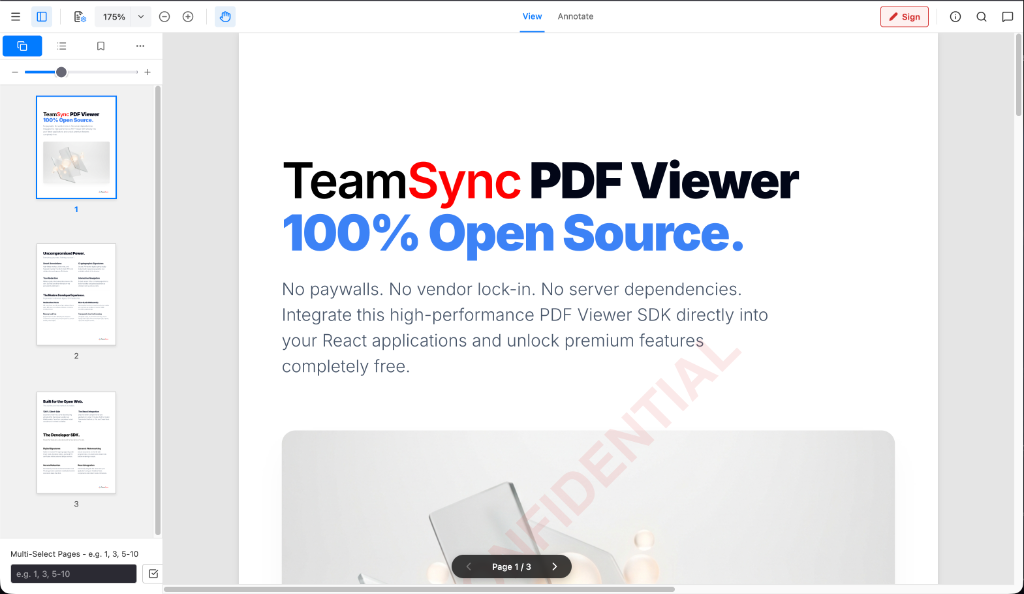
 TeamSync PDF Viewer is an open-source, 100% client-side PDF viewer SDK for React apps, featuring annotations, secure redaction, forensic watermarking, and search, built on WebAssembly (PDF.js + pdf-lib).
TeamSync PDF Viewer is an open-source, 100% client-side PDF viewer SDK for React apps, featuring annotations, secure redaction, forensic watermarking, and search, built on WebAssembly (PDF.js + pdf-lib).Is this a standalone app or something I embed in my own project?It is a headless SDK/component you embed into a React/TypeScript app, either through a WebViewer({...}) API call or a native React component — not a standalone PDF reader app.
It is a headless SDK/component you embed into a React/TypeScript app, either through a WebViewer({...}) API call or a native React component — not a standalone PDF reader app.How do I add it to my React project?Install the package from npm into your React/TypeScript project (or from GitHub Packages via an .npmrc file), then initialize it with the WebViewer({...}) call or drop in the native React component.
Install the package from npm into your React/TypeScript project (or from GitHub Packages via an .npmrc file), then initialize it with the WebViewer({...}) call or drop in the native React component.Does this need a backend server or API keys?No — it runs entirely client-side using WebAssembly (PDF.js + pdf-lib) inside the browser sandbox, with no server-side processing dependency.
No — it runs entirely client-side using WebAssembly (PDF.js + pdf-lib) inside the browser sandbox, with no server-side processing dependency.Does it work with any React setup?It is built specifically for modern React 19 SPA lifecycles and intentionally avoids iframes for full styling control, so older React versions or iframe-based embeds may not be a direct fit.
It is built specifically for modern React 19 SPA lifecycles and intentionally avoids iframes for full styling control, so older React versions or iframe-based embeds may not be a direct fit.Where do my PDF documents go when I use this?Documents are processed entirely in the browser via WebAssembly and never leave the browser sandbox — there is no server upload step.
Documents are processed entirely in the browser via WebAssembly and never leave the browser sandbox — there is no server upload step.Is the license as permissive as MIT?It uses CPAL 1.0 (Common Public Attribution License), not a plain MIT/Apache license, but it's free for both personal and commercial use with no per-domain fees.
It uses CPAL 1.0 (Common Public Attribution License), not a plain MIT/Apache license, but it's free for both personal and commercial use with no per-domain fees.What annotation tools come out of the box?Freehand ink/brush drawing, highlighters, geometric shapes, arrows and lines, sticky notes, callout text boxes, and clickable internal page-jump or external hyperlinks.
Freehand ink/brush drawing, highlighters, geometric shapes, arrows and lines, sticky notes, callout text boxes, and clickable internal page-jump or external hyperlinks.How thorough is the redaction?Redactions are permanently rasterized into the PDF's vector structure and the redacted text is stripped from the DOM text layer and content streams so it can't be copy-pasted or searched; it also supports automatic regex-based PII redaction.
Redactions are permanently rasterized into the PDF's vector structure and the redacted text is stripped from the DOM text layer and content streams so it can't be copy-pasted or searched; it also supports automatic regex-based PII redaction.Can it watermark documents?Yes, it supports dynamic forensic watermarking rendered on the fly as a single centered mark or full-page tile, with customizable text, color, opacity, size and rotation.
Yes, it supports dynamic forensic watermarking rendered on the fly as a single centered mark or full-page tile, with customizable text, color, opacity, size and rotation.Can I extend it with custom features?Yes, it has a decoupled plugin architecture — the core rendering, annotation, redaction, and search engine stay lightweight while enterprise extensions plug in as independent modules.
Yes, it has a decoupled plugin architecture — the core rendering, annotation, redaction, and search engine stay lightweight while enterprise extensions plug in as independent modules.What are similar projects?pdfcraft, bentopdf, pdfcraft, PDFPatcher, react-pdf, Stirling-PDF, pdfcn, nativePDF-structurer
pdfcraft, bentopdf, pdfcraft, PDFPatcher, react-pdf, Stirling-PDF, pdfcn, nativePDF-structurerWhich topics is it in?pdf-processing, watermark, pdf-editor, pdf-tools, pdf-viewer, annotation, webassembly, npm-package, privacy-first, document-processing, search, plugin-system
pdf-processing, watermark, pdf-editor, pdf-tools, pdf-viewer, annotation, webassembly, npm-package, privacy-first, document-processing, search, plugin-system