


© Open Dev Society. This project is licensed under AGPL-3.0; if you modify, redistribute, or deploy it (including as a web service), you must release your source code under the same license and credit the original authors.
OpenStock
OpenStock is an open-source alternative to expensive market platforms. Track real-time prices, set personalized alerts, and explore detailed company insights — built openly, for everyone, forever free.
Note: OpenStock is community-built and not a brokerage. Market data may be delayed based on provider rules and your configuration. Nothing here is financial advice.
📋 Table of Contents
- ✨ Introduction
- 🌍 Open Dev Society Manifesto
- ⚙️ Tech Stack
- 🔋 Features
- 🤸 Quick Start
- 🐳 Docker Setup
- 🔐 Environment Variables
- 🧱 Project Structure
- 📡 Data & Integrations
- 🌍 Market Support
- 🧪 Scripts & Tooling
- 🤝 Contributing
- 🛡️ Security
- 📜 License
- 🙏 Acknowledgements
✨ Introduction
OpenStock is a modern stock market app powered by Next.js (App Router), shadcn/ui and Tailwind CSS, Better Auth for authentication, MongoDB for persistence, Finnhub for market data, and TradingView widgets for charts and market views.
🌍 Open Dev Society Manifesto
We live in a world where knowledge is hidden behind paywalls. Where tools are locked in subscriptions. Where information is twisted by bias. Where newcomers are told they’re not “good enough” to build.
We believe there’s a better way.
- Our Belief: Technology should belong to everyone. Knowledge should be open, free, and accessible. Communities should welcome newcomers with trust, not gatekeeping.
- Our Mission: Build free, open-source projects that make a real difference:
- Tools that professionals and students can use without barriers.
- Knowledge platforms where learning is free, forever.
- Communities where every beginner is guided, not judged.
- Resources that run on trust, not profit.
- Our Promise: We will never lock knowledge. We will never charge for access. We will never trade trust for money. We run on transparency, donations, and the strength of our community.
- Our Call: If you’ve ever felt you didn’t belong, struggled to find free resources, or wanted to build something meaningful — you belong here.
Because the future belongs to those who build it openly.
⚙️ Tech Stack
Core
- Next.js 15 (App Router), React 19
- TypeScript
- Tailwind CSS v4 (via @tailwindcss/postcss)
- shadcn/ui + Radix UI primitives
- Lucide icons
Auth & Data
- Better Auth (email/password) with MongoDB adapter
- MongoDB + Mongoose
- Finnhub API for symbols, profiles, and market news
- TradingView embeddable widgets
Automation & Comms
- Inngest (events, cron, AI inference via Gemini)
- Nodemailer (Gmail transport)
- next-themes, cmdk (command palette), react-hook-form
Language composition
- TypeScript (
93.4%), CSS (6%), JavaScript (~0.6%)
🔋 Features
- Authentication
- Email/password auth with Better Auth + MongoDB adapter
- Protected routes enforced via Next.js middleware
- Global search and Command + K palette
- Fast stock search backed by Finnhub
- Popular stocks when idle; debounced querying
- Watchlist
- Per-user watchlist stored in MongoDB (unique symbol per user)
- Stock details
- TradingView symbol info, candlestick/advanced charts, baseline, technicals
- Company profile and financials widgets
- Optional cross-source sentiment insights for Reddit, X.com, news, and Polymarket
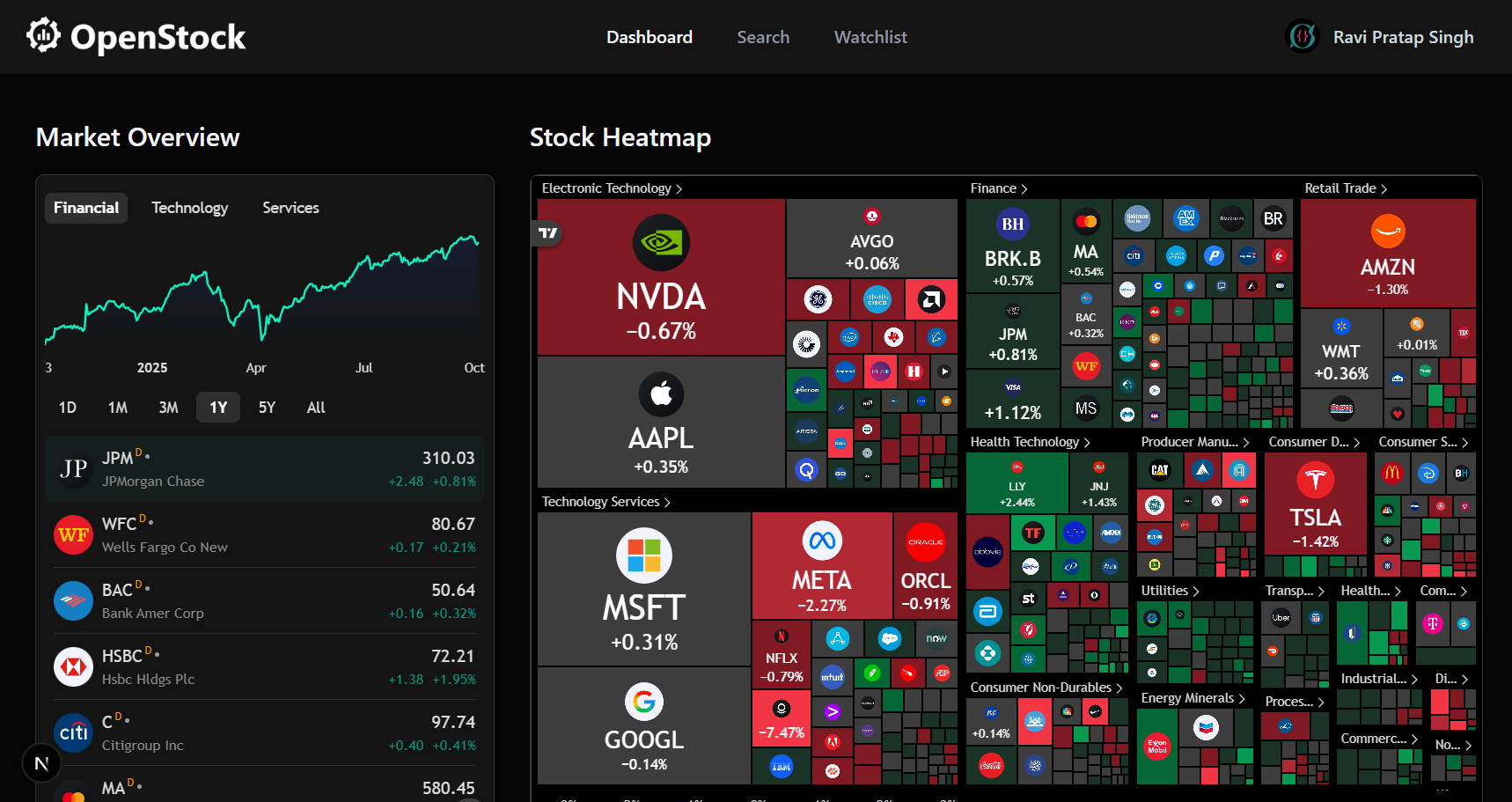
- Market overview
- Heatmap, quotes, and top stories (TradingView widgets)
- Personalized onboarding
- Collects country, investment goals, risk tolerance, preferred industry
- Email & automation
- AI-personalized welcome email (Gemini via Inngest)
- Daily news summary emails (cron) personalized using user watchlists
- Polished UI
- shadcn/ui components, Radix primitives, Tailwind v4 design tokens
- Dark theme by default
- Keyboard shortcut
- Cmd/Ctrl + K for quick actions/search
🤸 Quick Start
Prerequisites
- Node.js 20+ and pnpm or npm
- MongoDB connection string (MongoDB Atlas or local via Docker Compose)
- Finnhub API key (free tier supported; real-time may require paid)
- Gmail account for email (or update Nodemailer transport)
- Optional: Google Gemini API key (for AI-generated welcome intros)
Clone and install
git clone https://github.com/Open-Dev-Society/OpenStock.git
cd OpenStock

# choose one:
pnpm install
# or
npm install
Configure environment
pnpm test:db
# or
npm run test:db
Run development
# Next.js dev (Turbopack)
pnpm dev
# or
npm run dev
Run Inngest locally (workflows, cron, AI)
npx inngest-cli@latest dev
Build & start (production)
pnpm build && pnpm start
# or
npm run build && npm start
Open http://localhost:3000 to view the app.
🐳 Docker Setup
You can run OpenStock and MongoDB easily with Docker Compose.
Ensure Docker and Docker Compose are installed.
docker-compose.yml includes two services:
- openstock (this app)
- mongodb (MongoDB database with a persistent volume)
- Create your
.env (see examples below). For the Docker setup, use a local connection string like:
MONGODB_URI=mongodb://root:example@mongodb:27017/openstock?authSource=admin
- Start the stack:
# from the repository root
docker compose up -d mongodb && docker compose up -d --build
- Access the app:
Notes
- The app service depends_on the mongodb service.
- Credentials are defined in Compose for the MongoDB root user; authSource=admin is required on the connection string for root.
- Data persists across restarts via the docker volume.
Optional: Example MongoDB service definition used in this project:
services:
  mongodb:
    image: mongo:7
    container_name: mongodb
    restart: unless-stopped
    environment:
      MONGO_INITDB_ROOT_USERNAME: root
      MONGO_INITDB_ROOT_PASSWORD: example
    ports:
      - "27017:27017"
    volumes:
      - mongo-data:/data/db
    healthcheck:
      test: ["CMD", "mongosh", "--eval", "db.adminCommand('ping')"]
      interval: 10s
      timeout: 5s
      retries: 5

volumes:
  mongo-data:
🔐 Environment Variables
Create .env at the project root. Choose either a hosted MongoDB (Atlas) URI or the local Docker URI.
Hosted (MongoDB Atlas):
# Core
NODE_ENV=development

# Database (Atlas)
MONGODB_URI=mongodb+srv://<user>:<pass>@<cluster>/<db>?retryWrites=true&w=majority

# Better Auth
BETTER_AUTH_SECRET=your_better_auth_secret
BETTER_AUTH_URL=http://localhost:3000

# Finnhub
# Note: NEXT_PUBLIC_FINNHUB_API_KEY is required for Vercel deployment
NEXT_PUBLIC_FINNHUB_API_KEY=your_finnhub_key
FINNHUB_BASE_URL=https://finnhub.io/api/v1

# Sentiment insights (optional)
ADANOS_API_KEY=your_adanos_api_key
# ADANOS_API_BASE_URL=https://api.adanos.org

# AI Provider (optional, default: "gemini")
# Supported: "gemini", "minimax", "siray"
# AI_PROVIDER=gemini

# Gemini
GEMINI_API_KEY=your_gemini_api_key

# MiniMax (optional, used when AI_PROVIDER=minimax or as fallback)
# Get your key at https://platform.minimaxi.com
# MINIMAX_API_KEY=your_minimax_api_key

# Inngest Signing Key (required for Vercel deployment)
# Get this from your Inngest dashboard: https://app.inngest.com/env/settings/keys
INNGEST_SIGNING_KEY=your_inngest_signing_key

# Email (Nodemailer via Gmail; consider App Passwords if 2FA)
[email protected]
NODEMAILER_PASSWORD=your_gmail_app_password
Local (Docker Compose) MongoDB:
# Core
NODE_ENV=development

# Database (Docker)
MONGODB_URI=mongodb://root:example@mongodb:27017/openstock?authSource=admin

# Better Auth
BETTER_AUTH_SECRET=your_better_auth_secret
BETTER_AUTH_URL=http://localhost:3000

# Finnhub
# Note: NEXT_PUBLIC_FINNHUB_API_KEY is required for Vercel deployment
NEXT_PUBLIC_FINNHUB_API_KEY=your_finnhub_key
FINNHUB_BASE_URL=https://finnhub.io/api/v1

# Sentiment insights (optional)
ADANOS_API_KEY=your_adanos_api_key
# ADANOS_API_BASE_URL=https://api.adanos.org

# AI Provider (optional, default: "gemini")
# Supported: "gemini", "minimax", "siray"
# AI_PROVIDER=gemini

# Gemini
GEMINI_API_KEY=your_gemini_api_key

# MiniMax (optional, used when AI_PROVIDER=minimax or as fallback)
# Get your key at https://platform.minimaxi.com
# MINIMAX_API_KEY=your_minimax_api_key

# Inngest Signing Key (required for Vercel deployment)
# Get this from your Inngest dashboard: https://app.inngest.com/env/settings/keys
INNGEST_SIGNING_KEY=your_inngest_signing_key

# Email (Nodemailer via Gmail; consider App Passwords if 2FA)
[email protected]
NODEMAILER_PASSWORD=your_gmail_app_password
Notes
- Keep private keys server-side whenever possible.
- If using
NEXT_PUBLIC_ variables, remember they are exposed to the browser.
- In production, prefer a dedicated SMTP provider over a personal Gmail.
- Do not hardcode secrets in the Dockerfile; use
.env and Compose.
🧱 Project Structure
app/
  (auth)/
    layout.tsx
    sign-in/page.tsx
    sign-up/page.tsx
  (root)/
    layout.tsx
    page.tsx
    help/page.tsx
    stocks/[symbol]/page.tsx
  api/inngest/route.ts
  globals.css
  layout.tsx
components/
  ui/…          # shadcn/radix primitives (button, dialog, command, input, etc.)
  forms/…       # InputField, SelectField, CountrySelectField, FooterLink
  Header.tsx, Footer.tsx, SearchCommand.tsx, WatchlistButton.tsx, …
database/
  models/watchlist.model.ts
  mongoose.ts
lib/
  actions/…     # server actions (auth, finnhub, user, watchlist)
  better-auth/…
  inngest/…     # client, functions, prompts
  nodemailer/…  # transporter, email templates
  constants.ts, utils.ts
scripts/
  test-db.mjs
types/
  global.d.ts
next.config.ts          # i.ibb.co image domain allowlist
postcss.config.mjs      # Tailwind v4 postcss setup
components.json         # shadcn config
public/assets/images/   # logos and screenshots
📡 Data & Integrations
🌍 Market Support
OpenStock supports 30+ international stock exchanges including NSE, LSE, TSX, and more. However, please be aware of important limitations based on our data providers.
Quick Facts:
- ✅ Finnhub supports most global exchanges
- ⚠️ TradingView free tier has restrictions on emerging markets (India NSE, Vietnam, etc.)
- 📊 Real-time data for non-US stocks is delayed by 15+ minutes on free tier
See MARKET_SUPPORT.md for:
- Complete list of supported exchanges
- Known limitations and workarounds
- Why "This symbol is only available on TradingView" appears
- How to upgrade for broader market coverage
- Future improvements planned
For the latest supported symbols and exchanges, see Finnhub's exchange list.
Package scripts
dev: Next.js dev server with Turbopackbuild: Production build (Turbopack)start: Run production serverlint: ESLinttest:db: Validate DB connectivity
Developer experience
- TypeScript strict mode
- Tailwind CSS v4 (no separate tailwind.config needed)
- shadcn/ui components with Radix primitives
- cmdk command palette, next-themes, lucide-react icons
🤝 Contributing
You belong here. Whether you’re a student, a self-taught dev, or a seasoned engineer — contributions are welcome.
- Open an issue to discuss ideas and bugs
- Look for “good first issue” or “help wanted”
- Keep PRs focused; add screenshots for UI changes
- Be kind, guide beginners, no gatekeeping — that’s the ODS way
🛡️ Security
If you discover a vulnerability:
- Do not open a public issue
- Email: [email protected]
- We'll coordinate responsible disclosure and patch swiftly
📜 License
OpenStock is and will remain free and open for everyone. This project is licensed under the AGPL-3.0 License - see the LICENSE file for details.
🙏 Acknowledgements
- Finnhub for accessible market data
- TradingView for embeddable market widgets
- shadcn/ui, Radix UI, Tailwind CSS, Next.js community
- Inngest for dependable background jobs and workflows
- Better Auth for simple and secure authentication
- All contributors who make open tools possible
— Built openly, for everyone, forever free. Open Dev Society.
© Open Dev Society. This project is licensed under AGPL-3.0; if you modify, redistribute, or deploy it (including as a web service), you must release your source code under the same license and credit the original authors.
Our Honourable Contributors
- ravixalgorithm - Developed the entire application from the ground up, including authentication, UI design, API and AI integration, and deployment.
- Priyanshuu00007 - Created the official OpenStock logo and contributed to the project’s visual identity.
- chinnsenn - Set up Docker configuration for the repository, ensuring a smooth development and deployment process.
- koevoet1221 - Resolved MongoDB Docker build issues, improving the project’s overall stability and reliability.
- ettoreciolli1 - updated Readme
❤️ Partners & Backers

Siray.ai — The robust AI infrastructure backing OpenStock. Siray.ai ensures our market insights never sleep.
Special thanks
Huge thanks to Adrian Hajdin (JavaScript Mastery) — his excellent Stock Market App tutorial was instrumental in building OpenStock for the open-source community under the Open Dev Society.
GitHub: adrianhajdin
YouTube tutorial: Stock Market App Tutorial
YouTube channel: JavaScript Mastery




 OpenStock 是一款开源、可自行部署的股票市场跟踪应用:可以实时查看股价、设置个性化提醒,并查看公司分析信息,是付费行情平台的免费替代方案。