https://github.com/user-attachments/assets/02477c18-28ff-4aad-a6bd-b54c6f032bc8
News
- 🚀 2026-09-02 · v0.2.1 released. A brand-new desktop app. Welcome aboard. (v0.2.1)
- 📚 2026-09-02 · Awesome AI Scientist. We released a collection for AI scientists at Omni-Scientist/Awesome-AI-Scientist, covering papers, systems, workbenches, benchmarks and datasets.
- 🌍 2026-08-24 · Multi-language support. The workspace interface and this page are both available in multiple languages, listed at the top of this page and switched from the toolbar in the app. (v0.1.3)
- 👁️ 2026-08-23 · DeepSeek multimodal support.
deepseek-v4-flash-vision-exp joins the perception sidecar, so one DeepSeek key now covers both reasoning and vision. (v0.1.2)
- 🔐 2026-08-18 · First patch release. Release assets carry a single
SHA256SUMS, and the installers verify it before installing. (v0.1.1)
- 🎉 2026-08-16 · First public release. Desktop app, terminal agent, and a Claude Code skill, from one codebase. (v0.1.0)
- 📄 2026-08-13 · Technical report. arXiv:2608.13558, with runs across twelve modalities.
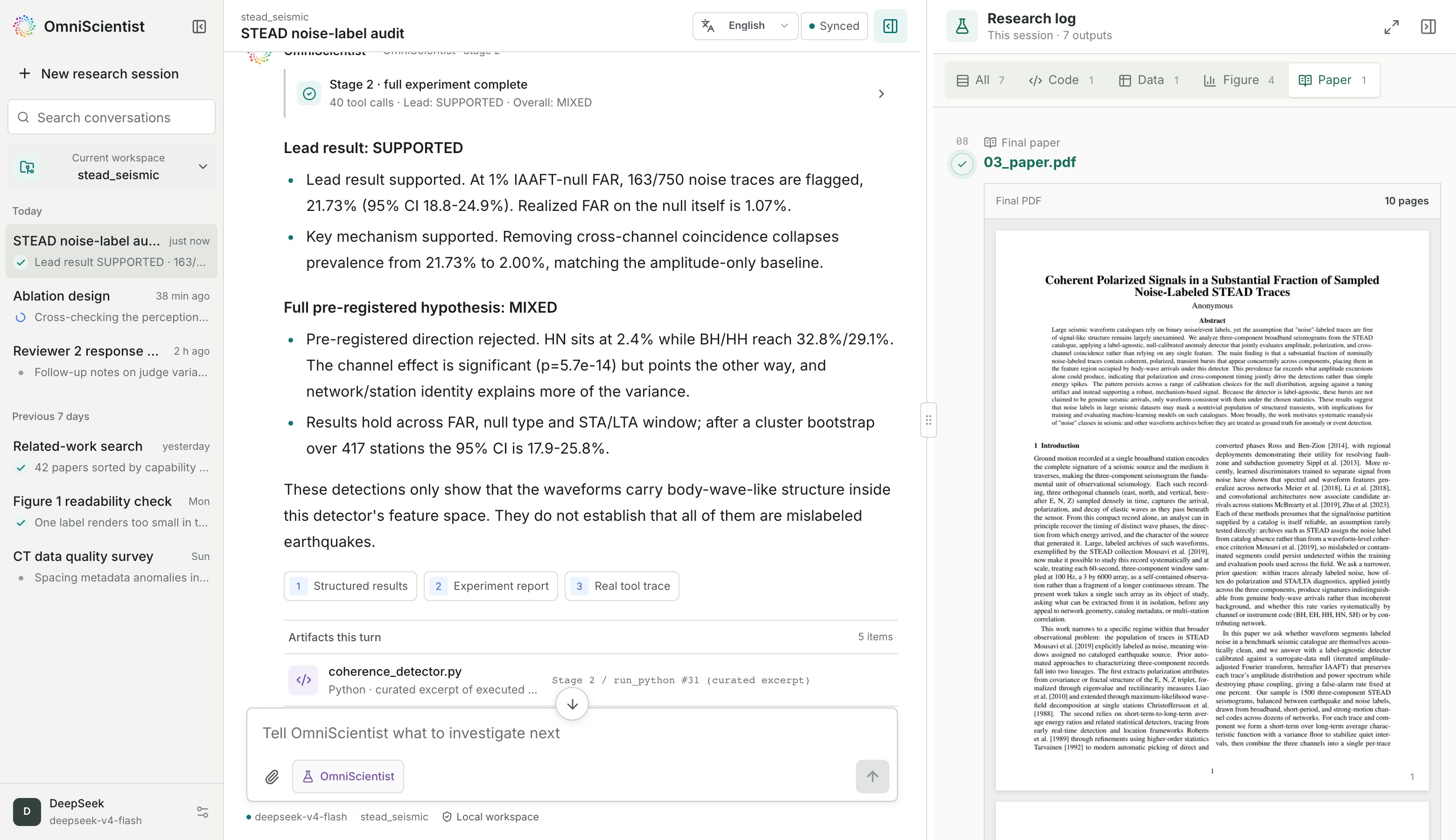
The compiled paper beside the experiment trace, every highlighted number resolving to the run that produced it.
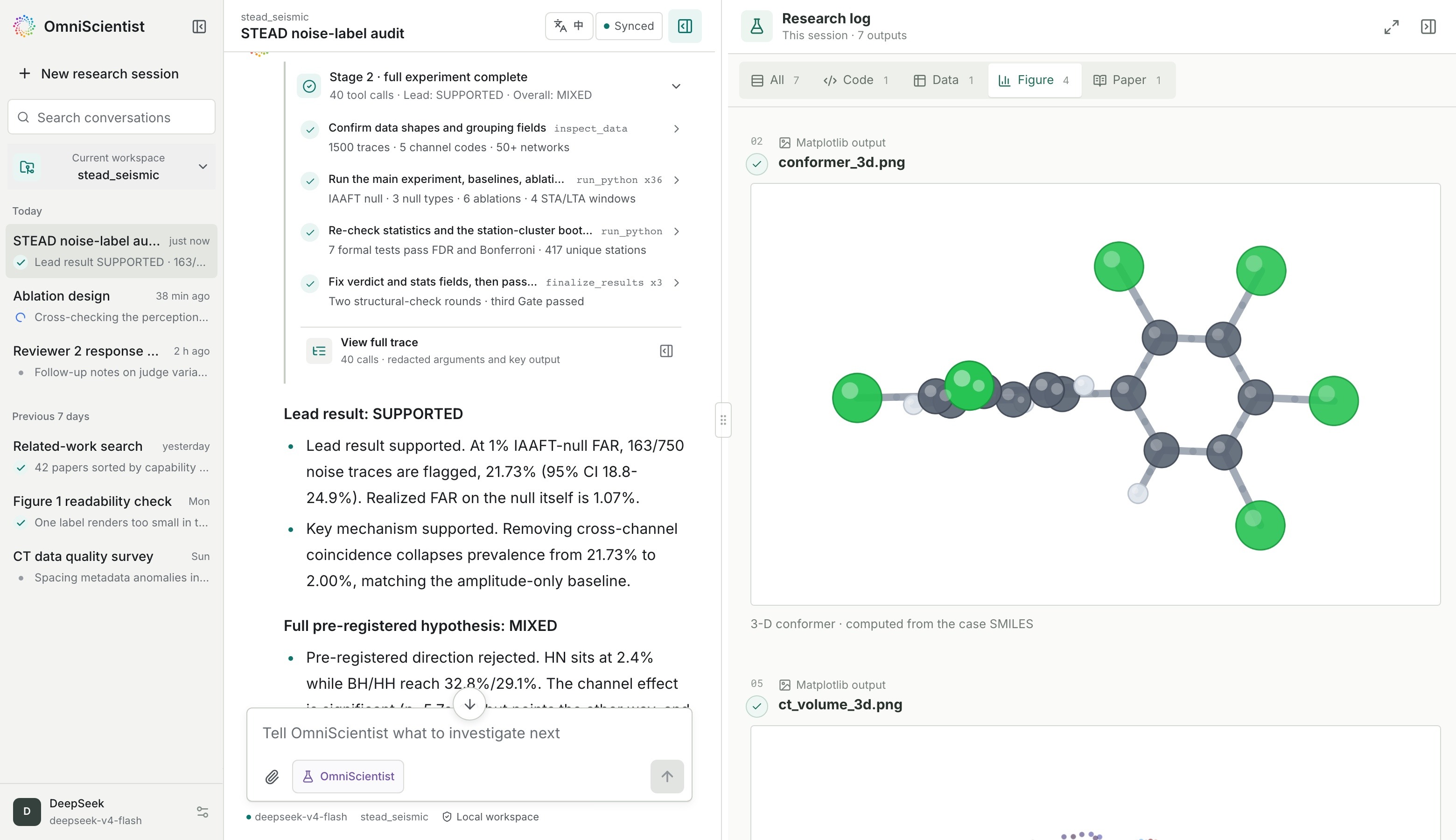
A ball-and-stick conformer computed from the chemistry case's own SMILES, arriving in the research log mid-run.
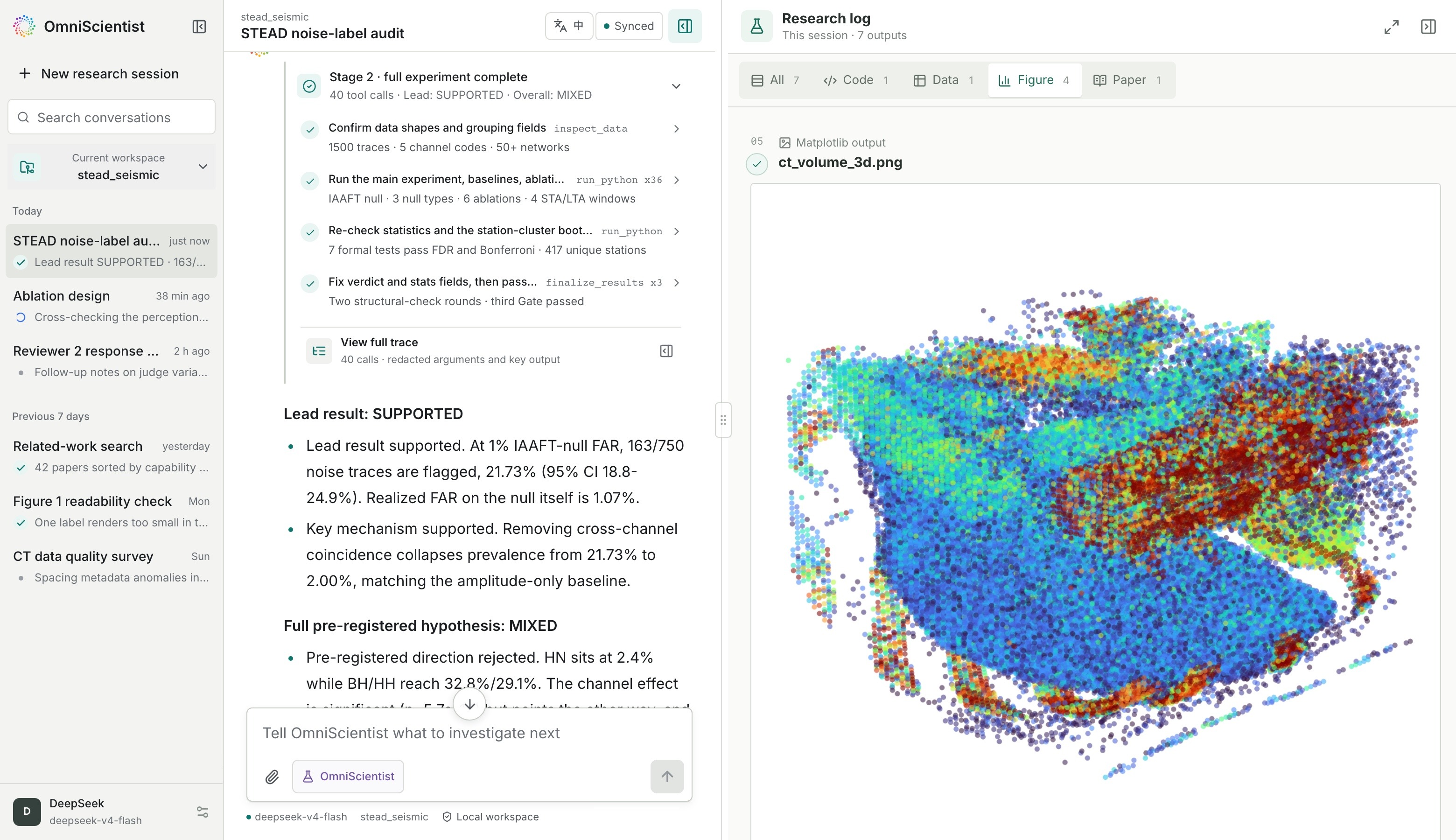
A 64³ CT volume read as a point cloud, beside the tool calls that produced it.
Point OmniScientist at a folder of data and a research direction. It looks at the raw material itself, forms a hypothesis, writes and runs its own analysis code, reads the figures that come back, and drafts a paper whose every number traces to a real execution record. A run ends at a compiled PDF with figures, tables and references that resolve to real DOIs.
Images, waveforms, audio, video, point clouds, trajectories, tables and formulas all go in as they are.
Install
With an agent
Paste this into Claude Code, Cursor, Codex, or anything else with a shell.
For more details, please refer to omniscientist.github.io.
Read https://omni-scientist.github.io/setup/install.md and install the OmniScientist desktop app on this machine, following the steps.
Download
The terminal edition (CLI) is discontinued as of 0.2.1. The desktop app carries the same engine, and Claude Code users take the skill above.
The workspace
Each stage streams into the transcript, and every artifact lands in the research log the moment it exists. That covers the matplotlib output, the script that drew it, the data table behind it, and at the end the compiled paper.
The workspace is a local web app. The address bar in the screenshots above reads 127.0.0.1 because that is the entire deployment. The layout collapses to one column on a phone. Closing the page no longer stops a run. Research keeps going in the background, and the next launch shows everything it produced.
The interface follows the browser's language on first launch and is switched from the toolbar, in English, Simplified and Traditional Chinese, French, Spanish, Japanese, Korean, Portuguese, German and Russian.
Provenance
Every number in the draft carries a link back to the run that produced it. A gate reads the execution record rather than the draft, and admits the draft once each of those numbers has appeared in some run's stdout. A null result routes back to re-ideation. Citations are resolved live against OpenAlex and Crossref, so each one carries a real DOI.
Configuration
Credentials live in ~/.omnisci/env, one KEY=VALUE per line, and in %USERPROFILE%\.omnisci\env on Windows.
DEEPSEEK_API_KEY=...
ANTHROPIC_API_KEY=...
The file is parsed strictly as data. The values are removed from the environment at startup, so they stay out of the analysis code the agent writes.
Two models do two jobs. The backbone reasons and writes. A perception sidecar reads the pixels, and takes over whenever the evidence is an image, a waveform, a video or a point cloud.
| Edition |
Backbone |
Perception sidecar |
| desktop, terminal |
deepseek-v4-flash, or any OpenAI-compatible endpoint via OMNISCI_BASE_URL / OMNISCI_API_KEY / OMNISCI_MODEL |
claude-sonnet-5 by default, deepseek-v4-flash-vision-exp on the same DeepSeek key, changed with OMNISCI_VISION_PROVIDER / OMNISCI_VISION_MODEL |
| engine |
any, selected by OMNIST_MODEL, covering OpenAI, Anthropic, OpenRouter, a local vLLM or sglang server, or your own gateway |
OMNIST_PERCEIVER |
In the desktop edition both are set from the settings dialog, which saves a configuration once it has answered a live request. The transport follows from the model name, so you supply your own URL and key. The full table is in docs/USAGE.md.
Outbound traffic falls into three kinds. The first is your own model endpoint. The second is a once-a-day release check against GitHub, which OMNISCI_UPDATE_CHECK=off turns off. The third happens when you ask the desktop app to install its dependencies, and reaches PyPI and the tectonic release page.
Build from source
Needs Bun 1.3 or newer.
cd cli
bun install
bun run tools/gen-skill-assets.ts    # embed the skill, then it is one file
bun run build                        # -> dist/omnisci

cd ../desktop
bun install
bun run build:desktop                # -> dist-desktop/omnisci-desktop
The desktop launcher is pure TypeScript and cross-compiles with --target; it has no native dependencies.
Tests
python3 scripts/scan_leaks.py        # scan for personal data
python3 scripts/check_parity.py      # engine, both skills and the desktop agree
python3 skill/build.py               # the skill is still self-contained

cd cli      && bun run typecheck && bun test
cd desktop  && bun run build:assets && bun run typecheck && bun test gateway launcher && bun run test:e2e
CI runs all of the above plus a live smoke test of the compiled launcher on every push. Tagging v* builds and publishes the release artifacts.
Repository layout
OmniScientist/
├── engine/            the reference engine and evaluation harness
│   ├── omniscientist/     flat, self-contained modules
│   ├── examples/          case specifications and seven small real-data demos
│   ├── datasets/          provenance and split manifest
│   └── scripts/data.py    list, fetch and verify public research data
├── skill/             the Claude Code edition, self-contained
├── cli/               the agent engine the desktop embeds (its standalone CLI build is discontinued)
│   └── skills/omnisci/    the desktop's embedded edition of the skill
├── desktop/           the browser workspace, its gateway and the launcher
│   ├── launcher/          the single executable: static assets, gateway, browser
│   └── packaging/         macos, linux and windows
├── papers/            sample papers the engine wrote, with their scores
├── docs/              installation, usage, datasets, development
├── scripts/           repository hygiene
├── install.sh         kept to tell old CLI users the CLI is discontinued
└── install.ps1        the same for Windows
Notes on the two skill editions, the generated files and the per-platform build are in docs/DEVELOPMENT.md.
Status
Early software, version 0.2.1. Interfaces are still moving and releases can change them.
| Platform |
Desktop |
| macOS arm64 |
released |
| Linux x86_64 |
released |
| Linux arm64 |
released |
| Windows x64 |
released |
The desktop app has real-machine end-to-end paper runs on macOS (15.7.7 / M3) and on Windows, from install through a compiled PDF. Intel Macs build from source, see Build from source.
Release assets are listed in a single SHA256SUMS, and the desktop app's update check verifies downloads against it.
Sample papers
Five papers written end to end by a single run are in papers/, with the peer-review scores they were given. One worked example is the STEAD seismic traces carrying a "noise" label. The agent read the three-component waveforms, found coherent arrivals inside the noise-labeled set, and tested them against a surrogate null distribution it generated itself.
git clone https://github.com/Omni-Scientist/OmniScientist.git && cd OmniScientist
python -m venv .venv && source .venv/bin/activate && pip install -r engine/requirements.txt
export OMNIST_MODEL=claude-sonnet-5 ANTHROPIC_API_KEY=sk-ant-...
python engine/omniscientist/agentic.py --task stead_seismic --stage run
engine/ is the reference implementation the technical report describes, and the one to use for scriptable, reproducible runs. OMNIST_MODEL picks the backbone and the transport follows from the name, so you bring your own endpoint and key.
The resulting paper, Coherent polarized signals in a substantial fraction of noise-labeled STEAD traces, reports that 21.7% of the sampled noise-labeled traces carry real signal at a 1% false-alarm rate.
Contributing
Issues and pull requests are welcome. Reports from Windows and Intel Macs are especially useful. Before opening a PR, run the checks under Tests, which are the same ones CI runs. Adding a discipline takes one series.json under engine/examples/, described in docs/USAGE.md.
Citation
The technical report behind this software is on arXiv.
@article{omniscientist2026,
  title   = {OmniScientist: An Omni-Modal Omni-Discipline AI Scientist},
  author  = {Li, Bobo and Fei, Hao and Ju, Tianjie and Lee, Mong-Li and Hsu, Wynne},  % scan-leaks: allow
  journal = {arXiv preprint arXiv:2608.13558},
  year    = {2026}
}
The paper-facing version of this page, with authors and affiliations, is README_paper.md.
License
MIT.






 OmniScientist 是一个在你自己机器上运行的开源全模态 AI 科学家。给它一个数据文件夹和一个研究方向,它就会提出假设、编写并运行自己的分析代码、阅读生成的图表,并起草一篇论文,其中每个数字都能追溯到真实的执行记录。