






170 ·GitHub
Что это?
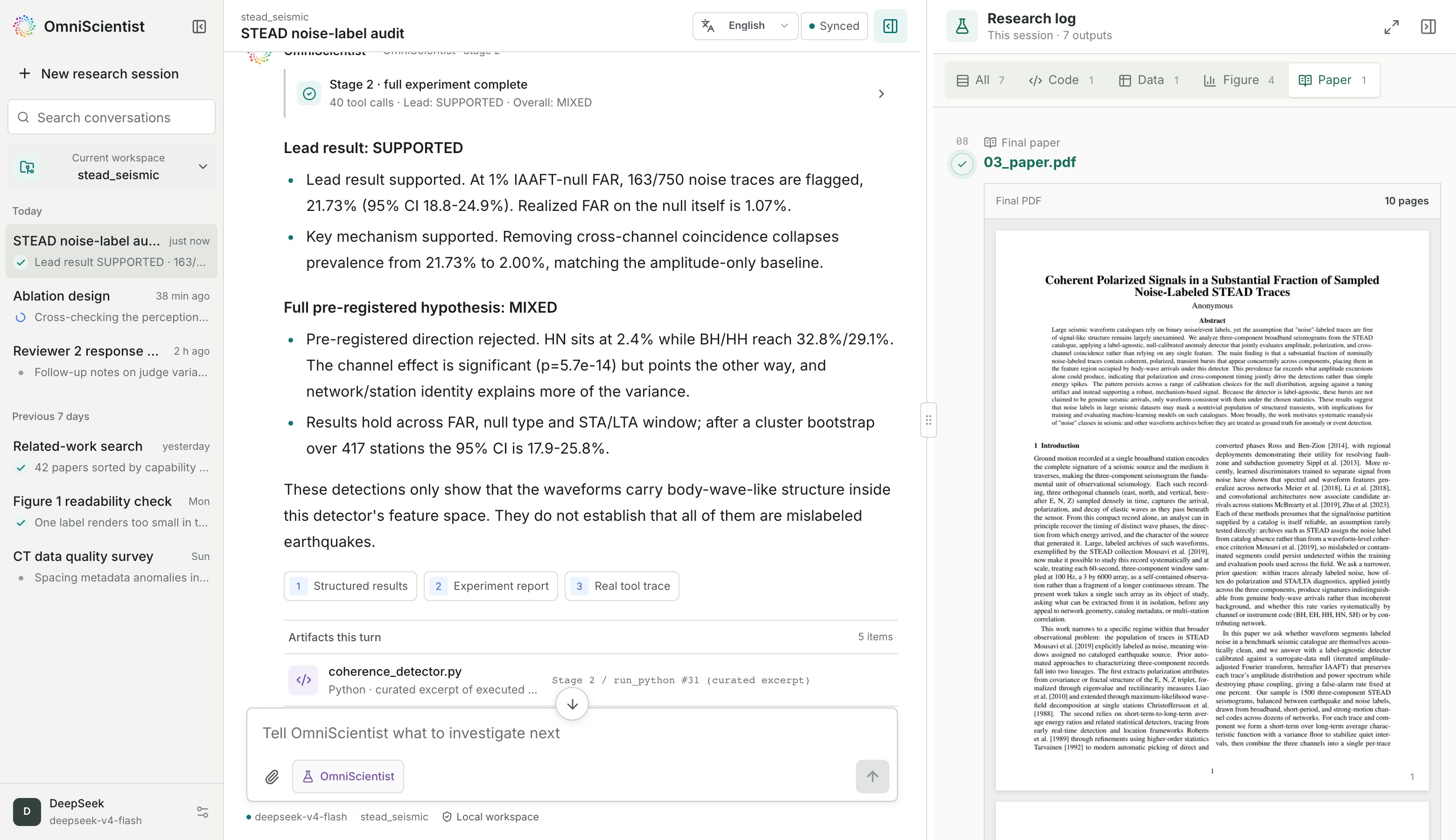
 OmniScientist — открытый всемодальный ИИ-учёный, работающий на вашей собственной машине. Укажите ему папку с данными и направление исследования, и он выдвинет гипотезу, напишет и запустит собственный аналитический код, изучит полученные графики и подготовит черновик статьи, где каждое число прослеживается до реальной записи о выполнении.
OmniScientist — открытый всемодальный ИИ-учёный, работающий на вашей собственной машине. Укажите ему папку с данными и направление исследования, и он выдвинет гипотезу, напишет и запустит собственный аналитический код, изучит полученные графики и подготовит черновик статьи, где каждое число прослеживается до реальной записи о выполнении.Это десктоп-приложение, CLI или что-то ещё?Он поставляется как десктоп-приложение плюс навык Claude Code, и то и другое собрано из одной кодовой базы; терминальная CLI-версия существовала, но прекращена с v0.2.1. Папка 'engine/' — эталонная реализация для скриптуемых воспроизводимых запусков.
Он поставляется как десктоп-приложение плюс навык Claude Code, и то и другое собрано из одной кодовой базы; терминальная CLI-версия существовала, но прекращена с v0.2.1. Папка 'engine/' — эталонная реализация для скриптуемых воспроизводимых запусков.Как это запустить?Либо скачайте десктоп-приложение для своей платформы (macOS Apple Silicon, Linux .deb, установщик Windows), либо вставьте установочный сниппет для агента в Claude Code, Cursor, Codex или любой агент с доступом к shell и добавьте zip навыка Claude Code.
Либо скачайте десктоп-приложение для своей платформы (macOS Apple Silicon, Linux .deb, установщик Windows), либо вставьте установочный сниппет для агента в Claude Code, Cursor, Codex или любой агент с доступом к shell и добавьте zip навыка Claude Code.Какие модели и API-ключи нужно настроить?Нужно задать основную модель (deepseek-v4-flash или любой эндпоинт, совместимый с OpenAI) и перцепционный сайдкар для изображений/видео/облаков точек (по умолчанию claude-sonnet-5 или vision-модель DeepSeek на том же ключе). Ключи сохраняются из диалога настроек в десктоп-приложении или хранятся в ~/.omnisci/env.
Нужно задать основную модель (deepseek-v4-flash или любой эндпоинт, совместимый с OpenAI) и перцепционный сайдкар для изображений/видео/облаков точек (по умолчанию claude-sonnet-5 или vision-модель DeepSeek на том же ключе). Ключи сохраняются из диалога настроек в десктоп-приложении или хранятся в ~/.omnisci/env.Готово ли это к повседневному использованию?Проект называет себя ранним ПО версии 0.2.1, где интерфейсы ещё меняются; терминальная CLI-версия уже прекращена, а для Intel Mac готовых сборок нет — придётся собирать из исходников.
Проект называет себя ранним ПО версии 0.2.1, где интерфейсы ещё меняются; терминальная CLI-версия уже прекращена, а для Intel Mac готовых сборок нет — придётся собирать из исходников.Для кого это предназначено?Для исследователей и аналитиков данных, которые хотят, чтобы агент исследовал сырые мультимодальные данные (изображения, осциллограммы, видео, облака точек, таблицы) и выдавал черновик статьи с подтверждаемым происхождением результатов, а не просто ответы в чате.
Для исследователей и аналитиков данных, которые хотят, чтобы агент исследовал сырые мультимодальные данные (изображения, осциллограммы, видео, облака точек, таблицы) и выдавал черновик статьи с подтверждаемым происхождением результатов, а не просто ответы в чате.Какие операционные системы поддерживаются?Десктоп-приложение выпускается для macOS (Apple Silicon), Linux (x64 .deb и arm64) и Windows (установщик x64); для Intel Mac требуется сборка из исходников.
Десктоп-приложение выпускается для macOS (Apple Silicon), Linux (x64 .deb и arm64) и Windows (установщик x64); для Intel Mac требуется сборка из исходников.Куда уходят мои API-ключи и данные?Учётные данные лежат в локальном env-файле (~/.omnisci/env или %USERPROFILE%\.omnisci\env), разбираются строго как данные и удаляются из окружения при запуске, так что собственный аналитический код агента их никогда не видит. Исходящий трафик ограничен выбранным эндпоинтом модели, ежедневной проверкой релизов GitHub и скачиванием зависимостей с PyPI/tectonic.
Учётные данные лежат в локальном env-файле (~/.omnisci/env или %USERPROFILE%\.omnisci\env), разбираются строго как данные и удаляются из окружения при запуске, так что собственный аналитический код агента их никогда не видит. Исходящий трафик ограничен выбранным эндпоинтом модели, ежедневной проверкой релизов GitHub и скачиванием зависимостей с PyPI/tectonic.Как OmniScientist убеждается, что числа в статье настоящие?Шлюз происхождения (provenance gate) проверяет записи о выполнении, а не черновик: заявленное число допускается, только если это точное значение появлялось в stdout какого-то запуска, а пустые результаты отправляются на повторную генерацию идей.
Шлюз происхождения (provenance gate) проверяет записи о выполнении, а не черновик: заявленное число допускается, только если это точное значение появлялось в stdout какого-то запуска, а пустые результаты отправляются на повторную генерацию идей.Можно ли доверять цитатам в сгенерированной статье?Цитаты в реальном времени сверяются с OpenAlex и Crossref, поэтому каждая несёт настоящий DOI вместо выдуманной ссылки.
Цитаты в реальном времени сверяются с OpenAlex и Crossref, поэтому каждая несёт настоящий DOI вместо выдуманной ссылки.Что обнаружила одна из примерных статей?В демо-запуске на сейсмических данных STEAD агент выяснил, что 21.7% трасс, помеченных как чистый «шум», на самом деле несли когерентный поляризованный сигнал при уровне ложных тревог 1%, проверив это на самостоятельно сгенерированном суррогатном нулевом распределении.
В демо-запуске на сейсмических данных STEAD агент выяснил, что 21.7% трасс, помеченных как чистый «шум», на самом деле несли когерентный поляризованный сигнал при уровне ложных тревог 1%, проверив это на самостоятельно сгенерированном суррогатном нулевом распределении.Как устроен интерфейс рабочего пространства?Это локальное веб-приложение на 127.0.0.1 без внешнего развёртывания; закрытие вкладки браузера не останавливает запуск — исследование продолжается в фоне и возобновляется при следующем старте.
Это локальное веб-приложение на 127.0.0.1 без внешнего развёртывания; закрытие вкладки браузера не останавливает запуск — исследование продолжается в фоне и возобновляется при следующем старте.What are similar projects?easyread, DeepAnalyze, open-science, openscience, unsloth, get-it, open-codesign, openpencil
easyread, DeepAnalyze, open-science, openscience, unsloth, get-it, open-codesign, openpencilWhich topics is it in?science, arxiv, bun, multimodal, academic-research, openai-compatible, data-science, skill, pdf, deepseek, anthropic, local-first
science, arxiv, bun, multimodal, academic-research, openai-compatible, data-science, skill, pdf, deepseek, anthropic, local-first