



Few-step-probabilistic-glucose-forecasting-from-continuous-glucose-monitoring-and-meal-images README

The project's README from github.com/OliverDOU776/Few-step-probabilistic-glucose-forecasting-from-continuous-glucose-monitoring-and-meal-images. As one markdown file: README.md.

GlucoFlow

Fast probabilistic forecasting that transfers from large source datasets to small target datasets

Paper Python PyTorch Status

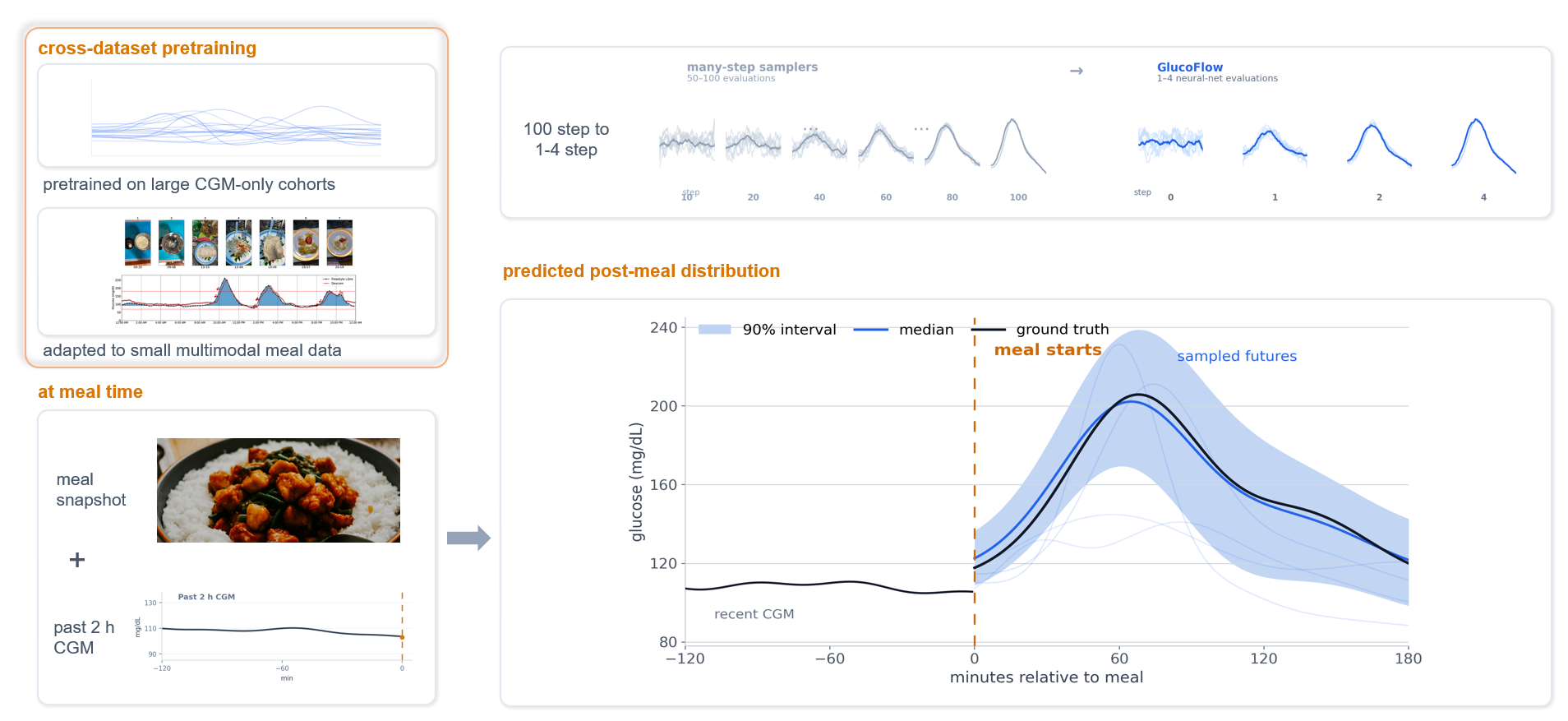
Pretrain temporal dynamics once. Adapt with limited target data. Generate full predictive distributions in 1–4 steps.

GlucoFlow architecture overview

[!IMPORTANT] GlucoFlow is research software, not a medical device. It must not be used for diagnosis, insulin dosing, treatment, alarms, or other clinical decisions.

Why GlucoFlow?

Many forecasting projects have the same data problem: historical time series are plentiful, but the target cohort or target modality is small. GlucoFlow is designed for that setting.

What you need What GlucoFlow provides
Reliable uncertainty, not only a point estimate Samples complete future trajectories and returns medians, intervals, event probabilities, or any task-specific summary.
Fast probabilistic inference Uses a conditional rectified flow with only 1, 2, or 4 Euler steps instead of a long diffusion chain.
Better use of scarce target data Learns reusable temporal dynamics from larger source datasets before adapting to the smaller target dataset.
Optional side information Conditions on images, nutrients, metadata, learned embeddings, or a null token when side information is unavailable.
A practical transfer path Includes a released temporal checkpoint, reusable model modules, reference training scripts, and a custom dataset-adapter example.

GlucoFlow is especially useful when:

Install

git clone https://github.com/OliverDOU776/Few-step-probabilistic-glucose-forecasting-from-continuous-glucose-monitoring-and-meal-images.git
cd Few-step-probabilistic-glucose-forecasting-from-continuous-glucose-monitoring-and-meal-images

python3.11 -m venv .venv
source .venv/bin/activate          # Windows PowerShell: .venv\Scripts\Activate.ps1
python -m pip install --upgrade pip
python -m pip install -e ".[vision]"

For development:

python -m pip install -e ".[vision,dev]"
pytest -q

Quick start: sample future trajectories

The repository includes a Stage-A temporal checkpoint at checkpoints/stage_a.pt. Inputs must be normalized using statistics fitted on the training split of your target application.

from pathlib import Path

import torch

from glucoflow.models import build_flow_model

model = build_flow_model(history_len=24, prediction_len=24)
state = torch.load(
    Path("checkpoints/stage_a.pt"),
    map_location="cpu",
    weights_only=True,
)
model.load_state_dict(state, strict=True)
model.eval()

# Example: two normalized histories with 24 time points each.
history = torch.randn(2, 24)
time_features = torch.zeros(2, 24, 4)

with torch.no_grad():
    samples = model.sample(
        history,
        nfe=4,
        num_samples=100,
        time_features=time_features,
        meal_embed=None,
    )

# samples: [batch, sampled futures, forecast length]
median = samples.median(dim=1).values
lower = samples.quantile(0.05, dim=1)
upper = samples.quantile(0.95, dim=1)

print(samples.shape)  # torch.Size([2, 100, 24])

Run the data-free checkpoint verification:

python scripts/smoke_test.py

Add optional conditioning

The flow model accepts an optional conditioning tensor through meal_embed. In the associated glucose study, that tensor represents meal photographs and nutrients, but it can represent any target-domain context with the configured embedding dimension.

conditioning = torch.randn(2, 512)

with torch.no_grad():
    conditioned_samples = model.sample(
        history,
        nfe=2,
        num_samples=100,
        time_features=time_features,
        meal_embed=conditioning,
    )

The supplied MealEncoder demonstrates one image–nutrient implementation. A new application can replace it with an encoder for text, categorical metadata, sensor context, interventions, or another modality.

Bring your own dataset

1. Implement the shared adapter contract

glucoflow.data.adapters.base.DatasetOutput defines the data interface. For the supplied glucose-oriented schema, the minimum time-series table is:

subject_id | timestamp | glucose_mgdl

A ready-to-run CSV template is provided in examples/custom_adapter.py.

python examples/custom_adapter.py /path/to/my_dataset

The example expects:

my_dataset/
├── cgm.csv          # required
├── meals.csv        # optional conditioning events
└── subjects.csv     # optional subject metadata

For a non-glucose application, map the target signal into the supplied schema for a quick prototype, or fork the schema with domain-appropriate names.

2. Set the forecasting task

Choose the history length, forecast length, sampling interval, normalization strategy, and evaluation metrics for the target application. Do not inherit the glucose-study defaults without checking whether they fit the new problem.

3. Pretrain or start from the released checkpoint

Use scripts/pretrain.py as a reference for multi-dataset temporal pretraining. The released checkpoint is a useful initialization when the target signal is sufficiently related to the original physiological time series; otherwise, pretrain the same architecture on your own source datasets.

4. Adapt to the target dataset

Use scripts/finetune_cgmacros.py as a reference for target-domain adaptation with optional conditioning and modality dropout. The reusable modules in src/glucoflow/ can also be called directly from a cleaner application-specific trainer.

5. Keep model selection honest

Fit normalization, choose checkpoints, tune uncertainty scales, and select operating parameters using training and validation data only. Evaluate the held-out test split after the configuration is fixed.

Main entry points

Path Purpose
src/glucoflow/models/ Rectified-flow backbone, Euler sampling, and conditioning modules.
src/glucoflow/data/ Shared schema, adapters, normalization, and dataset utilities.
src/glucoflow/evaluation/ Reusable splits, windows, and probabilistic metrics.
scripts/pretrain.py Reference multi-dataset temporal pretraining.
scripts/finetune_cgmacros.py Reference target adaptation with optional multimodal conditioning.
scripts/prepare_data.py Reference preprocessing and feature caching.
examples/custom_adapter.py Minimal template for connecting a new dataset.
scripts/smoke_test.py Data-free checkpoint and NFE=1/2/4 inference test.
scripts/validate_release.py Source-tree and release-integrity checks.

Repository layout

.
├── src/glucoflow/
│   ├── models/              # Conditional rectified flow and conditioning
│   ├── data/                # Shared schema, normalization, adapters
│   └── evaluation/          # Splits, windows, probabilistic metrics
├── scripts/                 # Preparation, pretraining, adaptation, validation
├── examples/                # Bring-your-own-data templates
├── checkpoints/stage_a.pt   # Released temporal initialization
├── tests/                   # Data-free unit and integrity tests
└── assets/overview.png      # Architecture overview

Associated research

Paper: arXiv preprint coming soon.

The associated study applies GlucoFlow to multimodal glucose forecasting using CGMacros, cross-dataset CGM pretraining, five GlucoBench evaluation cohorts, OhioT1DM, and the official controlled-access DiaTrend cohort. The software architecture is designed to be reused beyond that study by replacing the data adapter, target-specific conditioning, and evaluation layer.

Checkpoint and responsible use

checkpoints/stage_a.pt is a CGM-only temporal initialization, not a calibrated model for a new population or application.

SHA-256  759dabb7a5b20f9377a8d9ddaa2ae333d8e7166bc07c8d17a04f14d58acdd5a7

Before using it on a new dataset:

See MODEL_CARD.md for intended use, limitations, and out-of-scope applications.

Citation

@misc{wang2026glucoflow,
  title  = {GlucoFlow: Cross-Dataset Pretraining for Few-Step
            Probabilistic Glucose Forecasting},
  author = {Wang, Zijia and Toumazou, Christofer},
  year   = {2026},
  note   = {Research software; arXiv preprint forthcoming},
  url    = {https://github.com/OliverDOU776/Few-step-probabilistic-glucose-forecasting-from-continuous-glucose-monitoring-and-meal-images}
}

Third-party components and data terms

The optional image path uses OpenCLIP and public LAION ViT-B/32 weights. Dataset licenses and controlled-access agreements do not transfer to this repository. See THIRD_PARTY.md before redistributing derived models, embeddings, or data artifacts.

Few-step-probabilistic-glucose-forecasting-from-continuous-glucose-monitoring-and-meal-images (OliverDOU776/Few-step-probabilistic-glucose-forecasting-from-continuous-glucose-monitoring-and-meal-images)

Searching Database…

What is this?GlucoFlow is research code for probabilistic glucose forecasting: it generates full future trajectories (medians, intervals, event probabilities) in just 1-4 sampling steps using a conditional rectified-flow model, optionally conditioned on meal photos or other side information.
Is this a ready-made app or a research codebase to build on?It is a PyTorch research codebase: reusable model modules, a released Stage-A checkpoint, reference training scripts, and a template for plugging in your own dataset, not a packaged application.
How do I try it out quickly?Install the package for development, then run the data-free checkpoint verification script, which tests the included stagea.pt checkpoint with 1/2/4-step inference without needing any data.
What do I need besides Python to use the image conditioning?The core stack is Python and PyTorch; the optional meal-image conditioning path additionally depends on OpenCLIP and public LAION ViT-B/32 weights.
Can I use this for real clinical decisions?No. The authors explicitly state it is research software, not a medical device, and it must not be used for diagnosis, insulin dosing, treatment, or alarms.
Who is this built for?It targets ML researchers with one or more large source time-series datasets and a smaller target cohort who need calibrated, sampled forecasts rather than a single point prediction, possibly with extra side information like images or metadata.
What datasets does the associated glucose study use?The study applies GlucoFlow to CGMacros, cross-dataset CGM pretraining data, five GlucoBench evaluation cohorts, OhioT1DM, and the controlled-access DiaTrend cohort.
Can I swap in a different conditioning signal besides meal photos?Yes. The supplied MealEncoder is just one image-nutrient example; you can replace it with an encoder for text, categorical metadata, sensor context, or other modalities, or use a null token if no side information is available.
How do I plug in my own dataset?Implement the shared DatasetOutput adapter contract (template in examples/customadapter.py), define the forecasting task, then pretrain or adapt from the released checkpoint using scripts/pretrain.py and scripts/finetunecgmacros.py.
Why use rectified flow instead of a standard diffusion model?Rectified flow lets GlucoFlow sample full predictive distributions in as few as 1 Euler step instead of running a long iterative diffusion chain, making probabilistic inference much faster.
Size
2.9 MB
Stars
397
Updated
CommitAug 20
Age
2mo
Commits · 90 Days