



What is this?
 An agent skill that makes narrated cinematic films entirely from code. Your coding agent writes the script, records a voice, finds public-domain photos and builds one continuous camera move timed to the narration.
Does it generate video with AI?No. Every frame is drawn by code with Skia in Python, so a film renders the same every time and changes are cheap to make.
No. Every frame is drawn by code with Skia in Python, so a film renders the same every time and changes are cheap to make.How do I get it running?Install through the npx skills CLI (Node 22.20+), which sets it up for Claude Code, Codex, Cursor, Gemini CLI and more, or use the shell installer that clones to ~/.cinematic-skill. Then start a new agent session and ask for a film.
Install through the npx skills CLI (Node 22.20+), which sets it up for Claude Code, Codex, Cursor, Gemini CLI and more, or use the shell installer that clones to ~/.cinematic-skill. Then start a new agent session and ask for a film.What do I need besides the agent?Node 22.20+ for the npx route, Python for the renderer, and ffmpeg on your PATH. Run checksetup.py from the skill to see what is missing.
Node 22.20+ for the npx route, Python for the renderer, and ffmpeg on your PATH. Run checksetup.py from the skill to see what is missing.Any install pitfalls or slow parts?A missing ffmpeg on PATH is the first thing to check. Renders also take real time: the 92 second example takes about 6 minutes at 1080p on a 16 GB laptop.
A missing ffmpeg on PATH is the first thing to check. Renders also take real time: the 92 second example takes about 6 minutes at 1080p on a 16 GB laptop.Which systems does it run on?The README names macOS for the scratch voice and ships a shell installer, and says nothing about Windows. macOS and Linux are the safe bets.
The README names macOS for the scratch voice and ships a shell installer, and says nothing about Windows. macOS and Linux are the safe bets.Does it need internet?Photo search and download use Wikimedia Commons, so that step needs a connection. The README does not say which TTS service the final voice would use.
Photo search and download use Wikimedia Commons, so that step needs a connection. The README does not say which TTS service the final voice would use.Can I use my own photos instead of public-domain ones?Yes. You can add your own photos, screenshots or AI stills, and the items such as torn clippings, stamps, cards, maps and red string work on every look.
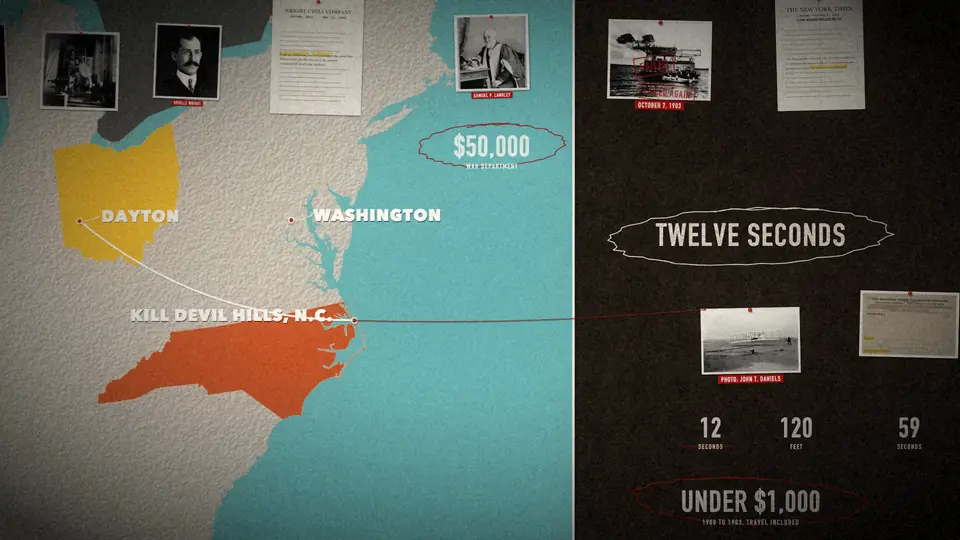
Yes. You can add your own photos, screenshots or AI stills, and the items such as torn clippings, stamps, cards, maps and red string work on every look.What kinds of films does it make?Documentaries, product launches, science explainers and tech or trailer films, each with its own look such as a cork evidence wall, studio, blueprint or night.
Documentaries, product launches, science explainers and tech or trailer films, each with its own look such as a cork evidence wall, studio, blueprint or night.Is there a finished example to watch?Yes, 'Twelve Seconds', a 90 second documentary made from seven public-domain photos, ships with the skill as the worked example.
Yes, 'Twelve Seconds', a 90 second documentary made from seven public-domain photos, ships with the skill as the worked example.Where did the code come from?It was extracted from a 5 minute documentary about Al Capone that exploraX made with an agent, and the rules were written from what broke along the way.
It was extracted from a 5 minute documentary about Al Capone that exploraX made with an agent, and the rules were written from what broke along the way.What are similar projects?bang-motion, eian-riso-broll, motion-video-kit, cinecode, huashu-motion, claude-animated-shorts, huashu-art-motion, hyperframes
bang-motion, eian-riso-broll, motion-video-kit, cinecode, huashu-motion, claude-animated-shorts, huashu-art-motion, hyperframesWhich topics is it in?skia, storytelling, explainer-video, video-production, motion-graphics, subtitles, claude-skill, gemini-cli, text-to-speech, content-creation, ffmpeg, image-processing
skia, storytelling, explainer-video, video-production, motion-graphics, subtitles, claude-skill, gemini-cli, text-to-speech, content-creation, ffmpeg, image-processing