

Atlas Cloud — powers OpenAI-compatible --smart classification. For AI coding workflows, try the Atlas Cloud coding plan.
Bloome — deploys your AI clone to handle every audience conversation, running in the cloud, 24/7.
Try designlang on Bloome.
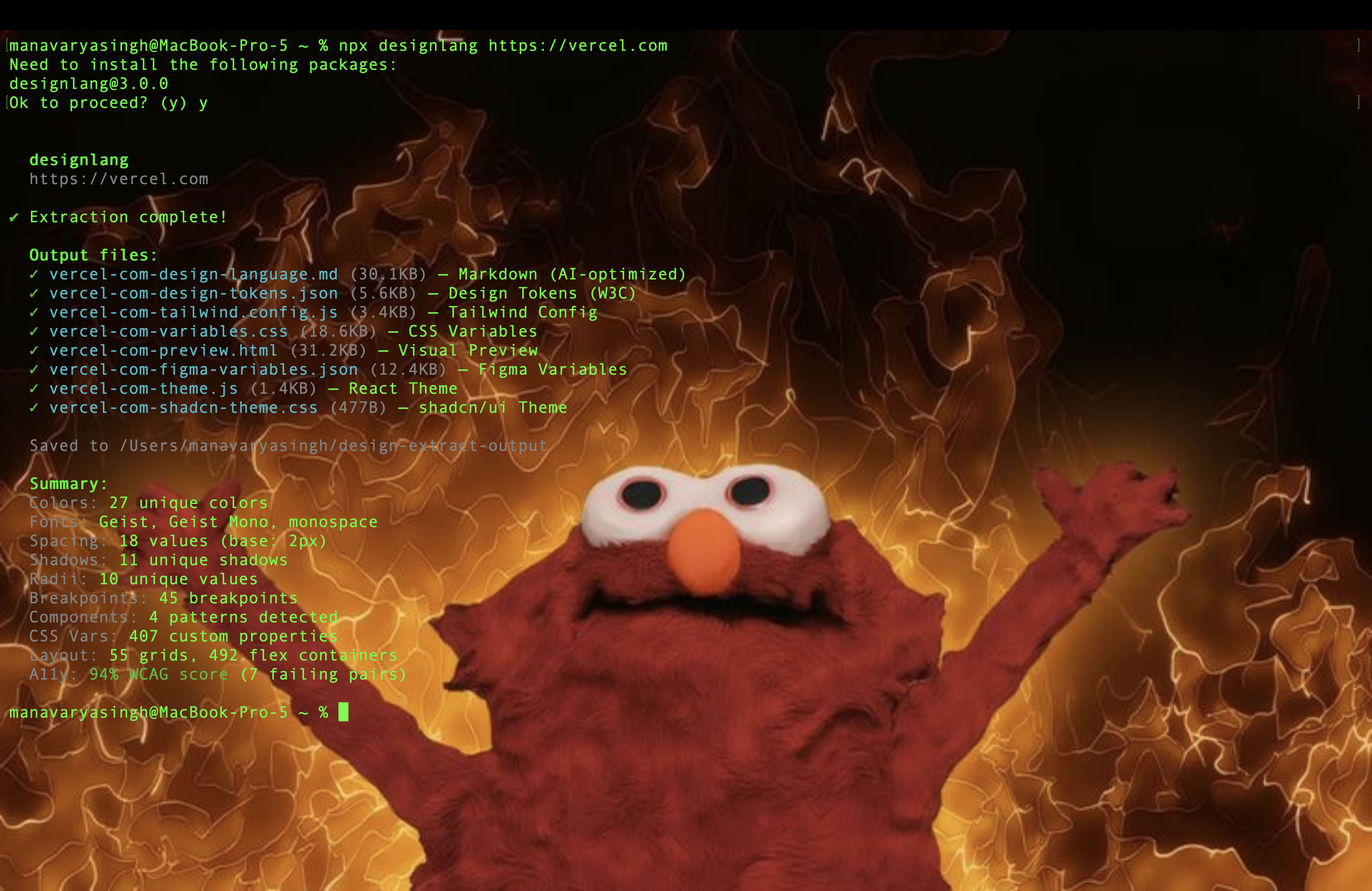
designlang points a headless browser at any URL and reads the design system off the live DOM. One command emits 17+ files — DTCG tokens, Tailwind config, shadcn theme, Figma variables, motion tokens, typed component anatomy, brand voice, page-intent labels, and a paste-ready prompt pack for v0 / Lovable / Cursor / Claude Artifacts.
It also goes where extractors don't: layout patterns, responsive behavior across 4 breakpoints, hover / focus / active states, WCAG contrast scoring, multi-page consistency, drift checks against a live source-of-truth, visual-diffs, and a shareable graded report card.
Quick start
npx designlang https://stripe.com                      # extract everything
npx designlang dna stripe.com                          # place it in the measured design space: neighbours + percentiles ← v13.1
npx designlang site stripe.com                         # whole-site: one canonical system + consistency grade ← v12.23
npx designlang fidelity stripe.com --clone localhost:3000  # score a clone vs the original (visual + motion) ← v12.24
npx designlang gallery                                 # static shareable gallery of measured clones      ← v12.24
npx designlang studio                                  # live token editor: edit, preview, export, share ← v12.19
npx designlang verify stripe.com                       # fidelity score: rebuild from tokens vs live ← v12.18
npx designlang pair stripe.com linear.app              # fuse two designs (visuals A × voice B)    ← v12.8
npx designlang brand stripe.com                        # full brand-guidelines book (13 chapters)  ← v12.7
npx designlang theme-swap stripe.com --primary "#ff4800"  # recolour around your brand        ← v12.6
npx designlang pack stripe.com                         # one polished design-system directory ← v12.4
npx designlang remix stripe.com --as cyberpunk         # restyle in another vocabulary       ← v12.3
npx designlang remix stripe.com --all                  # emit all 6 vocabs at once           ← v12.3
npx designlang grade https://stripe.com --badge        # report card + SVG badge             ← v12.2
npx designlang battle stripe.com vercel.com            # head-to-head graded fight           ← v12.2
npx designlang clone https://stripe.com                # working Next.js starter
npx designlang --full https://stripe.com               # screenshots + responsive + interactions
Drop a live design-score badge in any README:

Don't take the output on faith — watch it happen. On
designlang.app/watch you paste a URL and a real
headless Chromium opens the page and reads its entire design system in real
time: a split stage with the live browser on the left and the design system —
palette, type, spacing, motion — assembling itself on the right as each token
lifts off the page.
It's driven by the actual extraction (the browser's CDP screencast streamed
frame-by-frame alongside the real token events), recorded so a shared link
replays the exact run. No install, no account. Every gallery card can be watched
the same way, and the gallery now spans 37
real-graded design systems.
Whole-site design system (site)
Most extractors read a single URL. designlang site crawls a site's canonical
pages (home, pricing, docs, blog, about, product…) and synthesizes one
de-duplicated system. Every token is elected by coverage — the share of pages
that use it — so what's genuinely site-wide is separated from one-off,
page-local choices. Near-identical colours are merged in OKLab. It's fully
deterministic and free; no API key.
npx designlang site stripe.com --max-pages 8
You get, alongside the standard pack emitted from the canonical system:
| File |
What it is |
*-site-system.json |
canonical unified tokens + coverage + drift |
*-site-coverage.md |
every token tagged 🟢 site-wide / 🟡 section / 🔴 page-local, with the pages using it |
*-site-consistency.md |
a 0–100 consistency grade, per-category breakdown, and the off-system outliers to consolidate |
Measured clone fidelity (fidelity + gallery)
Cloning tools all claim "pixel-perfect" — none of them measure it. designlang fidelity does. Point it at the original and your clone (often a local dev
server) and it returns one honest number, both halves of the clone:
- Visual — full-page screenshots of each, pixel-diffed.
- Motion —
extractMotion() on both, compared across feel, durations,
easings, springs, keyframe kinds, scroll-linked motion, and choreography/
stagger. (Most clones reproduce static pixels and drop the motion entirely;
this is where they lose.)
The two blend into a 0–100 score + letter grade, and — the part competitors
don't ship — a ranked correction plan: the exact next edits that will raise
the score, hardest-hitting first. Measure → fix → re-run until it converges.
npx designlang fidelity https://stripe.com --clone http://localhost:3000
npx designlang fidelity https://stripe.com --clone http://localhost:3000 --min 90   # CI gate
Generating the clone with designlang clone? Add --fidelity and it grades the
clone's token basis against the live site the moment it's built — writing
FIDELITY.md + a correction plan straight into the project, no separate step:
npx designlang clone https://stripe.com --fidelity
You get fidelity.md (score + motion table + correction plan), fidelity.json,
a shareable fidelity-card.svg (88% · B · stripe.com), and a fidelity-diff.png
loss heatmap.
Then publish them. designlang gallery scans your reports and builds a
deployable static site — an index of score cards plus a permalink page per clone
(each with an OG card, so a shared link unfurls the number).
npx designlang gallery --title "Our clones" --base-url https://clones.example.com
A measured design space (dna)
Every extractor on the market answers what a design uses. None of them answers
where it sits. designlang grade returns a letter — but a letter with no
reference frame is a thermometer with no scale on it.
designlang dna reduces a design to 30 deterministic features across five
axes — colour, type, space, shape, motion — and ranks it against a corpus of
real design systems:
npx designlang dna raycast.com
  Design DNA · https://raycast.com
  30 features, 100% measurable

  vs 8 systems (default)

  color    65th percentile
  type     56th percentile
  space    42th percentile
  shape    79th percentile
  motion   67th percentile

  Nearest
  0.14  https://railway.app
  0.15  https://linear.app
  0.19  https://notion.so
Distance is the mean absolute difference across the features both designs have,
so 0.14 reads as "the average feature is 14% of its range apart" — a number you
can reason about, unlike a Euclidean distance in 30 dimensions.
The report goes past similarity to what makes a design look the way it does:
the features furthest from the middle of the corpus, in plain language
("corner radius — 100th percentile, far above the corpus").
Bring your own reference frame — your products, your competitors, a target look:
npx designlang dna-corpus acme.com acme.com/pricing competitor.com
npx designlang dna acme.com/new-page --corpus ./corpus.json
Three things it refuses to do, because a design score that overclaims is worse
than no score at all:
- A missing measurement stays missing. Features the page never exposed are
null, never a substituted midpoint, and distance skips them instead of
comparing against an invented value.
- Every number carries its evidence. Distances report how many features
backed them, percentiles name the corpus and its size, and the report warns
when coverage was partial.
- The space is versioned. Feature order and normalization are frozen per
vector version, and a corpus built by different rules is rejected rather than
silently compared against.
Install
npm i -g designlang                         # global
npx skills add Manavarya09/design-extract   # as an agent skill (40+ agents)
Use in Claude Code (plugin)
designlang ships as a Claude Code plugin — eleven slash commands that wrap
the CLI. Install it from inside Claude Code:
/plugin marketplace add Manavarya09/design-extract
/plugin install designlang@designlang
The first command registers this repo as a plugin marketplace; the second
installs the designlang plugin from it. Restart Claude Code if prompted, then
the commands are available:
| Command |
What it does |
/extract <url> |
full design language → DTCG, Tailwind, Figma, motion, voice |
/site <url> |
crawl a whole site → one canonical design system + consistency grade |
/grade <url> |
shareable HTML report card + SVG badge |
/battle <a> <b> |
head-to-head graded comparison |
/remix <url> --as <vocab> |
restyle in 6 vocabularies (brutalist, swiss, art-deco, cyberpunk, soft-ui, editorial) |
/pack <url> |
one downloadable design-system bundle |
/theme-swap <url> |
OKLCH-correct recolour around a new brand primary |
/brand <url> |
full editorial brand-guidelines book (13 chapters) |
/pair <a> <b> |
fuse two designs across configurable axes |
/studio |
live token editor — preview, dark mode, export, share |
/verify <url> |
rebuild from tokens, pixel-diff vs live, fidelity score |
/fidelity <url> --clone <url> |
score a clone vs the original (visual + motion) + correction plan |
/gallery [dir] |
build a static shareable gallery of measured clones |
/dna <url> |
place a design in the measured design space — nearest systems, per-axis percentiles, outliers |
Prefer the raw MCP tools? The CLI also ships an MCP server — run
designlang mcp --output-dir ./design-extract-output to serve the latest
extraction's tokens to any MCP client.
Atlas Cloud for --smart
designlang --smart can now use Atlas Cloud through its OpenAI-compatible chat API, so low-confidence classifiers can stay zero-dependency while routing to Atlas-hosted models.
export ATLASCLOUD_API_KEY="<atlascloud-api-key>"
export ATLASCLOUD_MODEL="deepseek-ai/deepseek-v4-pro"

npx designlang https://stripe.com --smart
- Atlas Cloud envs:
ATLASCLOUD_API_KEY, ATLASCLOUD_MODEL, optional ATLASCLOUD_API_BASE
- Alias envs also work:
ATLAS_CLOUD_API_KEY, ATLAS_CLOUD_MODEL, ATLAS_CLOUD_API_BASE
- Existing
OPENAI_API_KEY and ANTHROPIC_API_KEY flows keep working unchanged
What you get
Each run writes 17+ files to ./design-extract-output/. The headline outputs:
| File |
What it is |
*-design-language.md |
19-section markdown — feed any LLM to recreate the design |
*-design-tokens.json |
W3C DTCG tokens (primitive + semantic + composite layers) |
*-tailwind.config.js |
Drop-in Tailwind theme |
*-shadcn-theme.css |
shadcn/ui globals.css variables |
*-figma-variables.json |
Figma Variables import (light + dark) |
*-variables.css |
CSS custom properties |
*-anatomy.tsx |
Typed React stubs for every detected component + variants |
*-motion-tokens.json |
Durations, easings, springs, scroll-linked flag; with --motion-runtime also choreography (stagger) + scroll recipes + observed durations |
*-voice.json |
Brand voice — tone, pronoun posture, CTA verbs |
*-prompts/ |
Paste-ready prompts for v0, Lovable, Cursor, Claude Artifacts |
*-mcp.json |
Disk-backed MCP server payload |
*-grade.html |
v12.1 Shareable Design Report Card (letter grade + evidence) |
*-grade.svg |
v12.2 Shields.io-style design-score badge (drop into any README) |
*-battle.html |
v12.2 Head-to-head graded battle card from designlang battle |
*-remix.<vocab>.html |
v12.3 Site restyled in another vocabulary — brutalist / swiss / art-deco / cyberpunk / soft-ui / editorial |
Multi-platform (--platforms web,ios,android,flutter,wordpress,all) adds ios/, android/, flutter/, and a WordPress block theme. --emit-agent-rules adds Cursor / Claude Code / generic agent rule files.
Why designlang vs anything else
Other tools give you the paint. designlang reads the architecture:
- Layout system — grids, flex containers, container widths, gaps — not just tokens.
- Responsive — crawls 4 breakpoints and reports what changes (
--responsive).
- Interaction states — programmatically hovers and focuses, captures the deltas (
--interactions, --deep-interact).
- Motion language — durations, easing families, spring detection, scroll-linked flag,
feel fingerprint (springy / smooth / mechanical / mixed).
- Runtime motion (
--motion-runtime) — drives the page (load / scroll / hover / focus) and reads document.getAnimations() to capture what actually animates: real durations, choreography/stagger sequences, and scroll recipes (parallax / reveal / pin). Folded into *-motion-tokens.json and previewable live in the studio's Motion tab.
- Component anatomy — slot trees with variant × size × state matrices, emitted as typed
.tsx.
- Brand voice — tone, pronoun posture, heading style, CTA verb inventory.
- Page intent + section roles —
landing / pricing / docs etc., with semantic regions (hero, feature-grid, pricing-table, cta…).
- Multi-page consistency — auto-discovers canonical pages, reconciles shared vs per-route tokens.
- WCAG — every fg/bg pair scored, with a remediation palette suggesting nearest passing colors.
- Drift + lint + visual-diff —
designlang drift, lint, visual-diff all CI-ready, exit non-zero on failure.
- Live-site sync — treat the deployed site as source of truth (
designlang sync).
- MCP server —
designlang mcp exposes tokens, regions, components, and contrast pairs to any MCP-aware agent.
designlang grade https://stripe.com         # ← v12.1: shareable report card
designlang clone https://stripe.com         # → working Next.js app
designlang apply https://stripe.com -d ./app   # auto-detect framework, write tokens
designlang brands stripe.com vercel.com linear.app   # N-brand matrix
designlang drift https://yourapp.com --tokens ./src/tokens.json
designlang lint ./src/tokens/design-tokens.json     # CI-ready linter
designlang visual-diff https://staging.app https://app   # single-file HTML diff
designlang mcp                              # stdio MCP server for Cursor / Claude Code
designlang doctor                           # sanity-check the local install
All features
| Feature |
Flag / Command |
Description |
| Base extraction |
designlang <url> |
Colors, typography, spacing, shadows, radii, CSS vars, breakpoints, animations, components |
| Layout system |
automatic |
Grid patterns, flex usage, container widths, gap values |
| Accessibility |
automatic |
WCAG 2.1 contrast ratios for all fg/bg pairs |
| Design scoring |
automatic |
7-category quality rating (A-F) with actionable issues |
| Gradients |
automatic |
Gradient type, direction, stops, classification |
| Z-index map |
automatic |
Layer hierarchy, z-index wars detection |
| SVG icons |
automatic |
Deduplicated icons, size/style classification, color palette |
| Font files |
automatic |
Source detection (Google/self-hosted/CDN/system), @font-face CSS |
| Image styles |
automatic |
Aspect ratios, shapes, filters, pattern classification |
| Dark mode |
--dark |
Extracts dark color scheme + light/dark diff |
| Auth pages |
--cookie, --cookie-file, --header |
Extract from authenticated/protected pages; cookie files in JSON / Playwright storageState / Netscape formats |
| Self-signed / dev TLS |
--insecure |
Ignore HTTPS/SSL certificate errors |
| User-Agent override |
--user-agent <ua> |
Set a custom User-Agent string |
| Chrome extension |
chrome-extension/ |
One-click handoff from any tab, MV3, activeTab only |
| Multi-page |
--depth <n> |
Crawl N internal pages; emits shared-vs-per-route token reconciliation (*-tokens-shared.json, *-tokens-routes/<slug>.json, *-routes-report.md) |
| Screenshots |
--screenshots |
Capture buttons, cards, inputs, nav, hero, full page |
| Responsive |
--responsive |
Crawl at 4 viewports, map breakpoint changes |
| Interactions |
--interactions |
Capture hover/focus/active state transitions |
| Auto-interact |
--deep-interact |
Scroll, open menus/modals/accordions, hover CTAs before extraction |
| Runtime motion |
--motion-runtime |
Capture real motion via document.getAnimations() — durations, stagger/choreography, scroll recipes |
| Everything |
--full |
Enable screenshots + responsive + interactions + deep-interact + motion-runtime |
| Apply |
designlang apply <url> |
Auto-detect framework and write tokens to your project |
| Clone |
designlang clone <url> |
Generate a working Next.js starter with extracted design |
| Score |
designlang score <url> |
Rate design quality with visual bar chart breakdown |
| Grade (v12.1) |
designlang grade <url> |
Shareable HTML "Design Report Card" — letter grade, 8 dimensions, evidence, strengths + fixes |
| Battle (v12.2) |
designlang battle <A> <B> |
H |

 Designlang(即“design-extract” CLI)用无头浏览器访问任意线上 URL,通过一条命令从 DOM 中读取该网站完整的设计系统,输出 17 个以上的文件,包括 DTCG tokens、Tailwind 配置、shadcn 主题、Figma 变量、动效 tokens、组件结构解析和品牌语调。