Bytecode Viewer
Bytecode Viewer - a lightweight user-friendly Java/Android Bytecode Viewer, Decompiler & More.
New Features
- Jump to Declaration
- Draggable tabs
- Patched CVE-2022-21675 (Make sure to upgrade to v2.11.X)
- Dark mode by default with multiple themes
- Translated into over 30 languages including: Arabic, German, Japanese, Mandarin, Russian, Spanish
- Plugin Writer - create and edit external plugins from within BCV
- Fixed Java & Bytecode editing/compiling
- Tabbed plugin console
- Right-click menus on the resource and search panels
- Javap disassembler
- XAPK support
- Latest dependencies (incl. decompilers like CFR, JD-GUI etc.)
- Added support to Java files compiled using JDK > 13
- Migrated to Maven
Links
Key Features
- Simply drag and drop to decompile and search Java Jars & Android APKs
- File format support for: Class, Jar, APK, DEX, XAPK, APKM, WAR, JSP, Image Resources, Text Resources & More
- 6 Built-in Java decompilers: Krakatau, CFR, Procyon, FernFlower, JADX, JD-GUI
- 3 Built-in Bytecode disassemblers, including 2 assemblers: Krakatau and Smali/BakSmali
- APK/DEX Support from Dex2Jar and Enjarify
- Built-in Java Compiler
- Advanced static-search functionality
- Customizable UI
- Plugins + Script Engine Design
- Malicious code scanning API
- Translated Into over 30 Languages Including: Arabic, German, Japanese, Mandarin, Russian, Spanish)
- Export functionality as Runnable Jar, Zip, APK, Decompile All As Zip, Etc.
- And more! Give it a try for yourself!
	-help                         Displays the help menu
	-clean                        Deletes the BCV directory
	-english                      Forces English language translations
	-list                         Displays the available decompilers
	-decompiler <decompiler>      Selects the decompiler, procyon by default
	-i <input file>               Selects the input file (Jar, Class, APK, ZIP, DEX all work automatically)
	-o <output file>              Selects the output file (Java or Java-Bytecode)
	-t <target classname>         Must either be the fully qualified classname or "all" to decompile all as zip
	-nowait                       Doesn't wait for the user to read the CLI messages
What is Bytecode Viewer?
Bytecode Viewer (BCV) is an Advanced Lightweight Java/Android Reverse Engineering Suite. Powered by several open source tools BCV is designed to aid in the reversing process.
BCV comes with 6 decompilers, 3 disassemblers, 2 assemblers, 2 APK converters, advanced searching, debugging & more.
It's written completely in Java, and it's open sourced. It's currently being maintained and developed by Konloch.
Is there a demo?
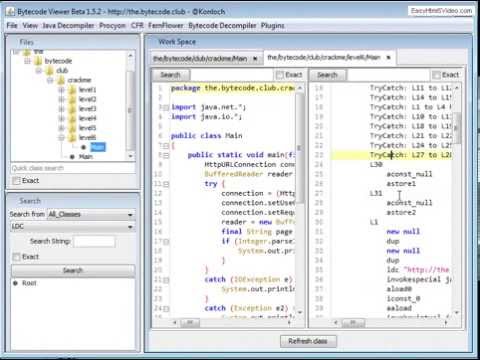
Please note this demo is from a very old version
How do I install BCV?
Download the latest version from https://github.com/konloch/bytecode-viewer/releases and run the Bytecode-Viewer-2.10.x.jar.
You may need to execute it via command line java -jar Bytecode-Viewer-2.10.x.jar (replace the X with the current minor version)
How can I use BCV?
- Starting with a Jar, Zip, ClassFile or Android file (APK, DEX, XAPK, APKM, etc) drag it into BCV. It will start the decoding process automatically.
- From here you can select the decompilers you would like to use by selecting the View Pane>View 1, View 2, View 3, etc.
- The view panes are-used to display up to 3 decompilers side by side, you can also toggle edibility here.
- Select the resource you would like to open by navigating using the resource list, BCV will do its best to display it (Decompiling, Disassembling, etc).
- You can use plugins to help you search along with using the search pane in the left-hand bottom corner.
How do the plugins work?
There is also a plugin system that will allow you to interact with the loaded classfiles. You could for example write a String deobfuscator, a malicious code searcher, or anything else you can think of.
You can either use one of the pre-written plugins, or write your own. The plugin system supports java and javascript scripting.
Once a plugin is activated, it will execute the plugin with a ClassNode ArrayList of every single class loaded in BCV, this allows the user to handle it completely using ASM.
Instructions to compile
Just clone this repo and run mvn package. It's that simple!
Working on the source
Open the Maven project (e.g. in IntelliJ, open the pom.xml as a project file).
UI Is Lagging
Change the theme to your systems. Go into View->Visual Settings->Window Theme and select System Theme.
Java Heap Space Issues (java.lang.OutOfMemoryError)
Start BCV with more RAM, e.g. java -Xmx3G -jar BCV.jar
File Permission Issues (java.io.FileNotFoundException)
Right click on the jar file, go to Properties, and select Unblock under Security at the bottom of the General tab.
APK File Permission Issues (java.io.FileNotFoundException)
Run BCV as administrator.
Are you a Java Reverse Engineer? Do you want to learn?
Join The Bytecode Club Today! - https://the.bytecode.club

 Bytecode Viewer(BCV)是一套轻量的 Java/Android 逆向工程工具:把 Jar 或 APK 拖进去,它就能反编译、反汇编、搜索和调试,背后集成了多个开源工具。