DLSS 5 Autopilot
Puts DLSS 5 neural rendering into games that never shipped it. Scans your
library, reads each executable, picks the route that fits the game and your
card, downloads every part from its publisher, writes the configuration,
and can take all of it back out. One .exe, nothing to install, no admin.
Download the latest release · Windows 10/11 ·
NVIDIA RTX 20 or newer
This repository holds installer logic only. No game files, no NVIDIA
binaries, no third-party code is redistributed - everything is fetched at
run time from the original publishers. Credits and licensing.
What DLSS 5 is
A network that runs over a finished frame and re-lights it: materials,
skin, tone. NVIDIA shipped it on 3 September 2026 in NBA 2K27, for RTX 50.
The community wired it into other games through ReShade add-ons and an
OptiScaler fork, and re-targeted the runtime so RTX 40, 30 and 20 run it
too. This tool automates that setup. Unofficial; the tool resolves the
current version of every part each time it runs.
Using it
- Run
dlss5-autopilot.exe. It scans Steam, Epic, GOG, EA, Ubisoft,
Battle.net, Rockstar, Amazon, itch, Heroic, Xbox/Game Pass, D:\Games\*
folders and 19 emulators. Anything else: choose folder. With scan
library at start on - the default - later runs open straight on that
library; rescan walks the disks again when you have installed or
removed a game.
- Pick the game. The card shows what was read - executable, 32/64-bit,
graphics API, whether it ships DLSS - and the route it will take.
- Press INSTALL. The log says what went where. Then start the game and
press the key the tool named; did it work? reads the game's logs
afterwards and reports what happened.
Uninstall removes exactly what was written, restores anything it replaced,
and nothing else.
Which route a game gets
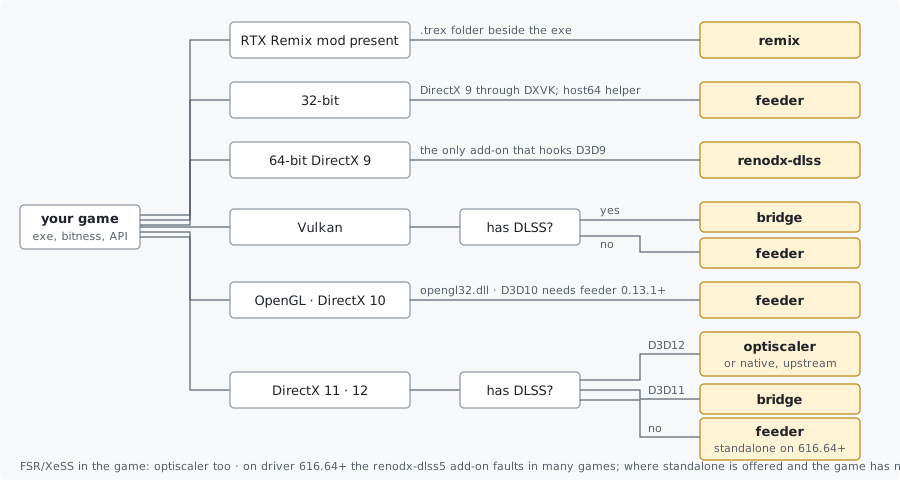
The dropdown lists every route the game allows, marks the recommended one
and greys out what your card cannot run. The card under it says, per
route, what it does and what must not sit in the same folder.
The graphics API comes from the executable's import table, with one
exception: a d3d9.dll import is checked against the delay-load table, a
D3D12 Agility SDK in the folder and the executable's own names before the
game is called DirectX 9, because engines keep that import long after they
stop drawing with it. When the table names no graphics DLL at all (the
engine loads its renderer at run time), the tool reads the DLL names inside
the exe, the imports of the DLLs beside it and the names inside the largest
of them, and ranks them as the import table would: a Direct3D name anywhere
outranks OpenGL or Vulkan, because an engine that can drive several
backends names all of them and draws with Direct3D on Windows. A Unity game
(UnityPlayer.dll beside the exe) is Direct3D 11 unless started with
-force-d3d12, -force-vulkan or -force-glcore. An import table can also lie
- R.U.S.E. links D3D11 and renders with Direct3D 9 - so the install page
has a graphics api
dropdown (auto / DirectX 9 / 10 / 11 / 12 / Vulkan / OpenGL); the choice
is remembered for that folder.
| Route |
What it is |
For |
FPS dial |
| native |
Krish's renodx-dlss5 add-on hooks the DLSS calls the game already makes |
64-bit D3D12 games with DLSS; on an RTX card optiscaler is recommended first, native is one click away |
the game's DLSS mode |
| neural-upstream |
matiasLombo's add-on runs the network at render resolution, before the game's DLSS upscales |
64-bit D3D12 games with DLSS |
cadence (every 1st/2nd/3rd frame) |
| optiscaler |
Dagherbou's OptiScaler fork (or y4my4my4m's, or wilsjo2's - which is installed with its neural pass before the upscaler, the placement it exists for; neither of those two has been run here) replaces the upscaler and runs the model over its output; no ReShade |
64-bit D3D11/12 with DLSS, or with FSR 2/3 / XeSS redirected into DLSS |
model resolution 25-100 % - cost falls with the square; optional frame generation (FSR 3.1, any card, D3D12) |
| bridge |
NIGos' dlss5-bridge mirrors the game's DLSS contract onto a private D3D12 session |
D3D11 and Vulkan games with DLSS |
the game's DLSS mode |
| feeder |
jlrouzies-fr's DLSS5-Feeder builds a DLAA contract from ReShade's depth buffer and shader motion vectors |
games with no DLSS: D3D10/11/12, Vulkan, OpenGL, 32-bit (host64 helper, DirectX 9 through DXVK) |
work area 50-100 % (64-bit D3D11) |
| standalone-dlssnr |
kibblerz's add-on: own feed, DLAA or DLSS Super Resolution, frame generation, shown through its own window |
64-bit D3D11/12, with or without DLSS; experimental |
run the game below native |
| renodx-dlss |
ShortFuse's add-on hooks D3D9/11/12 in-process; no bridge, no shaders |
64-bit DirectX 9 (nothing else reaches it); reported failing in many other games |
the game's DLSS mode |
| remix |
the game has an RTX Remix mod; DLSS 5 runs inside the Remix runtime, after its upscaler. Nothing injected |
any game with a .trex folder beside it |
Remix's Neural Uplift sliders |
Two things that override the diagram. A Remix mod present means remix,
always - ReShade crashes a Remix game before it draws. And an online game
with anti-cheat (BattlEye, EAC, Vanguard, EA Javelin, HoYoverse, GameGuard,
XIGNCODE3, Denuvo Anti-Cheat, PunkBuster, FACEIT, Ricochet, ACE) is marked
in the list and asks for confirmation before INSTALL: ReShade add-ons and
anti-cheat do not coexist, and a ban is on the person who chooses to
install anyway.
Frame generation
Two switches, both off by default:
- Frame generation, any RTX card (optiscaler route, D3D12). OptiScaler
ships AMD's FSR 3.1 frame-generation libraries; the tool turns them on
with the upscaler it already runs as the input. One generated frame per
rendered one - 2x - on RTX 20 through 50. Turn the game's own frame
generation off; expect added latency; the HUD is the part that varies
by game.
- Multi-frame generation on RTX 40 (ReShade routes, D3D12 and Vulkan).
dashdogy's RTX40MFG-Unlock
raises the multiplier of a DLSS Frame Generation the game already has
to 3x/4x, in memory, with the Ada temporal correction; the tool places it
with Ultimate ASI Loader
under a proxy name the executable imports. Offered only on an RTX 40 and
only when
nvngx_dlssg.dll or sl.dlss_g.dll is in the folder. Research
software: higher multipliers and Vulkan can freeze or crash. The
multiplier is chosen in ReShade's DLSS MFG tab.
The first works in any D3D12 game on the optiscaler route; the second only
raises a multiplier the game already has. NVIDIA's own multi-frame
generation stays an RTX 50 feature.
Where the files come from
nvngx_dlss.dll (super resolution) and nvngx_dlssg.dll (frame generation)
are fetched from NVIDIA's own repository, read at its release tag.
nvngx_dlssd.dll (ray reconstruction) can be swapped the same way, and only
for a game that already ships one - the dropdown does not appear otherwise,
and not on the optiscaler or remix routes, whose install cannot act on it.
The game's own file is backed up and comes back on uninstall, and the
download is checked for being a 64-bit Windows DLL before anything is
overwritten.
A swap is worth knowing two things about: a launcher that verifies its files
puts its own copy back, and in an online game an anti-cheat can treat a
changed file as tampering. For anything you play online, leave these on
"keep the game's own".
Neural rendering itself is not in NVIDIA's SDK. nvngx_dlssnr.dll comes
from the community build that matches your card, which is what the next
section is about.
Your graphics card
nvngx_dlssnr.dll is compiled per architecture. NVIDIA's build is FP8 for
RTX 50; the community re-targeted it for older cards. The tool detects the
card, picks the matching build, then opens the file and checks its CUDA
fatbin records against the card before installing it.
| Card |
Build |
Cost |
| RTX 50 |
310.8.0, NVIDIA's own |
full speed |
| RTX 40 |
310.8.0-RTX40, community, sm_89 |
moderate |
| RTX 20 / 30 |
310.8.SF / SF-v2, community, FP16 |
heavy - about half your fps at 100 % model resolution; use the dial |
| GTX, RTX 16 |
- |
does not run |
| AMD, Intel |
- |
not from here - see below |
Neural rendering runs inside NVIDIA's nvngx_dlssnr.dll, so a Radeon or an
Arc card has no runtime for it to use. Two projects run the network on
Radeon through HIP (RDNA 3 / RDNA 4 with HIP 7, Direct3D 12) and their users
report both working, at a heavy cost. Neither can be installed from here:
the open one keeps the runtime DLL and its weights in a Discord channel
rather than in its releases, and the other is closed source. The tool says
so when it finds an AMD card, and this becomes a route the day either of
them publishes the whole thing.
Swapping the DLL alone does nothing on any card: a game has to ask for
neural rendering, and outside NBA 2K27 none do. That request is what the
add-on or OptiScaler makes.
In the game
The keys below are the defaults. A keyboard without an Insert or a Home key
has no way into the overlay at all, so the overlay key setting on the
install page rebinds both ReShade's and OptiScaler's, and every instruction
the tool prints then names the key that was chosen.
| Route |
Keys |
| optiscaler |
Insert opens the overlay; neural rendering is already on |
| native · bridge |
Home → DLSS 5 tab → neural rendering on (F5 toggles it in add-on 4.6+); keep the game's DLSS on |
| neural-upstream |
Home → NR Pre-Upscale tab; keep the game's DLSS on; with DLSS Frame Generation set the cadence to Quality |
| feeder |
Home → tick LUMENITE: Kernel 2.0 (or VORT) and DLSS 5 Feed, provider above the feed → DLSS 5 panel → on. 32-bit games: the panel is a separate helper window beside the game |
| renodx-dlss |
Home → RenoDX DLSS tab; already on |
| remix |
Alt+X → Developer Settings → Post-Processing → Enable Neural Uplift |
| standalone-dlssnr |
F10 compares |
Everywhere: MSAA/SSAA off. Set resolution and display mode before
turning neural rendering on - the feature is built for one back-buffer
size, and a rebuild mid-session is where crashes live. Prefer borderless
over exclusive fullscreen for the same reason. "No .fx files found" in
ReShade's overlay is normal on the add-on routes; the add-on tab is what
matters.
Settings worth knowing
- work area (the slider; on the optiscaler route its ini and log call
the same dial model resolution): 75 % is about half the cost of 100 %,
50 % a quarter. The frame keeps full detail; only the model's
contribution is computed small.
- Feeder build: stable, newest pre-release, or any exact release when
the newest breaks a game. Builds before 0.8 pair with add-on 4.55 and the
tool pins it. OpenGL games are pinned to 4.60 (4.70 stalls on GL).
- Motion vectors (feeder): LumeniteFX Kernel by default; VORT
Motion (optical flow) on OpenGL, where LumeniteFX reads nothing - the
tool installs whichever is chosen and puts it above the feed.
- Profiles: save the dials under a name; Quality / Balanced /
Performance are built in.
- scan library at start (games page): off means no scan at all -
rescan and choose folder still work. The scan never walks a whole
disk (launcher registries,
XboxGames, folders named Games and the
like, emulator locations) and skips removable drives. What it finds is
kept in %LOCALAPPDATA%\dlss5-autopilot\library.json, so later launches
show the list at once; a game that has changed on disk since is read
again, and rescan always does the full walk.
- aim for _ fps (optiscaler, and the feeder's 64-bit D3D11 path - the
same places the work-area slider applies): put in the frame rate you want
and the tool works out the work area to reach it, from what the last runs
of that game actually measured. It says how confident it is and never
applies anything on its own.
- Overlay key: ReShade opens its panel on Home and OptiScaler on
Insert. A keyboard with neither can bind another key here, once, for
every game.
- Ray reconstruction: a game that ships
nvngx_dlssd.dll can have it
replaced with a newer build. It is a swap - the game's own file is backed
up and comes back on uninstall - and the tool says what that means for a
launcher that verifies its files and for an online game's anti-cheat.
- What will happen? lists what INSTALL would write, back up and remove,
without writing anything.
- Before / after puts the last two ReShade screenshots side by side.
- Check versions: games you set up earlier are checked against what
their publishers offer now; update (N newer) appears in the list.
- The tool updates itself: a new release downloads in the background, its
SHA-256 is checked against the
SHA256SUMS.txt GitHub published, and the
top bar offers a one-click restart. "auto_update": false in
%LOCALAPPDATA%\dlss5-autopilot\settings.json keeps it manual.
Video, YouTube, webcam
The feed does not care what draws the frame. The video and youtube card
fetches a portable MPC-HC into a folder of your choice, sets its renderer
to D3D11 and installs DLSS 5 into it like a game. Open a file, paste a
YouTube link (played live via yt-dlp, or downloaded first), render a clip
through DLSS 5 offline with process a file, or point a webcam at it.
F6 toggles the effect while playing. Neural rendering redraws the whole
window, menus included; expect text to look hand-drawn.
Anything on your screen. The screen row captures part of the
desktop (Desktop Duplication on the GPU, NVENC, 30 fps) and plays it
through DLSS 5 about half a second behind: a browser playing YouTube or
Twitch, an emulator, a video call, a game with anti-cheat. Two methods:
screen - with one monitor the left 62 % of the screen is captured and
the player is parked on the right, on top; with two monitors the whole
screen is captured and the player goes to the other one. window - one
window from the list is captured on its own, wherever it is and whatever
covers it, so the player can go fullscreen over it. Nothing is injected
into the source; the delay makes this for watching, not for playing.
RTX Remix
A Remix mod rebuilds an old DirectX 8/9 game with path tracing. Once one is
installed its runtime sits in a .trex folder beside the game; press
rescan, the game appears with remix chosen, and INSTALL does three
things: the matching nvngx_dlssnr.dll into .trex, one line in
rtx.conf, and - only if you tick swap the Remix runtime - a
DLSS 5-capable community runtime in place of one that has no neural pass
(original backed up; experimental, it can undo a mod's own fixes).
The rtx remix card lists every project the tool knows about, marks the
ones in your library, and for the two that publish a complete install as a
plain zip on their own releases page - GTA IV and NFS Underground 2 -
offers download & install from that page. Nothing is mirrored; every
other project is a link.
Known Remix projects
More on ModDB. A mod existing is not the same
as it running well.
When it does not work
did it work? reads ReShade.log, dlss5-feed.log, OptiScaler.log,
the DXVK and Remix logs, and - when the game left no log at all - Windows'
own Application Error record, and names the cause.
The game closes a second after starting, no message
Some games quit the moment ReShade hooks Direct3D (Metal Gear Solid V is
the known one). The tool runs those through DXVK: the game renders on
Vulkan and ReShade loads as a Vulkan layer outside it. Any D3D11 game can
take that path with the checkbox on the install page or --dxvk; DirectX 9
always does. Use borderless there - alt-tab in exclusive fullscreen
re-creates the swap chain, and the second feature creation crashes.
The desktop mirror changes, the VR headset does not
A VR game that runs on OpenXR draws the headset's image through it; the
desktop window is a mirror of it, and that is where a proxy DLL or the
Vulkan layer puts ReShade. The VR headset (OpenXR) checkbox on the
install page (or --vr) registers ReShade's OpenXR layer as well, which
hooks the image the headset shows. Games on OpenVR/SteamVR are not
reached by it. It is global for the user, like the Vulkan layer, and the
last VR uninstall removes it. This has not been tried with a headset
by the author. It is offered as an experiment; a report of what happens,
either way, is what it needs.
Driver 616.64 or newer: everything loads, nothing changes
NVIDIA's DLSS 5 launch drivers route the neural feature into the runtime
itself, and the renodx-dlss5 4.6/4.7 add-on faults on every evaluate
there (measured by the feeder's author: 4.7 passes 0/300, 4.55 passes
300/300). With the add-on dropdown on auto the tool installs 4.55 on
these drivers; a build picked from the list is used as picked. That is a
way round it and not a fix - some games fault on 4.55 too - so rolling the
driver back to 616.56 is the surer

 DLSS5-Autopilot 是一款 Windows 工具,能把 NVIDIA 的 DLSS 5 神经渲染注入从未内置该功能的 PC 游戏,并升级已有旧版 DLSS 的游戏。它会扫描你的游戏库,根据游戏和你的 GPU 从八条安装路线中选择一条,从各发布方获取所需文件,之后还可以彻底自我卸载。