



4.8K ·GitHub
What is this?
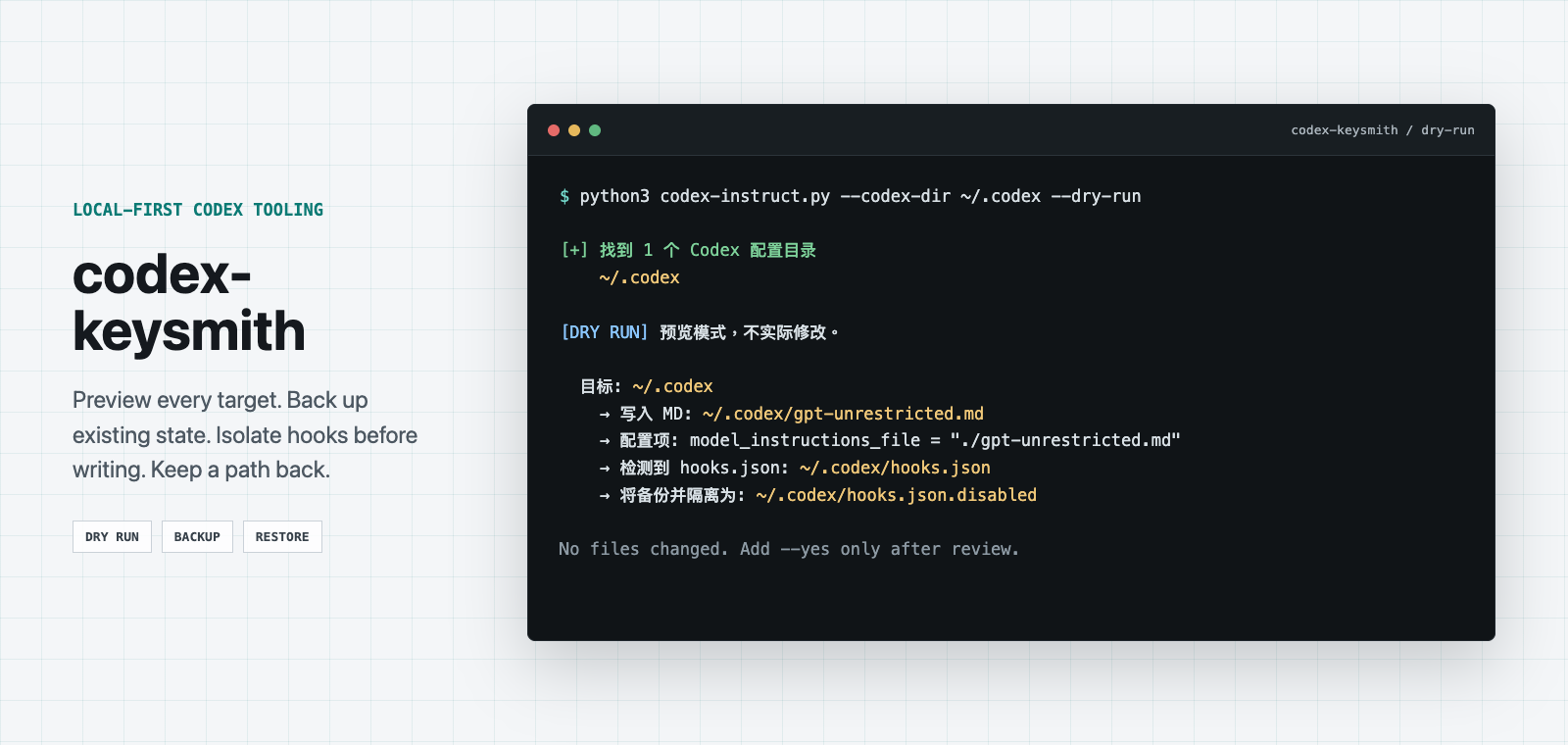
 A CLI tool that deploys a versioned Markdown instruction file into Codex's global config directory (usually ~/.codex), always previewing first and letting you undo the deployment later.
A CLI tool that deploys a versioned Markdown instruction file into Codex's global config directory (usually ~/.codex), always previewing first and letting you undo the deployment later.Is this a GUI app or a command-line tool?It's primarily a single-file Python CLI script; there is also an unsigned Desktop beta app (macOS Apple Silicon DMG, Windows x64 NSIS) that wraps the same CLI as a sidecar.
It's primarily a single-file Python CLI script; there is also an unsigned Desktop beta app (macOS Apple Silicon DMG, Windows x64 NSIS) that wraps the same CLI as a sidecar.How do I install and run it?Download the verified single-file script (currently codex-instruct-v0.5.1.py) plus SHA256SUMS from the latest stable Release, check the hash, then run it with python3; alternatively clone the repo and run python3 codex-instruct.py directly.
Download the verified single-file script (currently codex-instruct-v0.5.1.py) plus SHA256SUMS from the latest stable Release, check the hash, then run it with python3; alternatively clone the repo and run python3 codex-instruct.py directly.Do I need pip or any package manager to use it?No, it's a dependency-free single-file script; you just need Python 3.10-3.14, there's no pip install and no auto-update mechanism.
No, it's a dependency-free single-file script; you just need Python 3.10-3.14, there's no pip install and no auto-update mechanism.Is the Windows build safe to use right now?Windows is marked as EXPLICITBETA for fresh deployments and the old v0.1.0 release should not be used; the Desktop beta app is unsigned and unnotarized, so it can trigger Gatekeeper or SmartScreen warnings.
Windows is marked as EXPLICITBETA for fresh deployments and the old v0.1.0 release should not be used; the Desktop beta app is unsigned and unnotarized, so it can trigger Gatekeeper or SmartScreen warnings.Which platforms are actually fully supported?The CLI's main supported platforms are macOS and Linux, with Windows in beta; the separate Desktop beta app is only built for macOS Apple Silicon and Windows x64, and there's no Linux GUI.
The CLI's main supported platforms are macOS and Linux, with Windows in beta; the separate Desktop beta app is only built for macOS Apple Silicon and Windows x64, and there's no Linux GUI.Does it collect or upload any of my data?No, normal CLI and Desktop operation doesn't actively collect or upload user data.
No, normal CLI and Desktop operation doesn't actively collect or upload user data.What's the difference between the instruction channel and the scaffold channel?The instruction channel deploys a Markdown file into ~/.codex with default preset unrestricted; the separate --scaffold environment channel writes a fixture workspace to ~/.codex-fixture-workspace/ without touching ~/.codex. Both can be used together since they never write to each other's directories.
The instruction channel deploys a Markdown file into ~/.codex with default preset unrestricted; the separate --scaffold environment channel writes a fixture workspace to ~/.codex-fixture-workspace/ without touching ~/.codex. Both can be used together since they never write to each other's directories.How do I undo a deployment if something breaks?Uninstall rolls back one layer at a time; --reactivate (since v0.3.9) restores just the top-level modelinstructionsfile reference without a full redeploy, and --recover handles interrupted deploy/uninstall transactions without manually touching the journal or manifest.
Uninstall rolls back one layer at a time; --reactivate (since v0.3.9) restores just the top-level modelinstructionsfile reference without a full redeploy, and --recover handles interrupted deploy/uninstall transactions without manually touching the journal or manifest.How does this relate to claude-keysmith or grok-keysmith?It's part of a 'Keysmith' family of tools that safely deploy and remove custom instructions for different AI assistants: codex-keysmith targets Codex's global ~/.codex instructions, while sibling projects target Claude Code, Grok Build, and ZCode App respectively.
It's part of a 'Keysmith' family of tools that safely deploy and remove custom instructions for different AI assistants: codex-keysmith targets Codex's global ~/.codex instructions, while sibling projects target Claude Code, Grok Build, and ZCode App respectively.Does it touch my hooks.json?Yes, by default it isolates Codex's hooks.json by renaming it to hooks.json.disabled; the --restore-hooks flag brings it back immediately and, unlike other operations, doesn't accept --yes.
Yes, by default it isolates Codex's hooks.json by renaming it to hooks.json.disabled; the --restore-hooks flag brings it back immediately and, unlike other operations, doesn't accept --yes.What are similar projects?nuwa-skill, headroom, casbin-gateway, SwiftUI-Agent-Skill, agent-router, jev-code-reviewer, codex-provider-sync, coop
nuwa-skill, headroom, casbin-gateway, SwiftUI-Agent-Skill, agent-router, jev-code-reviewer, codex-provider-sync, coopWhich topics is it in?configuration-management, codex-cli, backup, installer, cli-tool, prompt-engineering, local-first, coding-agent, openai, codex, command-line-tool, security
configuration-management, codex-cli, backup, installer, cli-tool, prompt-engineering, local-first, coding-agent, openai, codex, command-line-tool, security