




What is this?
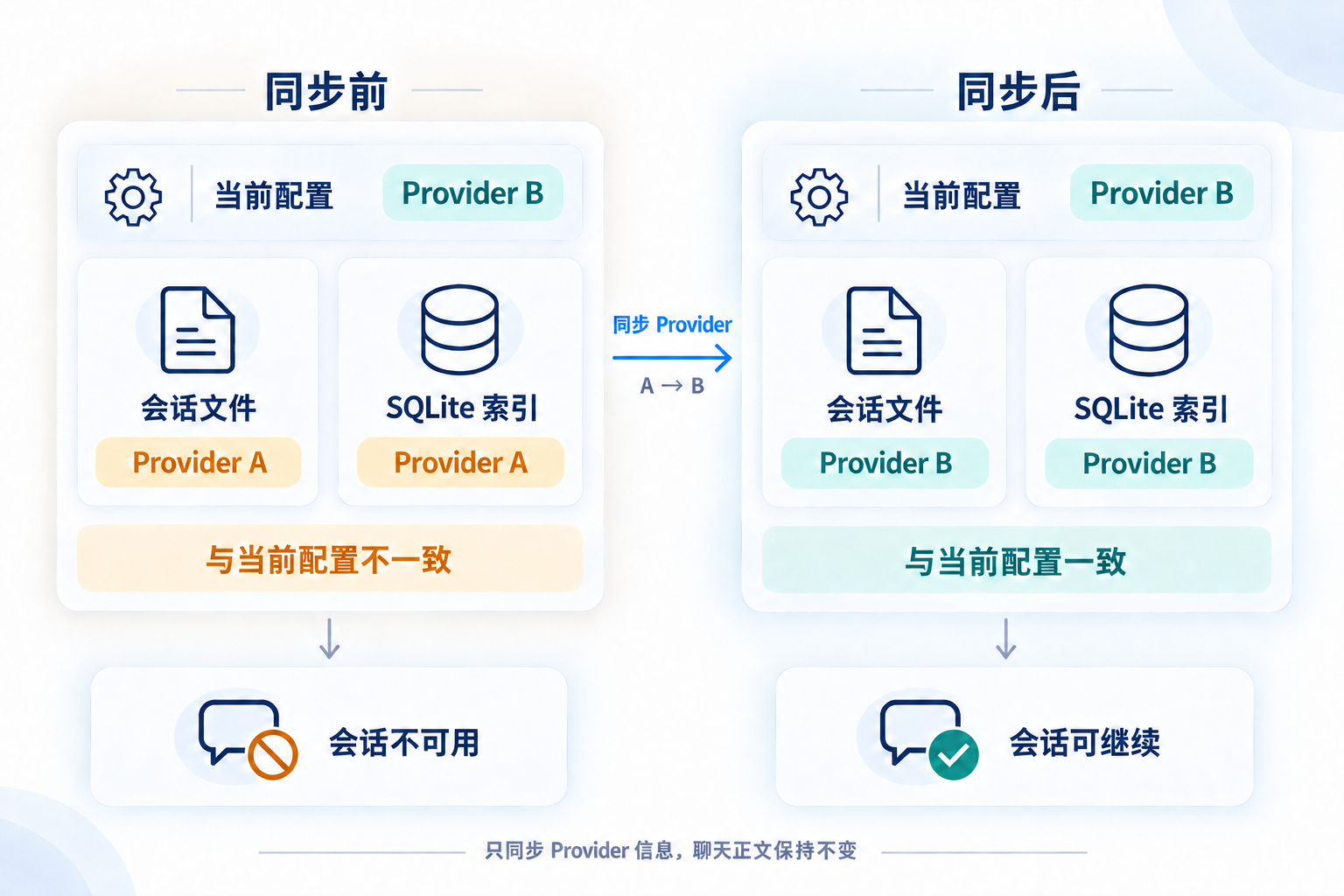
 A repair utility for OpenAI Codex sessions: after switching providers, old sessions can still point at the previous one, and this tool re-aligns the provider metadata in session files and the SQLite chat index with your current configuration.
A repair utility for OpenAI Codex sessions: after switching providers, old sessions can still point at the previous one, and this tool re-aligns the provider metadata in session files and the SQLite chat index with your current configuration.Is it a desktop app, a web tool, or a CLI?All three, sharing one core: a Windows desktop app, a local Web UI and a CLI. The entrance only changes how you operate it — sync, provider switching, backup and restore behave the same everywhere.
All three, sharing one core: a Windows desktop app, a local Web UI and a CLI. The entrance only changes how you operate it — sync, provider switching, backup and restore behave the same everywhere.How do I get it?Download the Windows x64 desktop build (installer or portable ZIP) from Releases — no Node.js needed. Note the binary is unsigned and the portable ZIP must be fully extracted; the CLI and local Web UI ship separately on npm.
Download the Windows x64 desktop build (installer or portable ZIP) from Releases — no Node.js needed. Note the binary is unsigned and the portable ZIP must be fully extracted; the CLI and local Web UI ship separately on npm.Do I need Node.js installed for any of the entrances?Only for the npm-based ones: the local Web UI and CLI require Node.js 16.20.2 or newer, while the Windows desktop build is self-contained. Developing from source uses Node 24.
Only for the npm-based ones: the local Web UI and CLI require Node.js 16.20.2 or newer, while the Windows desktop build is self-contained. Developing from source uses Node 24.If I run a sync, will my old sessions actually work again?Not guaranteed — matching provider metadata is only one condition. The tool does not handle login, authentication or encrypted content, so a cross-provider or cross-account session may still fail; check the error Codex itself reports.
Not guaranteed — matching provider metadata is only one condition. The tool does not handle login, authentication or encrypted content, so a cross-provider or cross-account session may still fail; check the error Codex itself reports.Does the desktop app work on macOS or Linux?Not yet — the macOS and Linux Electron packages have not shipped, so the current desktop build is Windows x64 only. The npm CLI and local Web UI work cross-platform, and a legacy .NET build for Windows and macOS is still maintained.
Not yet — the macOS and Linux Electron packages have not shipped, so the current desktop build is Windows x64 only. The npm CLI and local Web UI work cross-platform, and a legacy .NET build for Windows and macOS is still maintained.Can it switch the provider itself, or only fix sessions after I used CCSwitch?Both flows work. If you already switched with CCSwitch or a similar tool, just sync to the current configuration; or switch inside this tool — it updates the config first, then aligns session files and the index. Custom providers must be preconfigured.
Both flows work. If you already switched with CCSwitch or a similar tool, just sync to the current configuration; or switch inside this tool — it updates the config first, then aligns session files and the index. Custom providers must be preconfigured.Why can syncing take a while on an account with a lot of history?Time mostly depends on how many sessions need updating. When the new provider name differs in byte length and old files are large, the tool streams the unchanged body into a new file instead of editing in place; backups, pre-write validation and flushing to disk also add time. The operation log shows per-step timing.
Time mostly depends on how many sessions need updating. When the new provider name differs in byte length and old files are large, the tool streams the unchanged body into a new file instead of editing in place; backups, pre-write validation and flushing to disk also add time. The operation log shows per-step timing.How does it avoid corrupting my session files?It only parses the first line of each session and rewrites the provider metadata there. Equal-length providers are edited in place; otherwise the body is streamed into a fresh file that replaces the original. Chat content is never modified.
It only parses the first line of each session and rewrites the provider metadata there. Equal-length providers are edited in place; otherwise the body is streamed into a fresh file that replaces the original. Chat content is never modified.What else can it do besides fixing sessions?It can browse sessions by project, show operation results and timings, use custom storage locations, and run diagnostics or targeted repairs. An auto-sync mode keeps sessions aligned without manual clicks.
It can browse sessions by project, show operation results and timings, use custom storage locations, and run diagnostics or targeted repairs. An auto-sync mode keeps sessions aligned without manual clicks.What are similar projects?codex-command-center, ImageGlass, casbin-gateway, codex-keysmith, jev-router, stop-that-shit, raft-source, skills-manager
codex-command-center, ImageGlass, casbin-gateway, codex-keysmith, jev-router, stop-that-shit, raft-source, skills-managerWhich topics is it in?session-management, winforms, avalonia, openai-codex, codex-cli, backup, dotnet, sqlite, openai, codex, desktop-app, terminal
session-management, winforms, avalonia, openai-codex, codex-cli, backup, dotnet, sqlite, openai, codex, desktop-app, terminal