ThinkRail is an agentic IDE that gets better every time you use it. With Spec-Driven Development support, it learns your project as you work, becoming more capable and helpful over time.
We built a rich interface around the pi coding agent, isolated work into separate workspaces, and gave the agent durable project knowledge through the spec graph and reusable skills. We are now adding full extension support, so ThinkRail can create the tools it needs based on how you work.
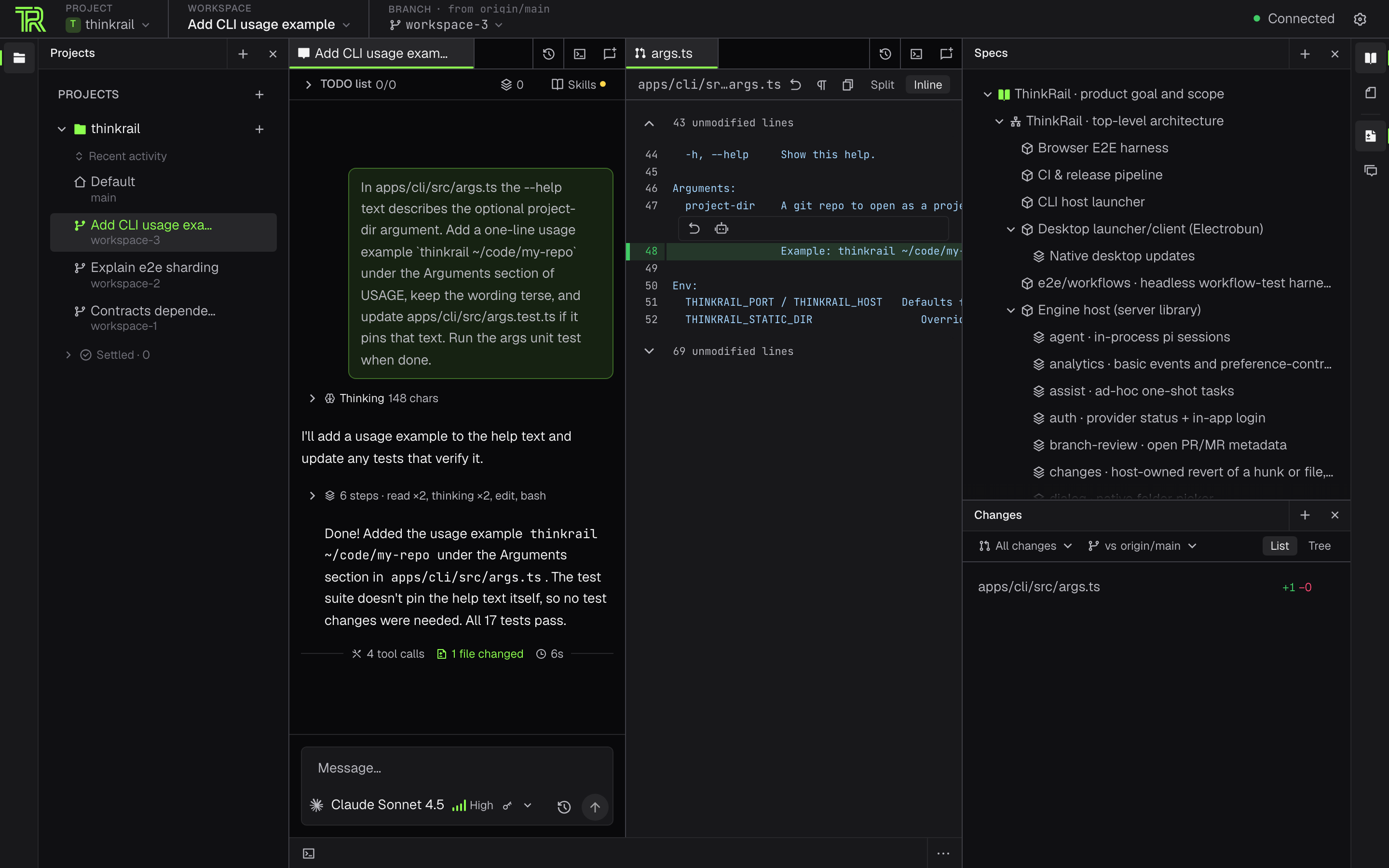
Isolated workspaces. Open any git repo as a project and create git worktree workspaces from it, each with its own branch and working directory. Agents can then work in parallel without touching your original codebase; when they finish, merge the results you want to keep and delete the rest. Ask a chat to do something "in a side workspace" and the agent starts that workspace and its chat itself, then checks how its chats and pull requests are doing. You can also attach existing git worktrees or explicitly work in the project folder.
Finished and dormant workspaces are settled when their pull request merges or closes, or after a quiet week, and return the moment you work in them again.
The topbar shows where the active branch stands against origin, and the state of its pull request. From there you can publish, push, or open a new PR described from the plan, the commits, your PR template, or an agent-written draft.
Once a GitHub PR is open, ThinkRail shows its CI checks and review decision, and lets you mark it ready, merge it, reopen it, or delete the remote branch.
An IDE around the agent. ThinkRail comes with Monaco editor tabs, a file tree integrated with git to show code changes as they happen, terminals, and document support. Rendered Markdown previews have a heading outline that follows the section you're reading; hide it or move it to either side. The pane you're typing in carries an accent line, a frame briefly lights the pane the keyboard takes you to, and VS Code-style keys move you around: F6 steps between panes, ⌘L jumps to the chat input, ⌘0 to Projects, ⌘1–⌘9 to an editor group, and ⌃` to the terminal; ⌘\ splits the editor and ⌃⌘← / ⌃⌘→ move a tab between groups. In a chat, ⌘↑ steps from the input into the conversation, where arrows or j/k walk messages, tool calls and thinking blocks, →/← unfold them, C copies and O opens the file a tool touched. When the agent asks a question, F6 (or ⇧Tab from the input) lands on its options, D marks it for discussion, I steps into an HTML mockup and ⌘↵ answers. Review comments need no mouse either: Tab onto a diff and a line cursor moves with arrows or j/k (h/l switch sides, Shift extends), Enter comments, and rendered Markdown blocks, image regions and the swipe divider take the same keys. Press F outside a text field (or ⌘; anywhere) for hint mode: every button, tab, row and field gets a short label, and typing it presses that element (Shift on the last letter only focuses it); Esc leaves a text field, so F works from anywhere. Switch hint mode off in Settings → Extensions. In the sidebar trees S searches the visible rows and h/j/k/l move like the arrows. ⌘? opens a filterable, near-fullscreen cheatsheet of every shortcut in columns, with the pane you're in highlighted (a Mac browser keeps ⌘? for its Help menu, so use the keyboard icon at the bottom of the left tool rail or the palette there); tooltips show a button's shortcut. Rebind shortcuts in Settings → Keyboard — the global chords and the keys a tree, tab strip, chat, review or palette takes while focused (letters like S, C or j/k, and chords like ⌘↵); arrows, Enter, Esc, Tab, Space, Home/End and PgUp/PgDn stay fixed. Bindings are saved on the host, so every window and browser follows, and export or import as a JSON file; extensions bring their own shortcuts, which you can rebind too.
Powerful chat features. You can open several concurrent work sessions per workspace, each with its own model. Send a prompt, or queue it as a follow-up, delegate to subagents, and work together on a shared plan: the agent updates it, and you review and edit.
Find anything from one box.⌘K (or a double tap of Shift) opens a palette that finds chats and the messages inside them, workspaces and projects, files in the current workspace, specs, and plans, with a preview pane. It also runs the app's commands, including the active tab's layout commands (split, move to another group or pane, new or remove group, close), and opens Settings sections, and with nothing typed it lists the chats waiting for you. Type a task and press ⌘↵ to open Create workspace with it as the prompt. Press ⌘⇧F to find text inside the workspace's files as you type: matches are grouped by file, with match-case and whole-word toggles and a code preview, and ↵ opens the file at that line.
Chats without a project. Ask, plan, or draft without a repository. Each chat gets its own scratch folder under Chats for its files, terminal, and plan, with no branch, review, or pull request. Start one from the Welcome screen, the Create dialog, the palette, or the Chats section; deleting a chat moves its whole folder to the Trash. When a chat turns into work, Continue in workspace has the agent write a handoff summary and starts a new workspace chat with it.
Artifacts that stay. Everything the agent makes for you, such as design notes, mockups, diagrams, screenshots, and reports, lands in the workspace's git-ignored .thinkrail/context/ folder. The Artifacts tool shows it newest first, as a folder tree, or — in its Smart view — as what the agent actually made for you: the mockups and reports it showed or linked, and the one you picked, with the scripts and scratch renders behind each folded away. Each round in the chat lists the artifacts it made. It also names the chat that wrote each file and the ignored files its runs left behind. A dot on its rail icon tells you something new arrived. Nothing there disappears on its own: if the agent deletes a file, it stays listed, and opening it brings it back. The agent is steered away from leaving new files in /tmp. Mention an artifact in the chat, reveal it in Files, rename it, or cut and paste it into your project.
Always up-to-date specifications. A connected graph of SPEC.md files lives beside the code; the agent reads, searches, and maintains it through dedicated spec_* tools, so project intent persists across sessions. The read-only Specs tool renders the graph as a tree in its own view. Type # and a question in the palette to find the spec sections that answer it, in any word order and word form, ranked the way the agent's own spec_search ranks them. Press ↵ to open the spec at that heading, or ⌥↵ to ask the agent in a new chat when the specs phrase it differently.
Skills. ThinkRail loads your pi skills and any already in your project. It can also import skills from Claude, Codex, and other coding agents: switch them on in Settings → Extensions, or per project in the Skills dialog, which also shows the size of your skill catalog. A large library is listed within a small prompt budget, and the agent finds the rest with a skill search.
Agent tools beyond the shell. Thanks to the ThinkRail GUI, your AI agent can ask you structured multiple-choice questions in the chat instead of guessing, draw Mermaid diagrams, and show comparisons and file previews. When the agent proposes a UI change, it shows a before/after mockup you can comment on like a diff; in a browser, the agent's mockups are clickable prototypes whose scripts run in a sandbox with no network access. Any HTML file, from a mockup to a generated report, opens in your browser from its tab, its preview or the Files menu. When a question's options come with mockups, open them full screen to flip through them, put two side by side (two HTML mockups scroll together and also compare with a swipe or an overlay), or see them all at once, and pick one right there.
Settings → Extensions lists the ThinkRail extensions the agent may use. It can also install any pi package by source (npm, git or a local folder), for you or for a repository, showing what each one adds and letting you switch individual packages, their extensions and skills, and pi's built-ins on or off.
The tools behind the questions, diagrams, and previews are also published as plain pi packages: pi install npm:@thinkrail/pi-ask-user-question for the questions @thinkrail/pi-ask-user-question) and pi install npm:@thinkrail/pi-visualize for the diagrams and previews @thinkrail/pi-visualize), so a vanilla pi in the terminal gets the same tools.
MCP servers. Connect the MCP servers in your pimcp.json, or configure them in Settings. ThinkRail asks in the chat before calls that the server does not mark read-only, or always allows the tools you trust in a project. Servers a repository defines stay off until you approve them. ThinkRail signs you in to OAuth servers from Settings and shows each chat's servers next to its background commands and subagents, with each server's state and the chat's calls to it.
Your providers, your credentials. Sign in with JetBrains AI or connect any provider through pi's own auth. ThinkRail has no accounts of its own.
Your pi setup. ThinkRail reads your existing pi configuration (~/.pi/agent). To use another one (for example, a personal ~/.pi/agent-personal), or to pass extra environment variables to the agent, terminals and MCP servers, set them in Settings → Environment. The configuration becomes active on the next start. Settings → Models also holds pi's prompt-cache warming (off, only while a run is active, or also between runs); ThinkRail keeps it to active runs unless you choose otherwise, so idle chats don't spend in the background.
Your own model servers. Go to Settings → Providers → Custom servers and connect a company LLM gateway or a model running on your own machine. Any OpenAI-compatible server fits: LiteLLM, sglang, vLLM, Ollama, LM Studio, or llama.cpp.
The Find models button lists the models available on the server, together with their capabilities. The server is saved to pi's models.json. The models models appear in the chat model picker, and in the pi CLI alike.
Desktop app or browser. A native desktop app, or the thinkrail CLI that opens the same app in your browser. Both embed the same engine host. App state lives under ~/.thinkrail.
Your language. ThinkRail uses your system language or a language you pick in Settings → Language: English, Japanese, Polish, Russian, Simplified Chinese, Spanish, or Traditional Chinese (Taiwan). You can add a language ThinkRail doesn't ship yet by putting a translated locale file, for example de.json, in ~/.thinkrail/locales. (Tell your AI agent to do it for you!)
Your themes. In Settings → Appearance, you can choose from dark, light, minimal, and high-contrast themes. You can also make your own theme by copying a bundled *.theme.json, changing its id and colors, and saving it to ~/.thinkrail/themes. (Again, tell your AI agent to do it for you!)
Your fonts. In Settings → Appearance, you can pick the interface and code fonts. You can choose from the bundled Geist and JetBrains Mono, any font installed on your computer, and font files kept in ~/.thinkrail/fonts, with fallback fonts for icon glyphs, a code size, ligatures, and a text-weight slider.
*The project's spec graph as a tree (on the right), with the spec itself rendered alongside in the center.*
Installation details
Desktop
Download the thinkrail-desktop-* asset for your platform:
macOS 14+ (Apple Silicon or Intel): open the DMG for your architecture: thinkrail-desktop-darwin-arm64.dmg or thinkrail-desktop-darwin-x64.dmg.
Windows x64: extract the complete setup ZIP, then run the executable.
Linux x64 / ARM64: extract the setup tarball and run installer. Desktop builds need glibc 2.38+ with GTK 3, WebKitGTK 4.1, Ayatana AppIndicator 3, librsvg 2, and Ubuntu 24.04 or newer, plus libnotify-bin for desktop notifications:
There are two update channels: stable and nightly. If the ThinkRail desktop app, you can check them in Settings → Updates: Download → Preparing update → Install & Restart.
Command line
The installer downloads the right binary, verifies its SHA-256 checksum, and puts thinkrail on your PATH.
Then run thinkrail, optionally with a git repo to open as a project:
thinkrail ~/code/my-repo
thinkrail needs git on your PATH and a model provider. You can sign in with JetBrains AI from the app or use your own provider credentials. The first launch walks you through connecting a provider and picking a project; Start a new project creates an empty git repository (under ~/thinkrail by default), so you don't need one ready.
Add project → Clone repository… clones a Git URL into a new folder on the computer running ThinkRail and opens it as a project. Choose the parent folder and folder name, optionally limit the history depth, or cancel an in-progress clone.
GitHub and other Git hosts work with the Git credentials and SSH keys already on your machine.
thinkrail --help lists the flags, and thinkrail --version prints the build.
Nightly builds, pinned versions, updates, and uninstall
The installer takes `--channel stable|nightly` and `--version`; a pinned version must belong to the
selected channel:
If you keep ThinkRail running, it periodically checks for updates and, when it finds one, shows an "Update available" button in the GUI.
thinkrail uninstall removes the executable, the PATH entry the installer added, and the install metadata; it then asks whether to delete your ~/.thinkrail app state (kept by default; --remove-data deletes it, and -y skips the questions).
If you prefer a manual install, download a binary and the SHA256SUMS from the releases page, and verify the checksum. For self-update to work, rename it to thinkrail (thinkrail.exe on Windows) and place it at <prefix>/bin/thinkrail[.exe]; a binary kept under its release filename or elsewhere must be replaced manually or reinstalled with the script.
Platform notes
Platform
Desktop
CLI
macOS Apple Silicon / Intel
DMG
signed binary
Windows x64
signed setup executable and app binaries
signed .exe
Linux x64 / ARM64
setup tarball, unsigned
unsigned
JetBrains signs the Windows CLI, the desktop setup executable, and every executable and DLL the desktop app installs. The macOS CLI is signed but not yet notarized. Signed and notarized desktop DMGs must come from the coordinated JetBrains service pipeline; older published DMGs and locally built packages may still be unsigned and blocked by Gatekeeper. Linux artifacts are unsigned.
Analytics & privacy
ThinkRail apps collect basic usage events: launches, chat creation, message sends, and provider connections. The data is tied to a random installation ID. Usage analytics never include prompts, code, files, credentials, or account identity. Error reports are always sent as well, tied to the same installation ID, so we can fix crashes: they include the error type and code, and where in ThinkRail's own code it happened. They never include error messages, file paths, names, URLs, or anything from your projects or extensions.
Additional product usage is shared only while Share additional usage data is on; the switch is offered during first-run setup (or right after you skip it) and lives in Settings → Privacy. From the command line, thinkrail --no-analytics (or THINKRAIL_NO_ANALYTICS=1) turns additional sharing off for that launch. With additional sharing on, a packaged build may open the ThinkRail blog in your browser once to link your installation to the website visit that brought you here - only where you accepted marketing cookies on the website or no consent is required, and that link expires after 30 days.
Feedback surveys are separate from usage analytics. ThinkRail may invite you to a short survey, and you can also open it from Settings → Feedback. Your answers, including anything you type, are sent to the ThinkRail team only when you press Send, and tied to the same random installation ID, not to your name or account. Please don't include secrets, code, or personal data. To have your answers deleted, email [email protected].
The ThinkRail apps and the ThinkRail website (thinkrail.ai) use PostHog Inc. services for analytics. The website also uses PostHog Surveys to collect feedback after a desktop download and, only if you choose to provide it, your email address, which is used to ask for further feedback and to send product updates. PostHog's privacy policy is at posthog.com/privacy.
Under the hood
ThinkRail is a thin host that runs pi in-process and bridges it to a web UI. pi owns models, skills, compaction, cost, and session state. ThinkRail owns workspace management, the GUI, and the contracts between the engine and the GUI.
Engine (packages/server + packages/shared): a Bun.serve HTTP+WS host with one in-process pi session per chat, launched by apps/cli or apps/desktop.
Contracts (packages/contracts): the typed, versioned protocol between the engine and the GUI.
GUI (apps/web): React 19 + Zustand + Tailwind v4, shipped independently; it communicates with the engine through the contracts.
goal-and-requirements.md and architecture.md are the product and design specs. ThinkRail is developed spec-first: a SPEC.md sits beside every module, and when a change made by an AI agent moves a boundary or a contract, the spec is updated in the same change.
Developing ThinkRail
You need Bun 1.4.4 (the pinned package manager and runtime), Node.js ≥ 22.23.4 (the in-process pi
engine needs ≥ 22.19; the website build and typecheck need ≥ 22.23.4 for Astro 7.4), and an AI provider for
agent work.
git clone https://github.com/JetBrains/thinkrail.git
cd thinkrail
bun install
bun run dev                          # host + web client together; Ctrl+C stops both
bun run --filter @thinkrail/cli dev  # browser launcher
bun run build:binary                 # standalone CLI artifact
bun run desktop:dev                  # package and open the Electrobun app
bun run desktop:build                # package without opening it
CONTRIBUTING.md covers the checks, the end-to-end suites, desktop packaging, and the repository layout.





 ThinkRail 是一款智能体 IDE,以 'pi' 编码智能体为核心。它通过 git worktree 工作区隔离各项任务,并借助持续维护的 SPEC.md 文件和可复用的 Agent Skills 保存项目的长期知识。