Vane 🔍







Vane is a privacy-focused AI answering engine that runs entirely on your own hardware. It combines knowledge from the vast internet with support for local LLMs (Ollama) and cloud providers (OpenAI, Claude, Groq), delivering accurate answers with cited sources while keeping your searches completely private.
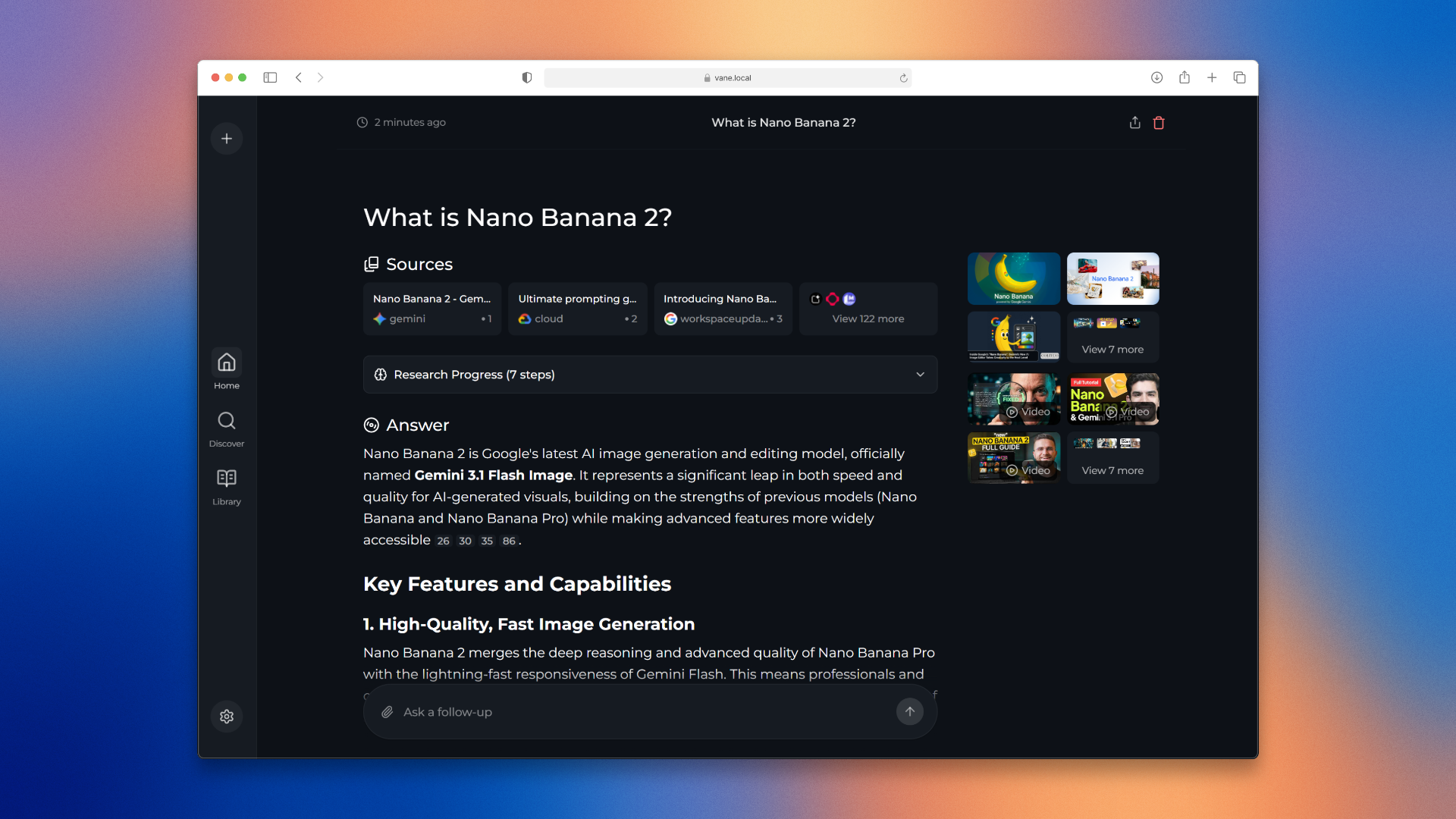
Want to know more about its architecture and how it works? You can read it here.
✨ Features
🤖 Support for all major AI providers - Use local LLMs through Ollama or connect to OpenAI, Anthropic Claude, Google Gemini, Groq, and more. Mix and match models based on your needs.
⚡ Smart search modes - Choose Speed Mode when you need quick answers, Balanced Mode for everyday searches, or Quality Mode for deep research.
🧭 Pick your sources - Search the web, discussions, or academic papers. More sources and integrations are in progress.
🧩 Widgets - Helpful UI cards that show up when relevant, like weather, calculations, stock prices, and other quick lookups.
🔍 Web search powered by SearxNG - Access multiple search engines while keeping your identity private. Support for Tavily and Exa coming soon for even better results.
📷 Image and video search - Find visual content alongside text results. Search isn't limited to just articles anymore.
📄 File uploads - Upload documents and ask questions about them. PDFs, text files, images - Vane understands them all.
🌐 Search specific domains - Limit your search to specific websites when you know where to look. Perfect for technical documentation or research papers.
💡 Smart suggestions - Get intelligent search suggestions as you type, helping you formulate better queries.
📚 Discover - Browse interesting articles and trending content throughout the day. Stay informed without even searching.
🕒 Search history - Every search is saved locally so you can revisit your discoveries anytime. Your research is never lost.
✨ More coming soon - We're actively developing new features based on community feedback. Join our Discord to help shape Vane's future!
Vane's development is powered by the generous support of our sponsors. Their contributions help keep this project free, open-source, and accessible to everyone.
We'd like to thank the following partners for their generous support:

|
Exa • The Perfect Web Search API for LLMs - web search, crawling, deep research, and answer APIs
|
Installation
There are mainly 2 ways of installing Vane - With Docker, Without Docker. Using Docker is highly recommended.
Getting Started with Docker (Recommended)
Vane can be easily run using Docker. Simply run the following command:
docker run -d -p 3000:3000 -v vane-data:/home/vane/data --name vane itzcrazykns1337/vane:latest
This will pull and start the Vane container with the bundled SearxNG search engine. Once running, open your browser and navigate to http://localhost:3000. You can then configure your settings (API keys, models, etc.) directly in the setup screen.
Note: The image includes both Vane and SearxNG, so no additional setup is required. The -v flags create persistent volumes for your data and uploaded files.
Using Vane with Your Own SearxNG Instance
If you already have SearxNG running, you can use the slim version of Vane:
docker run -d -p 3000:3000 -e SEARXNG_API_URL=http://your-searxng-url:8080 -v vane-data:/home/vane/data --name vane itzcrazykns1337/vane:slim-latest
Important: Make sure your SearxNG instance has:
- JSON format enabled in the settings
- Wolfram Alpha search engine enabled
Replace http://your-searxng-url:8080 with your actual SearxNG URL. Then configure your AI provider settings in the setup screen at http://localhost:3000.
Advanced Setup (Building from Source)
If you prefer to build from source or need more control:
Ensure Docker is installed and running on your system.
Clone the Vane repository:
git clone https://github.com/ItzCrazyKns/Vane.git
After cloning, navigate to the directory containing the project files.
Build and run using Docker:
docker build -t vane .
docker run -d -p 3000:3000 -v vane-data:/home/vane/data --name vane vane
Access Vane at http://localhost:3000 and configure your settings in the setup screen.
Note: After the containers are built, you can start Vane directly from Docker without having to open a terminal.
Non-Docker Installation
Install SearXNG and allow JSON format in the SearXNG settings. Make sure Wolfram Alpha search engine is also enabled.
Clone the repository:
git clone https://github.com/ItzCrazyKns/Vane.git
cd Vane
Install dependencies:
npm i
Build the application:
npm run build
Start the application:
npm run start
Open your browser and navigate to http://localhost:3000 to complete the setup and configure your settings (API keys, models, SearxNG URL, etc.) in the setup screen.
Note: Using Docker is recommended as it simplifies the setup process, especially for managing environment variables and dependencies.
See the installation documentation for more information like updating, etc.
Troubleshooting
Local OpenAI-API-Compliant Servers
If Vane tells you that you haven't configured any chat model providers, ensure that:
- Your server is running on
0.0.0.0 (not 127.0.0.1) and on the same port you put in the API URL.
- You have specified the correct model name loaded by your local LLM server.
- You have specified the correct API key, or if one is not defined, you have put something in the API key field and not left it empty.
Ollama Connection Errors
If you're encountering an Ollama connection error, it is likely due to the backend being unable to connect to Ollama's API. To fix this issue you can:
Check your Ollama API URL: Ensure that the API URL is correctly set in the settings menu.
Update API URL Based on OS:
- Windows: Use
http://host.docker.internal:11434
- Mac: Use
http://host.docker.internal:11434
- Linux: Use
http://<private_ip_of_host>:11434
Adjust the port number if you're using a different one.
Linux Users - Expose Ollama to Network:
Inside /etc/systemd/system/ollama.service, you need to add Environment="OLLAMA_HOST=0.0.0.0:11434". (Change the port number if you are using a different one.) Then reload the systemd manager configuration with systemctl daemon-reload, and restart Ollama by systemctl restart ollama. For more information see Ollama docs
Ensure that the port (default is 11434) is not blocked by your firewall.
Lemonade Connection Errors
If you're encountering a Lemonade connection error, it is likely due to the backend being unable to connect to Lemonade's API. To fix this issue you can:
Check your Lemonade API URL: Ensure that the API URL is correctly set in the settings menu.
Update API URL Based on OS:
- Windows: Use
http://host.docker.internal:8000
- Mac: Use
http://host.docker.internal:8000
- Linux: Use
http://<private_ip_of_host>:8000
Adjust the port number if you're using a different one.
Ensure Lemonade Server is Running:
- Make sure your Lemonade server is running and accessible on the configured port (default is 8000).
- Verify that Lemonade is configured to accept connections from all interfaces (
0.0.0.0), not just localhost (127.0.0.1).
- Ensure that the port (default is 8000) is not blocked by your firewall.
Using as a Search Engine
If you wish to use Vane as an alternative to traditional search engines like Google or Bing, or if you want to add a shortcut for quick access from your browser's search bar, follow these steps:
- Open your browser's settings.
- Navigate to the 'Search Engines' section.
- Add a new site search with the following URL:
http://localhost:3000/?q=%s. Replace localhost with your IP address or domain name, and 3000 with the port number if Vane is not hosted locally.
- Click the add button. Now, you can use Vane directly from your browser's search bar.
Using Vane's API
Vane also provides an API for developers looking to integrate its powerful search engine into their own applications. You can run searches, use multiple models and get answers to your queries.
For more details, check out the full documentation here.
Expose Vane to network
Vane runs on Next.js and handles all API requests. It works right away on the same network and stays accessible even with port forwarding.
One-Click Deployment




Upcoming Features
- Adding more widgets, integrations, search sources
- Adding ability to create custom agents (name T.B.D.)
- Adding authentication
Support Us
If you find Vane useful, consider giving us a star on GitHub. This helps more people discover Vane and supports the development of new features. Your support is greatly appreciated.
Donations
We also accept donations to help sustain our project. If you would like to contribute, you can use the following options to donate. Thank you for your support!
| Ethereum |
Address: 0xB025a84b2F269570Eb8D4b05DEdaA41D8525B6DD |
Contribution
Vane is built on the idea that AI and large language models should be easy for everyone to use. If you find bugs or have ideas, please share them in via GitHub Issues. For more information on contributing to Vane you can read the CONTRIBUTING.md file to learn more about Vane and how you can contribute to it.
Help and Support
If you have any questions or feedback, please feel free to reach out to us. You can create an issue on GitHub or join our Discord server. There, you can connect with other users, share your experiences and reviews, and receive more personalized help. Click here to join the Discord server. To discuss matters outside of regular support, feel free to contact me on Discord at itzcrazykns.
Thank you for exploring Vane, the AI-powered search engine designed to enhance your search experience. We are constantly working to improve Vane and expand its capabilities. We value your feedback and contributions which help us make Vane even better. Don't forget to check back for updates and new features!

 Vane is an open-source, privacy-focused AI answering engine: it searches the web for you and answers with cited sources, running entirely on your own hardware.