An open-source take on ChatGPT's Intelligent UI: answers stream as interactive UI (maps, photos, charts, drawings and working tools). Built with OpenUI.
open-intelligent-ui (thesysdev/open-intelligent-ui)
Searching Database…
The project's README from github.com/thesysdev/open-intelligent-ui. As one markdown file: README.md.
An open-source implementation of the "Intelligent UI" experience introduced in ChatGPT, built on OpenUI.
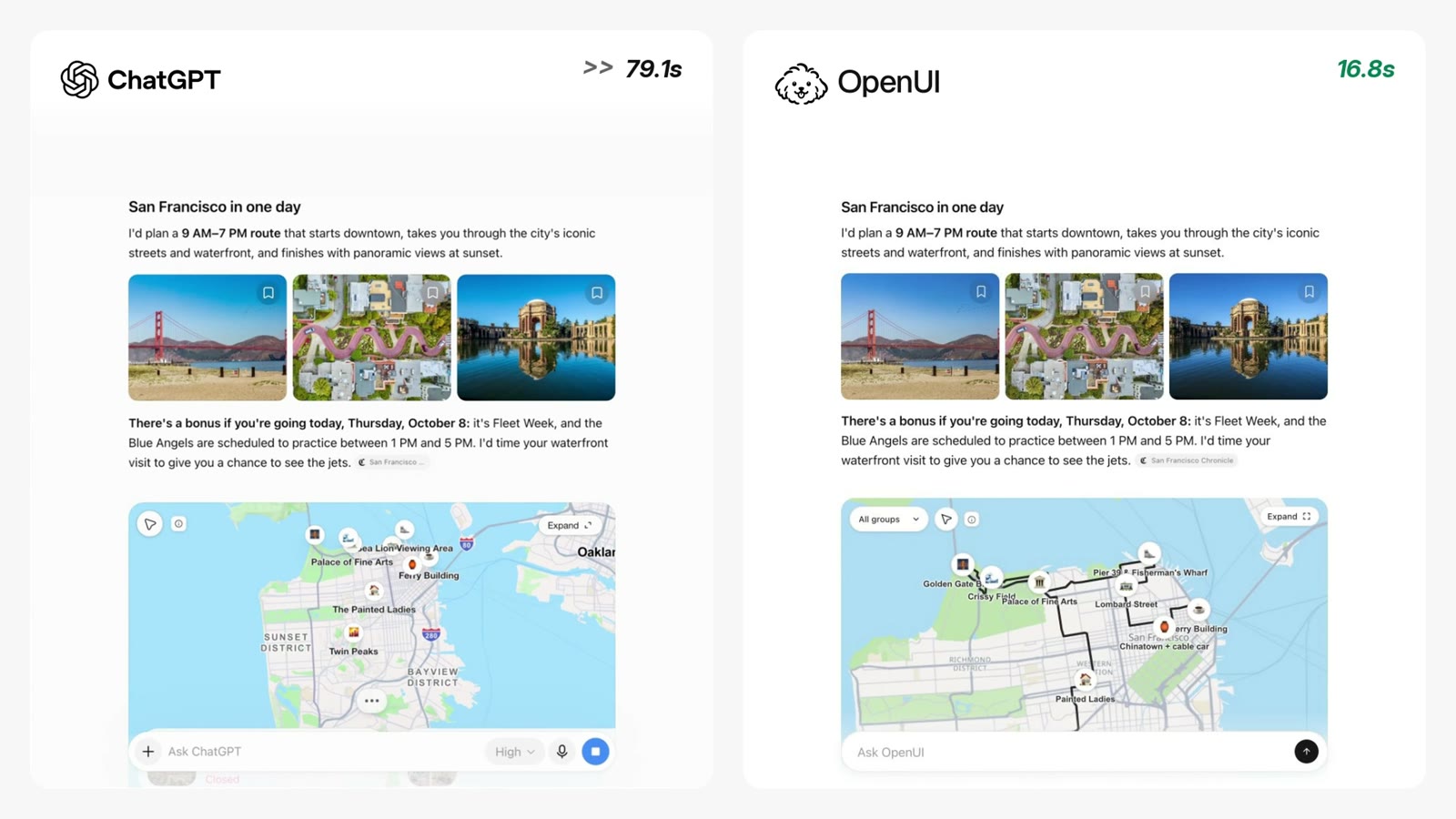
In ChatGPT's Intelligent UI, a request such as "plan a day in San Francisco" returns an interactive answer (a map, photographs and an editable itinerary) rather than text. This repository reproduces that experience with open-source components, so that the same kind of interface can be built, modified and shipped inside any application.
OpenUI is an open standard for Generative UI.
This project is independent and is not affiliated with or endorsed by OpenAI. "Intelligent UI" refers to the ChatGPT feature that this demo recreates.
ChatGPT's Intelligent UI (left) and this project (right) answering the same request. Select the image to play the video.
The model streams OpenUI Lang 1.0, and the app renders it with a library of primitives the model arranges itself: no layout is fixed in the components. The library (src/lib/library.ts, components in src/lib/components/) follows the Open Intelligent UI design. The components have light and dark tokens, but only /gallery (and the benchmark's /preview) switch to dark; the chat is light only:
Layout: Col, Row, Box (background, radius, border, sizes, flex), Grid, Card, Carousel (a scrolling, snapping row), Popover, Divider, Spacer.
Text: Title, Text (inline bold, italic, code, links), Caption, Label, Badge, Link, List and ListItem (bullets, numbers, a timeline), Markdown.
Inputs: Button, IconButton, Pressable, Input, TextArea, Select, SegmentedControl, Slider, Checkbox, RadioGroup, DatePicker, Timer (a countdown), Form. Each input's first argument is its value, usually a $variable other statements read.
Media and data: SearchImage (a photo the app finds for a query, like ChatGPT's server-resolved images), Image (a given URL), Icon (lucide names), Table (cells may be components), Chart (bar, line, area, pie, donut, scatter), Map with MapMarker (MapLibre GL, category filter, expansion, a street route), and YouTube.
More text and play: Text takes a list mixing strings and inline components; Quote, Code (with copy) and Math (KaTeX); Flashcard (flips) and Celebration (confetti when a condition turns true).
Drawing: Svg with G, Circle, Ellipse, Rect, Line, Path, Polyline, Polygon and SvgText, whose attributes take expressions so state can move them; HtmlView runs an HTML page (a game, a canvas) in a sandboxed iframe.
Functions: 59 generic @functions (src/lib/functions/) next to the 1.0 built-ins, so an answer can compute with its own state: lists (@Append, @Remove, @Update, @Toggle, @Includes, @Range, @Chunk, @Shuffle, ...), numbers (@Pow, @Random, @Clamp, @Percent, @Allocate for splits that add up to the cent, @Payment for loans, @Convert for units), text (@Format, @Join, @Split, @Replace, @Capitalize, @Plural, @Duration, @Default), colors (@MixColor), dates (@Today, @FormatDate, @AddDays, @AddMonths, @DaysBetween, @MonthsBetween, @StartOf) and data for dashboards (@GroupBy, @Pivot, @Top, @Between, @Bucket, @Cumulative, @MovingAvg, @Change, @Histogram, @Stats). A bad argument makes a call evaluate to null, as in 1.0.
Actions: @CopyToClipboard(text), for copying a shopping list or a split.
The dev-only page /gallery renders hand-written programs: a working answer for each of the 16 Intelligent UI examples (from the 7-speed bike to the arcade game), two dashboards over demo data, the prompt's worked examples, and programs that exercise every component.
Requires Node 24.
cp .env.example .env
npm install
npm run generate:apiKey   # writes THESYS_API_KEY to .env
npm run dev
Open http://localhost:3000 and try: I'm in San Francisco for a day, plan a sightseeing route for me
| Variable | Required | Purpose |
|---|---|---|
THESYS_API_KEY |
Yes, unless using a direct API | OpenUI Cloud (Gateway) key, used only on the server. |
THESYS_MODEL |
No | A {provider}/{model} id. Defaults to openai/gpt-6.1-sol. |
THESYS_BASE_URL |
No | The Gateway's Responses endpoint. Defaults to https://api.thesys.dev/v1/embed. |
LLM_BASE_URL |
No | Use any OpenAI-compatible Chat Completions API directly instead of Cloud, e.g. https://openrouter.ai/api/v1; see Use any OpenAI-compatible API. |
LLM_API_KEY |
With LLM_BASE_URL |
That API's key. |
LLM_MODEL |
With LLM_BASE_URL |
The model id it serves, e.g. openai/gpt-6.1-sol on OpenRouter. |
LLM_REASONING_EFFORT |
No | Reasoning effort for both paths. Defaults to low (about five times faster to the first line of UI on gpt-6.1-sol, same quality); default sends none. |
MODEL_PROVIDER |
No | Set to ollama to run a local model instead of Gateway; see Run with a local model. |
OLLAMA_MODEL |
No | The Ollama model to use. Defaults to qwen3.8:27b. |
OLLAMA_BASE_URL |
No | Ollama's OpenAI-compatible endpoint. Defaults to http://localhost:11434/v1. |
Set LLM_BASE_URL, LLM_API_KEY and LLM_MODEL to skip OpenUI Cloud and call a model directly, for example through OpenRouter:
LLM_BASE_URL=https://openrouter.ai/api/v1
LLM_API_KEY=sk-or-...
LLM_MODEL=openai/gpt-6.1-sol
/api/chat then builds the full OpenUI 1.0 system prompt on the server, from the same library spec and prompt options (generateSystemPrompt), streams Chat Completions and relays the text as Responses events, so the browser is unchanged. The Ollama variables below are shortcuts for the same path. Output is rendered as written: Cloud's correction step is not there.
The demo can also run on a local model through Ollama, with no API key required.
It works with any OpenAI-compatible local server (Ollama, LM Studio) via OLLAMA_BASE_URL.
Install Ollama and pull a model. The default is qwen3.8:27b (about 18 GB, best with 32 GB of memory or more); gpt-oss:20b and qwen3:8b are smaller alternatives.
ollama pull qwen3.8:27b
Give the model a larger context window. The OpenUI prompt for this app is about 8,000 tokens, and Ollama's default window is 4,096, which silently cuts the prompt and produces broken output. Either start Ollama with a larger default:
OLLAMA_CONTEXT_LENGTH=32768 ollama serve
or create a model variant with a larger window and use its name as OLLAMA_MODEL:
printf 'FROM qwen3.8:27b\nPARAMETER num_ctx 32768\n' > Modelfile
ollama create qwen3.8-32k -f Modelfile
In .env, set MODEL_PROVIDER=ollama (and OLLAMA_MODEL to use another model), then npm run dev.
What changes with a local model:
LLM_REASONING_EFFORT=low cuts the wait considerably./api/chat calls OpenUI Gateway's Responses API with generateSystemPrompt({ cloud: true }), so Gateway validates and corrects the generated OpenUI Lang against this app's component library. No search tool is sent: SearchImage finds its own photo (see Photos below), so the model never announces a search that shows nothing. Requests ask for low reasoning effort (LLM_REASONING_EFFORT).openAIReadableStreamAdapter or openAIAdapter in the browser.$variables (Slider($price, 0, 100)), and any statement that reads them updates as the user interacts. Buttons and Pressable run @Set, @Reset, @ToAssistant, @OpenUrl and @CopyToClipboard steps.src/lib/prompt-options.ts (rules and worked examples) teach the model to answer with a tool that works in the page: lists and inputs live in $variables, everything shown is computed from them with @functions, and buttons change them with @Set, instead of sending a form back to the assistant. @Each maps a list into rows, e.g. @Each(@Range(0, $years + 1), "y", {year: y, balance: $p * @Pow(1 + $r / 100, y)}).SearchImage (and Image when its URL fails) asks /api/wiki for the lead photo of the Wikipedia article titled like the query, then /api/image-search for Wikipedia and Wikimedia Commons results whose titles match it.src/lib/chat-storage.tsx), so they survive switching threads and reloading./api/street-route, which validates input and caches results from the public OSRM demo server's driving profile: a road overview, not walking or transit directions. When it's unavailable, a labelled direct connection is drawn instead.src/lib/components/theme.css, with a dark set under data-theme="dark" that only /gallery and /preview use. The chat shell keeps its AgentInterface theme from src/lib/response-theme.ts.| File | Purpose |
|---|---|
src/app/layout.tsx |
Root layout: page metadata, the Inter font and globals.css. |
src/app/page.tsx |
The chat page. Renders AgentInterface with the component library, theme, welcome screen and starter prompts, and connects it to /api/chat. |
src/app/globals.css |
Global CSS reset. |
src/app/shell.css |
Restyles the AgentInterface shell (sidebar, composer, starters, message bubbles), using theme tokens where they exist. |
src/app/api/chat/route.ts |
Chat endpoint. Validates the request, forwards the conversation to OpenUI Cloud (or, with LLM_BASE_URL or the Ollama variables, to any OpenAI-compatible API with the prompt built here), and streams the response back. |
src/app/api/street-route/route.ts |
Street geometry between stops from OSRM, cached on the server. |
src/app/api/wiki/route.ts |
Wikipedia lookup: the lead photos (and coordinates) of an article, cached on the server. |
src/app/api/image-search/route.ts |
Photo search for SearchImage: matching Wikipedia lead images, then Wikimedia Commons, cached on the server. |
src/app/gallery/ |
The dev-only /gallery page and its OpenUI Lang programs; tool-programs.ts holds the 16 examples and the dashboards. |
src/app/preview/ |
A dev-only page that renders one program handed in by a script, for the benchmark's screenshots. |
src/lib/library.ts |
The OpenUI component library: the primitives, their groups and prompt notes. |
src/lib/functions/ |
The library's @functions (defineFunction), with tests that run them through the 1.0 parser and evaluator. |
src/lib/actions.ts |
The @CopyToClipboard action and its handler. |
src/lib/demo-data.ts |
Demo data tools (get_orders, get_tickets, get_traffic) for Query-backed dashboards: their specs for the prompt and a function-map tool provider. |
src/lib/prompt-options.ts |
The prompt options: the working-tool rules and examples, and a dashboard variant with the demo data tools. |
src/lib/response-theme.ts |
Theme tokens for the AgentInterface shell (colors, fonts, radii, chat bubbles), built with createTheme(). |
src/lib/components/ |
The components (defineComponent + Zod schema each), their styles and tokens, and the map in map/. |
src/generated/spec.json |
Library spec sent to Gateway in the system prompt. Regenerate with npm run generate after changing a component schema. |
src/generated/system-prompt.txt |
The full system prompt for the library; dashboard-system-prompt.txt adds the demo data tools. Regenerate with npm run prompt. |
scripts/bench/ |
The benchmark: 16 example prompts and 8 dashboard prompts, run against a model and checked; see Benchmark. |
docs/openui-chatgpt-comparison.mp4 |
Side-by-side video of ChatGPT and this project; docs/openui-chatgpt-comparison.jpg is its README preview. |
.env.example |
The environment variables to copy into .env. |
npm install && npm run dev, then open http://localhost:3000/gallery. It needs no API key: every example and component renders from hand-written programs, with Light and Dark at the top right. Check phone width too.
src/lib/components/ (layout.tsx, text.tsx, markdown.tsx, controls.tsx, media.tsx, chart.tsx, table.tsx, svg.tsx, html-view.tsx, map/), styled by components.css (iui-* classes).src/lib/components/theme.css, with the dark set under [data-theme="dark"]. The chat shell around answers is src/app/shell.css and src/lib/response-theme.ts./gallery is the design surface: "Working tools" holds the 16 examples and two dashboards, "Components" one program per component.How anything looks can change freely. What the model writes must keep working, so keep these as they are, or regenerate the prompt (npm run generate && npm run prompt) and tell whoever owns it:
@function names, the order of their arguments, and option values such as Button's "solid" | "outline" | "soft" | "ghost";ink, muted, faint, surface, info, success, warning, danger, purple, pink, chart1 to chart6.npm run generate && npm run prompt # after changing a component schema, a function or the prompt options
npm test # the functions, and every gallery program and prompt example parsed by the 1.0 parser
npm run typecheck
npm run build
Then open /gallery (npm run dev), switch between light and dark, and try it at phone width.
scripts/bench/run.mjs sends the 16 example prompts (with system-prompt.txt) and 8 dashboard prompts (with dashboard-system-prompt.txt) to a model on any OpenAI-compatible endpoint, saves each answer, checks it with the 1.0 parser, flags @names and components the library does not have, and screenshots each answer in light and dark at 390 and 1280 px through /preview. The key is read from an environment variable at run time.
npm run dev   # in another terminal, for the screenshots
PLAYWRIGHT_CORE=/path/to/playwright-core CHROME=/path/to/chrome-headless-shell \
  OPENROUTER_API_KEY=... npm run bench -- --model <id> --base-url https://openrouter.ai/api/v1 --key-env OPENROUTER_API_KEY
npm run bench -- --fake                 # the hand-written programs stand in for the model
npm run bench -- --answers <dir>        # re-check and re-shoot saved <id>.oui answers
Results go to bench-out/<model>-<time>/: answers/, shots/, report.json and report.md. Other options: --only id,id, --kind tool|dashboard, --widths, --no-shots, --concurrency, --temperature, --max-tokens, --app.
An open-source take on ChatGPT's Intelligent UI: answers stream as interactive UI (maps, photos, charts, drawings and working tools). Built with OpenUI.