✨ Showcase
Type One Sentence, Get Complete Image & Text Posts
Step 1: Smart Outline Generation
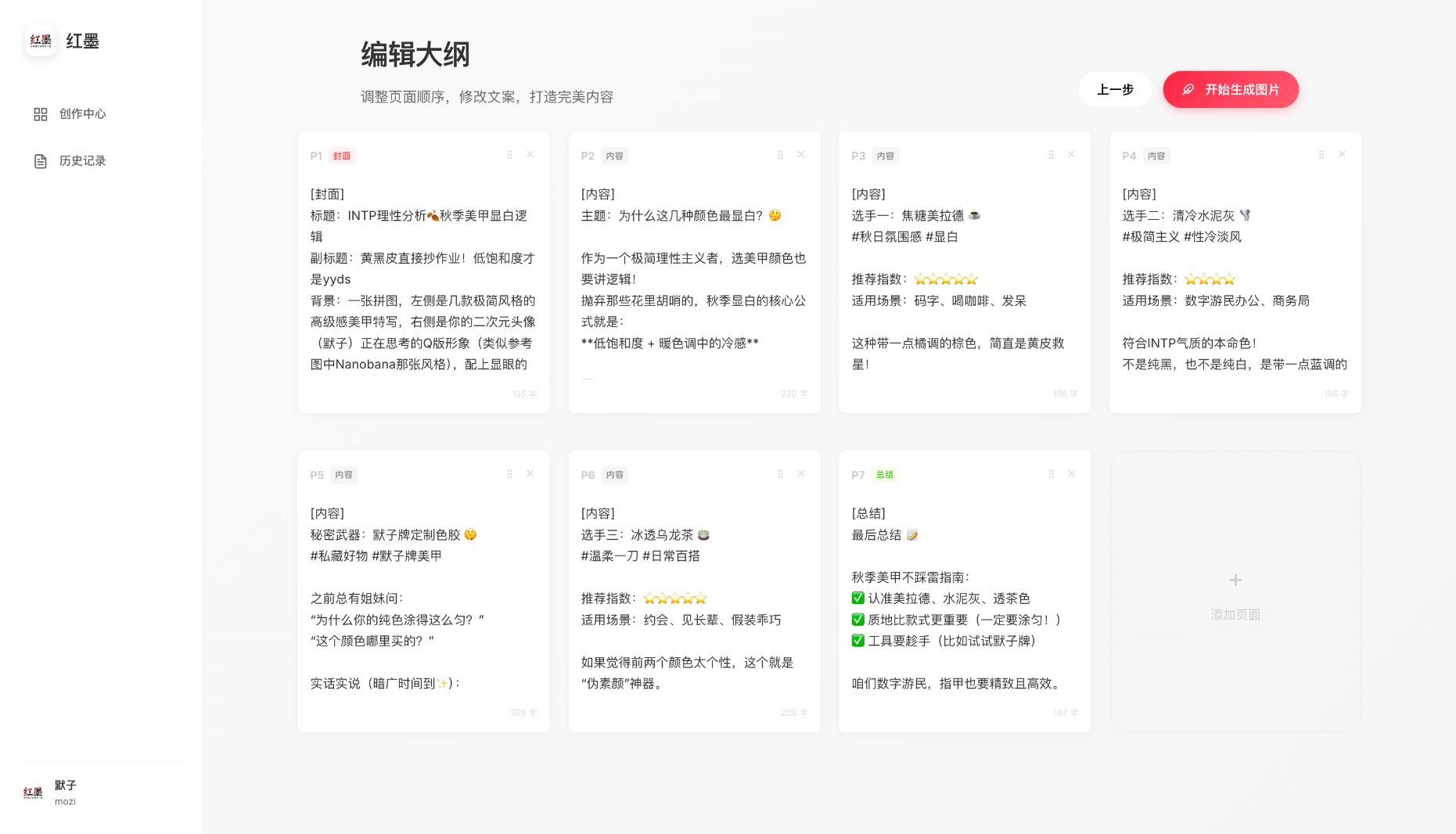
Features:
- ✏️ Edit content for each page
- 🔄 Reorder pages (not recommended)
- ✨ Custom description per page (highly recommended)
🎨 Step 2: Cover Page Generation
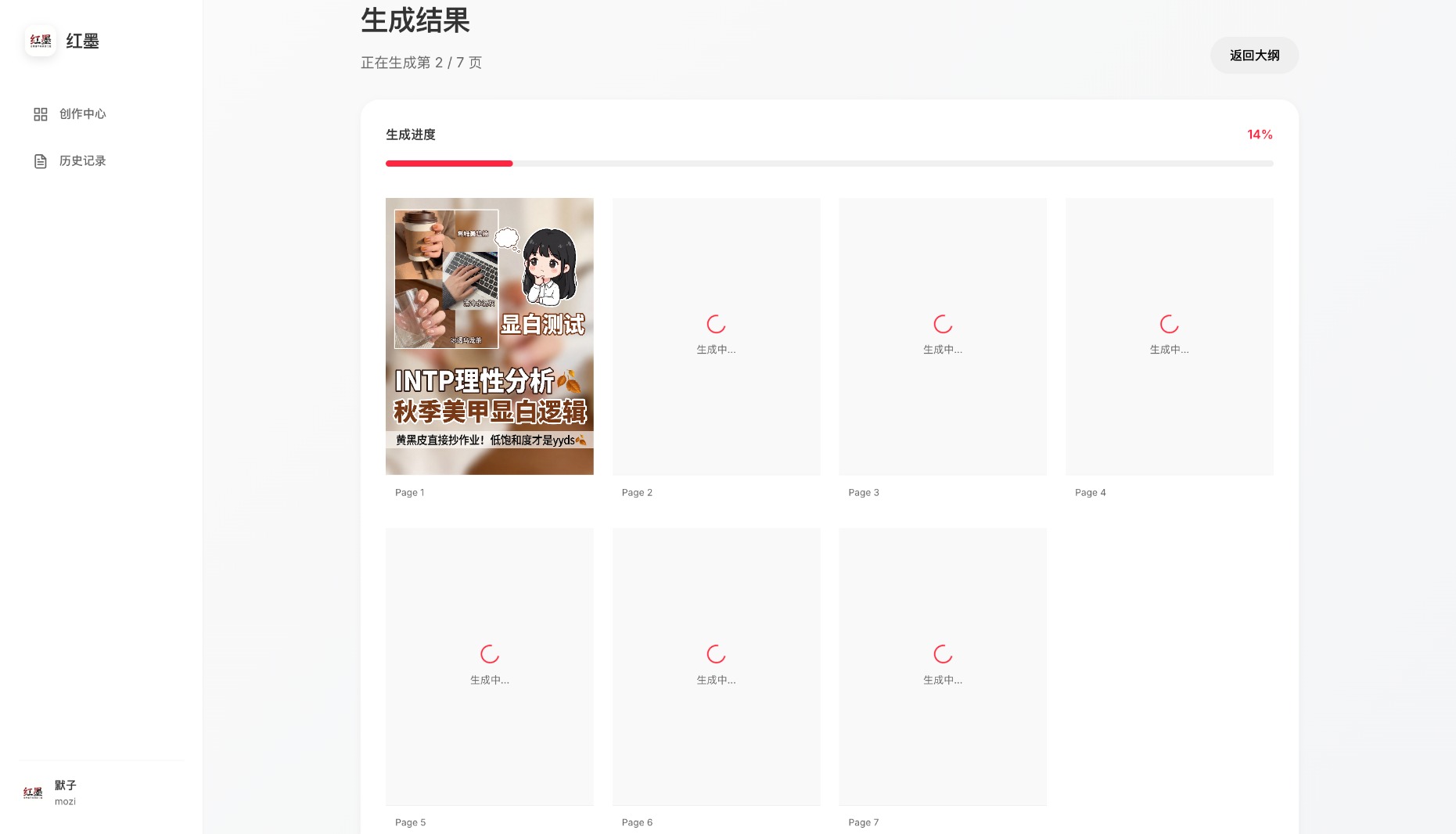
Cover Highlights:
- 🎯 Matches your personal style
- 📝 Accurate text rendering
- 🌈 Visually consistent and coordinated
📚 Step 3: Batch Content Page Generation
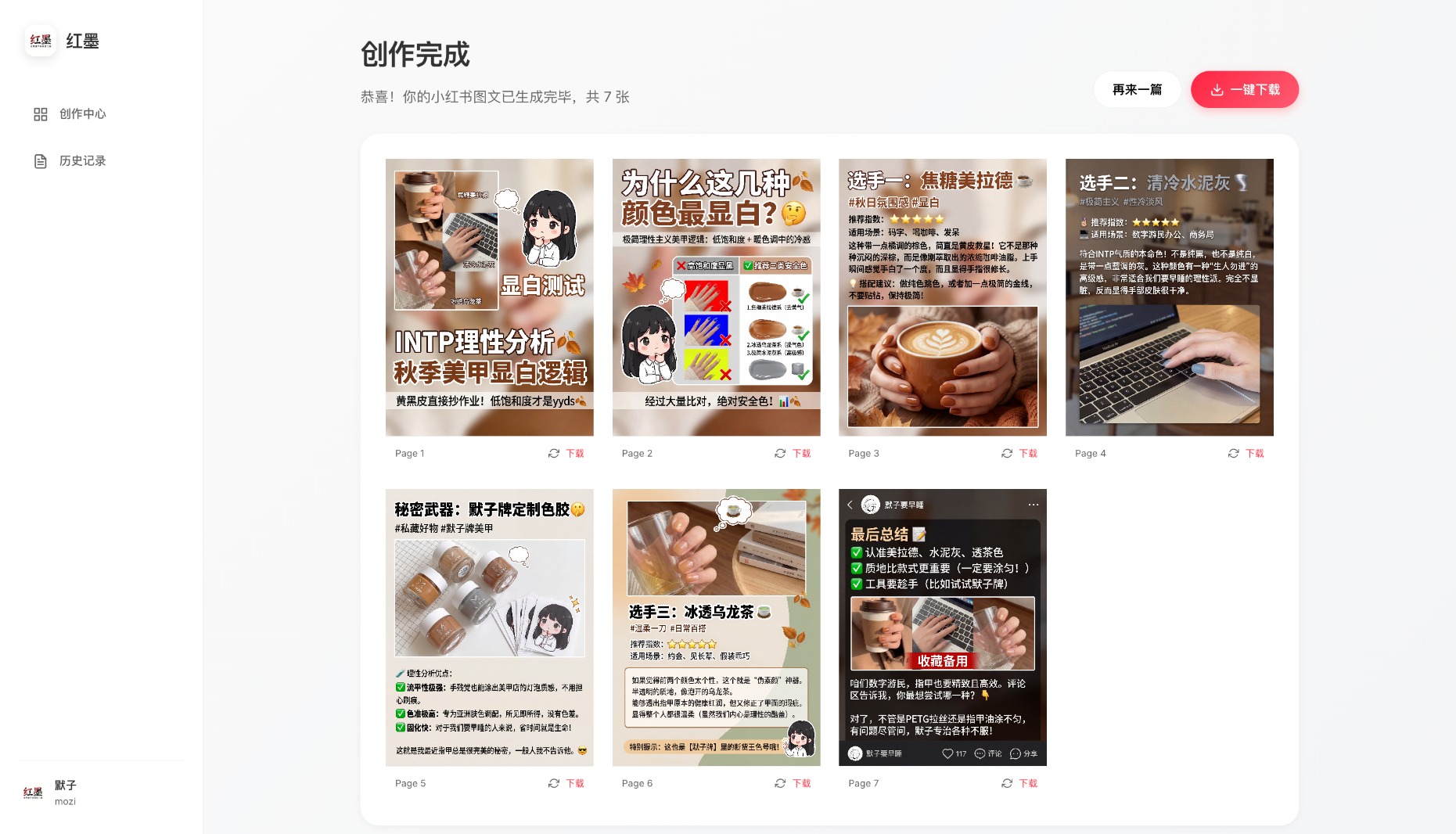
Generation Notes:
- ⚡ Concurrent generation for all pages (up to 15 by default)
- ⚠️ Disable high concurrency in settings if your API doesn't support it
- 🔧 Regenerate individual pages you're not satisfied with
🏗️ Tech Stack
🔧 Backend
| Technology |
Description |
| Language |
Python 3.11+ |
| Framework |
Flask |
| Package Manager |
uv |
| Text AI |
Gemini 3 |
| Image AI |
🍌 Nano Banana Pro |
|
🎨 Frontend
| Technology |
Description |
| Framework |
Vue 3 + TypeScript |
| Build Tool |
Vite |
| State Management |
Pinia |
| Styling |
Modern CSS |
|
📦 Deployment
Option 1: Docker (Recommended)
The simplest way — one command to start:
docker run -d -p 12398:12398 -v ./history:/app/history -v ./output:/app/output histonemax/redink:latest
Visit http://localhost:12398 and configure your API Key in the Settings page.
Using docker-compose (optional):
Download docker-compose.yml, then:
docker-compose up -d
Docker Notes:
- The container does not include any API Keys — configure them in the web UI
- Use
-v ./history:/app/history to persist history
- Use
-v ./output:/app/output to persist generated images
- Optional: mount custom config
-v ./text_providers.yaml:/app/text_providers.yaml
Option 2: Local Development
Prerequisites:
- Python 3.11+
- Node.js 18+
- pnpm
- uv
1. Clone the Repository
git clone https://github.com/HisMax/RedInk.git
cd RedInk
Copy the config templates:
cp text_providers.yaml.example text_providers.yaml
cp image_providers.yaml.example image_providers.yaml
Edit the config files with your API Key and service settings, or configure them later via the Settings page in the web UI.
3. Install Backend Dependencies
uv sync
4. Install Frontend Dependencies
cd frontend
pnpm install
5. Start the Services
One-Click Start (Recommended)
Run the start script to automatically install dependencies and launch both frontend and backend:
- macOS:
start.sh or double-click scripts/start-macos.command
- Linux:
./start.sh
- Windows: Double-click
start.bat
The browser will automatically open at http://localhost:5173
Manual Start
Start Backend:
uv run python -m backend.app
Visit: http://localhost:12398
Start Frontend:
cd frontend
pnpm dev
Visit: http://localhost:5173
🔧 Configuration
Configuration Methods
The project supports two configuration methods:
- Web UI (Recommended): Visual configuration via the Settings page after starting the service
- YAML Files: Edit config files directly
Text Generation Config
Config file: text_providers.yaml
# Active provider
active_provider: openai

providers:
  # OpenAI or compatible API
  openai:
    type: openai_compatible
    api_key: sk-xxxxxxxxxxxxxxxxxxxx
    base_url: https://api.openai.com/v1
    model: gpt-4o

  # Google Gemini (native API)
  gemini:
    type: google_gemini
    api_key: AIzaxxxxxxxxxxxxxxxxxxxxxxxxx
    model: gemini-2.0-flash
Image Generation Config
Config file: image_providers.yaml
# Active provider
active_provider: gemini

providers:
  # Google Gemini image generation
  gemini:
    type: google_genai
    api_key: AIzaxxxxxxxxxxxxxxxxxxxxxxxxx
    model: gemini-3-pro-image-preview
    high_concurrency: false

  # OpenAI compatible API
  openai_image:
    type: image_api
    api_key: sk-xxxxxxxxxxxxxxxxxxxx
    base_url: https://your-api-endpoint.com
    model: dall-e-3
    high_concurrency: false
High Concurrency Mode
- Off (default): Images generated one by one — suitable for GCP $300 trial accounts or rate-limited APIs
- On: Images generated in parallel (up to 15 simultaneously) — faster but requires API support for high concurrency
⚠️ Not recommended for GCP $300 trial accounts — may trigger rate limits and cause generation failures.
⚠️ Notes
API Quota Limits:
- Be aware of Gemini and image generation API call quotas
- GCP trial accounts should keep high concurrency disabled
Generation Time:
- Outline generation usually takes 15-30 seconds
- Image generation takes time — please be patient (don't leave the page)
🤝 Contributing
Issues and Pull Requests are welcome!
If this project helps you, please give it a Star ⭐
Changelog
v1.4.3 (2026-06-30)
- ✨ Default outline length changed to 5 pages when the user does not specify a page count
- ✨ Added clearer outline generation loading copy: "please wait, this step usually takes 15-30 seconds"
- 🏗️ Modularized image provider logic with reusable provider policy, API client, response extractor, rate limiter, and history image merger
- 🔧 Fixed GPT Image and Nano Banana compatible image APIs by omitting
response_format by default and supporting b64_json, data URLs, and temporary image URLs
- 🔧 Added per-record image generation recovery so refreshes or retries reuse existing images instead of spending upstream quota again
- 🔧 Protected history records from empty image overwrites and status regressions; history reads can self-heal from task image folders
- ✨ Added structured Problem Details-style API errors and reusable frontend error cards with copyable diagnostics
- 🐛 Fixed provider connection tests for reasoning models that return
reasoning_content or reasoning tokens without final content
- 🧪 Added backend coverage for image API compatibility, history merging, structured errors, cached generation, and reasoning-model connection tests
v1.4.2 (2026-03-15)
- ✨ Added English README as default with language toggle (中文/English)
- ✨ Added AI-generated English banner and showcase grid images
- ✨ Added Claude Opus 4.5 to acknowledgments
- ✨ Added shields.io badges (Stars, License, Docker Pulls, Release)
- ✨ Added GitHub Issue/PR templates for standardized contributions
- ✨ Added CONTRIBUTING.md and SECURITY.md
- 🐛 Fixed
rstrip('/v1') incorrectly stripping URL characters (e.g. api.openai.com → api.openai.co) — 5 occurrences across backend
- 🐛 Fixed image API test connection failing for chat-based endpoints (Doubao/Volcengine) by using configured endpoint_type instead of hardcoded
/v1/models
- 🐛 Fixed bare
except: clause replaced with except Exception: in history service
- 🐛 Fixed SSE stream reader not released on error in frontend API layer (resource leak)
- 🐛 Fixed 5 uncleared
setTimeout calls in ContentDisplay component (memory leak)
- 🐛 Fixed duplicate image regeneration requests by tracking in-progress indices
- 🐛 Fixed GenerateView redirect timer not cleared on component unmount
v1.4.1 (2025-12-29)
- ✨ Added one-click start scripts for macOS/Linux/Windows
- ✨ Added copywriting generation: auto-generate titles, body text, and tags
- 🔧 Fixed history saving: immediate save after outline generation, auto-save on edit (300ms debounce)
- 🔧 Optimized navigation: force-save unsaved changes before clicking "Start Generation"
- 🔧 Unified startup script port display to 12398
- 🔧 Cleaned up unused retry decorator code in backend generators
- 🔧 Fixed frontend CSS variable reference issues
- 🔧 Optimized checkHistoryExists API performance with dedicated endpoint
- 🔧 Standardized recordId assignment using setRecordId() method
v1.4.0 (2025-11-30)
- 🏗️ Backend refactored: split monolithic routes into modular blueprints (history, images, generation, outline, config)
- 🏗️ Frontend refactored: extracted reusable components (ImageGalleryModal, OutlineModal, ShowcaseBackground, etc.)
- ✨ Optimized homepage design, removed redundant content blocks
- ✨ Background image preloading with fade-in animation for better loading experience
- ✨ History persistence support (Docker deployment)
- 🔧 Fixed history preview and outline viewing
- 🔧 Optimized Modal component visibility control
- 🧪 Added 65 backend unit tests
v1.3.0 (2025-11-26)
- ✨ Added Docker support for one-click deployment
- ✨ Published official Docker image to Docker Hub:
histonemax/redink
- 🔧 Flask auto-detects frontend build artifacts for single-container deployment
- 🔧 Docker image includes blank config templates to protect API Key security
- 📝 Updated README with Docker deployment instructions
v1.2.0 (2025-11-26)
- ✨ Added copyright info display on all pages
- ✨ Improved image regeneration with single image redraw support
- ✨ Regenerated images maintain style consistency with full context (cover, outline, user input)
- ✨ Fixed image cache issues — regenerated images refresh immediately
- ✨ Unified text generation client supporting Google Gemini and OpenAI-compatible APIs with auto-switching
- ✨ Added web UI configuration for visual API provider management
- ✨ Added high concurrency mode toggle for different API quotas
- ✨ API Key masking for security
- ✨ Auto-save configuration with instant effect
- 🔧 Adjusted default max_output_tokens to 8000 for broader model compatibility
- 🔧 Optimized frontend routing and page layout for better UX
- 🔧 Simplified config file structure, removed redundant parameters
- 🔧 Optimized history image display with thumbnails to save bandwidth
- 🔧 History regeneration auto-loads cover image from filesystem as reference
- 🐛 Fixed missing
store.updateImage method causing regeneration failure
- 🐛 Fixed image URL concatenation error during history loading
- 🐛 Fixed raw image parameter handling in download function
- 🐛 Fixed image loading 500 error
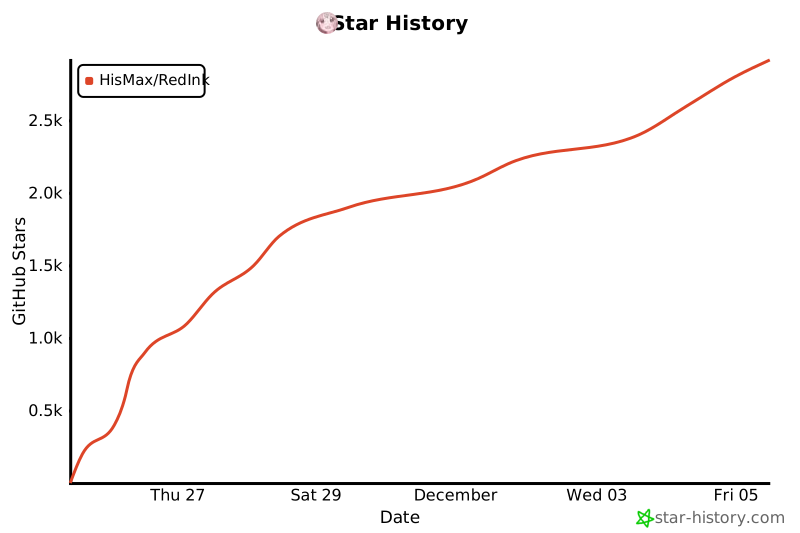
Support the Project

Star History
📄 License
Personal Use - CC BY-NC-SA 4.0
This project is licensed under CC BY-NC-SA 4.0
You are free to:
- ✅ Personal Use — for learning, research, and personal projects
- ✅ Share — copy and redistribute the material in any medium or format
- ✅ Adapt — remix, transform, and build upon the material
Under the following terms:
- 📝 Attribution — You must give appropriate credit, provide a link to the license, and indicate if changes were made
- 🚫 NonCommercial — You may not use the material for commercial purposes
- 🔄 ShareAlike — If you remix, transform, or build upon the material, you must distribute your contributions under the same license
Commercial License
If you wish to use this project for commercial purposes (including but not limited to):
- Providing paid services
- Integrating into commercial products
- Operating as a SaaS service
- Other for-profit uses
Please contact the author for a commercial license:
- 📧 Email: [email protected]
- 💬 WeChat: Histone2024 (please note "Commercial License Inquiry")
The author will provide flexible commercial licensing options based on your specific use case.
Disclaimer
This software is provided "as is", without warranty of any kind, express or implied, including but not limited to the warranties of merchantability, fitness for a particular purpose, and noninfringement. In no event shall the authors or copyright holders be liable for any claim, damages, or other liability.
🙏 Acknowledgments
- Google Gemini — Powerful text generation capabilities
- Claude Opus 4.5 — Intelligent code assistance and development support
- Image generation service providers — Stunning image generation
- Linux.do — Excellent developer community
👨💻 Author
Mozi (Histone) - AI Entrepreneur
- 🏠 Location: Hangzhou, China
- 🚀 Status: Startup in progress
- 📧 Email: [email protected]
- 💬 WeChat: Histone2024 (personal WeChat — no tech support)
- 🐙 GitHub: @HisMax
"Let AI do the creative work for us"
If this project helped you, share it with others! ⭐
Questions or suggestions? Feel free to open an Issue!






 RedInk превращает одно предложение в готовый пост для Xiaohongshu (Red Note) с подходящей обложкой, картинками для содержательных страниц и текстом. Для текста используется Gemini, для картинок — Nano Banana Pro.