Franco
An outbound sales agent that runs on your own machine, on the Claude Code or Codex subscription you already pay for.
Franco works through a list of accounts. For each one it finds or imports a reason to write, sends a short email sequence from your own mailbox, reads the replies, and handles them. Every fact it uses is recorded with its source. You review every email before it sends, unless you turn on autopilot.
It works in three ways (outreach.mode):
- Generated (
generated, the default). Franco finds businesses, reads their websites, picks the right person, and drafts a personalized sequence with the model.
- Approved copy (
templates). You import accounts you researched yourself, with one sourced observation for each. Franco sends your approved sequences word for word. No model writes them, the schedule counts business days, and the compliance footer and suppression rules are enforced in code. This is the mode Gortex uses today.
- Raad (
raad). Franco places every account in the narrowest funnel it fits, based on what it observed about the account (a marketplace that already runs AdSense is a different conversation from one with no ads). It then writes email 1 from that funnel's story, one customer benefit, the buyer's role and the account's own sourced fact, and follows up with the funnel's approved emails. More below.
Bring your own lists as CSV files: researched accounts, plain company/contact lists, and do-not-contact lists. Use the terminal or the dashboard. Every new campaign starts in preview: a few accounts per owner are staged for review, and nothing sends until someone signs the campaign off.
There is no model API bill. Model calls go through claude (Claude Pro or Max) or, if you opt in, an isolated codex runtime (a ChatGPT plan). Everything that can be done in plain code is done in plain code.
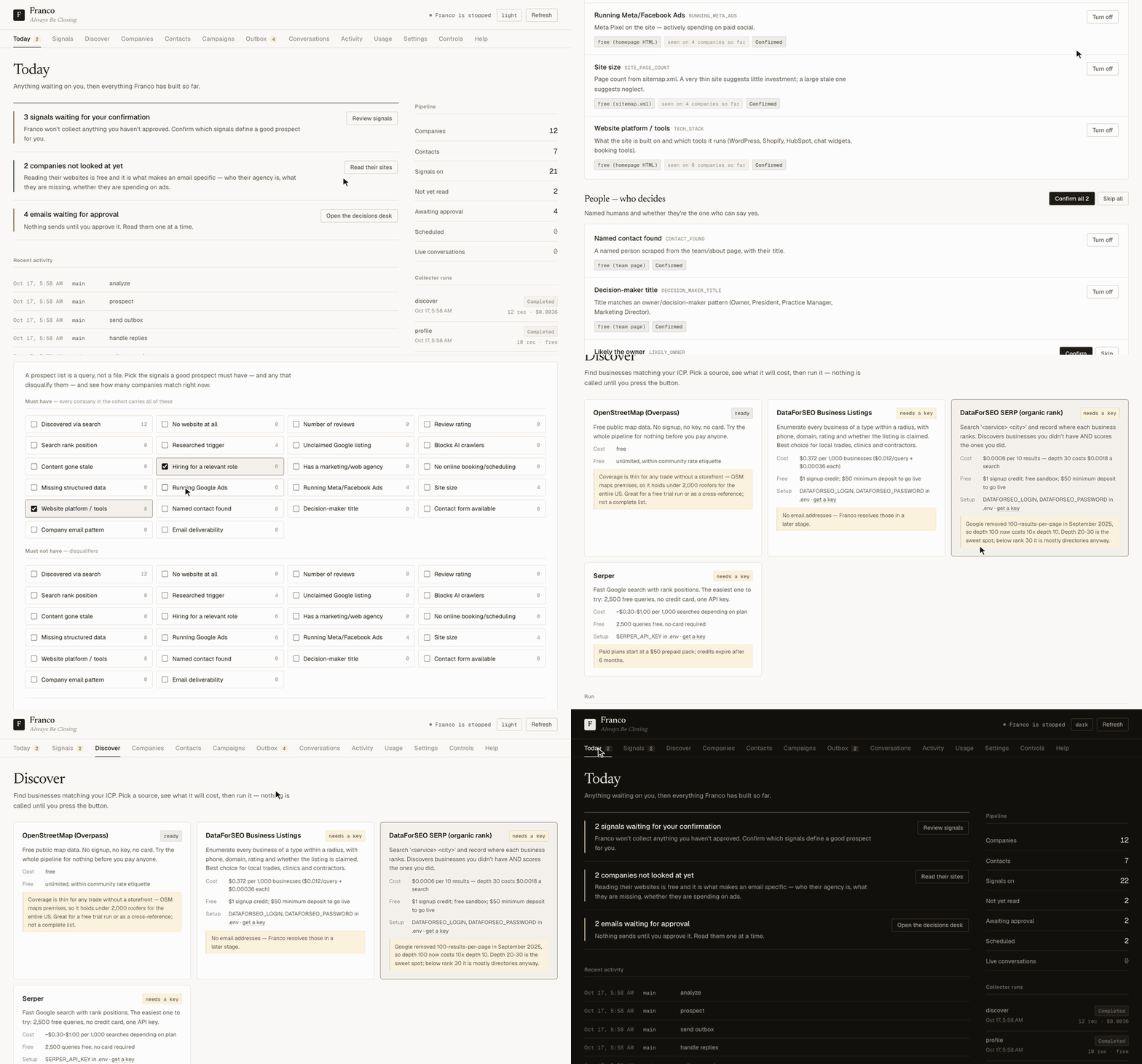
Recorded from made-up demo data by scripts/record_demo.py. Re-run it after changing the dashboard.
Contents
Quick start
You need:
- Python 3.11 or newer. macOS ships 3.9, so use
brew install [email protected].
- Claude Code, logged in with
claude login, on a Pro or Max plan. Codex is the alternative; see below.
- A mailbox to send from. Google Workspace is recommended.
Install from PyPI (recommended):
pipx install franco                    # or, in a virtualenv: pip install franco
franco init ~/franco && cd ~/franco    # your home folder: config, .env, prompts, skills, data
franco install                         # Chromium, for LinkedIn and JavaScript-heavy sites

$EDITOR .env                           # mail provider + verifier keys, documented inline
franco gmail auth                      # one-time browser login when provider: gmail
franco gmail test

franco dashboard                       # http://localhost:5555
franco run                             # the heartbeat loop
Franco works in one home folder. It finds it in this order:
$FRANCO_HOME, when set;- the source checkout, when you run from a clone;
- the current folder, when it has a
franco.yaml;
~/.franco otherwise.
franco init creates a home folder. The prompts and skills it copies there are yours to edit; delete one to go back to the version that ships with Franco.
Or run from a clone (to change Franco itself):
git clone https://github.com/GortexAI/franco.git && cd franco
python3.13 -m venv .venv && source .venv/bin/activate && pip install -e .
cp .env.example .env && $EDITOR .env
The clone is its own home folder: config, prompts/, skills/ and data/ live next to the code.
Or run the published container image (Linux, Intel or ARM). It already includes Chromium and the Claude CLI:
docker pull ghcr.io/gortexai/franco:latest      # or :edge for the latest main, or a version tag
docker compose up -d                            # uses that image, with ./data, .env and your config mounted
Every image is built by GitHub Actions with a signed provenance attestation. You can check one with gh attestation verify oci://ghcr.io/gortexai/franco:latest --owner GortexAI.
Or open the repo in Claude Code and say "set up Franco for me". CLAUDE.md turns Claude into the setup guide: it checks what's missing and asks for one thing at a time.
Put your real settings in franco.local.yaml. It is gitignored, and when it exists it is used instead of franco.yaml. The tracked franco.yaml stays a template.
How Franco works
Franco runs a heartbeat. By default, every 15 minutes it wakes up, checks quiet hours and its usage budget, decides what most needs doing, does it, logs it, and goes back to sleep.
handle replies > send due email > write/stage sequences > prospect > idle (analyze)
The decision is made from counts in the database, not by asking a model. Profiling and draining the outbox happen on every cycle because they cost nothing.
| Agent |
What it does |
| Scout |
Scores and personalizes prospects. Searching, website reading and email resolution are plain Python. |
| Writer |
Drafts sequences with the model (generated), renders approved copy with no model (approved copy), or places accounts in funnels and writes email 1 from the funnel's brief (raad). |
| Sender |
Stages each email in the outbox with a send time, then sends due, approved items with human-like pacing, the daily cap and the pre-send gate. |
| Handler |
Reads replies, removes quoted text, classifies intent, stops sequences, records opt-outs, detects bounces, and queues responses through the outbox. |
| Analyst |
On idle cycles, writes pipeline stats to data/analytics.json. |
Bring your own lists (CSV)
Every list Franco takes can come in as a CSV file. You don't have to use discovery or type entries one at a time. There are three kinds, each with a template:
| Kind |
One row is |
Required columns |
Used by |
accounts |
a researched account: one buyer, the campaign they get, and the sourced fact behind it |
company, domain, campaign, first_name, last_name, title, email, observation, source_url, source_date |
approved copy, raad |
contacts |
a company, optionally with a person at it |
company, domain |
generated, raad |
suppressions |
an email address or a whole domain never to contact |
value (an address or a domain) |
everything |
Optional columns:
- accounts:
owner, segment, hypothesis, score (0-10), email_status, linkedin_url.
- contacts:
first_name, last_name, title, email, email_status, linkedin_url, segment, location, phone, owner, notes. In raad mode, also campaign (pin a funnel), plus observation, source_url, source_date.
- suppressions:
reason. A suppressions file with no header, one address or domain per line, also works.
Common spreadsheet header names are accepted, for example website for domain, role for title and funnel for campaign.
From the terminal:
franco import --template --kind contacts > contacts.csv   # start from the template
franco import contacts.csv --kind contacts --dry-run      # check every row, write nothing
franco import contacts.csv --kind contacts --verify       # import; verify unverified emails
franco import accounts.csv                                # --kind defaults to accounts in approved-copy mode
franco suppress import do_not_contact.csv                 # same as --kind suppressions
franco suppress export > suppressions.csv
From the dashboard: the Contacts tab has an Import CSV panel. Pick the kind, download its template, then choose a file. The file is checked straight away, and nothing is written until you press Import. The browser reads the file and sends its text only to your local dashboard.
Rules that apply to every import:
- Every row is validated before anything is written, and rejected rows are reported with the reason.
- Rows are refused if they are suppressed (the address or its domain), already in outreach, owned by someone else, or duplicated within the file.
--verify spends one verification credit per address that isn't already marked verified. Only verified addresses are emailed, unless channels.email.send_to_risky is on.- Re-importing a file is safe: companies and people are matched by domain and email, not duplicated.
- An imported company with no person is profiled like a discovered one, and Franco finds and verifies people at it.
Approved-copy outreach
Use this mode when the copy has been signed off and must go out exactly as written.
1. Define the sequences
In franco.local.yaml:
outreach:
  mode: templates
  timezone: America/Los_Angeles
  send_hour: 9
  observation_max_age_days: 90
  campaigns:
    M1:
      name: Vertical marketplaces
      steps:
        - day: 1
          subject: "{{company}} sponsored listings"
          body: |
            Hi {{first_name}},

            I noticed {{verified_observation}}.
            ...
            Hemin
        - { day: 5,  subject: "...", body: "..." }
        - { day: 9,  subject: "...", body: "..." }
        - { day: 14, subject: "...", body: "..." }

compliance:
  require_footer: true
  postal_address: "<your postal address>"
  blocked_claims: ["real-time auction", "guaranteed uplift"]
  send_opt_out_ack: true
The only merge fields are {{first_name}}, {{last_name}}, {{company}}, {{title}}, {{verified_observation}} and {{sender_name}}. If any field can't be filled, the account is skipped. Franco never sends a gap or a guess.
day counts business days. Day 1 is the first send, and each later step is scheduled from the date the previous step actually went out.
2. Import researched accounts
Each row is one account, one buyer, the campaign they get, and the fact that justifies writing to them, with the page it came from and the date it was checked.
franco import --template --kind accounts > accounts.csv   # header + example row
franco import accounts.csv --dry-run                      # validate every row, write nothing
franco import accounts.csv --verify --owner Hemin
The columns are in Bring your own lists, and the dashboard's Import CSV panel does the same thing. Besides the general import rules, an account row is also rejected if it:
- is missing a field;
- names a campaign that isn't configured;
- has a bad email, a source that isn't a link, or a future date;
- has an observation too short to be a specific, checkable fact.
The observation is stored as the account's TRIGGER_OBSERVATION, together with its source and date.
3. What happens next
On the next cycle, the writer stages the full sequence for one contact per account. It does this only when:
- the email is verified;
- no one else at the company is already in outreach;
- the observation is within
observation_max_age_days.
The first accounts of every campaign are a preview. Nothing sends until the campaign is signed off; see Review, preview, autopilot and the kill switch. After sign-off, every step waits in the outbox for review, unless autopilot is on.
- Every email, replies included, is checked by the pre-send gate for blocked claims.
- Cold emails must also carry the footer, and they get List-Unsubscribe headers.
- No cold email is sent while the postal address is blank.
franco outbox lists each draft with the reason for writing: the campaign, the observation, its source and the date it was checked. franco outbox --edit <id> opens a draft in $EDITOR.
Raad mode
Named after Raad Mobrem, CEO of Intro, whose way of finding customers and personalizing outbound this mode follows:
- At most three customer benefits. Every message connects to one of them and never works against another.
- Narrow, observable funnels instead of one broad message. Zapier writing to a shop that runs Shopify and QuickBooks about exactly that connection lands far better than "we connect your apps". Split the market by what you can actually see: marketplace vs feed first, then edge cases like "already runs AdSense" vs "no ads at all".
- A tiny story the whole funnel recognises. "Every marketplace reaches a size where sellers will pay for better placement…", then how you handle it, kept to what is true today.
- The pitch shifts with the buyer. A CEO and a head of product care about different consequences of the same thing.
- One page per funnel. The email lands on a page that restates the same narrow case.
outreach:
  mode: raad
  benefits:                     # at most three; every funnel names one
    - { key: revenue, text: "A measurable revenue opportunity from intent already on the platform" }
    - { key: control, text: "Discovery and commercial rules stay under your product control" }
  first_email_max_words: 110
  funnels:                      # tried in order: put the narrowest first
    MKT_3P_ADS:
      name: "Marketplace already selling third-party ads"
      benefit: control
      match:
        require: ["segment=marketplace", "TECH_STACK=AdSense|Ad Manager|Prebid"]
      story: "A marketplace that monetises with third-party ad slots hands its best positions to a network that knows nothing about its sellers."
      solution: "We help a marketplace offer sponsored listings from its own sellers on one surface, under rules the product team sets."
      landing_url: "https://example.com/marketplaces"
      personas:                 # regex on the contact's title → the angle to lean on
        - { match: "\\b(ceo|founder)\\b", angle: "a revenue line from seller demand you already have" }
        - { match: "product|search",      angle: "control over eligibility, placement and guardrails" }
      steps:                    # approved follow-ups, by business day
        - { day: 5, subject: "...", body: "Hi {{first_name}}, ..." }
        - { day: 9, subject: "...", body: "..." }
    MKT:
      name: "Marketplace, no sponsored placement yet"
      benefit: revenue
      match: { require: ["segment=marketplace"] }
      story: "Every marketplace reaches a size where some sellers will pay for better placement..."
      solution: "..."
Match conditions can use:
- A signal code:
RUNNING_GOOGLE_ADS holds when the account carries that signal.
- A signal value:
TECH_STACK=AdSense holds when the value contains the text. a|b means either one.
- An account field: lowercase
segment, industry, location, company_size, description, hypothesis or owner, again with field=text.
exclude takes the same conditions. An account imported with a campaign (funnel) column keeps that funnel; the researcher's call beats inference. The profiler detects publisher ad tags (Google AdSense, Ad Manager, Prebid, Amazon Publisher Services), so "already sells ad space" is something Franco can observe.
What it does each cycle
- Find. It places each new, verified contact's company in the first funnel whose conditions hold. Companies that match nothing are left alone.
- Check there's something to say. It writes only when it can cite something specific and sourced: a researched
TRIGGER_OBSERVATION (within observation_max_age_days) or the observed signal that put the account in the funnel.
- Write email 1. The model gets the funnel's story, the account's facts with their sources, the funnel's solution, exactly one benefit, the role angle for the buyer's title, the word limit and the blocked-claims list. It may not claim anything that isn't in that text. A draft that contains a blocked claim is thrown away.
- Queue follow-ups. It adds the funnel's approved steps, rendered with merge fields and scheduled in business days.
- Apply the usual rules. Preview and sign-off (per funnel), the footer, the gate, suppression, the account stop and autopilot all apply as in the other modes.
See how your companies split across funnels, and why any one landed where it did:
franco funnels                          # benefits, each funnel's conditions, companies and reachable contacts
franco funnels --company market.example # which funnel, which conditions held, which facts
The dashboard's Campaigns tab shows the same table.
Plain contact lists work well with this mode. Import companies with a segment (and, when you have them, an observation and its source). Franco profiles their sites, places them, and writes from what it finds.
Generated outreach
This is the default mode, outreach.mode: generated.
1. Learn the product. franco train https://your-site.com writes franco.yaml, skills/product_knowledge.md and skills/competitive_intel.md. The two skills files are gitignored.
2. Confirm signals. Franco proposes a catalog of 24 signals it knows how to collect, such as ad pixels, tech stack, open roles, incumbent agency and search rank. It collects nothing until you confirm signals:
franco signals                     # the catalog, with what each one costs
franco signals --confirm free      # everything that costs nothing
franco signals --confirm SERP_RANK # a paid one, explicitly
The cohort builder on the dashboard's Signals tab turns confirmed signals into a target list. You choose what a prospect must have and what disqualifies it, and it counts the matches as you go.
3. Discover, or bring a list. Already have the companies? Import them as a CSV (franco import companies.csv --kind contacts) and skip discovery. Otherwise, discovery is the only stage that spends money, so it always estimates first:
franco discover --providers        # the menu, with real prices
franco discover --estimate
franco discover --provider dataforseo_listings --max-spend 2.00
| Source |
Cost |
Free tier |
| OpenStreetMap (default) |
free |
unlimited. Thin coverage; a trial source. |
| DataForSEO Business Listings |
$0.372 / 1k businesses |
$1 credit |
| DataForSEO SERP |
$0.0018 / search at depth 30 |
$1 credit + sandbox |
| Serper |
~$0.30–1.00 / 1k |
2,500 free |
4. Profile, enrich, verify. Franco reads each homepage, robots.txt, sitemap.xml, and the team and careers pages, with no model calls. It learns each company's email pattern and verifies one candidate through Reoon, ZeroBounce or Hunter. Every address is tagged verified, risky (catch-all), guess or invalid, and Franco only sends to deliverable addresses. Without a verifier key, addresses stay guess and are never sent to.
5. Write. The writer drafts sequences using the skills in skills/, which are plain Markdown you can edit. The next heartbeat uses your changes.
franco export writes a sequencer-ready CSV, so Franco is useful as a list builder even if it never sends.
Review, preview, autopilot and the kill switch
By default every outgoing email waits in the outbox for your approval. That includes replies.
franco outbox                   # review in the terminal (with the reason for each draft)
franco outbox --approve <id>    # or --approve-all, --reject <id>, --edit <id>
On the dashboard, the Outbox is a decisions desk. One email fills the pane, with a strip above it showing why the email exists:
- the campaign or funnel, the owner, the buyer and the account;
- the observation, a link to its source and the date it was checked.
You work the queue with A (approve), R (reject), E (edit the draft in place) and J/K (move).
Preview and sign-off. Every approved-copy campaign and raad funnel starts in preview, set by outreach.preview_accounts (default 10, 0 to turn it off):
- Small batch. Only the first 10 accounts per owner are staged.
- Always reviewed. They wait for review even with autopilot on.
- Nothing sends until a person signs the campaign off.
Signing off releases the preview for normal approval and lets the rest of the campaign's accounts stage on the next cycle.
franco preview                        # every campaign's state, and each preview account:
                                      # buyer, role, campaign, observation + source, exact first email
franco preview M1 --csv preview.csv   # the same as a spreadsheet, to send to whoever signs off
franco preview signoff M1 --by "Hemin"
franco preview reopen M1              # back to preview: nothing more sends
On the dashboard, each campaign in preview gets a card in the Outbox with a Download preview CSV button and a Sign off button.
Autopilot turns review off without editing config or restarting:
franco autopilot on              # new emails and replies send on schedule, unreviewed;
                                 # also approves what's already waiting (--keep-pending to skip)
franco autopilot off             # every new draft waits for you again
franco autopilot default         # follow channels.email.require_approval in the config
franco autopilot                 # current state and where it comes from
The same switch is on the dashboard's Outbox tab. Autopilot only removes the human review step. Everything else still applies:
- the pre-send gate;
- the footer and blocked-claims checks;
- suppression;
- the account-level stop;
- step ordering;
- the daily cap and quiet hours;
- the bounce kill switch.
Turning autopilot off doesn't affect emails that are already approved. To stop them, use the kill switch.
Kill switch: franco sending pause (or the Outbox button) stops all outbound immediately. franco sending resume restarts it and resets the bounce counter.
The pre-send gate is plain code with no model. It rejects an email that has:
- unrendered merge tags, banned phrases or blocked claims;
- a body over the length cap, too many links, or an HTML body;
- a missing footer (cold emails only);
- a recipient that isn't deliverable or doesn't match the database.
Replies
The handler polls the mailbox every cycle.
- Before any rule runs, it removes quoted history and Franco's own footer. A "no thanks" in your own quoted footer never counts as an opt-out.
- Out-of-office replies don't stop the sequence.
- Any other reply stops the sequence for that contact and cancels queued email to everyone else at the same company.
- Opt-outs ("no thanks", "unsubscribe", "stop", and so on, in the body or the subject) add the address to the suppression list. If
send_opt_out_ack is set, Franco sends a one-line acknowledgement after the suppression is recorded.
- "Later" pauses the contact and records when to get back in touch.
- Bounces mark the address invalid and cancel its queued sends. If the bounce rate passes
max_bounce_rate, Franco trips the kill switch.
- Not interested closes the conversation. If
outreach.reply_templates.not_interested is set, Franco sends that text once, as written, with no model involved.
- Other intents get a drafted response, which goes through the outbox like everything else.
outreach.reply_templates gives the handler approved wording to adapt for each intent: interested, question, wrong_person and later.
The suppression list is shared by every campaign and mode. A domain entry blocks everyone at that domain.
franco suppress list
franco suppress add [email protected] acme.com --reason "asked to stop"
franco suppress import do_not_contact.csv     # CSV with value[,reason], or one address per line
franco suppress export > suppressions.csv     # CSV: value, kind, reason, source, created_at
The dashboard
franco dashboard serves a local web UI at localhost:5555. It's plain HTML, CSS and JavaScript in franco/web/, with no build step: edit a file and reload.
- Today: anything waiting on a decision, then the pipeline
- Signals: the confirmation gate and the cohort builder
- Discover: providers and prices side by side, an estimate, then a run
- Companies / Contacts: everything found or imported, with CSV import (accounts, contacts, suppressions) and CSV export
- Campaigns: sequences, plus the funnel table in raad mode
- Outbox: the decisions desk, preview cards with sign-off, autopilot and the kill switch
- Conversations, Activity
- Usage: quota gauges and token counts for each agent
- Settings
Configuration
.env: credentials. Each variable is documented inline in .env.example. You need a mail provider (Gmail OAuth, SMTP+IMAP, or legacy Instantly). A verifier key is strongly recommended.
franco.yaml / franco.local.yaml:
persona:     { name, company, role, email, tone }
product:     { name, description, pricing, key_benefits, objection_responses, offer }
icp:         { industries, titles, company_size, geography, hiring_signals, geo_coordinates }
channels:
  email:     { provider: gmail | smtp | instantly, max_daily_sends, require_approval,
               send_to_risky, max_bounce_rate }
  linkedin:  { enabled }
outreach:    { mode: generated | templates | raad, campaigns, benefits, funnels,
               timezone, send_hour, observation_max_age_days, preview_accounts,
               first_email_max_words, reply_templates }
compliance:  { require_footer, postal_address, footer, unsubscribe_url,
               blocked_claims, send_opt_out_ack, opt_out_ack }
usage:       { max_daily_claude_percent, heartbeat_interval_minutes, quiet_hours }
brain:       { provider: claude | codex, model, reasoning_effort }
usage.max_daily_claude_percent caps whichever subscription brain.provider uses. Franco reads the live quota and leaves room for your own work.
Commands
franco run                      # heartbeat loop
franco dashboard                # web UI at localhost:5555
franco setup                    # interactive setup wizard
franco train <url>              # learn a product from its website
franco status [--check]         # pipeline summary / provider health check
franco usage                    # quota + per-agent tokens

franco import FILE              # a CSV list: --kind accounts|contacts|suppressions (--dry-run, --verify, --template)
franco signals                  # review/confirm signals
franco discover                 # find businesses (--providers, --estimate, --provider, --max-spend)
franco profile                  # read discovered sites (free)
franco export [--all]           # prospects → CSV

franco funnels [--company D]    # raad mode: how companies split across funnels
franco outbox                   # review queue (--approve, --approve-all, --reject, --edit)
franco preview [KEY]            # a campaign's preview (--csv FILE); preview signoff|reopen KEY
franco autopilot on|off|default # send without review
franco sending pause|resume     # kill switch
franco suppress list|add|remove|import|export
franco gmail auth|test          # Gmail provider
Using a ChatGPT plan (Codex)
Claude is the default. To use a ChatGPT plan instead:
npm install -g @openai/[email protected]   # the only version Franco accepts
codex login                            # "Sign in with ChatGPT"; API-key logins are refused
brain:
  provider: codex
  model: gpt-5.5        # the verified text-only model; code-mode models are refused
How it works:
- No fallback. Franco uses exactly the provider you configure and never switches to the other one.
- Isolated calls. Each call runs a throwaway
codex app-server in a private home and an empty workspace, with every tool turned off. Franco checks Codex's own reports to confirm the lockdown before it sends a prompt.
- Your setup is untouched. Your
~/.codex config and login are never changed or renewed.
- Paused when unusable. If Codex can't be used, Franco skips whole cycles and says why in the log,
franco status and the dashboard.
- Platforms. macOS and Linux only.
Compliance and deliverability
Franco automates outreach, but you are the sender.
- CAN-SPAM. Every email needs a truthful subject, an accurate from address, a working opt-out that is honored quickly, and a physical postal address. In every mode, Franco adds the footer to cold email and the gate refuses cold email without it. The template
franco.yaml ships with require_footer: true and a blank address, so no cold email sends until you enter your own postal address.
- GDPR / PECR. B2B email needs a legitimate interest you can defend: the message is relevant to the person's role, you know where the data came from, and objecting is easy. Imported accounts carry the source of their observation for exactly this reason.
- Honesty. If someone asks whether they are talking to an automated system, Franco says yes.
- LinkedIn. Automating LinkedIn violates its terms of service. LinkedIn is off by default.
Deliverability:
- Authenticate the sending domain with SPF, DKIM and DMARC, and check "Show original" on a test email.
- Warm the mailbox up.
- Start at 10–20 a day and ramp slowly. The
max_daily_sends default is a ceiling, not a target.
- Keep bounces under about 3%.
None of this is legal advice.
Your data folder
Everything Franco knows and does lives in data/ inside your home folder (next to the code in a clone, wherever you ran franco init for a pip install), on your machine. It is created on first run. In a clone and in a franco init folder it is gitignored. Never commit it, never put it in a shared drive, and never attach it to an issue.
| File |
What it holds |
Sensitive? |
franco.db |
The SQLite database: every company, person, email address, observation, email sent, reply, suppression, setting and decision |
Yes: personal data about the people you contact |
gmail_token.json |
The Gmail OAuth refresh token from franco gmail auth |
Yes: treat it like a password; it can send as you |
franco.log |
The heartbeat log when Franco is started from the dashboard |
Somewhat: email addresses appear in it |
franco.pid |
The process id of a dashboard-started franco run |
No |
analytics.json |
The analyst's latest pipeline report |
Somewhat |
Your credentials are in .env and your sending config is in franco.local.yaml. Both are next to data/, and both are gitignored for the same reason.
Using it
- Look inside.
sqlite3 data/franco.db, or any SQLite browser. Useful tables:
companies, prospects, observations (every fact with its source);outbox (every email, with status and send time) and conversations;suppressions, campaigns, actions (every decision Franco made);settings (autopilot, the kill switch, sign-offs).
- Get lists out without SQL:
franco export (deliverable contacts as CSV), franco export --all, franco suppress export, franco preview --csv, or the export buttons on the dashboard.
- Back it up while Franco is running, safely:
sqlite3 data/franco.db ".backup data/backup-$(date +%F).db". Copying the file mid-write can give you a corrupt copy.
- Move to another machine. Stop Franco, then copy
data/, .env and franco.local.yaml. Run franco gmail auth again if the token doesn't carry over.
- Start fresh. Stop Franco and move
data/franco.db aside. The next run creates an empty database. Export the suppression list first and re-import it, so that people who opted out stay opted out.
- Someone asks what you hold about them, or to be deleted. Look them up in
prospects and outbox by email. To delete them, remove their rows from prospects, outbox and conversations, and keep (or add) their address in suppressions so they're never contacted again.
- Docker mounts
./data into the container (see docker-compose.yml), so the same folder is used either way.
How it's organised
Each fact Franco learns is a row in observations, not a column. A row carries the signal code, the value, a confidence, an evidence URL and a timestamp. As a result:
- a new signal needs no migration;
- re-observing an account builds a history automatically;
- a cohort or a funnel is a query.
A database trigger rejects any signal code that isn't in the governed signal_codes table. The schema migrates itself forward on startup.
Troubleshooting
command not found: franco: run source .venv/bin/activate.- Odd import errors on macOS: the venv is probably Python 3.9. Rebuild it with
python3.13 -m venv .venv.
ModuleNotFoundError: franco on macOS 3.13: run franco install again; it relinks the package.- Claude calls fail: run
claude login and check with claude -p "say hi".
- Nothing is staged in approved-copy mode: run
franco import --dry-run and check the campaign key, the email status (it must be verified), the observation's age, and whether someone else at the company is already in outreach. The heartbeat log names the reason for each skipped account.
- Staged, but nothing sends: the campaign is probably still in preview. Run
franco preview, then franco preview signoff KEY --by NAME.
- Raad mode writes nothing: run
franco funnels. Companies may match no funnel, may have no verified contact, or Franco may have nothing sourced to cite. franco funnels --company DOMAIN shows what it knows about one company.
- Cold email held:
compliance.postal_address is blank while require_footer is on.
- Nothing sends: check
franco sending, quiet hours, the daily cap and franco gmail test.
- Emails land in spam: almost always a domain problem, not the copy. Check SPF, DKIM and DMARC, warmup and volume.
Development
pip install -e ".[dev]"
pytest -q                          # full suite
python scripts/record_demo.py      # re-record docs/dashboard.gif (pip install -e ".[demo]")
Dependencies live in three files that must agree (a test checks):
| File |
What it is |
pyproject.toml |
The version ranges pip install -e . accepts |
requirements.in |
The same direct dependencies and ranges |
requirements.txt |
Generated. Every package, including the ones those depend on, pinned to an exact version with hashes. Docker installs exactly this. |
To change a dependency, edit pyproject.toml and requirements.in, then regenerate the lock:
uvx --python 3.11 --from pip-tools pip-compile --generate-hashes \
    --allow-unsafe --strip-extras --output-file=requirements.txt requirements.in
The exact pins are what let GitHub's dependency graph see every installed package. Dependabot alerts and Dependabot security updates rely on them, and Renovate (renovate.json) recompiles the lock when it updates a dependency. Without a lock, Dependabot can't tell what's installed and won't open security fixes.
franco/
├── main.py            # heartbeat loop
├── brain.py           # Claude/Codex provider, skills injection, usage
├── codex.py           # isolated Codex runtime
├── state.py           # SQLite schema + migrations, observations, outbox, suppression, settings
├── outreach.py        # rendering, footer, business days, quoted-text stripping
├── importer.py        # CSV lists: accounts, contacts, suppressions
├── funnels.py         # raad mode: funnel placement and the funnel report
├── gate.py            # deterministic pre-send checks
├── signals.py         # the signal catalog
├── dashboard.py       # FastAPI JSON API
├── agents/            # scout, writer, sender, handler, analyst
├── collectors/        # discover (paid adapters), profile (free HTTP)
├── integrations/      # gmail, smtp, instantly, email finder, quota
└── web/               # dashboard HTML/CSS/JS
skills/                # sales knowledge, editable Markdown
prompts/               # agent system prompts
scripts/record_demo.py # demo GIF recorder
tests/
See CHANGELOG.md for release history.
License
MIT. See LICENSE. Copyright (c) 2026 Gortex. Franco is derived from an MIT-licensed project, and that project's copyright notice is kept in LICENSE as the license requires.
Franco is built and maintained by Gortex.
Gortex · 440 N Wolfe Rd, Suite E133, Sunnyvale, CA 94085 · [email protected]
Bugs and feature requests: GitHub issues. Want to help? Start with CONTRIBUTING.md; everyone taking part follows the Code of Conduct.
Found a security problem? Please report it privately, as described in SECURITY.md, not in a public issue.
If you run Franco yourself, put your own postal address in compliance.postal_address. The footer on your emails must name you, not Gortex.

 Franco 是一个自主运行的外呼销售代理,它会调研目标客户,用你自己的邮箱起草并发送个性化的冷邮件序列,并处理回复。它运行在你已经付费的 Claude Code 或 Codex 订阅上,不需要单独的模型 API。