



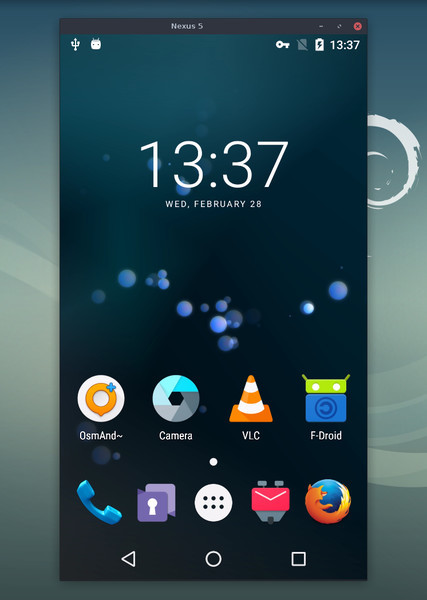
这是什么?
 scrcpy(读音类似 'screen copy')可以让你在电脑上显示并操控你的安卓设备:它通过 USB 或 TCP/IP 镜像视频和音频,让你用键盘和鼠标操作手机。
scrcpy(读音类似 'screen copy')可以让你在电脑上显示并操控你的安卓设备:它通过 USB 或 TCP/IP 镜像视频和音频,让你用键盘和鼠标操作手机。手机上需要安装什么东西吗?什么都不用——它是 Linux、Windows 和 macOS 上的桌面应用。不需要 root 权限,也不会在安卓设备上留下任何已安装的东西。
什么都不用——它是 Linux、Windows 和 macOS 上的桌面应用。不需要 root 权限,也不会在安卓设备上留下任何已安装的东西。要开始投屏我的手机需要做些什么?为你的操作系统安装这个应用,在手机的开发者选项里开启 USB 调试,然后插上数据线或通过 TCP/IP 连接。
为你的操作系统安装这个应用,在手机的开发者选项里开启 USB 调试,然后插上数据线或通过 TCP/IP 连接。我的安卓版本能用吗?任何运行 Android 5.0(API 21)或更新版本的设备都可以;音频传输需要 Android 11 及以上,摄像头镜像需要 Android 12 及以上。
任何运行 Android 5.0(API 21)或更新版本的设备都可以;音频传输需要 Android 11 及以上,摄像头镜像需要 Android 12 及以上。有没有某些设备上键盘鼠标控制一开始不管用的情况?有——在某些手机上(尤其是小米),你还需要额外开启“USB 调试(安全设置)”并重启设备,键盘和鼠标控制才能生效。
有——在某些手机上(尤其是小米),你还需要额外开启“USB 调试(安全设置)”并重启设备,键盘和鼠标控制才能生效。投屏会把数据发送到互联网上吗?不会。scrcpy 不需要账号、没有广告、也不联网——画面和音频都只通过你自己的 USB 或 TCP/IP 连接传输。
不会。scrcpy 不需要账号、没有广告、也不联网——画面和音频都只通过你自己的 USB 或 TCP/IP 连接传输。实际投屏有多流畅?根据设备不同,可以达到 30~120fps、1920×1080 或更高分辨率,延迟约 35~70 毫秒,从启动到显示第一帧画面大约需要一秒。
根据设备不同,可以达到 30~120fps、1920×1080 或更高分辨率,延迟约 35~70 毫秒,从启动到显示第一帧画面大约需要一秒。除了基本的投屏,它还能做什么?它可以录屏、在安卓屏幕熄灭的情况下继续投屏、双向复制粘贴、在虚拟显示器上运行应用、通过 HID 模拟物理键盘和鼠标、支持游戏手柄,还有 OTG 模式。
它可以录屏、在安卓屏幕熄灭的情况下继续投屏、双向复制粘贴、在虚拟显示器上运行应用、通过 HID 模拟物理键盘和鼠标、支持游戏手柄,还有 OTG 模式。它能用手机摄像头,或者当电脑摄像头用吗?可以——在 Android 12 及以上版本可以镜像摄像头并录制为 MP4;在 Linux 上还可以通过 V4L2 把设备的前置摄像头当作电脑摄像头使用。
可以——在 Android 12 及以上版本可以镜像摄像头并录制为 MP4;在 Linux 上还可以通过 V4L2 把设备的前置摄像头当作电脑摄像头使用。运行起来之后,有哪些必知的快捷操作?鼠标右键相当于返回(BACK),中键相当于主屏(HOME),Alt+f 切换全屏;运行 scrcpy -m1024 降低分辨率可以大幅提升性能。
鼠标右键相当于返回(BACK),中键相当于主屏(HOME),Alt+f 切换全屏;运行 scrcpy -m1024 降低分辨率可以大幅提升性能。What are similar projects?escrcpy, QtScrcpy, Recordly, Captura, WebRTC-Experiment, my-tv, screenity, rustdesk
escrcpy, QtScrcpy, Recordly, Captura, WebRTC-Experiment, my-tv, screenity, rustdeskWhich topics is it in?sdl2, screencast, recording, adb, mouse, screen-recording, webcam, screen-capture, usb, remote-desktop, remote-control, keyboard
sdl2, screencast, recording, adb, mouse, screen-recording, webcam, screen-capture, usb, remote-desktop, remote-control, keyboard