



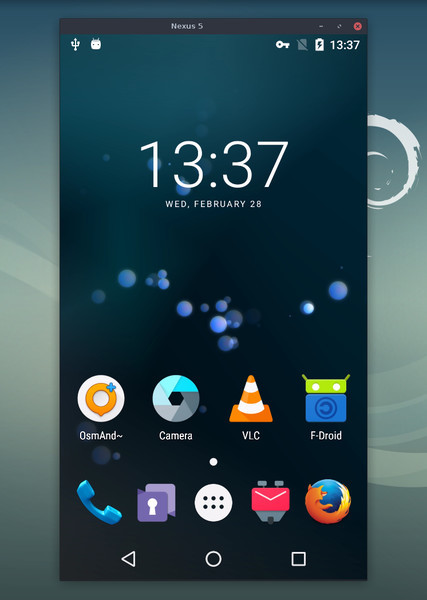
What is this?
 scrcpy (pronounced 'screen copy') displays and controls your Android device from the computer: it mirrors video and audio over USB or TCP/IP and lets you drive the phone with your keyboard and mouse.
scrcpy (pronounced 'screen copy') displays and controls your Android device from the computer: it mirrors video and audio over USB or TCP/IP and lets you drive the phone with your keyboard and mouse.Do I need to install anything on my phone?Nothing — it is a desktop app for Linux, Windows, and macOS. It needs no root access and leaves nothing installed on the Android device.
Nothing — it is a desktop app for Linux, Windows, and macOS. It needs no root access and leaves nothing installed on the Android device.What does it take to start mirroring my phone?Install the app for your OS, enable USB debugging in the phone's developer options, then plug in a cable or connect over TCP/IP.
Install the app for your OS, enable USB debugging in the phone's developer options, then plug in a cable or connect over TCP/IP.Will my Android version be supported?Any device with Android 5.0 (API 21) or newer works; audio forwarding needs Android 11+ and camera mirroring needs Android 12+.
Any device with Android 5.0 (API 21) or newer works; audio forwarding needs Android 11+ and camera mirroring needs Android 12+.Are there devices where control does not work right away?Yes — on some phones, notably Xiaomi, you must additionally enable 'USB debugging (Security Settings)' and reboot the device before keyboard and mouse control works.
Yes — on some phones, notably Xiaomi, you must additionally enable 'USB debugging (Security Settings)' and reboot the device before keyboard and mouse control works.Does mirroring send anything to the internet?No. scrcpy works with no account, no ads, and no internet required — the screen and audio travel over your own USB or TCP/IP link.
No. scrcpy works with no account, no ads, and no internet required — the screen and audio travel over your own USB or TCP/IP link.How smooth is the mirroring in practice?Expect 30~120fps depending on the device, 1920×1080 or above, 35~70ms of latency, and roughly one second until the first image appears.
Expect 30~120fps depending on the device, 1920×1080 or above, 35~70ms of latency, and roughly one second until the first image appears.What can it do beyond plain mirroring?It records the screen, mirrors while the Android screen stays off, copy-pastes in both directions, runs apps in virtual displays, simulates a physical keyboard and mouse over HID, supports gamepads, and has an OTG mode.
It records the screen, mirrors while the Android screen stays off, copy-pastes in both directions, runs apps in virtual displays, simulates a physical keyboard and mouse over HID, supports gamepads, and has an OTG mode.Can it use the phone's camera or act as a webcam?Yes — on Android 12+ it can mirror the camera and record it to MP4, and on Linux it can expose the device's front camera as a webcam via V4L2.
Yes — on Android 12+ it can mirror the camera and record it to MP4, and on Linux it can expose the device's front camera as a webcam via V4L2.Any must-know shortcuts once it is running?Right-click triggers BACK, middle-click triggers HOME, Alt+f toggles fullscreen, and running scrcpy -m1024 to lower the resolution can greatly improve performance.
Right-click triggers BACK, middle-click triggers HOME, Alt+f toggles fullscreen, and running scrcpy -m1024 to lower the resolution can greatly improve performance.What are similar projects?escrcpy, QtScrcpy, Recordly, Captura, WebRTC-Experiment, my-tv, screenity, rustdesk
escrcpy, QtScrcpy, Recordly, Captura, WebRTC-Experiment, my-tv, screenity, rustdeskWhich topics is it in?sdl2, screencast, recording, adb, mouse, screen-recording, webcam, screen-capture, usb, remote-desktop, remote-control, keyboard
sdl2, screencast, recording, adb, mouse, screen-recording, webcam, screen-capture, usb, remote-desktop, remote-control, keyboard