Claude Engineer v3 🤖
A powerful self-improving AI Assistant designed for creating and managing AI tools with Claude 3.5. This framework enables Claude to generate and manage its own tools, continuously expanding its capabilities through conversation. Available both as a CLI and a modern web interface!
History and Evolution
This project represents the third major iteration of Claude Engineer, building upon the success of Claude Engineer v2. Key improvements from previous versions include:
- Upgraded to Claude 3.5 Sonnet model
- Enhanced token management with Anthropic's new token counting API
- Self-improving tool creation system
- Streamlined conversation handling
- More precise token usage tracking and visualization
- Autonomous tool generation capabilities
- No need for automode since Claude can intelligently decide when to run tools automatically and sequentially.
Description
Claude Engineer v3 is a sophisticated framework that allows Claude to expand its own capabilities through dynamic tool creation. During conversations, Claude can identify needs for new tools, design them, and implement them automatically. This self-improving architecture means the framework becomes more powerful the more you use it.
Installation
For the best possible experience install uv
macOS and Linux
# Install uv
curl -LsSf https://astral.sh/uv/install.sh | sh
# Or using wget if curl is not available:
# wget -qO- https://astral.sh/uv/install.sh | sh

# Clone and setup
git clone https://github.com/Doriandarko/claude-engineer.git
cd claude-engineer
uv venv
source .venv/bin/activate

# Run web interface
uv run app.py

# Or run CLI
uv run ce3.py
Windows
# Install uv
powershell -ExecutionPolicy ByPass -c "irm https://astral.sh/uv/install.ps1 | iex"

# Clone and setup
git clone https://github.com/Doriandarko/claude-engineer.git
cd claude-engineer
uv venv
.venv\Scripts\activate


# Run web interface
uv run app.py

# Or run CLI
uv run ce3.py
Interface Options
1. Web Interface 🌐
A sleek, modern web UI with features like:
- Real-time token usage visualization
- Image upload and analysis capabilities
- Markdown rendering with syntax highlighting
- Responsive design for all devices
- Tool usage indicators
- Clean, minimal interface
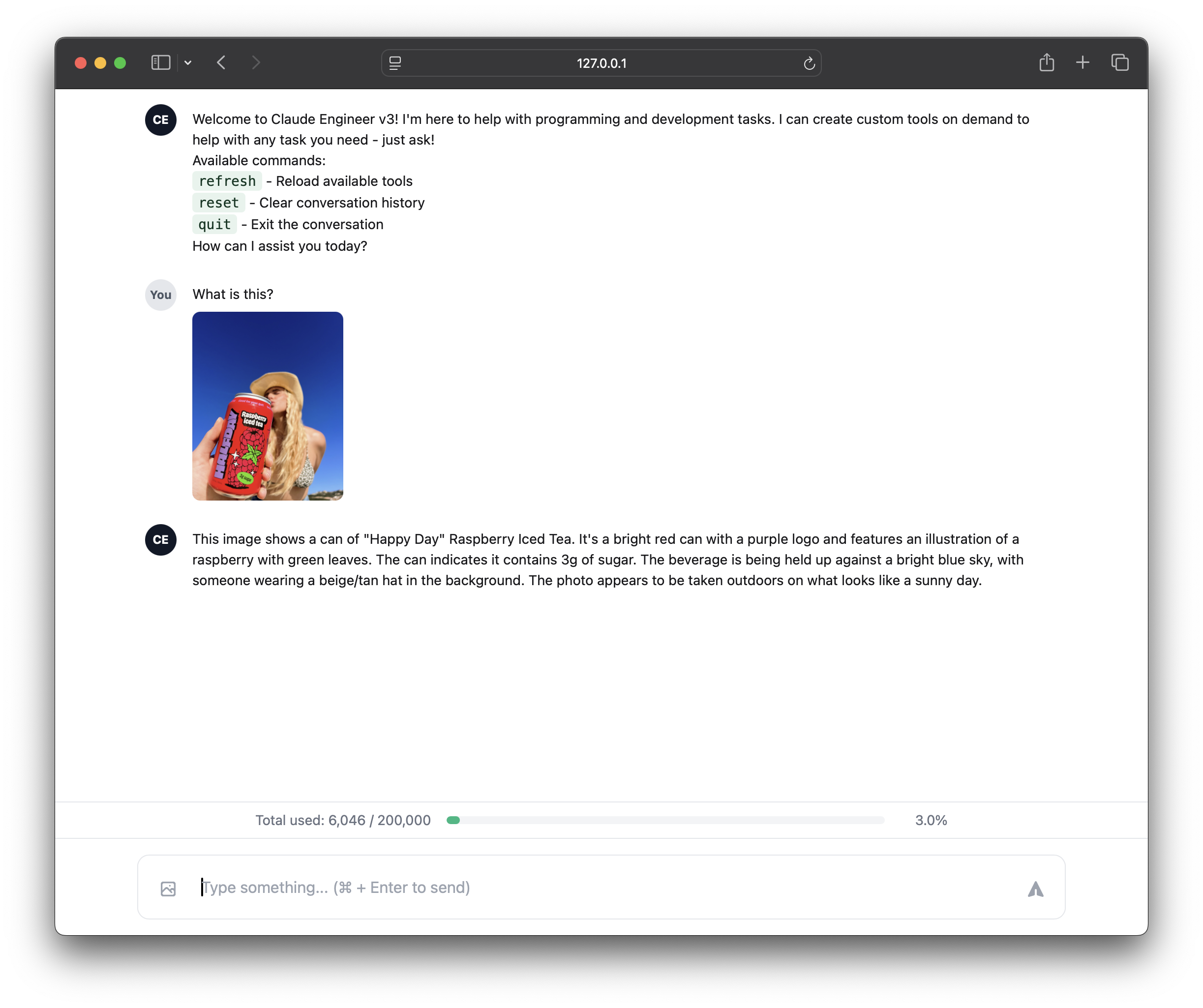
To run the web interface:
# Using uv (recommended)
uv run app.py

# Or using traditional Python
python app.py

# Then open your browser to:
http://localhost:5000
2. Command Line Interface (CLI) 💻
A powerful terminal-based interface with:
- Rich text formatting
- Progress indicators
- Token usage visualization
- Direct tool interaction
- Detailed debugging output
To run the CLI:
# Using uv (recommended)
uv run ce3.py

# Or using traditional Python
python ce3.py
Choose the interface that best suits your workflow:
- Web UI: Great for visual work, image analysis, and a more modern experience
- CLI: Perfect for developers, system integration, and terminal workflows
Self-Improvement Features
- 🧠 Autonomous tool identification and creation
- 🔄 Dynamic capability expansion during conversations
- 🎯 Smart tool dependency management
- 📈 Learning from tool usage patterns
- 🔍 Automatic identification of capability gaps
- 🛠️ Self-optimization of existing tools
Core Features
- 🔨 Dynamic tool creation and loading
- 🔄 Hot-reload capability for new tools
- 🎨 Rich console interface with progress indicators
- 🧩 Tool abstraction framework with clean interfaces
- 📝 Automated tool code generation
- 🔌 Easy integration with Claude 3.5 AI
- 💬 Persistent conversation history with token management
- 🛠️ Real-time tool usage display
- 🔄 Automatic tool chaining support
- ⚡ Dynamic module importing system
- 📊 Advanced token tracking with Anthropic's token counting API
- 🎯 Precise context window management
- 🔍 Enhanced error handling and debugging
- 💾 Conversation state management
Project Structure
claude-engineer/
├── app.py             # Web interface server
├── ce3.py            # CLI interface
├── config.py         # Configuration settings
├── static/           # Web assets
│   ├── css/         # Stylesheets
│   └── js/          # JavaScript files
├── templates/        # HTML templates
├── tools/           # Tool implementations
│   ├── base.py      # Base tool class
│   └── ...         # Generated and custom tools
└── prompts/         # System prompts
    └── system_prompts.py
Features by Interface
Web Interface Features
- 🖼️ Image upload and analysis with Claude Vision
- 📊 Visual token usage progress bar
- 🎨 Clean, modern design with Tailwind CSS
- 📝 Markdown rendering with syntax highlighting
- 🔄 Real-time updates
- 📱 Responsive design for all devices
- 🖥️ Tool usage indicators
- ⌨️ Command/Ctrl + Enter to send messages
CLI Features
- 🎨 Rich text formatting
- 📊 ASCII token usage bar
- 🔄 Live progress indicators
- 🛠️ Direct tool interaction
- 📝 Detailed debugging output
- 💻 Terminal-optimized interface
Choose the interface that best matches your workflow and preferences. Both interfaces provide access to the same powerful Claude Engineer capabilities, just presented in different ways.
Key Components
Assistant Class
The core Assistant class provides:
- Dynamic tool loading and management
- Real-time conversation handling with token tracking
- Automatic tool creation and validation
- Tool execution and chaining
- Rich console output with progress indicators
- Token usage optimization
Configuration Options
The assistant supports various configuration options through the Config class:
- MODEL: Claude 3.5 Sonnet model specification
- MAX_TOKENS: Maximum tokens for individual responses
- MAX_CONVERSATION_TOKENS: Total token limit for conversations
- TOOLS_DIR: Directory for tool storage
- SHOW_TOOL_USAGE: Toggle tool usage display
- ENABLE_THINKING: Toggle thinking indicator
- DEFAULT_TEMPERATURE: Model temperature setting
Requirements
- Python 3.8+
- Anthropic API Key (Claude 3.5 access)
- Required packages in
requirements.txt
- Rich terminal support
Contributing
Contributions are welcome! Please feel free to submit a Pull Request. For major changes, please open an issue first to discuss what you would like to change.
License
MIT
Acknowledgments
This project builds upon the foundations of Claude Engineer v2, enhancing its capabilities with self-improving tool generation and advanced token management.
Claude Engineer v3 comes with a comprehensive set of pre-built tools:
- 🛠️ Tool Creator (
toolcreator): Creates new tools based on natural language descriptions, enabling the framework's self-improvement capabilities.
- 📦 UV Package Manager (
uvpackagemanager): Interface to the UV package manager for Python dependency management, supporting package installation, removal, updates, and virtual environment management.
- 🐍 E2B Code Executor (
e2bcodetool): Securely executes Python code in a sandboxed environment powered by E2B. This tool enables Claude to write and run Python code directly, making it capable of data analysis, visualization, and complex computations. Requires an E2B API key available at e2b.dev.
- 🔍 Linting Tool (
lintingtool): Runs the Ruff linter on Python files to detect and fix coding style or syntax issues, with support for automatic fixes and customizable rules.
- 📂 Create Folders Tool (
createfolderstool): Creates new directories and nested directory structures with proper error handling and path validation.
- 📝 File Creator (
filecreatortool): Creates new files with specified content, supporting both text and binary files.
- 📖 File Content Reader (
filecontentreadertool): Reads content from multiple files simultaneously, with smart filtering of binary and system files.
- ✏️ File Edit (
fileedittool): Advanced file editing with support for full content replacement and partial edits.
- 🔄 Diff Editor (
diffeditortool): Performs precise text replacements in files by matching exact substrings.
- 🔍 DuckDuckGo (
duckduckgotool): Performs web searches using DuckDuckGo.
- 🌐 Web Scraper (
webscrapertool): Intelligently extracts readable content from web pages while removing unnecessary elements.
- 🌍 Browser (
browsertool): Opens URLs in the system's default web browser.
- 📸 Screenshot Tool (
screenshottool): Captures screenshots of the entire screen or specific regions, returning base64-encoded images ready for Claude's vision capabilities.
Each tool is designed to be:
- Self-documenting with detailed descriptions
- Error-resistant with comprehensive error handling
- Composable for complex operations
- Secure with proper input validation
- Cross-platform compatible where applicable
The tools are dynamically loaded and can be extended during runtime through the Tool Creator, allowing the assistant to continuously expand its capabilities based on user needs.
API Keys Required
- Anthropic API Key: Required for Claude 3.5 access
- E2B API Key: Required for Python code execution capabilities. Get your key at e2b.dev
Add these to your .env file:
ANTHROPIC_API_KEY=your_anthropic_key
E2B_API_KEY=your_e2b_key
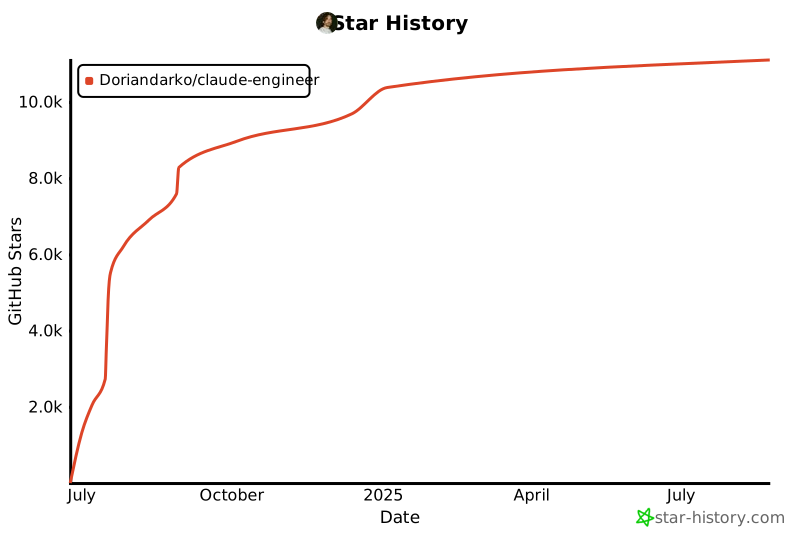
Star History

 Claude Engineer 是一个能够自我改进的 AI 助手框架,基于 Claude 3.5 Sonnet 构建。它可以在对话过程中生成并管理自己的工具,随着时间推移不断扩展自身能力。它同时提供命令行(CLI)和网页界面,用于软件开发任务。