

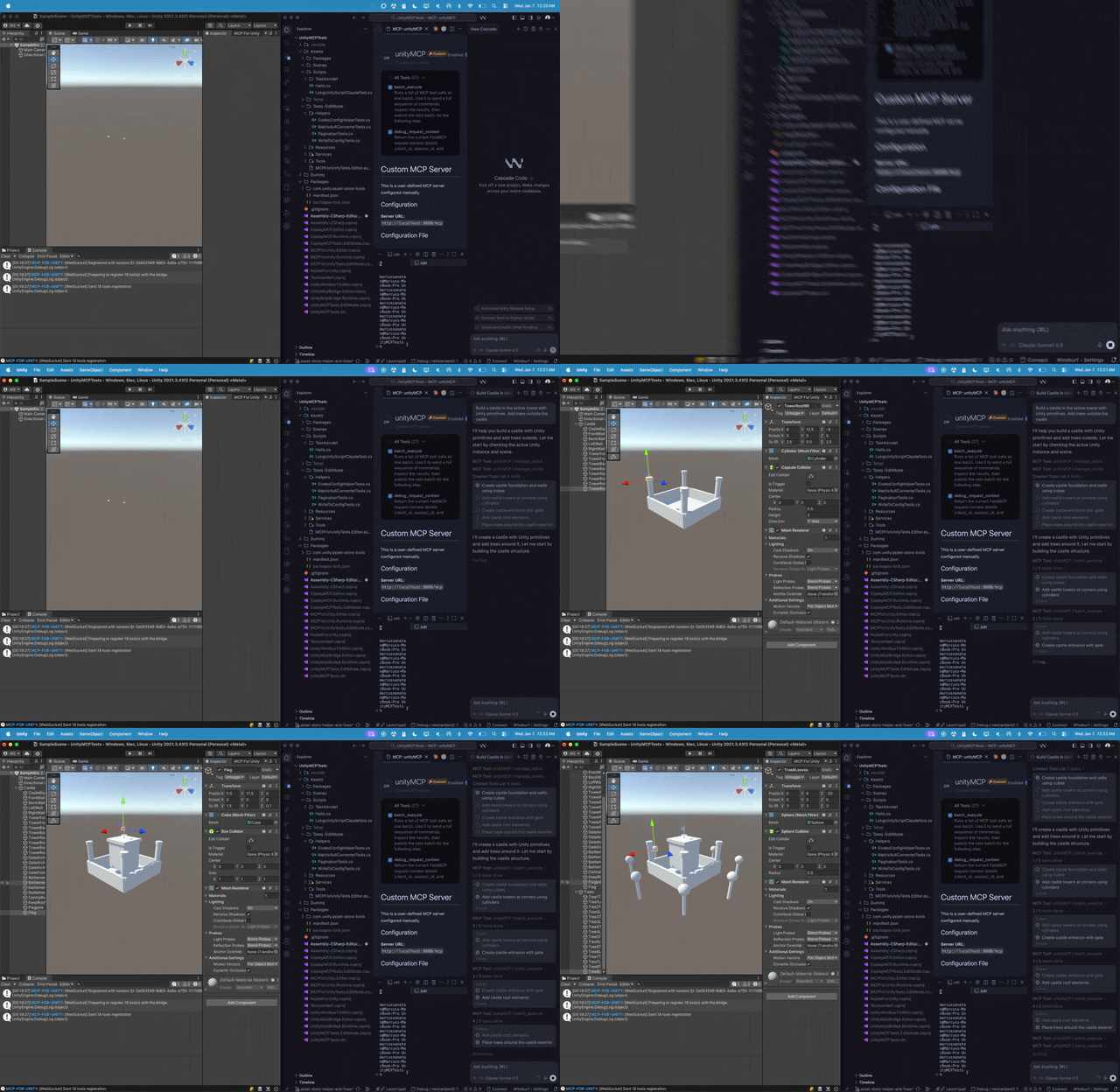
这是干什么的?
 它是 MCP for Unity,一个开源桥接工具,能把 Claude、Cursor 这类 AI 助手连接到你的 Unity 编辑器,让大语言模型可以管理资源、控制场景、编辑脚本,并把游戏开发工作自动化。
它是 MCP for Unity,一个开源桥接工具,能把 Claude、Cursor 这类 AI 助手连接到你的 Unity 编辑器,让大语言模型可以管理资源、控制场景、编辑脚本,并把游戏开发工作自动化。它是 Unity 里的插件,还是一个独立的软件?两者都有,合起来是一座桥:一部分是装在 Unity 编辑器里的包,另一部分是一个 MCP 服务器,对外提供 47 个专注的工具入口,供你的 AI 助手调用。
两者都有,合起来是一座桥:一部分是装在 Unity 编辑器里的包,另一部分是一个 MCP 服务器,对外提供 47 个专注的工具入口,供你的 AI 助手调用。怎么把它跑起来?在 Unity 的 Package Manager 里通过 git URL 添加这个包(或者运行 openupm add com.coplaydev.unity-mcp),然后打开 Window → MCP for Unity → Configure All Detected Clients。
在 Unity 的 Package Manager 里通过 git URL 添加这个包(或者运行 openupm add com.coplaydev.unity-mcp),然后打开 Window → MCP for Unity → Configure All Detected Clients。用之前需要装好哪些东西?需要 Unity 2021.3 LTS 到 Unity 6.x,另外还要 Python 3.10+,安装过程会用 uv 来管理它。
需要 Unity 2021.3 LTS 到 Unity 6.x,另外还要 Python 3.10+,安装过程会用 uv 来管理它。安装时有什么坑要注意?添加 git URL 时,最好固定一个发布标签,比如 #v10.0.0,这样拿到的是稳定版本;走 openupm 这条路装到的则是固定的包版本。
添加 git URL 时,最好固定一个发布标签,比如 #v10.0.0,这样拿到的是稳定版本;走 openupm 这条路装到的则是固定的包版本。哪些 AI 助手可以接上去用?任何 MCP 客户端都行——包括 Claude Desktop 和 Claude Code、Cursor、VS Code、Windsurf、Cline、Gemini CLI 等等。
任何 MCP 客户端都行——包括 Claude Desktop 和 Claude Code、Cursor、VS Code、Windsurf、Cline、Gemini CLI 等等。是免费的吗,有没有付费版?完全免费,采用 MIT 许可证。README 里也说明该项目与 Unity Technologies 没有任何隶属关系。
完全免费,采用 MIT 许可证。README 里也说明该项目与 Unity Technologies 没有任何隶属关系。这个 AI 在编辑器里到底能做什么?可以创建场景和 GameObject、编辑 C# 脚本、管理资源、跑测试、做性能分析、执行构建——总共 47 个专注的工具入口。
可以创建场景和 GameObject、编辑 C# 脚本、管理资源、跑测试、做性能分析、执行构建——总共 47 个专注的工具入口。我经常同时开着好几个 Unity 项目,支持吗?支持,多实例路由是官方文档里写明的高级功能,专门用于同时操作多个 Unity 实例。
支持,多实例路由是官方文档里写明的高级功能,专门用于同时操作多个 Unity 实例。它能检查 AI 写出来的 C# 脚本对不对吗?能——Roslyn 脚本校验是文档里写明的高级功能,而且工具分组功能可以让你把访问范围限定在 vfx、动画、ui、测试等特定领域。
能——Roslyn 脚本校验是文档里写明的高级功能,而且工具分组功能可以让你把访问范围限定在 vfx、动画、ui、测试等特定领域。它和那个付费的 Aura 助手是一回事吗?不是——MCP for Unity 是免费且采用 MIT 许可证的。Aura for Unity 是同一个团队推出的另一款面向 Unity 和 Unreal 的付费 AI 助手。
不是——MCP for Unity 是免费且采用 MIT 许可证的。Aura for Unity 是同一个团队推出的另一款面向 Unity 和 Unreal 的付费 AI 助手。What are similar projects?headroom, OmniRoute, 9router, superpowers-zh, void, skills, mcp-for-blender, overmind
headroom, OmniRoute, 9router, superpowers-zh, void, skills, mcp-for-blender, overmind