ClearAI is an ontology discovery and exploration platform, built on two core concepts:
Domain ontology (what you get) — your project's own vocabulary, the knowledge entries established through the loop, and their graphs. At the end of a research session you hold a continuously growing knowledge structure, retrievable next round by concept.
Epistemic loop (how you get it) — question → judgement (state what would prove it wrong) → a test that could fail → evidence → bounded conclusion → grows into the ontology. Every edge is tested by evidence and independent evaluation.
Other knowledge graphs pile up edges by extraction and assertion; here every edge has to be earned through the loop.
# Install (npm package, prebuilt — no build step, no allowBuilds prompt)
dsh plugin --profile web add [email protected]
# or in the app: Plugins → Add plugin → [email protected]
Restart dsh web, then pick ClearAI in the preset picker at the top of a new session. That is the whole setup. Full install notes ↓
Left: the Epistemic Loop. Its emerald fact dot is also the first node of the domain ontology on the right. Right: the ontology graph — dark is a concept, light is a value form, emerald an instance; the instance carries two contradictory assertions — the two readings are tinted amber, marking that they do not agree. The system reports the conflict; retracting or keeping is a human decision.
What you get: a domain ontology
A domain ontology that grows as you research:
Vocabulary — the language your project speaks: concepts, predicates, value forms, units. Conventions themselves carry no truth value; sentences written with them do.
Established entries — knowledge that passed the loop: each with its boundary, support level, and evidence chain. Each entry states its boundary explicitly, so it can be cited safely.
Ontology graph and entity graph — what your domain looks like (structure), and what you have actually verified (the state of play).
Conflict readings — contradictory conclusions surface automatically; the system reports them, and retracting or keeping is your decision.
How you get it: the Epistemic Loop
Most agent loops track one thing: whether the task is done. The Epistemic Loop also tracks what makes a conclusion trustworthy:
Task loop
Epistemic loop
Driving question
What next?
What do we know, and on what grounds?
Completion
The model declares it
The system computes it from delivered evidence
Verdict
Whoever did it, says so
Separated — above a level, the doer cannot judge themselves
Failure
Deleted, retried, forgotten
Kept: a refuted hypothesis is a result, not noise
What accumulates
A chat transcript
An ontology: every edge earned through the loop
Inside the ring is the instrument's read-out: the L0–L4 axis, the pre-registered threshold as a dashed line, and five observations with error bars — the supported one filled, the inconclusive drawn as a dashed circle, the refuted left in place with a slash through it (nothing is deleted). The emerald dot at the opening is the one reading that crossed the threshold and settled as a fact.
State is derived from the session record with no second store; the tools the model holds contain no field in which it could declare a step complete, and a goal completes only after independent evaluation. ClearAI does only what the host cannot — the epistemic contract, the domain ontology, presentation; goal continuation, subagents, asking you, deliverable cards and file history all come from DSH itself.
ClearAI does not claim recursive self-improvement. It provides the epistemic substrate a self-improving system would need. See Positioning and the OpenRSI survey.
Install and use
Requirements: DSH ≥ 0.1.7-alpha.1 — that generation introduced the composition declaration line this preset rides on. Verified against the host's 0.1.7-rc.2 and 0.2.0-rc.1.
Recommended — install it in the app, with the version pinned:
In the sidebar open Plugins → Add plugin, enter [email protected], and install. That is DSH's own plugin manager: it hands what you type to pnpm, checks that the package declares a bundle and is compatible with this host, and applies it live. (The Settings page 插件列表 / Plugins is the read-only inventory — installing happens on the sidebar's Plugins page.)
This installs the prebuilt package from the npm registry. Nothing is compiled on your machine, so there is no allowBuilds grant to approve — the plugin is ready the moment the command returns.
Why the version is pinned. pnpm ≥ 11 holds back newly published versions: minimumReleaseAge defaults to 1440 minutes, and because that built-in default is non-strict, a bare package name (or @latest) silently falls back to the newest version older than a day — right after a release, the previous release. DSH's plugin manager forwards your spec to pnpm unchanged and does not compare what landed against what you asked for, so this downgrade is reported as a success. Its preview card is no help either: it reads the package with pnpm view, which ignores the age policy, so it can show the newest release while pnpm installs the one before it. Two ways to be exact:
Pin the version, as both commands above do — pnpm then records the exception itself.
Or exempt the package once in the profile's pnpm-workspace.yaml; a bare name works from then on:
minimumReleaseAgeExclude:
  - clearai-dsh
Also available — one-command installer (it resolves the current release and pins that version for you, so it is immune to the delay):
npx clearai-dsh install
Same install underneath; it resolves the DSH CLI from your PATH (or through npx), installs into the web profile, and reads the composed config back so you are not taking "success" on faith. Use this if you prefer a guided path, or --lang zh|en to force the installer's output language.
Community market (third-party):dsh-market lists whatever the curated awesome-dsh-plugin catalog carries and installs a pinned version for you; ClearAI's catalog entry is in review there. It is not part of DSH, and it is not needed to install this plugin.
Install from source (for development, not the normal path):
dsh plugin --profile web add github:Clearailhc/clearai-dsh
Git fetches source rather than build artifacts, so pnpm ≥10 will refuse to run the prepare script until you add an allowBuilds entry to the profile's pnpm-workspace.yaml. That grant means permission for this package's code to execute on your machine at install time — grant it only if you have read the source, and pin a commit. If you just want to use ClearAI, use the npm install above.
The installer's output follows your system language (--lang zh|en overrides it, doctor / seed / unseed take the same flag). Its only runtime dependency is zod; the graph stack is bundled into the client half at build time.
Restart dsh web afterwards (npx @deepseek-ai/dsh web), then create a session and switch to the ClearAI mode in the picker at the top:
Open dsh web and click "New session";
Click the current mode name at the top (default: Standard mode) to open the preset list;
Pick ClearAI — its card reads "利用认识论循环构建可信本体。Build a trustworthy ontology through the epistemic loop.";
Just ask your question. Ordinary Q&A runs as usual; once a goal is set and judgements are registered, the system enters knowledge mode by itself: what is already known comes to you, and conclusions earn their place through evidence. Only decisions only you can make are put to you.
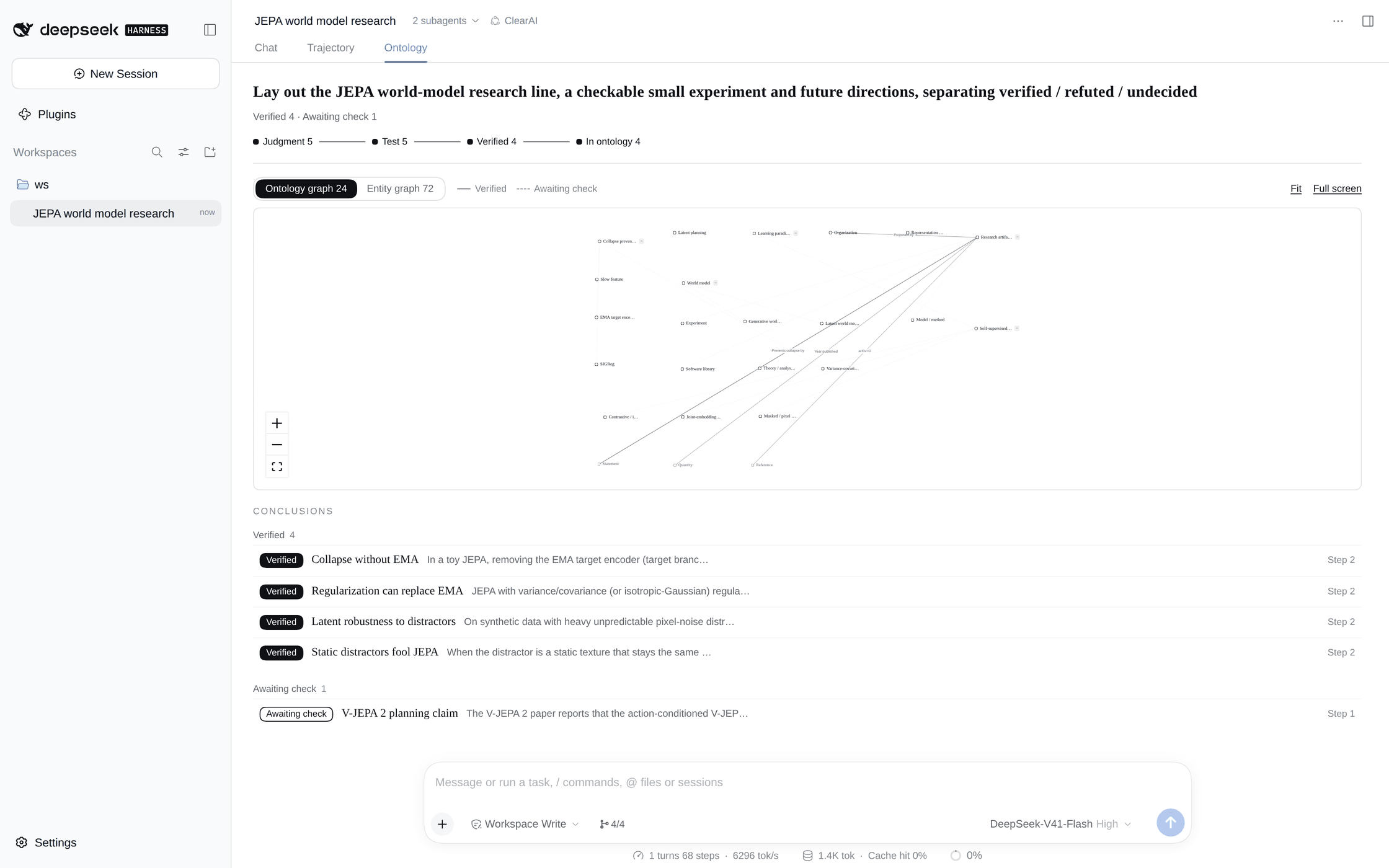
The Ontology pane after the JEPA world model session: the question, the progress rail, the graph, and the conclusions grouped by status.
If pnpm is not on PATH: npm install -g pnpm (do not corepack enable — it installs a version forwarder that may download a pnpm it cannot launch).
From the repository:
npm test                       # 17 suites
node tools/build-package.mjs   # assemble dist/ from source
node tools/verify-package.mjs  # rebuild on the spot, byte-compare
node docs/diagrams/build-hero.mjs   # redraw the product hero (needs google-chrome)
dist/ is generated and never committed. See DSH integration.
What it looks like
One pane in the middle: Ontology. One pane on the right: World Tree. Next to the input box: "to handle N".
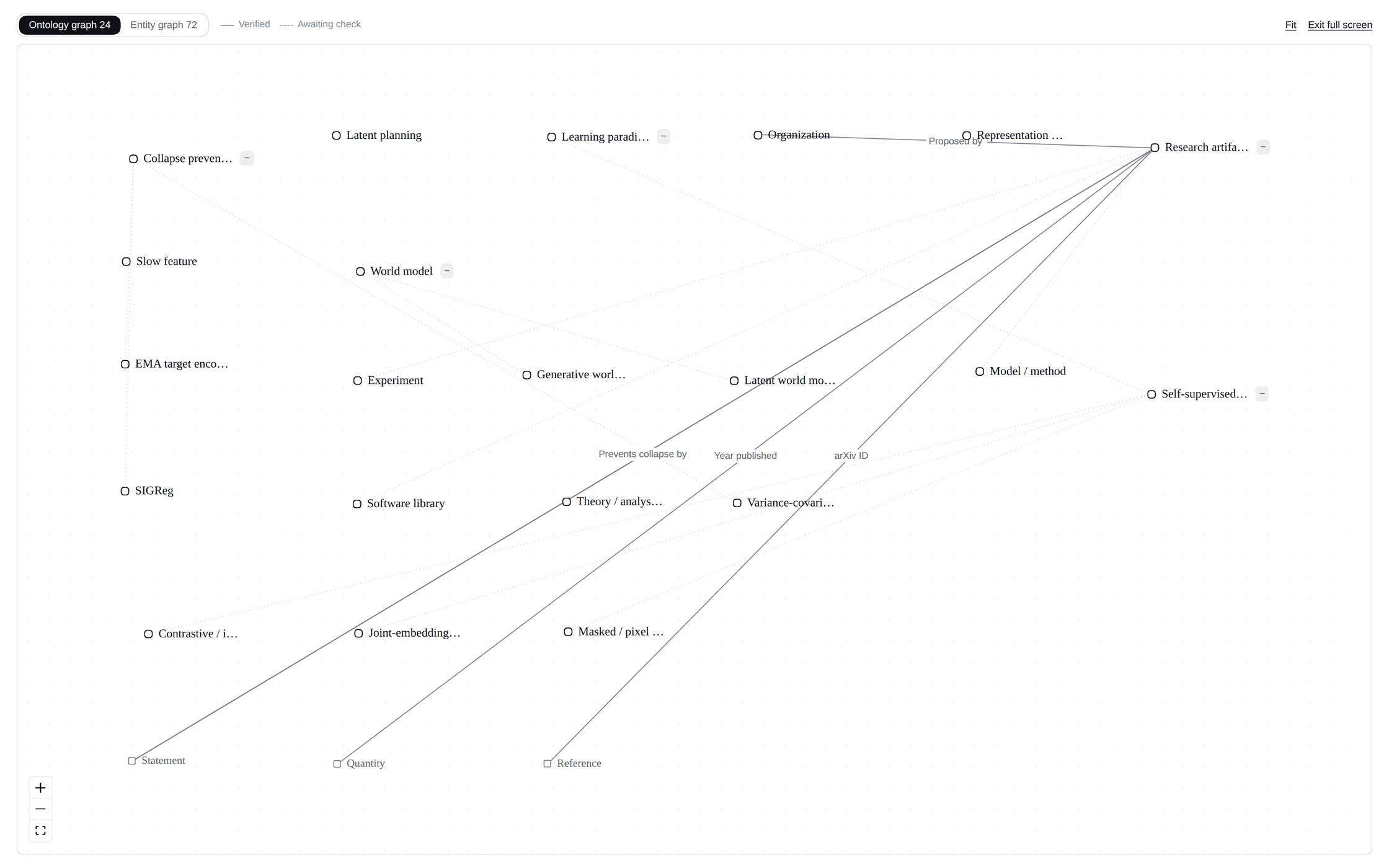
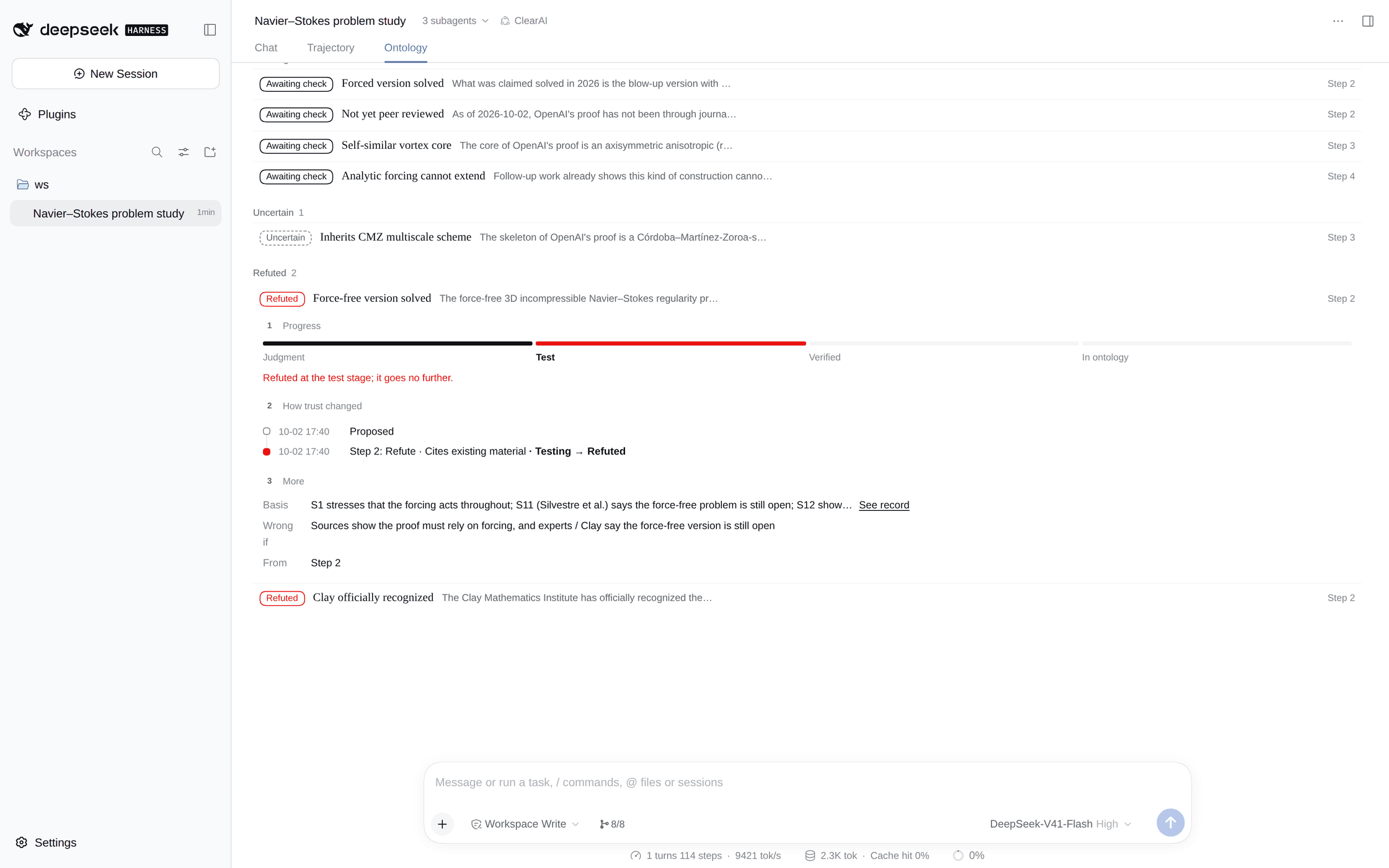
Ontology — one page for your four questions. At the top: the question, one line of counts, anything you need to handle ("to handle"), and a small progress rail: judgment → test → verified → in ontology. In the middle, the graph: the ontology graph (what your domain looks like) and the entity graph (the concrete things found) toggle with one click, and clicking a node filters by it. Below, the conclusion list, one line each, grouped by status: verified, awaiting check, testing, uncertain, refuted, replaced; open one to see which station it reached, how its trust changed, and its basis and scope. Two contradictory conclusions light up; retracting or keeping is your call.
World Tree — the plan's steps and gates, one line per step; open one to see which judgments it tested and what came out.
Deliverables — at close, the artefacts accepted for each step appear as DSH's native deliverable cards; what changed each turn is in DSH's native change cards.
Language — everything the system writes (tool results, the runtime card, questions to you, the files under clear/) follows the language you write in, Chinese or English. The panel follows the UI language.
The ontology graph, full screen. The ontology graph and the entity graph come from one deterministic projection of the files under clear/ontology/, so the same files always give the same picture.
A refuted judgment from the Navier–Stokes session: it stopped at the test stage, and the record keeps why.
Cases
Both are real-model sessions run end to end without asking anything; the screenshots replay them in real DSH.
JEPA world models: a literature review, a toy experiment judged by an independent evaluator, and an ontology of 21 concepts, 8 relations and 27 entities
Was Navier–Stokes solved?: two popular claims refuted and kept, an intake rejection handled honestly, and an ontology of 24 concepts, 13 relations and 59 entities
ClearAI adds the epistemic layer on DSH's composition plane — one host package, one agent preset, one client module, with zero changes to the DSH engine. Working style is unrestricted, but nothing outside the governed path can write to the authoritative ledger (pinned by tests).
Work attribution
This project's work attribution unit is Jidian Qiyuan.
A local-first ontology discovery and exploration platform delivered as a DSH plugin. What is not yet implemented, and what has not been verified in a real browser, is written in Known gaps.
clearai-dsh (Clearailhc/clearai-dsh)
Choose a tag and it will appear here. With no tags selected, all catalog projects are shown.
Searching Database…
Choose a tag and it will appear here. With no tags selected, all catalog projects are shown.



 ClearAI 是面向 DSH 的本体优先的智能体预设,把一次研究会话变成持续增长、经证据检验的领域本体,通过它所谓的“认知循环”(Epistemic Loop)构建——提问、可证伪的判断、测试、证据,然后得出有边界的结论。