


20.3K ·GitHub
What is this?
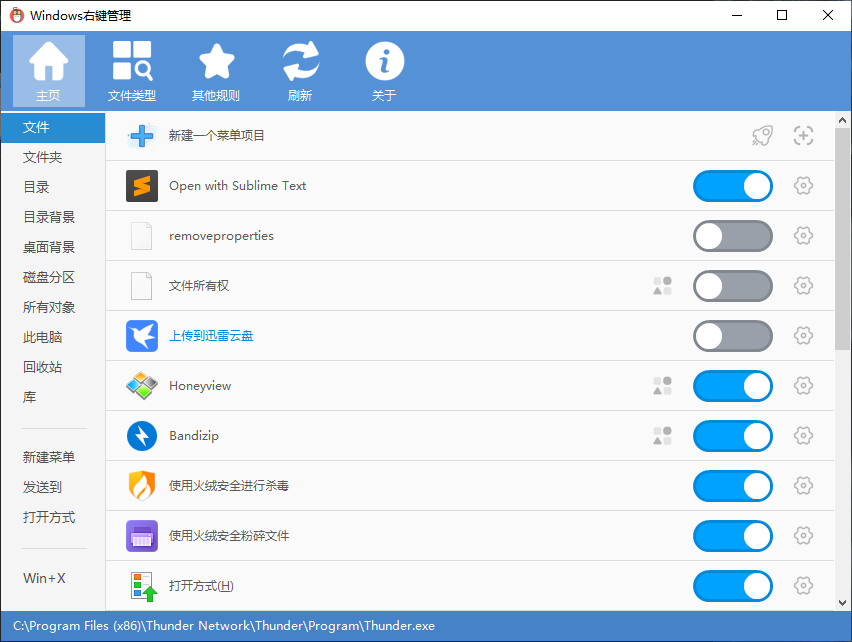
 ContextMenuManager is a Windows tool that lets you enable, disable, and customize right-click context menu items for files, folders, new-item menus, send-to, open-with, custom file formats, IE, and WinX menus.
ContextMenuManager is a Windows tool that lets you enable, disable, and customize right-click context menu items for files, folders, new-item menus, send-to, open-with, custom file formats, IE, and WinX menus.Is this a standalone app or a plugin for something else?It's a standalone Windows desktop GUI application (built with C#/.NET), not a plugin or extension for another program.
It's a standalone Windows desktop GUI application (built with C#/.NET), not a plugin or extension for another program.How do I get it running?Download the latest release from GitHub Releases or Gitee Releases, grab the zip (recommended) or exe from the Assets list, and run it.
Download the latest release from GitHub Releases or Gitee Releases, grab the zip (recommended) or exe from the Assets list, and run it.Do I need .NET installed first?It ships in .NET 3.5 and .NET 4.0 builds; Win7 has .NET 3.5 built in and Win8/8.1/10 have 4.0+ built in, but Vista has neither and needs the matching .NET Framework runtime installed manually.
It ships in .NET 3.5 and .NET 4.0 builds; Win7 has .NET 3.5 built in and Win8/8.1/10 have 4.0+ built in, but Vista has neither and needs the matching .NET Framework runtime installed manually.Any pitfalls I should know about, like antivirus flags?Because it reads/writes/deletes a lot of registry entries and files, Windows Defender or other antivirus software may falsely flag it as a virus, so you may need to whitelist it. Some special menu items may also appear 'enabled' even though other factors keep them hidden.
Because it reads/writes/deletes a lot of registry entries and files, Windows Defender or other antivirus software may falsely flag it as a virus, so you may need to whitelist it. Some special menu items may also appear 'enabled' even though other factors keep them hidden.Can it conflict with other context-menu cleaner tools?Yes — different context-menu managers disable items differently (most use a crude backup-delete method, while this one tries to use native system keys), so running multiple such tools together is not recommended and may hide items until restored in their original app.
Yes — different context-menu managers disable items differently (most use a crude backup-delete method, while this one tries to use native system keys), so running multiple such tools together is not recommended and may hide items until restored in their original app.Which Windows versions and CPU architectures does it support?It supports Windows 10, 8.1, 8, 7, and Vista, on both 64-bit and 32-bit CPUs, and has special handling for high-DPI screens at 150% scaling.
It supports Windows 10, 8.1, 8, 7, and Vista, on both 64-bit and 32-bit CPUs, and has special handling for high-DPI screens at 150% scaling.Can I rename or change the icon of a context menu item?Yes, for the supported menu locations you can rename items, change their icon, jump to their registry location or file location, or permanently delete them.
Yes, for the supported menu locations you can rename items, change their icon, jump to their registry location or file location, or permanently delete them.Can I add my own custom context menu commands?Yes, the program lets you add custom menu entries and define custom commands for the supported menu scenarios.
Yes, the program lets you add custom menu entries and define custom commands for the supported menu scenarios.Does it support languages other than Chinese?Yes, the app supports multiple language displays and the author welcomes contributions of translation dictionaries.
Yes, the app supports multiple language displays and the author welcomes contributions of translation dictionaries.Is this meant to clean up leftover files from uninstalled programs?No, it's not an uninstaller cleaner, but it can help you quickly locate the registry and file locations tied to a given menu item so you can act on them yourself.
No, it's not an uninstaller cleaner, but it can help you quickly locate the registry and file locations tied to a given menu item so you can act on them yourself.What are similar projects?FluentCleaner, FluentTweaker, Winhance, ExplorerPatcher, DeskBox, optimizer, Windows10Debloater, mactype
FluentCleaner, FluentTweaker, Winhance, ExplorerPatcher, DeskBox, optimizer, Windows10Debloater, mactypeWhich topics is it in?windows-desktop, system-cleaner, desktop-application, windows-tweaker, registry-tweaks, c-sharp, windows-10, windows-11, dotnet, c#, windows-app, sysadmin
windows-desktop, system-cleaner, desktop-application, windows-tweaker, registry-tweaks, c-sharp, windows-10, windows-11, dotnet, c#, windows-app, sysadmin