




Edit-Banana README

The project's README from github.com/BIT-DataLab/Edit-Banana. As one markdown file: README.md.

Edit Banana Logo

🍌 Edit Banana

中文 | English

Universal Content Re-Editor: Make the Uneditable, Editable

Break free from static formats. Our platform empowers you to transform fixed content into fully manipulatable assets. Powered by SAM 3 and multimodal large models, it enables high-fidelity reconstruction that preserves the original diagram details and logical relationships.

Python License CUDA WeChat GitHub stars AtomGit Star


Try It Now!

Try Online Demo

👆 Click above or https://www.editbanana.net/ to try Edit Banana online! Upload an image to get editable DrawIO (XML) in seconds.

[!WARNING] Please note: Our GitHub repository currently trails behind our web-based service. For the most up-to-date features and performance, we recommend using our web platform.


💬 Join WeChat Group

Welcome to join our WeChat group to discuss and exchange ideas! Scan the QR code below to join:

WeChat Group QR Code
Scan to join the Edit Banana community

[!TIP] If the QR code has expired, please submit an Issue to request an updated one.

👨‍🏫 Leader

Guoren Wang

Professor · Doctoral Supervisor

Database Systems Uncertain Data Management Multimedia Data Management Distributed Query Processing

Homepage →

Ye Yuan

Professor · Doctoral Supervisor

Big Data Management Graph Data Management Spatio-temporal Data Distributed Computing

Homepage →

Chengliang Chai

Associate Professor · Doctoral Supervisor

Data-centric AI Large Language Models Data Lakes Database Systems

Homepage →

📮 Contact Us

For academic cooperation, technical docking, commercial licensing, project customization and other business inquiries, please contact us via email:

E-mail: [email protected]


📑 Table of Contents


📸 Effect Demonstration

High-Definition Input-Output Comparison (4 Typical Scenarios)

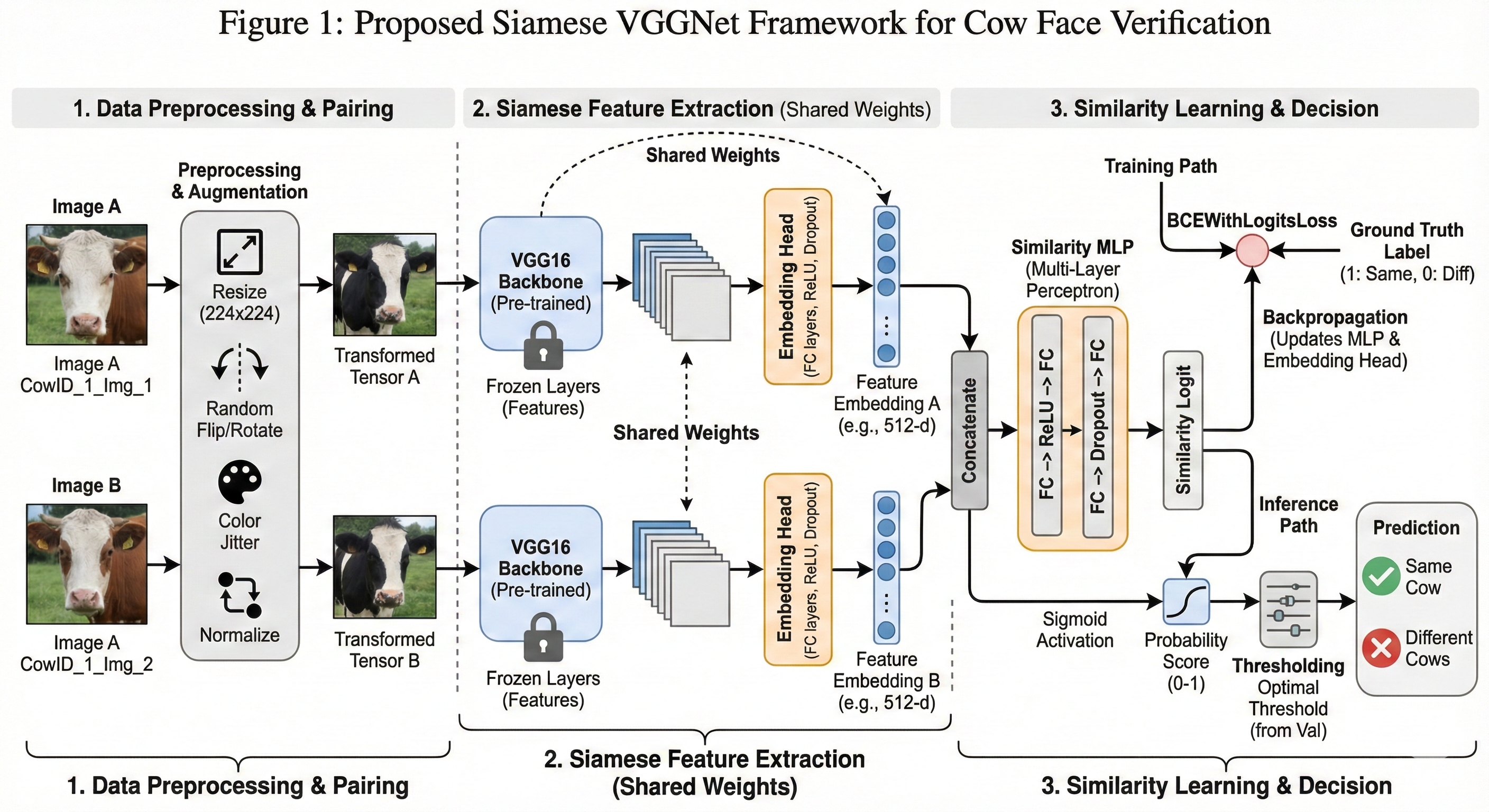
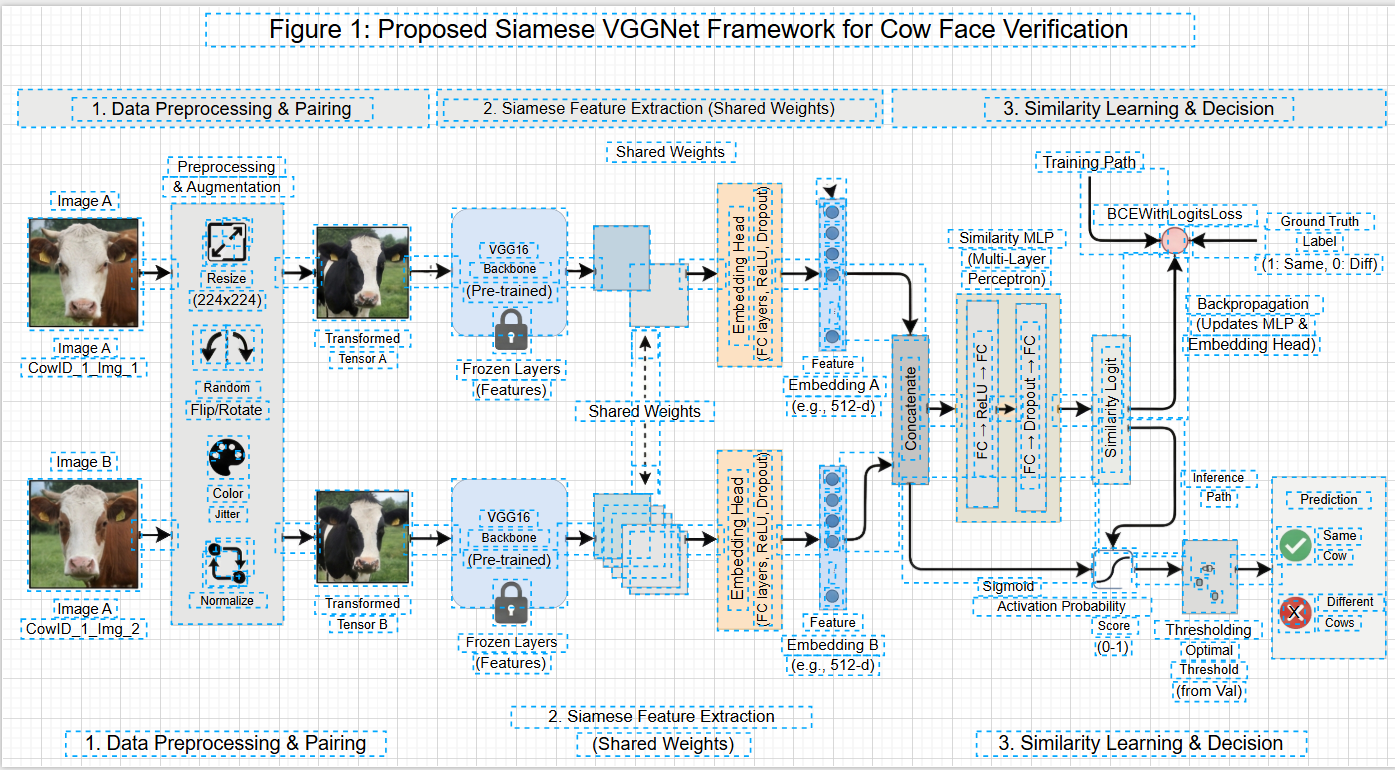
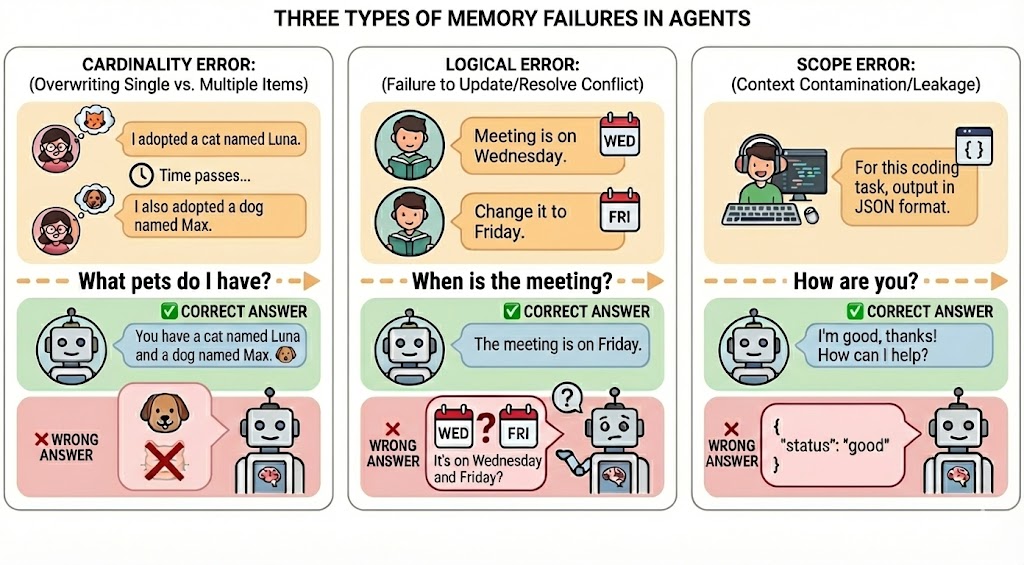
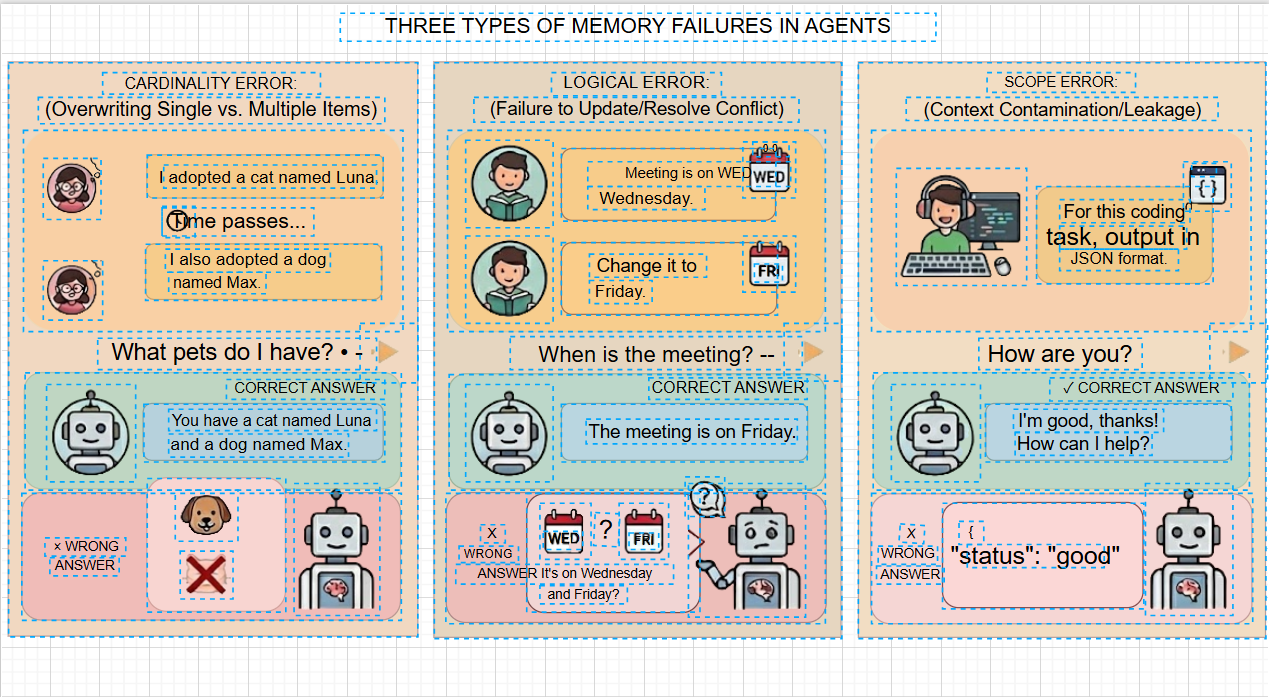
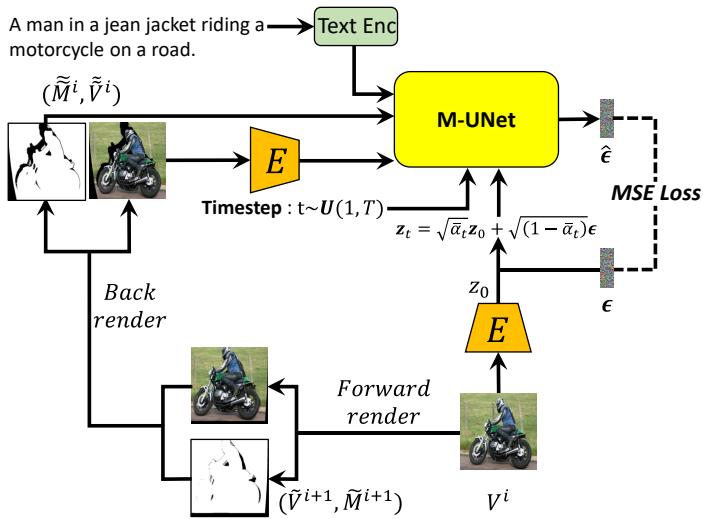
To demonstrate the high-fidelity conversion effect, we provides one-to-one comparisons between 4 scenarios of "original static formats" and "editable reconstruction results". All elements can be individually dragged, styled, and modified.

Scenario 1: Figures to DrawIO

🔒 Original Static Diagram (Input · Non-editable) 🔓 DrawIO Reconstruction Result (Output · Fully Editable)

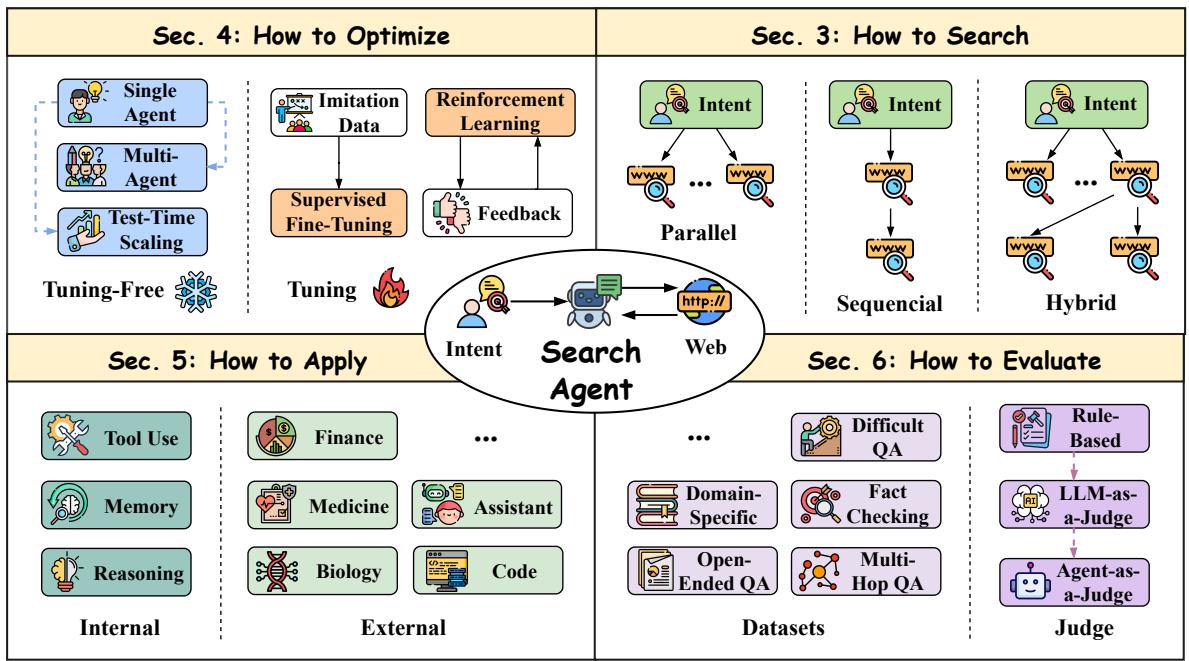
Example 1: Basic Flowchart

Original Diagram 1

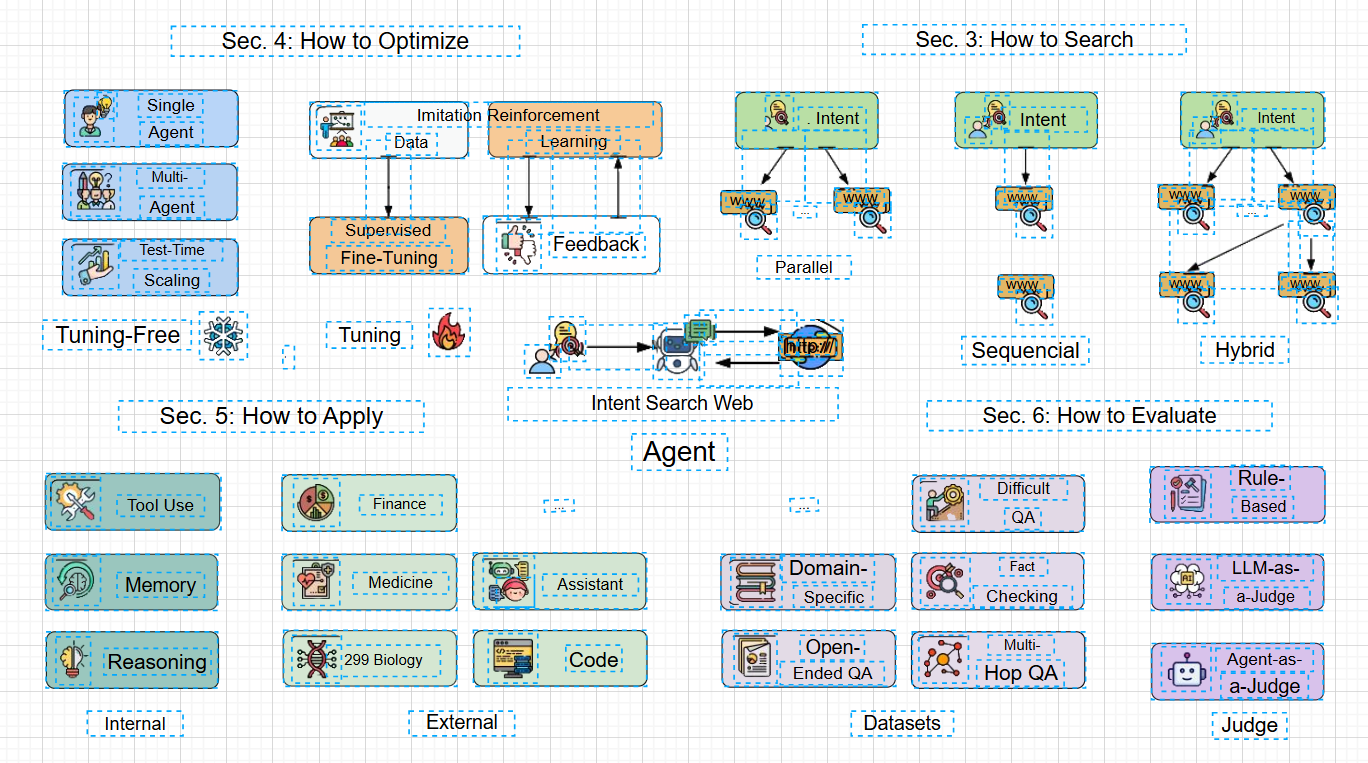
✨ Editable Flowchart

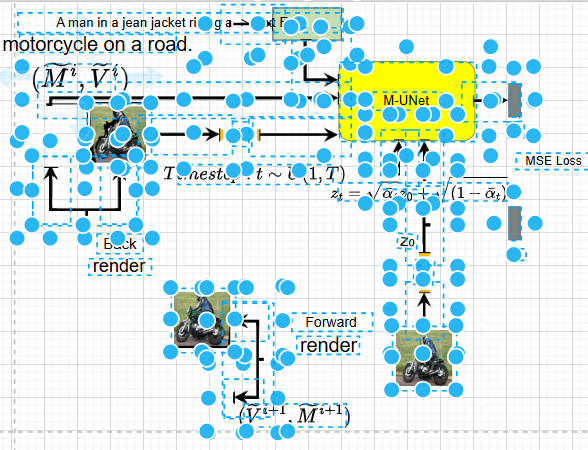
Reconstruction Result 1

Example 2: Multi-level Architecture

Original Diagram 2

✨ Editable Architecture

Reconstruction Result 2

Example 3: Technical Schematic

Original Diagram 3

✨ Editable Schematic

Reconstruction Result 3

Example 4: Scientific Formula

Original Diagram 4

✨ Editable Formula

Reconstruction Result 4

Scenario 2: Human in the Loop Modification


✨ Manual repair


✨ Save locally

[!NOTE] ✨ Conversion Highlights:

  1. Preserves the layout logic, color matching, and element hierarchy of the original diagram.
  2. 1:1 restoration of shape stroke/fill and arrow styles (dashed lines/thickness).
  3. Accurate text recognition, supporting direct subsequent editing and format adjustment.
  4. All elements are independently selectable, supporting native DrawIO template replacement and layout optimization.

🚀 Key Features


🛠️ Architecture Pipeline

  1. Input: Image (PNG/JPG/BMP/TIFF/WebP).
  2. Segmentation (SAM3): Using our fine-tuned SAM3 mask decoder.
  3. Text Extraction (Parallel):
    • Local OCR (Tesseract) detects text bounding boxes.
    • High-res crops of text/formula regions are sent to Pix2Text for LaTeX conversion.
  4. DrawIO XML Generation: Merging spatial data from SAM3 and text OCR results.

📂 Project Structure

Click to expand project structure
Edit-Banana/
├── config/               # Configuration files (copy config.yaml.example → config.yaml)
├── flowchart_text/       # OCR & Text Extraction Module (standalone entry)
│   ├── src/
│   └── main.py             # OCR-only entry point
├── input/                # [Manual] Input images directory
├── models/               # [Manual] Model weights (SAM3) and optional BPE vocab
├── output/               # [Manual] Results directory
├── sam3/                 # SAM3 library (see Installation: install from facebookresearch/sam3)
├── sam3_service/         # SAM3 HTTP service (optional, for multi-process deployment)
├── scripts/              # Setup and utility scripts
│   ├── setup_sam3.sh       # Install SAM3 lib and copy BPE to models/
│   ├── setup_rmbg.py       # Download RMBG model from ModelScope
│   └── merge_xml.py        # XML merge utilities
├── main.py               # CLI entry (modular pipeline)
├── server_pa.py          # FastAPI backend server
└── requirements.txt      # Python dependencies

📦 Installation & Setup

Follow these core phases to set up the project locally.

Phase 1: Environment & Base Setup

Configure your base environment and directory structure.

1. Prerequisites & Environment

2. Clone Repository & Init Directories

git clone https://github.com/BIT-DataLab/Edit-Banana.git
cd Edit-Banana
mkdir -p input output sam3_output

Phase 2: Models & Core Dependencies

Next, install the required packages and download necessary model weights (which should be placed in models/ and not committed).

1. Base Dependencies

pip install -r requirements.txt

2. SAM3 & Model Assets

🧩 Optional Capabilities (OCR Engine, Formula, RMBG) - Click to expand
  • PaddleOCR (Alternative/Better for mixed text): Use paddlepaddle==3.2.2 (avoiding 3.3.0 bug).

    pip install paddlepaddle==3.2.2 paddleocr.
    
  • Formula (Pix2Text):

    pip install pix2text onnxruntime-gpu.
    
  • Background Removal (RMBG): pip install onnxruntime modelscope then run python scripts/setup_rmbg.py.

Phase 3: Configuration & Troubleshooting

1. Final Configuration

Copy the example config and adjust the asset paths:

cp config/config.yaml.example config/config.yaml

Edit config.yaml to ensure sam3.checkpoint_path and sam3.bpe_path match your models/ locations.

🛠️ Before First Run Checklist & Troubleshooting - Click to expand

Checklist:

  • Config files copied and model paths set in config.yaml
  • SAM3 weights (sam3.pt) and BPE vocab placed under models/
  • Extracted SAM3 library via scripts/setup_sam3.sh Tesseract or PaddleOCR installed

Common Issues:

  • "no kernel image is available...": GPU arch mismatch. Upgrade PyTorch or set sam3.device: "cpu".
  • "Model file not found at ...rmbg/...": RMBG is optional. Enable by downloading via script.
  • "PaddleOCR inference failed...": Use paddlepaddle==3.2.2 or fallback to Tesseract.

🔤 Usage

Command Line Interface (CLI)

Supports image files (PNG, JPG, BMP, TIFF, WebP). To process a single image:

python main.py -i input/test_diagram.png

The output XML will be saved in the output/ directory. For batch processing, put images in input/ and run python main.py without -i.

Run and test locally

  1. One-time setup

    git clone https://github.com/BIT-DataLab/Edit-Banana.git && cd Edit-Banana
    python3 -m venv .venv && source .venv/bin/activate   # Linux/macOS; Windows: .venv\Scripts\activate
    pip install torch torchvision --index-url https://download.pytorch.org/whl/cu118   # or CPU build
    pip install -r requirements.txt
    sudo apt install tesseract-ocr tesseract-ocr-chi-sim   # OCR (or equivalent on your OS)
    

    Install the SAM3 library and download model weights + BPE. Then:

    mkdir -p input output
    cp config/config.yaml.example config/config.yaml
    # Edit config/config.yaml: set sam3.checkpoint_path and sam3.bpe_path to your models/ paths
    
  2. Test with CLI

    # Put a diagram image in input/, e.g. input/test.png
    python main.py -i input/test.png
    # Output appears under output/<image_stem>/ (DrawIO XML and intermediates)
    
  3. Optional: test the web API

    python server_pa.py
    # In another terminal:
    curl -X POST http://localhost:8000/convert -F "file=@input/test.png"
    # Or open http://localhost:8000/docs and use the /convert endpoint with a file upload
    

⚙️ Configuration

Customize the pipeline behavior in config/config.yaml:


📌 Development Roadmap

Feature Module Status Description
Core Conversion Pipeline ✅ Completed Full pipeline of segmentation, reconstruction and OCR
Intelligent Arrow Connection ⚠️ In Development Automatically associate arrows with target shapes
DrawIO Template Adaptation 📍 Planned Support custom template import
Batch Export Optimization 📍 Planned Batch export to DrawIO files (.drawio)
Local LLM Adaptation 📍 Planned Support local VLM deployment, independent of APIs

🤝 Contribution Guidelines

Contributions of all kinds are welcome (code submissions, bug reports, feature suggestions):

  1. Fork this repository
  2. Create a feature branch (git checkout -b feature/xxx)
  3. Commit your changes (git commit -m 'feat: add xxx')
  4. Push to the branch (git push origin feature/xxx)
  5. Open a Pull Request

Bug Reports: Issues Feature Suggestions: Discussions


📄 License

This project is open-source under the Apache License 2.0, allowing commercial use and secondary development (with copyright notice retained).


🌟 Star History

🌟 If this project helps you, please star it to show your support!

Star History Chart

Edit-Banana (BIT-DataLab/Edit-Banana)

Searching Database…

What is this?It converts images of static diagrams — flowcharts, multi-level architecture diagrams, technical schematics, scientific formulas — into fully editable DrawIO files, powered by fine-tuned SAM 3 segmentation and multimodal LLMs.
Is this a hosted web service or something I run myself?Both. The hosted web platform is the recommended, more up-to-date option; this repo is the local pipeline with a CLI plus a web API. You feed it PNG/JPG/BMP/TIFF/WebP images and get DrawIO XML back.
How do I set up the local version?Install Python 3.10+ with CUDA-enabled PyTorch, clone the repo and run scripts/setupsam3.sh, then download sam3.pt from ModelScope or Hugging Face into models/ and point config.yaml at the model paths. Process one image with python main.py -i yourfile.png.
Does the text recognition run locally or in the cloud?OCR is fully local: Tesseract runs offline, PaddleOCR is an alternative for mixed text, and Pix2Text converts formulas to LaTeX. A fully local VLM without external APIs is only on the roadmap so far.
Any install pitfalls I should know about?Pin paddlepaddle to 3.2.2 (3.3.0 has a known bug) or fall back to Tesseract. RMBG background removal is optional and only works after you download it via its setup script.
Can I use it commercially?The README states the project is under Apache 2.0, allowing commercial use and secondary development with the copyright notice retained. Note GitHub lists the repository license as AGPL-3.0, so check the LICENSE file before commercial use.
Do I need a CUDA GPU to run it well?A CUDA-capable GPU is highly recommended for the SAM3 stage. CPU mode exists via sam3.device: cpu, but the README frames it mainly as a workaround for GPU-architecture mismatch errors rather than a supported default.
How closely does the reconstructed file match the original diagram?The demos promise 1:1 restoration of shape stroke, fill and arrow styles (dashed lines, thickness), preserving the original layout logic, colors and element hierarchy. Every element stays independently selectable, so you can swap in native DrawIO templates or re-layout afterwards.
What happens inside when it processes an image?A fine-tuned SAM 3 segments the diagram elements, text extraction runs in parallel — Tesseract OCR finds text boxes while high-res crops go to Pix2Text for LaTeX formula conversion — and the spatial and text data merge into one DrawIO XML file.
What does the hosted web platform cost?New registered users get 10 free credits; after that it is pay-per-use through a credit system the authors use to prevent resource abuse. Self-hosting the repo itself costs nothing beyond your hardware.
What features are still coming?Intelligent arrow-to-shape association is in development. Custom DrawIO template import, optimized batch export and local VLM deployment independent of external APIs are all marked as planned.
Size
85.7 MB
Stars
5.5K
Updated
CommitOct 17
Age
9mo
Commits · 90 Days
