apfel
The free AI already on your Mac.








Apple Silicon Macs ship a built-in LLM via Apple FoundationModels. apfel exposes it as a UNIX tool and a local OpenAI-compatible server. 100% on-device. No API keys, no cloud.
| Mode |
Command |
What you get |
| UNIX tool |
apfel "prompt" / echo "text" | apfel |
Pipe-friendly answers, file attachments, JSON output, exit codes |
| OpenAI-compatible server |
apfel --serve |
Drop-in local http://localhost:11434/v1 backend for OpenAI SDKs |
apfel --chat - interactive REPL.
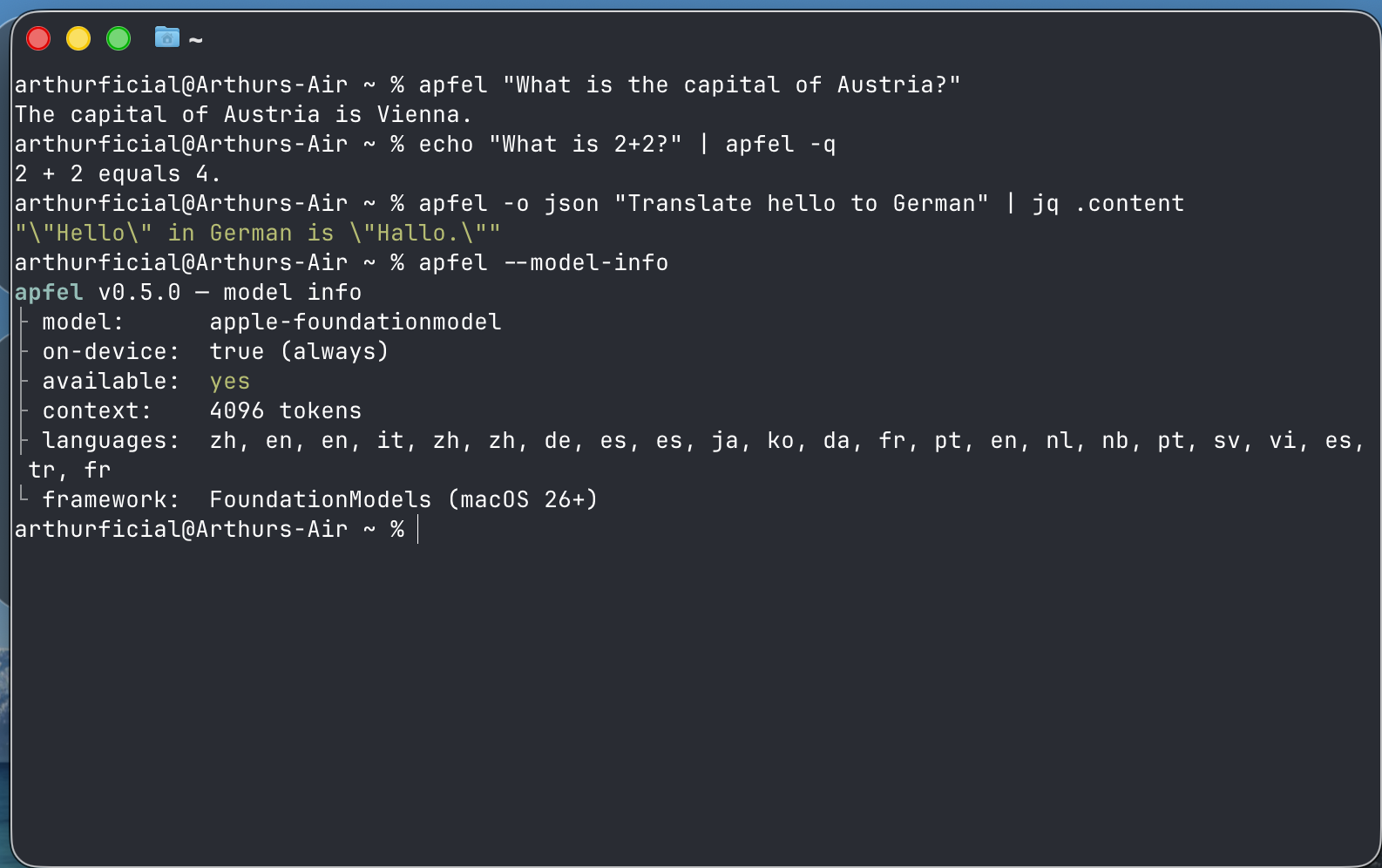
Tool calling works in all contexts. On-device context window: 4096 tokens on macOS 26, 8192 on macOS 27 - read at runtime, see Limitations.
Requirements & Install
macOS 26 Tahoe+, Apple Silicon (M1+), Apple Intelligence enabled.
brew install apfel
Update:
brew upgrade apfel
Build from source (Command Line Tools with macOS 26.4 SDK / Swift 6.3, no Xcode):
git clone https://github.com/Arthur-Ficial/apfel.git && cd apfel && make install
Nix, same-day tap, Mint, mise, troubleshooting: docs/install.md.
Quick Start
Quote prompts with ! in single quotes (zsh/bash history expansion): apfel 'Hello, Mac!'.
# Single prompt
apfel "What is the capital of Austria?"

# Permissive mode - reduces guardrail false positives for creative/long prompts
apfel --permissive "Write a dramatic opening for a thriller novel"

# Stream output
apfel --stream "Write a haiku about code"

# Pipe input
echo "Summarize: $(cat README.md)" | apfel

# Attach file content to prompt
apfel -f README.md "Summarize this project"

# Attach multiple files
apfel -f old.swift -f new.swift "What changed between these two files?"

# Attach a PDF or image - on-device text extraction, OCR, and "what the image is about"
apfel -f report.pdf "Summarize the key findings"
apfel -f receipt.jpg "What is the total?"

# Pipe a file straight in (PDF, image, or text)
cat report.pdf | apfel "Summarize this"

# Combine files with piped input
git diff HEAD~1 | apfel -f CONVENTIONS.md "Review this diff against our conventions"

# Only the code - no prose, no markdown fences (pipe-safe, exit 7 if empty)
apfel --code "a python function that deduplicates a list" > dedupe.py
apfel --code "shell one-liner to find the 10 largest files here" | pbcopy

# JSON output for scripting
apfel -o json "Translate to German: hello" | jq .content

# Guaranteed schema-valid JSON output (guided generation)
apfel --schema person.schema.json "Extract the person: Alice is 30." | jq .name

# One-shot multi-turn: conversation JSON in, next assistant turn out
jq '. += [{"role":"user","content":"and in German?"}]' conv.json | apfel --messages -

# Preflight token budget before a large prompt
apfel --count-tokens -f README.md "Summarize this"

# System prompt
apfel -s "You are a pirate" "What is recursion?"

# System prompt from file
apfel --system-file persona.txt "Explain TCP/IP"

# Quiet mode for shell scripts
result=$(apfel -q "Capital of France? One word.")
OpenAI-compatible server
apfel --serve                              # foreground
brew services start apfel                  # background (like Ollama)
brew services stop apfel
APFEL_TOKEN=$(uuidgen) APFEL_MCP=/path/to/tools.py brew services start apfel
curl http://localhost:11434/v1/chat/completions \
  -H "Content-Type: application/json" \
  -d '{"model":"apple-foundationmodel","messages":[{"role":"user","content":"Hello"}]}'
from openai import OpenAI
client = OpenAI(base_url="http://localhost:11434/v1", api_key="unused")
resp = client.chat.completions.create(
    model="apple-foundationmodel",
    messages=[{"role": "user", "content": "What is 1+1?"}],
)
print(resp.choices[0].message.content)
Background service details: docs/background-service.md.
Quick testing chat
apfel --chat is a small REPL for testing prompts or MCP servers. For a GUI chat app, see apfel-chat.
apfel --chat
apfel --chat -s "You are a helpful coding assistant"
apfel --chat --mcp ./mcp/calculator/server.py      # chat with MCP tools
apfel --chat --debug                                # debug output to stderr
Ctrl-C exits. Context is trimmed automatically (docs/context-strategies.md).
Demos
Real shell scripts that wrap apfel: cmd (English to shell command), oneliner, mac-narrator, wtd, explain, naming, port, gitsum. They are bundled in the binary - no repo clone. Write them out wherever you installed apfel from (homebrew-core, the tap, or source):
apfel demos ./apfel-demos
That writes every demo (executable) plus a README.md into ./apfel-demos. Then run them from there:
./apfel-demos/cmd "find all .log files modified today"
# $ find . -name "*.log" -type f -mtime -1

./apfel-demos/cmd -x "show disk usage sorted by size"   # -x = execute after confirm
./apfel-demos/cmd -c "list open ports"                   # -c = copy to clipboard
Re-run apfel demos after brew upgrade apfel to refresh. Sources: demo/. Walkthroughs and a copy-paste cmd shell function for your .zshrc: docs/demos.md.
Attach Model Context Protocol servers with --mcp. apfel discovers, invokes, and returns.
apfel --mcp ./mcp/calculator/server.py "What is 15 times 27?"
mcp: ./mcp/calculator/server.py - add, subtract, multiply, divide, sqrt, power, round_number    ← stderr
tool: multiply({"a": 15, "b": 27}) = 405                                          ← stderr
15 times 27 is 405.                                                                ← stdout
Use -q to suppress tool info.
apfel --mcp ./server_a.py --mcp ./server_b.py "Use both tools"
apfel --serve --mcp ./mcp/calculator/server.py
apfel --chat --mcp ./mcp/calculator/server.py
Ships with a calculator at mcp/calculator/ (docs/mcp-calculator.md).
Remote MCP servers (Streamable HTTP, MCP spec 2025-03-26):
apfel --mcp https://mcp.example.com/v1 "what tools do you have?"

# bearer token - prefer env var (flag is visible in ps aux)
APFEL_MCP_TOKEN=mytoken apfel --mcp https://mcp.example.com/v1 "..."

# mixed local + remote
apfel --mcp /path/to/local.py --mcp https://remote.example.com/v1 "..."
Security: prefer APFEL_MCP_TOKEN over --mcp-token (ps aux). apfel refuses bearer tokens over plaintext http://.
apfel-run: optional config layer
apfel itself has no config file - flags + env vars, like any UNIX tool. If you want a TOML config (many MCPs, profiles, team configs in git), apfel-run is an MIT wrapper that adds one via execve drop-in.
brew install Arthur-Ficial/tap/apfel-run
apfel-run config init                 # starter ~/.config/apfel/config.toml
alias apfel=apfel-run                 # optional, every apfel flag still works
OpenAI API Compatibility
Base URL: http://localhost:11434/v1
| Feature |
Status |
Notes |
POST /v1/chat/completions |
Supported |
Streaming + non-streaming |
POST /v1/responses |
Supported |
OpenAI Responses API: string/message input, instructions, streaming (canonical event sequence), text.format (incl. json_schema), function tools (non-streaming). Stateful features (previous_response_id, store: true, background, reasoning, hosted tools) return honest 501s |
GET /v1/models |
Supported |
Returns apple-foundationmodel |
GET /health |
Supported |
Model availability, context window, languages |
GET /v1/logs, /v1/logs/stats |
Debug only |
Requires --debug |
| Tool calling |
Supported |
Native ToolDefinition + JSON detection. See docs/tool-calling-guide.md |
response_format: json_object |
Supported |
System-prompt injection; markdown fences stripped from output |
response_format: json_schema |
Supported |
Guaranteed schema-conforming output via FoundationModels DynamicGenerationSchema; works with stream: true |
temperature, top_p, max_tokens, seed |
Supported |
Mapped to GenerationOptions. top_p is nucleus sampling; temperature: 0 maps to greedy (deterministic). Omitting max_tokens uses the remaining context window (drop-in OpenAI semantics) - see Default response cap |
stream: true |
Supported |
SSE; final usage chunk only when stream_options: {"include_usage": true} (per OpenAI spec) |
finish_reason |
Supported |
stop, tool_calls, length |
| Context strategies |
Supported |
x_context_strategy, x_context_max_turns, x_context_output_reserve extension fields |
| CORS |
Supported |
Enable with --cors |
POST /v1/completions |
501 |
Legacy text completions not supported |
POST /v1/embeddings |
501 |
Embeddings not available on-device |
logprobs=true, n>1, stop, presence_penalty, frequency_penalty |
400 |
Rejected explicitly. n=1 and logprobs=false are accepted as no-ops |
| Multi-modal (images) |
400 |
Rejected with clear error |
Authorization header |
Supported |
Required when --token is set. See docs/server-security.md |
Full API spec: openai/openai-openapi.
Default response cap (max_tokens)
When max_tokens is omitted, CLI and OpenAI-compatible server behave identically: the value flows through as nil and the model uses whatever room is left in the context window. This is drop-in OpenAI semantics - no arbitrary fallback constant.
The on-device context window holds input and output combined: 4096 tokens on macOS 26, 8192 on macOS 27. apfel reads the real size at runtime via SystemLanguageModel.contextSize - check yours with apfel --model-info. If generation runs into the ceiling, the response ends cleanly with finish_reason: "length" and the partial content is returned (server: HTTP 200; CLI: exit 0 with a stderr warning). Pass max_tokens explicitly when you want a tighter latency budget or a known cap for your client.
Examples
# Omitted: uses remaining window, finish_reason: "stop" or "length"
curl -sS http://localhost:11434/v1/chat/completions \
  -H "Content-Type: application/json" \
  -d '{"model":"apple-foundationmodel",
       "messages":[{"role":"user","content":"Reply SKIP, MOVE, or RENAME."}]}'

# Explicit cap (recommended for tight latency budgets)
curl -sS http://localhost:11434/v1/chat/completions \
  -H "Content-Type: application/json" \
  -d '{"model":"apple-foundationmodel","max_tokens":128,
       "messages":[{"role":"user","content":"Summarise: ..."}]}'
Picking a value
| Use case |
max_tokens |
| Single-word / classification reply |
16 - 32 |
| One-line instruction |
64 - 128 |
| Short paragraph |
256 - 512 |
| Long paragraph / structured JSON |
1024 - 2048 |
| As long as the context window allows |
omit it |
Keep input_tokens + max_tokens comfortably below the context window (4096 tokens on macOS 26, 8192 on macOS 27). If the prompt itself exceeds the window, generation cannot start and the request fails with [context overflow] (HTTP 400 / CLI exit 4). The validator rejects non-positive values (max_tokens <= 0).
CLI parity
CLI and server share one rule: omitted = use remaining window. No constant to drift. Override with --max-tokens N or APFEL_MAX_TOKENS=N.
apfel "Reply SKIP."                    # uses remaining window
apfel --max-tokens 64 "Reply SKIP."    # explicit cap
APFEL_MAX_TOKENS=2048 apfel "..."      # via env var
Permissive guardrails for the server
apfel --serve --permissive makes the server use Apple's .permissiveContentTransformations guardrails for every request the process handles. Same flag, same semantics as the CLI's --permissive (docs/PERMISSIVE.md). There is no per-request override - the server operator decides for the whole process.
apfel --serve --permissive # every request uses permissive guardrails
Limitations
| Constraint |
Detail |
| Context window |
4096 tokens on macOS 26, 8192 on macOS 27 (input + output combined). Not a hardcoded constant - apfel reads SystemLanguageModel.contextSize at runtime; apfel --model-info prints the live value |
| Platform |
macOS 26+, Apple Silicon only |
| Model |
One model (apple-foundationmodel, ~3B params on-device), not configurable |
| Guardrails |
Apple's safety system may block benign prompts. --permissive reduces false positives (docs/PERMISSIVE.md) |
| Speed |
On-device, not cloud-scale - a few seconds per response |
| No embeddings / vision |
Not available on-device |
| Training data / knowledge cutoff |
Apple has not published a precise cutoff for the on-device model. When pushed to name one, the model confabulates a different date each sample (e.g. "October 2023", "April 2023"). Treat all model self-reports about its own training as unreliable. |
| No current date or real-time awareness |
The model does not know today's date and has no network/clock access. If asked, it will either refuse or invent a date. Inject the current date via system prompt when arithmetic depends on it (see workaround below). |
Workaround for date-dependent prompts - inject the current date as a system message:
apfel -s "Today is $(date '+%B %d, %Y')." "Write a one-line release note dated today."
apfel --chat -s "Today is $(date '+%B %d, %Y'). You are a helpful assistant."
Note: even with an injected date the 3B model can still hallucinate (especially when asked directly about its own training cutoff). The injection helps generative prompts that use the date; it does not override the model's self-report reflex.
Background: #158.
Reference Docs
Guides to use apfel from Python, Node.js, Ruby, PHP, Bash/curl, Zsh, AppleScript, Swift, Perl, AWK - see docs/guides/index.md. Empirically tested; runnable proof at apfel-guides-lab.
Architecture
CLI (single/stream/chat) ──┐
                           ├─→ FoundationModels.SystemLanguageModel
HTTP Server (/v1/*) ───────┘   (100% on-device, zero network)
                                ContextManager → Transcript API
                                SchemaConverter → native ToolDefinitions
                                TokenCounter → real token counts (SDK 26.4)
Swift 6.3 strict concurrency. Three targets: ApfelCore (pure logic, unit-testable, also available as a Swift Package product - linked under Reference Docs above), apfel (CLI + server), and apfel-tests (pure Swift runner, no XCTest).
Build & Test
make test                                # release build + all unit/integration tests
make preflight                           # full release qualification
make install                             # build release + install to /usr/local/bin
make build                               # build release only
make version                             # print current version
make release                             # patch release
make release TYPE=minor                  # minor release
make release TYPE=major                  # major release
swift build                              # quick debug build (no version bump)
swift run apfel-tests                    # unit tests
python3 -m pytest Tests/integration/ -v  # integration tests
apfel --benchmark -o json                # performance report
.version is the single source of truth. Only make release bumps versions. Local builds do not change the version.
The apfel tree
Projects built on apfel. Each ships as its own repo + Homebrew formula.
| Project |
What it does |
Install |
| apfel |
The root. On-device FoundationModels CLI + OpenAI-compatible server. |
brew install apfel |
| apfel-chat |
macOS chat client: streaming markdown, speech I/O, Apple Vision image analysis. |
brew install Arthur-Ficial/tap/apfel-chat |
| apfel-clip |
Menu-bar AI actions on the clipboard: summarize, translate, rewrite. |
brew install Arthur-Ficial/tap/apfel-clip |
| apfel-quick |
Instant AI overlay: press a key, ask, answer, dismiss. |
brew install Arthur-Ficial/tap/apfel-quick |
| [apfelpad](https://apfe |
|
|

 Apfel 是一个命令行工具,同时也是一个兼容 OpenAI 的本地服务器,它对外提供搭载 Apple 芯片的 Mac 内置的 FoundationModels 大语言模型。你可以在终端里直接向它提问,把文本通过管道交给它处理,或者让 OpenAI SDK 客户端连接到它,全部在本机完成。