See it in action
This iPhone example uses OpenMed's local runtime after the required model artifacts are available:
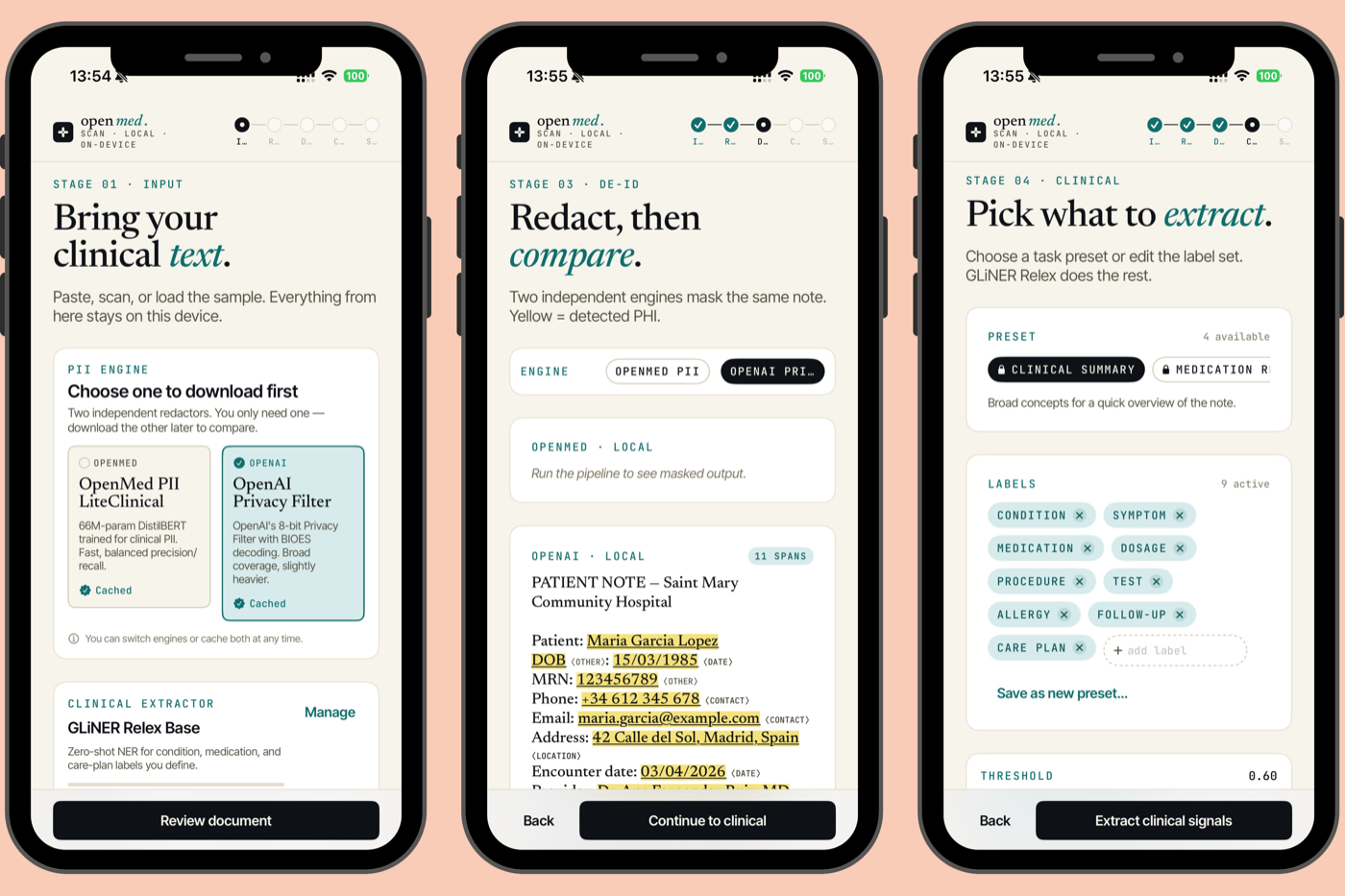 On iPhone via OpenMedKit: scan a clinical note, de-identify it, and extract clinical signals with Apple MLX processing locally in this configuration.
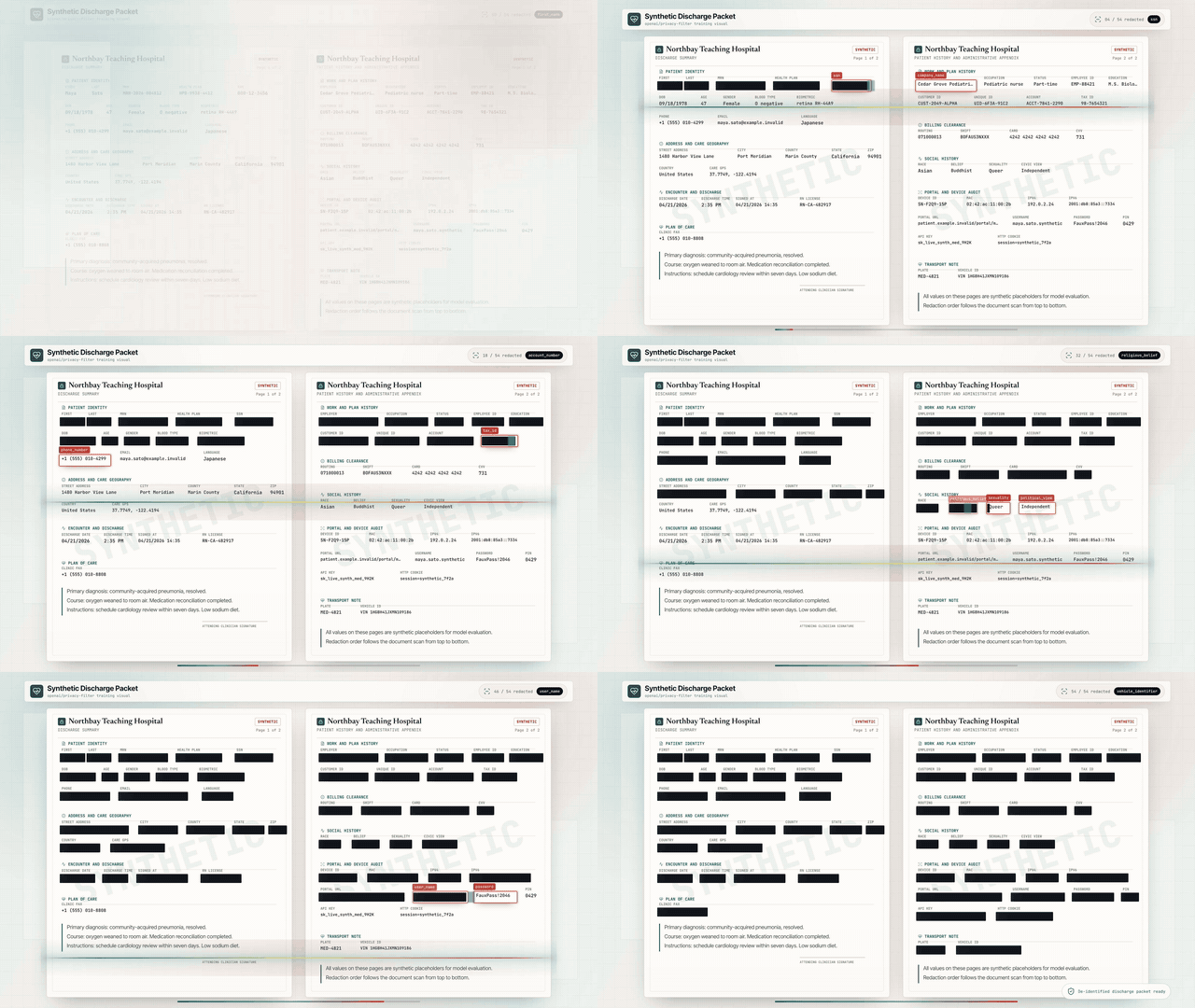 Real-time PII de-identification: in this configured local workflow, the Nemotron Privacy Filter redacts names, addresses, IDs, and billing data from a synthetic clinical discharge packet. (All values shown are synthetic.)
30-second example
from openmed import analyze_text

result = analyze_text(
    "Patient started on imatinib for chronic myeloid leukemia.",
    model_name="disease_detection_superclinical",
)

for entity in result.entities:
    print(f"{entity.label:<12} {entity.text:<28} {entity.confidence:.2f}")
# DISEASE      chronic myeloid leukemia     0.98
# DRUG         imatinib                     0.95
A clinical NER model using the local runtime after its required artifacts are available.
Building with an agent?
Start with the consumer agent-usage guide, or load the
curated llms.txt documentation index.
For callable local interfaces, use the MCP server, the
typed tool registry, or the
command-line interface. Ready-made
cross-tool procedures live in the repository skills catalog.
Why OpenMed?
| Deployment consideration |
OpenMed SDK boundary |
| Core runtime |
Processes locally after required artifacts are available |
| Optional network paths |
Downloads, remote adapters, telemetry-enabled paths, and user integrations may use a network |
| Validation |
Deployment owners validate model and dataset terms, privacy behavior, and clinical fitness |
| Interfaces |
Python, Swift, Android, browser, and service surfaces where supported |
- Curated model catalog: validate each model, license, and dataset for your use case.
- Safe Harbor-aligned configuration: can target the 18 identifier categories; expert deployment review remains required, and use of the SDK does not itself establish HIPAA compliance.
- Supported execution paths: CPU, CUDA, MLX, mobile, service, and browser adapters vary by environment and artifact.
- Deployment interfaces: Python, containers, services, and batch workflows require configuration and validation.
- SDK source: released under the Apache-2.0 License; model and dataset terms vary.
On-device on Apple: Swift, MLX & iOS
On supported Apple hardware, OpenMed can use MLX and OpenMedKit for local processing after required artifacts are available. Model acquisition and any user-configured remote integrations remain separate network boundaries.
// Add OpenMedKit to your app
dependencies: [
    .package(url: "https://github.com/maziyarpanahi/openmed.git", from: "2.3.0"),
]
Expected result: Swift Package Manager resolves OpenMedKit and makes
import OpenMedKit available to your app target.
- MLX runtime for PII token classification, the Privacy Filter family, experimental GLiNER-family zero-shot tasks, and Python MLX-LM text generation with Laneformer; includes a CoreML fallback path for supported token-classification artifacts.
- Portable model naming where supported: an MLX model name can fall back to a matching PyTorch checkpoint when that mapping and artifact are available on non-Apple hardware.
- Python on Apple Silicon too:
pip install --upgrade "openmed[mlx]".
Guides: MLX backend · OpenMedKit (Swift) · CoreML export
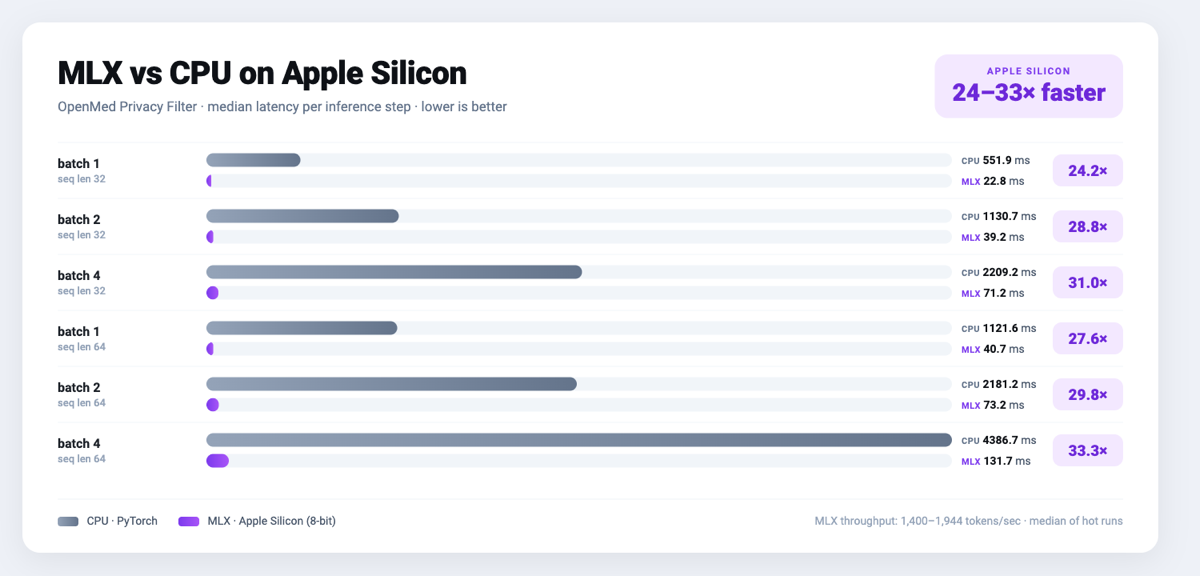 MLX on Apple Silicon: 24–33× faster than CPU PyTorch for the Privacy Filter: median latency per inference step, lower is better.
On-device on Android — Kotlin & ONNX Runtime Mobile
OpenMedKit also ships as a native Android/Kotlin library for local document
intake, OCR handoff, PII redaction, and token-classification inference through
ONNX Runtime Mobile. Mobile model repositories include stable tensor names,
dynamic sequence axes, tokenizer files, labels, and Android-ready fp32, fp16,
INT8, and optional .ort outputs.
Add the scoped JitPack repository in settings.gradle.kts:
dependencyResolutionManagement {
    repositories {
        google()
        mavenCentral()
        maven {
            url = uri("https://jitpack.io")
            content { includeGroup("com.github.maziyarpanahi") }
        }
    }
}
Then use the immutable OpenMed v2.3.0 release:
dependencies {
    implementation("com.github.maziyarpanahi:openmed:v2.3.0")
}
See the Android installation guide for local builds and
publishing details.
val model = OpenMedKit.fromDirectory(modelDir)
val entities = model.analyzeText("Patient Alice Nguyen was seen in cardiology.")
- Android ONNX profile emits
model.onnx, model_fp16.onnx,
model_int8.onnx, tokenizer assets, labels, and openmed-onnx.json.
- ORT Mobile support records the minimal-build operator configuration when
ONNX Runtime conversion tooling is installed.
- Kotlin parity tests keep tokenizer offsets, span boundaries, and decoder
output aligned with the Python runtime.
Guides: Android ONNX export ·
Android span parity ·
OpenMedKit Android
The same ONNX model on Python CPU
from openmed import OnnxModel

model = OnnxModel.from_pretrained(
    "OpenMed/OpenMed-PII-ClinicalE5-Small-33M-v1-onnx-android"
)
entities = model("Patient Alice Nguyen was seen in cardiology.")
The same ONNX model in the browser
npm install openmed @huggingface/transformers
import { loadOnnxModel } from "openmed";

const model = await loadOnnxModel(
  "OpenMed/OpenMed-PII-ClinicalE5-Small-33M-v1-onnx-android",
);
const entities = await model("Patient Alice Nguyen was seen in cardiology.");
How it works
flowchart LR
    A["Clinical text"] --> B["OpenMed<br/>(local-first)"]
    B --> C["Medical entities"]
    B --> D["PII detected"]
    B --> E["De-identified text"]
    style B fill:#0D6E6E,stroke:#0A5656,stroke-width:2px,color:#ffffff
    style C fill:#D6EBEB,stroke:#0D6E6E,color:#0E1116
    style D fill:#F7DCD8,stroke:#C5453A,color:#0E1116
    style E fill:#F5E27A,stroke:#A9A088,color:#0E1116
Rendered result: a local clinical-text pipeline that returns medical entities,
PII findings, and de-identified text without sending data to a cloud API.
Agent Skills — build with OpenMed from your coding agent
The skills/ catalog ships portable Agent Skills for on-device de-identification, clinical NER, FHIR export, evaluation, and the healthcare workflows around them. The same SKILL.md folders work in Claude Code, OpenAI Codex, OpenCode, and compatible agents; the installer uses each client's skills directory plus the cross-client ~/.agents/skills convention.
git clone https://github.com/maziyarpanahi/openmed && cd openmed
./install-skills.sh          # installs for Claude Code, Codex, OpenCode, and ~/.agents/skills
Then ask your agent for the pipeline using synthetic placeholders:
Build a local OpenMed pipeline that de-identifies a synthetic discharge note and extracts medication entities.
It loads the right skills and produces an on-device pipeline (openmed.deidentify(...) → openmed.analyze_text(...)). After the one-time model download, run that pipeline locally on real notes; do not paste real PHI into a cloud-hosted agent prompt. See the skills catalog and 30-second example.
Quick start
# Core + Hugging Face runtime (Linux, macOS, Windows; CPU or CUDA)
pip install --upgrade "openmed[hf]"

# Add the REST service
pip install --upgrade "openmed[hf,service]"

# Apple Silicon acceleration (MLX)
pip install --upgrade "openmed[mlx]"
Expected result:
Successfully installed openmed-...
|
Python API
from openmed import analyze_text

result = analyze_text(
  "Patient received 75mg "
  "clopidogrel for NSTEMI.",
  model_name=
  "pharma_detection_superclinical",
)
print([(e.label, e.text) for e in result.entities])
Example output:
[('DRUG', 'clopidogrel'), ('CONDITION', 'NSTEMI')]
|
REST service
uvicorn openmed.service.app:app \
  --host 0.0.0.0 --port 8080
Example output:
INFO:     Uvicorn running on http://0.0.0.0:8080
GET /health -> 200 OK
GET /health
POST /analyze
POST /pii/extract
POST /pii/deidentify
|
Batch
from openmed import BatchProcessor

p = BatchProcessor(
  model_name=
  "disease_detection_superclinical",
  group_entities=True,
)
results = p.process_texts([...])
print(len(results), sum(len(r.entities) for r in results))
print([(e.label, e.text) for e in results[0].entities[:1]])
Example output:
3 7
[('DISEASE', 'leukemia')]
|
Browser / WebGPU
Package ONNX token-classification exports for in-browser inference through
Transformers.js:
python -m openmed.onnx.convert \
  --model dslim/bert-base-NER \
  --output dist/example-onnx \
  --include-transformersjs
Example output:
Exported Transformers.js bundle to dist/example-onnx
import { pipeline } from "@huggingface/transformers";

const detector = await pipeline(
  "token-classification",
  "/models/openmed-pii/transformersjs",
  { device: "webgpu" },
);
const entities = await detector("Patient Casey Example called 212-555-0198.");
console.log(entities.slice(0, 2));
Example output:
[
  { entity: "NAME", word: "Casey Example", score: 0.99 },
  { entity: "PHONE", word: "212-555-0198", score: 0.98 },
]
Transformers.js export guide
Offline / air-gapped? Point model_name (or model_id) at a local directory and OpenMed loads it without contacting the Hugging Face Hub:
from openmed import OpenMedConfig, analyze_text

result = analyze_text(
    "Patient presents with chronic myeloid leukemia and Type 2 diabetes.",
    model_id="./models/OpenMed-NER-DiseaseDetect-SuperClinical-434M",
    config=OpenMedConfig(device="cpu"),
)
for entity in result.entities:
    print(f"{entity.label:<12} {entity.text:<28} {entity.confidence:.2f}")
Example output:
DISEASE      chronic myeloid leukemia     0.98
DISEASE      Type 2 diabetes              0.96
Because model_id points to a local directory, this example does not contact
the Hugging Face Hub or any external model provider.
Models
A curated registry of specialized medical NER models; browse the full catalog.
| Model |
Specialization |
Entity types |
Size |
disease_detection_superclinical |
Disease & conditions |
DISEASE, CONDITION, DIAGNOSIS |
434M |
pharma_detection_superclinical |
Drugs & medications |
DRUG, MEDICATION, TREATMENT |
434M |
pii_superclinical_large |
PII & de-identification |
NAME, DATE, SSN, PHONE, EMAIL, ADDRESS |
434M |
anatomy_detection_electramed |
Anatomy & body parts |
ANATOMY, ORGAN, BODY_PART |
109M |
gene_detection_genecorpus |
Genes & proteins |
GENE, PROTEIN |
109M |
Privacy: PII detection & de-identification
from openmed import extract_pii, deidentify

text = "Patient: John Doe, DOB: 01/15/1970, SSN: 123-45-6789"

# Extract PII with smart merging (prevents tokenization fragmentation)
result = extract_pii(text, model_name="pii_superclinical_large", use_smart_merging=True)
print([(e.label, e.text) for e in result.entities])

# De-identify with the method you need
print(deidentify(text, method="mask").deidentified_text)
print(deidentify(text, method="replace").deidentified_text)
print(deidentify(text, method="hash").deidentified_text)
print(deidentify(text, method="shift_dates", date_shift_days=180).deidentified_text)
Example output:
[('NAME', 'John Doe'), ('DATE', '01/15/1970'), ('SSN', '123-45-6789')]
Patient: [NAME], DOB: [DATE], SSN: [SSN]
Patient: Emily Chen, DOB: 03/22/1985, SSN: 456-78-9012
Patient: 6b8f...c4a1, DOB: 48b1...91de, SSN: 3f13...e912
Patient: John Doe, DOB: 07/14/1970, SSN: 123-45-6789
- Smart entity merging keeps
01/15/1970 whole instead of fragmenting it.
- Policy-aware pipelines add HIPAA/GDPR/research profiles, calibrated thresholds, signed audit reports, redaction previews, and minimum-necessary action selection.
- Faker-backed obfuscation with custom clinical-ID providers (CPF, CNPJ, BSN, NIR, Codice Fiscale, NIE, Aadhaar, Steuer-ID, NPI).
- HIPAA boundary: Safe Harbor-aligned categories and configurable thresholds are implementation aids; expert deployment review remains required, and SDK use alone does not establish compliance.
- Batch and streaming PII: extract or de-identify across many documents with
BatchProcessor(operation="extract_pii" | "deidentify", batch_size=16) or incremental streaming helpers.
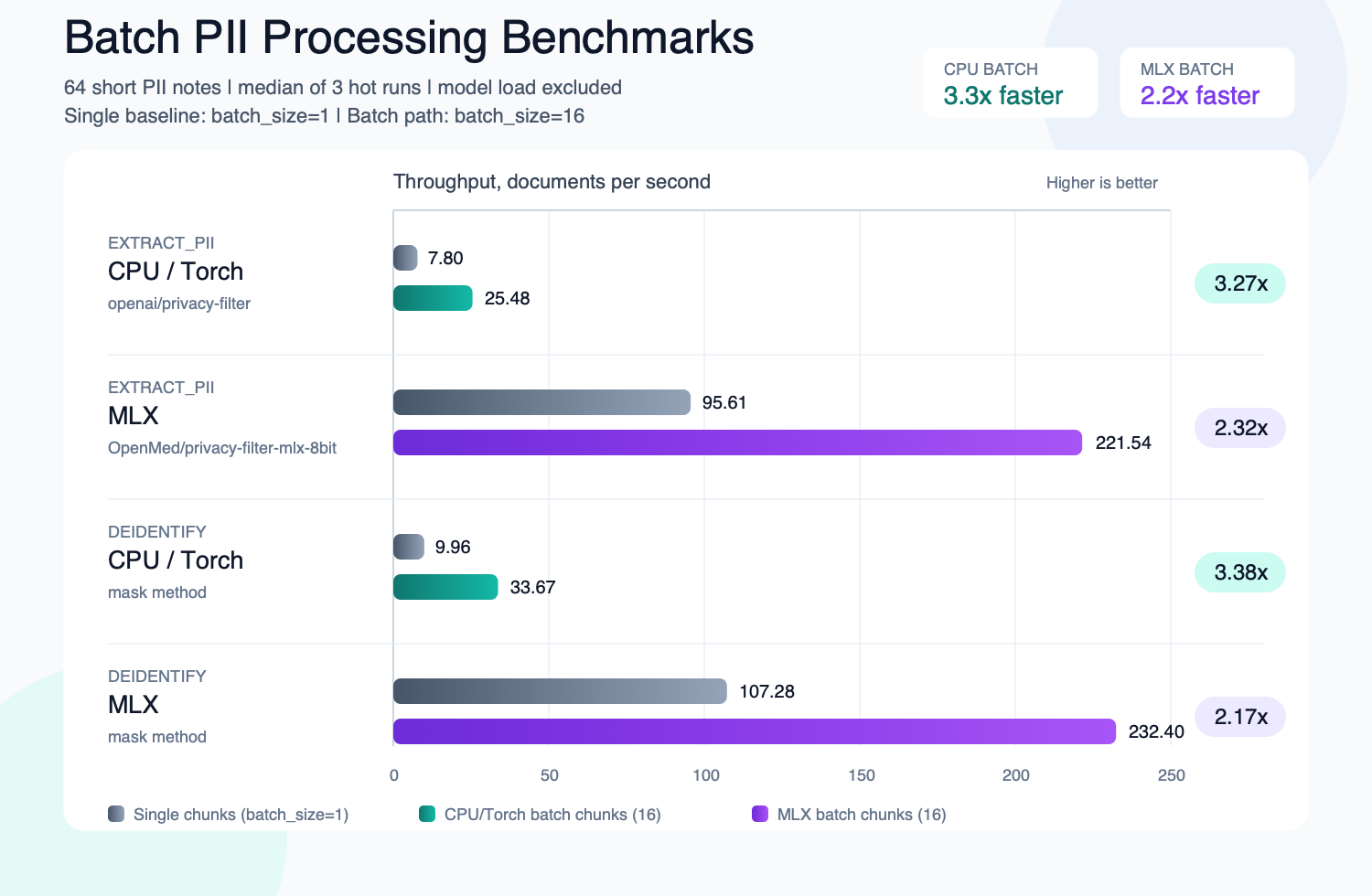 Batch processing: up to 3.3× higher throughput on CPU and 2.2× on MLX vs. one document at a time.
Complete PII notebook · Smart merging · Anonymization quickstart
Privacy Filter family: three model families on the OpenAI Privacy Filter architecture
Same model code (gpt-oss-style sparse-MoE transformer with local attention, sink tokens, RoPE+YaRN, tiktoken o200k_base), different training data. All route through the same extract_pii() / deidentify() API; only model_name= changes.
openai/privacy-filter is a Hugging Face model identifier for local weights;
using it here does not call the OpenAI API.
from openmed import extract_pii

text = "Patient Sarah Connor (DOB: 03/15/1985) at MRN 4471882."

variants = {
    "baseline": extract_pii(text, model_name="openai/privacy-filter"),
    "nemotron": extract_pii(text, model_name="OpenMed/privacy-filter-nemotron"),
    "mlx": extract_pii(text, model_name="OpenMed/privacy-filter-mlx"),
}
print([(e.label, e.text) for e in variants["baseline"].entities])
Example output:
[('NAME', 'Sarah Connor'), ('DATE', '03/15/1985'), ('ID', '4471882')]
On non-Apple-Silicon hosts, MLX model names are automatically substituted with the matching PyTorch checkpoint (with a one-time warning): reuse one model name where a matching backend artifact is available. See Privacy Filter architecture & backend routing.
Multilingual PII (36 supported routes; 33 model-backed)
Extraction and de-identification support 36 supported PII language codes:
am, ar, as, bn, cs, da, de, el, en, es, fa, fr, he, hi, id,
it, ja, ko, mr, nl, no, or, pt, ro, ru, sv, sw, ta,
te, th, tr, uk, vi, xh, zh, and zu, with the registry-backed PII model catalog in total.
Russian routing currently uses a documented multilingual default-model
placeholder. Bengali, Chinese, and Tamil have dedicated registry entries.
An optional, user-configured Indic NER family accepts four additional routes
(gu, kn, ml, and pa) and can also serve Assamese, Bengali, Hindi,
Marathi, Odia, Tamil, and Telugu. Set OPENMED_INDIC_NER_MODEL; OpenMed never
bundles or automatically selects those optional weights.
OpenMed also includes validator-backed national-ID coverage for addit


 OpenMed is a local-first healthcare AI SDK: clinical NER and HIPAA PII de-identification that runs on your own hardware, with 2,200+ medical models and Python, MLX, Android, and browser runtimes.