





Aperant README

The project's README from github.com/AndyMik90/Aperant. As one markdown file: README.md.

Aperant (formerly Auto Claude)

Autonomous multi-agent coding framework that plans, builds, and validates software for you.

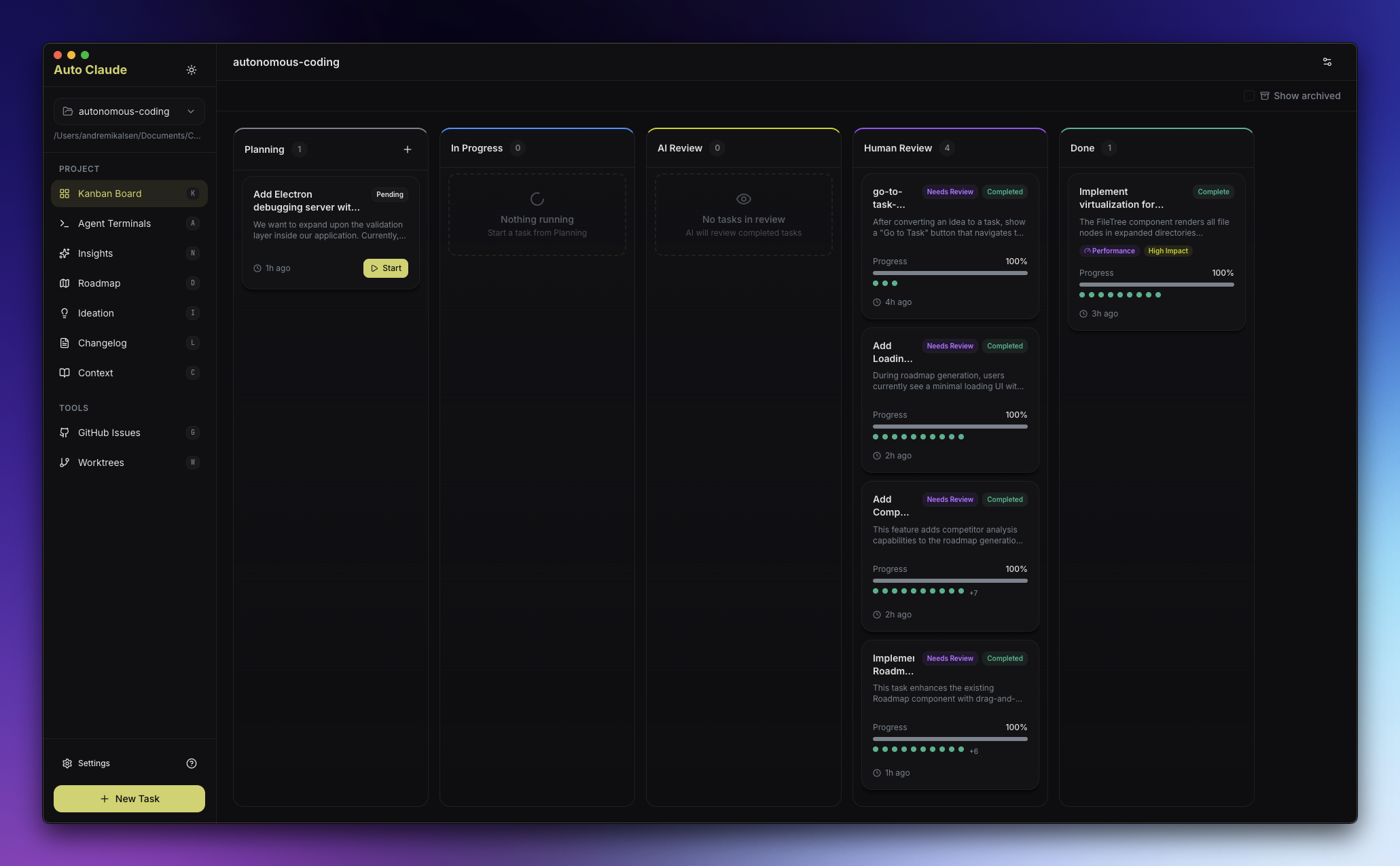
Aperant Kanban Board

License Discord YouTube CI Mentioned in Awesome Claude Code


🚀 Status: Aperant 3.0 in active development

Aperant is alive and under active development — it is not abandoned.

We're rebuilding the entire app from the ground up for Aperant 3.0, which adds cloud features on top of the local desktop experience. Aperant 3.0 will stay fully open source under AGPL-3.0.

Why this repo looks quiet: most of the 3.0 work is happening in a separate development repository right now and will be merged back here once it's ready. So even though commits look sparse on the surface, the project is very much alive and moving fast behind the scenes.

What this means today:

  • 🛠️ The current 2.x desktop app is in maintenance mode — it's stable and usable, but new development is going into 3.0.
  • 🚫 Pull requests are paused. Because the codebase is being rebuilt from scratch, code PRs against the current app can't be merged and will be closed. Please hold off on opening them for now.
  • 💬 We still want your input. Open an issue, start a discussion, or join our Discord to report bugs and help shape what 3.0 becomes.

No public release date yet — ⭐ star and watch the repo (or join Discord) to follow progress.


Download

🛠️ These are 2.x maintenance builds. They're stable and fully usable today, but active development has moved to Aperant 3.0 (see status above). Expect critical fixes here rather than new features.

Stable Release

Stable

Platform Download
Windows Auto-Claude-2.7.6-win32-x64.exe
macOS (Apple Silicon) Auto-Claude-2.7.6-darwin-arm64.dmg
macOS (Intel) Auto-Claude-2.7.6-darwin-x64.dmg
Linux Auto-Claude-2.7.6-linux-x86_64.AppImage
Linux (Debian) Auto-Claude-2.7.6-linux-amd64.deb
Linux (Flatpak) Auto-Claude-2.7.6-linux-x86_64.flatpak

Beta Release

⚠️ Beta releases may contain bugs and breaking changes. View all releases

Beta

Platform Download
Windows Aperant-2.8.0-beta.5-win32-x64.exe
macOS (Apple Silicon) Aperant-2.8.0-beta.5-darwin-arm64.dmg
macOS (Intel) Aperant-2.8.0-beta.5-darwin-x64.dmg
Linux Aperant-2.8.0-beta.5-linux-x86_64.AppImage
Linux (Debian) Aperant-2.8.0-beta.5-linux-amd64.deb
Linux (Flatpak) Aperant-2.8.0-beta.5-linux-x86_64.flatpak

All releases include SHA256 checksums and VirusTotal scan results for security verification.


Requirements


Quick Start

  1. Download and install the app for your platform
  2. Open your project - Select a git repository folder
  3. Connect Claude - The app will guide you through OAuth setup
  4. Create a task - Describe what you want to build
  5. Watch it work - Agents plan, code, and validate autonomously

Features

Feature Description
Autonomous Tasks Describe your goal; agents handle planning, implementation, and validation
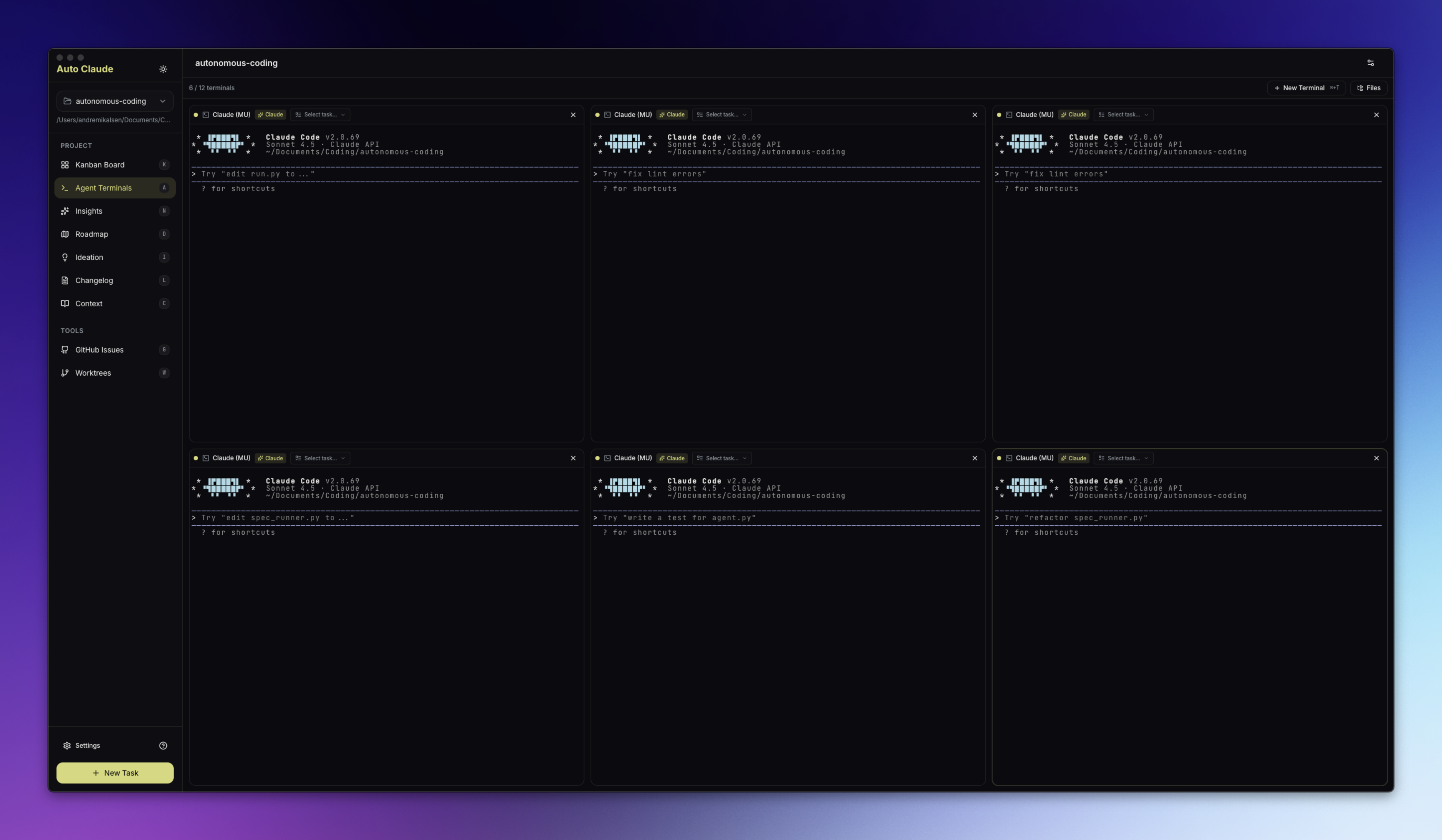
Parallel Execution Run multiple builds simultaneously with up to 12 agent terminals
Isolated Workspaces All changes happen in git worktrees - your main branch stays safe
Self-Validating QA Built-in quality assurance loop catches issues before you review
AI-Powered Merge Automatic conflict resolution when integrating back to main
Memory Layer Agents retain insights across sessions for smarter builds
GitHub/GitLab Integration Import issues, investigate with AI, create merge requests
Linear Integration Sync tasks with Linear for team progress tracking
Cross-Platform Native desktop apps for Windows, macOS, and Linux
Auto-Updates App updates automatically when new versions are released

Interface

Kanban Board

Visual task management from planning through completion. Create tasks and monitor agent progress in real-time.

Agent Terminals

AI-powered terminals with one-click task context injection. Spawn multiple agents for parallel work.

Agent Terminals

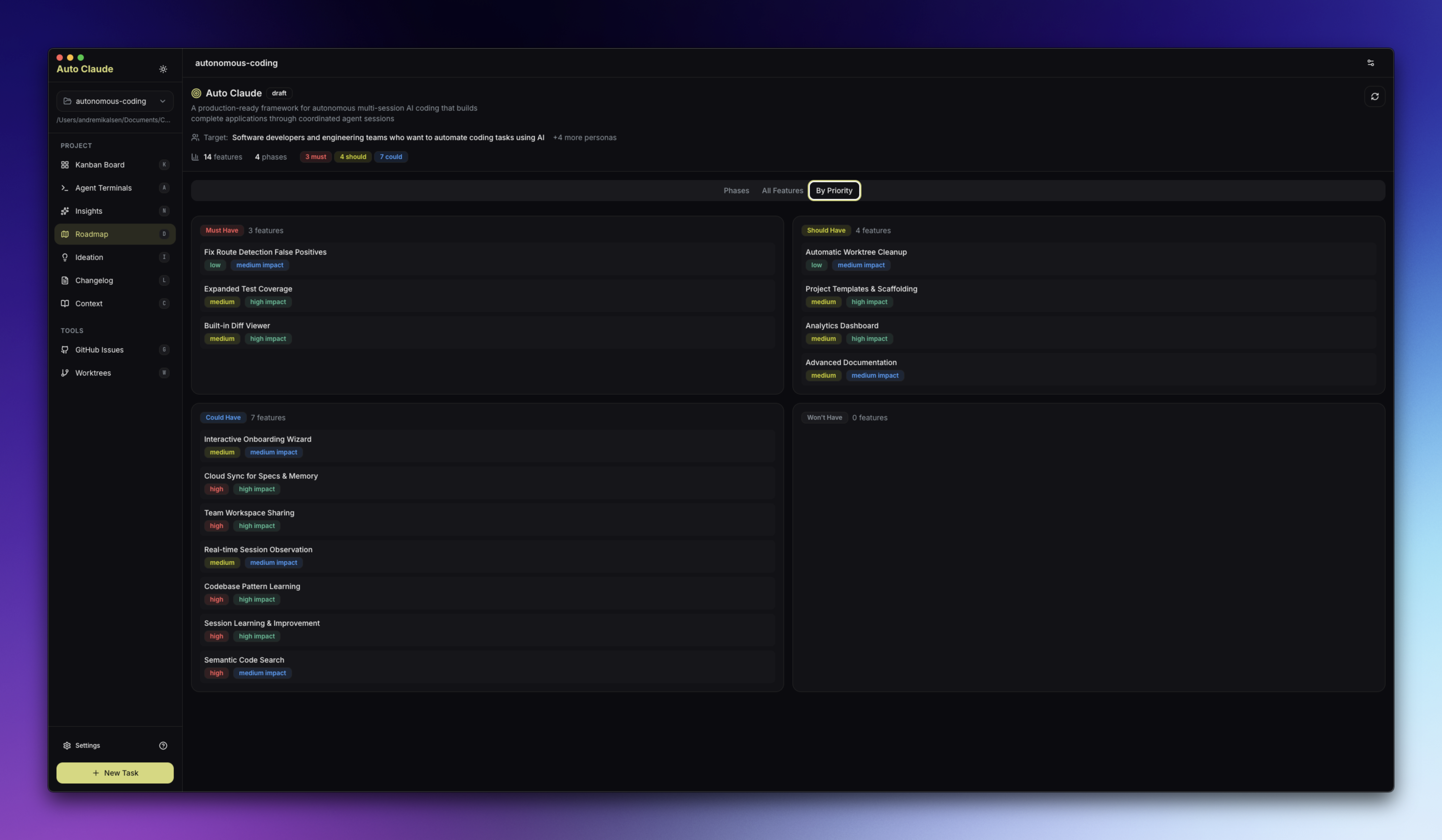
Roadmap

AI-assisted feature planning with competitor analysis and audience targeting.

Roadmap

Additional Features


Project Structure

Aperant/
├── apps/
│   └── desktop/     # Electron desktop application (TypeScript AI agent layer + UI)
├── guides/          # Additional documentation
└── scripts/         # Build utilities

Development

Want to build and run from source? See CONTRIBUTING.md for complete development setup instructions. (Note: code contributions are paused during the 3.0 rebuild — see Contributing below.)

For Linux-specific builds (Flatpak, AppImage), see guides/linux.md.


Security

Aperant uses a three-layer security model:

  1. OS Sandbox - Bash commands run in isolation
  2. Filesystem Restrictions - Operations limited to project directory
  3. Dynamic Command Allowlist - Only approved commands based on detected project stack

All releases are:


Available Scripts

Command Description
npm run install:all Install all dependencies
npm start Build and run the desktop app
npm run dev Run in development mode with hot reload
npm run package Package for current platform
npm run package:mac Package for macOS
npm run package:win Package for Windows
npm run package:linux Package for Linux
npm run package:flatpak Package as Flatpak (see guides/linux.md)
npm run lint Run linter
npm test Run frontend tests

Contributing

🚫 Pull requests are paused while we rebuild for Aperant 3.0. The current codebase is being replaced from the ground up, so code PRs against it can't be merged and will be closed. This is temporary — contribution will reopen once the 3.0 foundation lands.

You can still help shape Aperant right now:

When contributions reopen, CONTRIBUTING.md covers development setup, code style, testing, and the pull request process.


Community


License

AGPL-3.0 - GNU Affero General Public License v3.0

Aperant is free to use. If you modify and distribute it, or run it as a service, your code must also be open source under AGPL-3.0.

Commercial licensing available for closed-source use cases.


Star History

GitHub Repo stars

Star History Chart

Aperant (AndyMik90/Aperant)

Searching Database…

14.6K ·GitHub
Что это такое?Aperant (ранее Auto Claude) — это автономный фреймворк для программирования с несколькими агентами, упакованный в виде десктопного приложения: вы описываете цель, а ИИ-агенты планируют, пишут и проверяют код за вас.
Это библиотека, которую я подключаю в проект, или отдельное приложение, которое я устанавливаю?Это нативное десктопное приложение (сборка в стиле Electron, находится в apps/desktop) с установщиками для Windows, macOS и Linux, а не библиотека кода.
Как это запустить?Скачайте и установите приложение для своей платформы, откройте git-репозиторий, подключите Claude через OAuth, затем создайте задачу с описанием того, что нужно сделать, и смотрите, как работают агенты.
Нужна ли мне подписка Claude или достаточно только приложения?Нужна подписка Claude Pro/Max, Claude Code CLI (npm install -g @anthropic-ai/claude-code), а ваш проект должен уже быть git-репозиторием.
Как не дать автономному агенту сломать мою систему или репозиторий?Aperant использует трёхуровневую модель безопасности: изоляцию bash-команд средствами ОС, ограничение файловых операций каталогом проекта и динамический список разрешённых команд, который формируется на основе определённого стека проекта.
Как сделать так, чтобы параллельные агенты не мешали друг другу?Каждая задача выполняется в собственном изолированном git worktree, поэтому изменения параллельных сессий агентов не затрагивают вашу основную ветку, пока вы их не смержите.
Сколько агентов может работать одновременно?Одновременно могут работать до 12 терминалов агентов, каждый над своей задачей.
Что делает функция Memory Layer?Агенты сохраняют выводы между сессиями, поэтому последующие задачи используют то, что было изучено в предыдущих сборках.
Может ли он работать с моими существующими issues в GitHub или GitLab?Да, он может импортировать issues из GitHub или GitLab, анализировать их с помощью ИИ и создавать merge requests, а также синхронизировать задачи с Linear для командного трекинга.
What are similar projects?agentcraft, 1code, open-swe, ruflo, qwen-code, epiq, useagent, evenfire
Creator
AndyMik90
Size
57.5 MB
Stars
14.6K
Age
10mo
Commits · 90 Days