1Code
1Code.dev
Open-source coding agent client. Run Claude Code, Codex, and more - locally or in the cloud.
By 21st.dev team
Highlights
- Multi-Agent Support - Claude Code and Codex in one app, switch instantly
- Visual UI - Cursor-like desktop app with diff previews and real-time tool execution
- Custom Models & Providers (BYOK) - Bring your own API keys
- Git Worktree Isolation - Each chat runs in its own isolated worktree
- Background Agents - Cloud sandboxes that run when your laptop sleeps
- Live Browser Previews - Preview dev branches in a real browser
- Kanban Board - Visualize agent sessions
- Built-in Git Client - Visual staging, diffs, PR creation, push to GitHub
- File Viewer - File preview with Cmd+P search and image viewer
- Integrated Terminal - Sidebar or bottom panel with Cmd+J toggle
- Model Selector - Switch between models and providers
- MCP & Plugins - Server management, plugin marketplace, rich tool display
- Automations - Trigger agents from GitHub, Linear, Slack, or manually from git events
- Chat Forking - Fork a sub-chat from any assistant message
- Message Queue - Queue prompts while an agent is working
- API - Run agents programmatically with a single API call
- Voice Input - Hold-to-talk dictation
- Plan Mode - Structured plans with markdown preview
- Extended Thinking - Enabled by default with visual UX
- Skills & Slash Commands - Custom skills and slash commands
- Custom Sub-agents - Visual task display in sidebar
- Memory - CLAUDE.md and AGENTS.md support
- PWA - Start and monitor background agents from your phone
- Cross Platform - macOS desktop, web app, Windows and Linux
Features
Run coding agents the right way
Run agents locally, in worktrees, in background - without touching main branch.
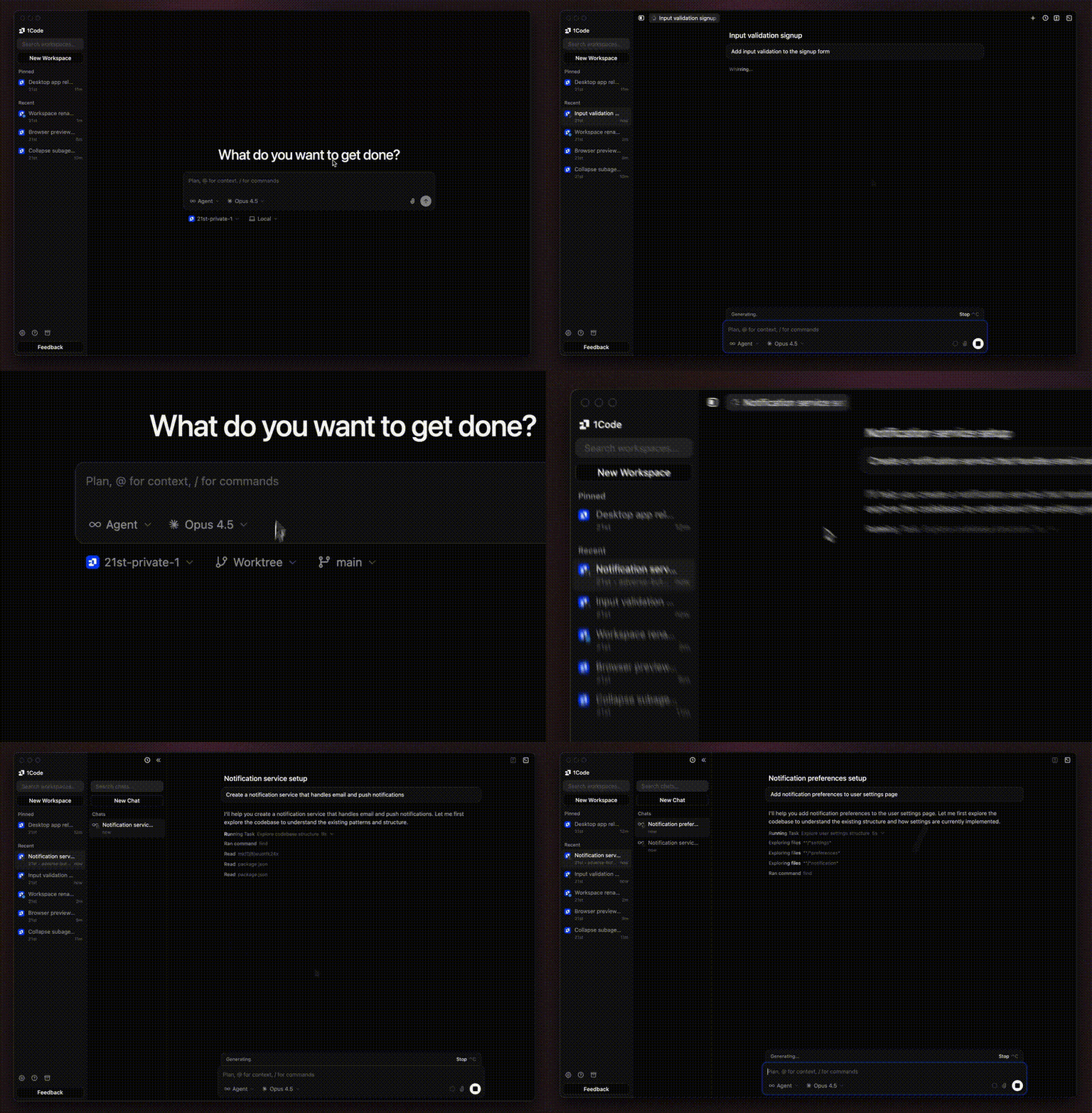
- Git Worktree Isolation - Each chat session runs in its own isolated worktree
- Background Execution - Run agents in background while you continue working
- Local-first - All code stays on your machine, no cloud sync required
- Branch Safety - Never accidentally commit to main branch
- Shared Terminals - Share terminal sessions across local-mode workspaces
UI that finally respects your code
Cursor-like UI with diff previews, built-in git client, and the ability to see changes before they land.
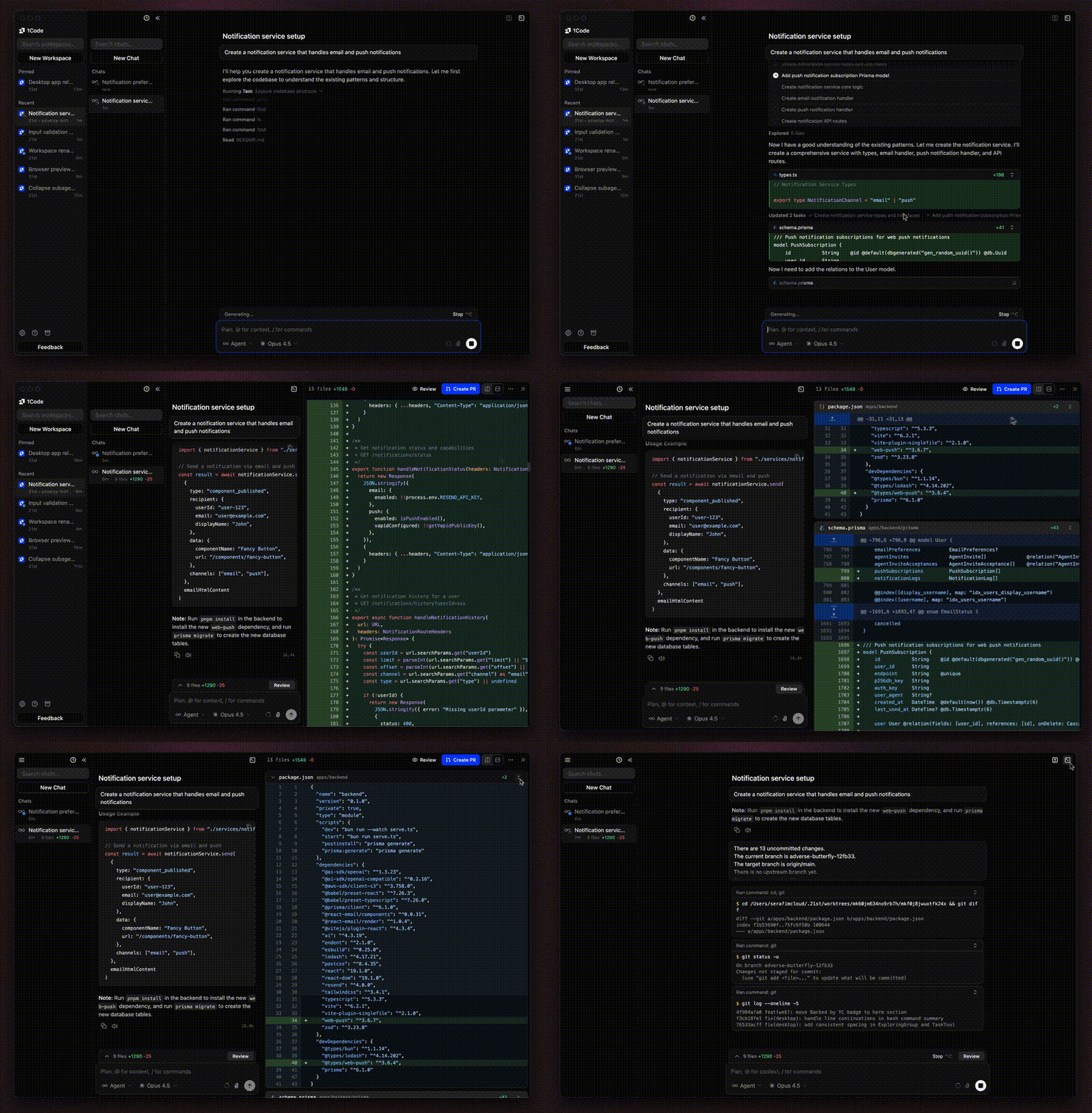
- Diff Previews - See exactly what changes the agent is making in real-time
- Built-in Git Client - Stage, commit, push to GitHub, and manage branches without leaving the app
- Git Activity Badges - See git operations directly on agent messages
- Rollback - Roll back changes from any user message bubble
- Real-time Tool Execution - See bash commands, file edits, and web searches as they happen
- File Viewer - File preview with Cmd+P search, syntax highlighting, and image viewer
- Chat Forking - Fork a sub-chat from any assistant message to explore alternatives
- Chat Export - Export conversations for sharing or archival
- File Mentions - Reference files directly in chat with @ mentions
- Message Queue - Queue up prompts while an agent is working
Plan mode that actually helps you think
The agent asks clarifying questions, builds structured plans, and shows clean markdown preview - all before execution.
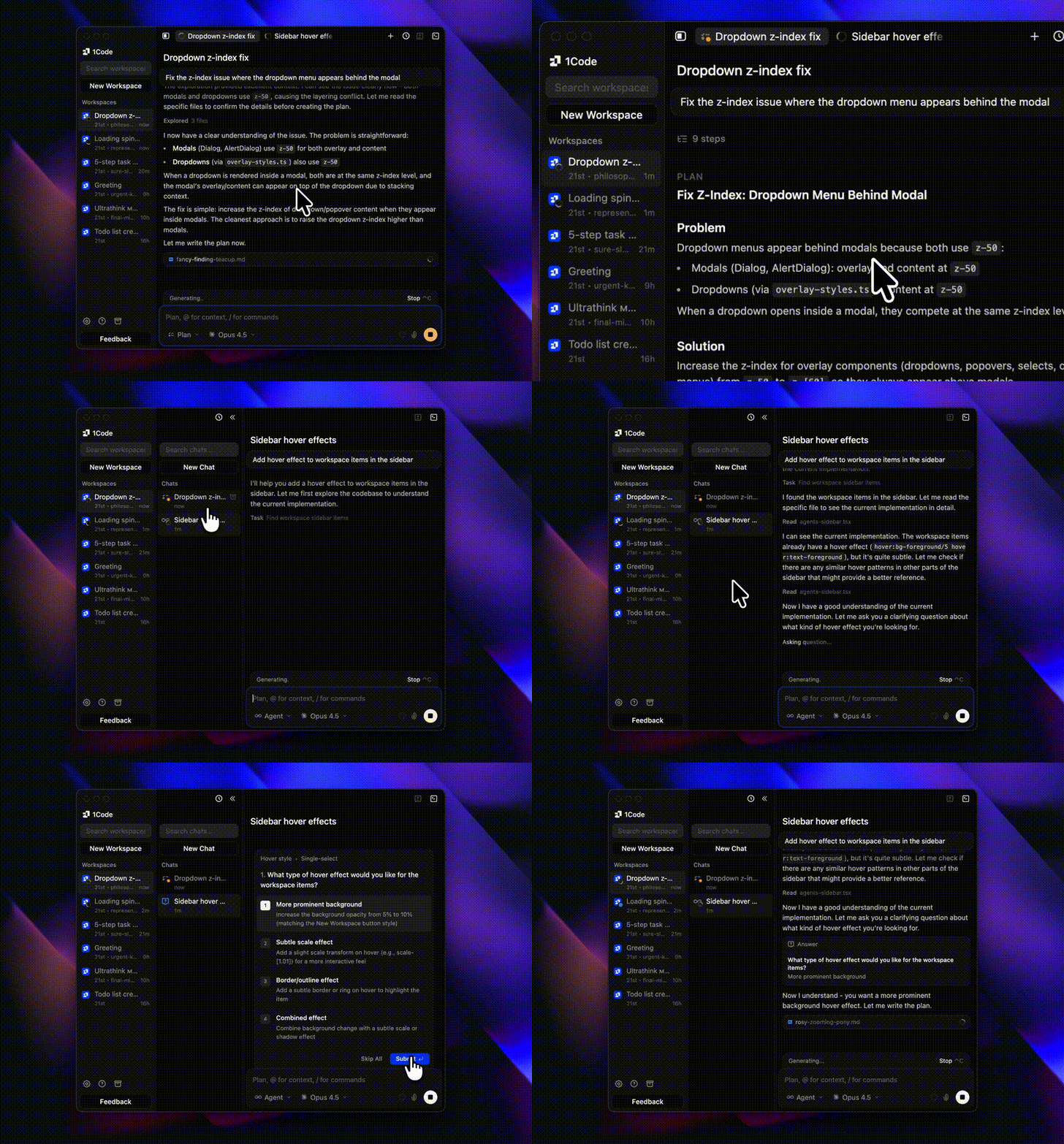
- Clarifying Questions - The agent asks what it needs to know before starting
- Structured Plans - See step-by-step breakdown of what will happen
- Clean Markdown Preview - Review plans in readable format
- Review Before Execution - Approve or modify the plan before the agent acts
- Extended Thinking - Enabled by default with visual thinking gradient
- Sub-agents - Visual task list for sub-agents in the details sidebar
Background agents that never sleep
Close your laptop. Your agents keep running in isolated cloud sandboxes with live browser previews.
- Runs When You Sleep - Background agents continue working even when your laptop is closed
- Cloud Sandboxes - Every background session runs in an isolated cloud environment
- Live Browser Previews - See your dev branch running in a real browser
Connect anything with MCP
Full MCP server lifecycle management with a built-in plugin marketplace. No config files needed.
- MCP Server Management - Toggle, configure, and delete MCP servers from the UI
- Plugin Marketplace - Browse and install plugins with one click
- Rich Tool Display - See MCP tool calls with formatted inputs and outputs
- @ Mentions - Reference MCP servers directly in chat input
Automations that work while you sleep
Trigger agents from GitHub, Linear, Slack, or manually from git events. Auto-review PRs, fix CI failures, and complete tasks - all configurable.
- @1code Triggers - Tag @1code in GitHub, Linear, or Slack to start agents
- Git Event Triggers - Run automations on push, PR, or any git event
- Conditions & Filters - Control when automations fire
- Execution Timeline - Visual history of past runs
- Silent Mode - Toggle respond-to-trigger for background automations
Automations require a Pro or Max subscription. Learn more at 1code.dev/agents/async.
API
Run coding agents programmatically. Point at a repo, give it a task - the agent runs in a sandbox and delivers a PR.
curl -X POST https://1code.dev/api/v1/tasks \
  -H "Authorization: Bearer YOUR_API_KEY" \
  -d '{
    "repository": "https://github.com/your-org/your-repo",
    "prompt": "Fix the failing CI tests"
  }'
- Remote Sandboxes - Isolated cloud environment, repo cloned, dependencies installed
- Git & PR Integration - Agent commits, pushes branches, opens PRs automatically
- Async Execution - Fire and forget, poll for status or get notified
- Follow-up Messages - Send additional instructions to a running task
Learn more at 1code.dev/agents/api
Installation
Option 1: Build from source (free)
# Prerequisites: Bun, Python 3.11, setuptools, Xcode Command Line Tools (macOS)
bun install
bun run claude:download  # Download Claude binary (required!)
bun run codex:download   # Download Codex binary (required!)
bun run build
bun run package:mac  # or package:win, package:linux
Important: The claude:download and codex:download steps download required agent binaries. If you skip them, the app may build but agent functionality will not work correctly.
Python note: Python 3.11 is recommended for native module rebuilds. On Python 3.12+, make sure setuptools is installed (pip install setuptools).
Option 2: Subscribe to 1code.dev (recommended)
Get pre-built releases + background agents support by subscribing at 1code.dev.
Your subscription helps us maintain and improve 1Code.
Development
bun install
bun run claude:download  # First time only
bun run codex:download   # First time only
bun run dev
Join our Discord for support and discussions.
License
Apache License 2.0 - see LICENSE for details.

 1Code 是一款开源桌面客户端,让你可以在本地或云端运行 Claude Code、Codex 等编程智能体,并通过一个类似 Cursor 的界面统一管理。