fauxnix





Run Linux-style commands on Windows — natively, deterministically, no VM, no WSL.
fauxnix is a bash→PowerShell translation layer built for AI agents. Your agent keeps writing the
bash it already knows (ls -la | grep foo, find . -name '*.ts' | wc -l, kill -9 1234), and
fauxnix deterministically translates each command into PowerShell, executes it natively, and hands
back output that looks like GNU/Linux: ls -l columns, bash-style error messages, coreutils exit
codes, UTF-8/GBK handled automatically.
One-command install for Claude Code · Codex · OpenCode · Kimi Code · Qwen Code, plus any MCP
client. 109 translated commands · 400+ automated tests · 253-case differential corpus verified
against real GNU coreutils · zero LLM calls at runtime.
Try it now — no install
npx fauxnix-cli@latest "ls -la src | head -3"
npx fauxnix-cli@latest translate "find . -name '*.log' -mtime +7 -delete"
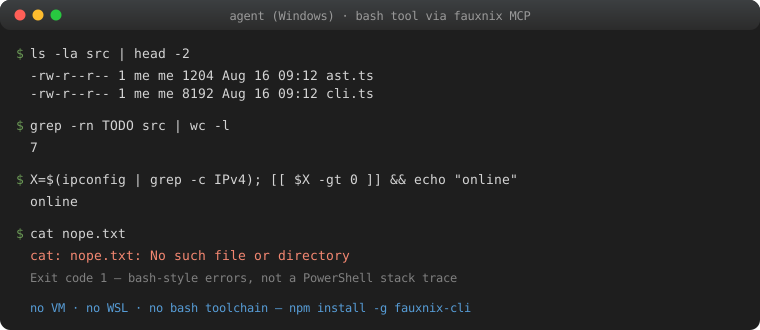
$ fauxnix "ls -la src | head -2"
-rw-r--r-- 1 me me 1204 Aug 16 09:12 ast.ts
-rw-r--r-- 1 me me 8192 Aug 16 09:12 cli.ts

$ fauxnix "cat nope.txt"
cat: nope.txt: No such file or directory        # not a PowerShell stack trace
Connect your agent — one command
npm install -g fauxnix-cli
fauxnix install --claude     # or --codex / --opencode / --kimi / --qwen
fauxnix doctor               # verifies encoding, harness config, and MCP round-trip
Idempotent; prints exactly what changed. Manual configurations below if you prefer to edit
config files yourself.
npm package name is fauxnix-cli (the fauxnix name on npm belongs to an unrelated 2015
websocket library); the installed command is fauxnix. Requires Windows with PowerShell 5.1+
(built-in) and Node.js ≥ 18.
Manual config per harness
Claude Code
claude mcp add fauxnix -- fauxnix mcp
Codex (~/.codex/config.toml or codex mcp add fauxnix -- fauxnix mcp)
[mcp_servers.fauxnix]
command = "fauxnix"
args = ["mcp"]
Note: in non-interactive codex exec mode, MCP tool calls are auto-denied by the approval
layer; pass --dangerously-bypass-approvals-and-sandbox (or run interactively and approve
once).
OpenCode (opencode.json)
{
  "mcp": {
    "fauxnix": { "type": "local", "command": ["fauxnix", "mcp"] }
  }
}
Kimi Code — MCP servers live in a JSON file, not the TOML config: ~/.kimi-code/mcp.json
{
  "mcpServers": {
    "fauxnix": { "command": "fauxnix", "args": ["mcp"] }
  }
}
Qwen Code (~/.qwen/settings.json)
fauxnix install --qwen
The installer preserves the rest of settings.json and writes an absolute Node + package-entry
launcher so Qwen startup does not depend on its working directory or PATH order. See
the Qwen example for the generated JSON shape.
Any MCP client — stdio server: fauxnix mcp. The tool name is bash (override with
FAUXNIX_TOOL_NAME). The tool description already teaches the model the supported subset, so no
system-prompt changes are required.
Copy-paste quickstarts with a 10-command smoke test per harness: docs/examples/
The MCP session persists cwd, environment variables, export/unset, cd -/OLDPWD, and
positional parameters (set -- / $1 / "$@") across tool calls — it behaves like a logged-in
shell, not a stateless exec. $0 is the MCP tool name, not a Windows path.
For workflows whose commands are already known, the MCP server also exposes bash_batch: it
compiles every step before execution, runs the plan atomically in one session, and returns one
structured result per step in a single MCP round trip (stops on first nonzero exit by default).
{
  "steps": [
    { "id": "write", "command": "printf 'a\\r\\nb' > data.txt" },
    { "id": "measure", "command": "wc -c data.txt" }
  ]
}
See compiled MCP batch plans for timeout, budget, cancellation,
and preflight semantics.
Measured: your model is probably worse at PowerShell than you think
Same model (DeepSeek-V4-Pro), same 5 tasks, three execution modes on one Windows machine —
full data in docs/benchmark-deepseek-v4-pro.md and
docs/benchmark-ark-models.md:
|
PowerShell |
fauxnix |
Git Bash |
| tool calls / unexpected errors |
14 / 9 |
7 / 0 |
4 / 0 |
| time (T1–T4) |
163s |
66s |
57s |
Across 7 models on the Volcano Ark Coding Plan, the PowerShell-vs-fauxnix gap held for every
model tested — worst case (kimi-k2-thinking): 3.1× slower with 24 error events writing
PowerShell vs zero errors through fauxnix. fauxnix lands within ~15% of the real-bash ceiling
with no bash toolchain installed.
Why
LLM agents are dramatically better at bash than at PowerShell — bash dominates training data, so
models on Windows often produce "looks right, doesn't run" commands (wrong quoting, curl that
isn't curl, mojibake from codepage mismatches, inscrutable CategoryInfo error dumps).
|
fauxnix |
Git Bash |
WSL |
Raw PowerShell |
| agent writes plain bash |
✓ |
✓ |
✓ |
✗ |
| only needs Node (no bash toolchain / VM) |
✓ |
✗ |
✗ (VM, GBs) |
✓ |
| native Windows filesystem & environment |
✓ |
mostly |
✗ (9P bridge) |
✓ |
| GNU-exact output, verified |
✓ 253-case differential |
✓ (is GNU) |
✓ |
✗ |
| CRLF / UTF-8 / GBK traps handled |
✓ |
locale-dependent |
✓ |
✗ |
If Git Bash already works for you, keep it — we literally use it as our differential-testing
oracle. fauxnix is for when you can't or don't want to ship one: agent fleets where the bash
toolchain drifts or isn't detected (the Windows ARM64 Git-Bash detection
failure is a live example), CI runners,
locked-down machines, or anywhere a single npm install -g is easier than a toolchain.
fauxnix takes the third road: translate, don't emulate. A large, high-value subset of the
Linux command line — file ops, text processing, process management, archives, networking basics —
maps cleanly onto PowerShell + .NET. fauxnix implements that subset faithfully and fails loudly
and helpfully on what it can't translate, so the agent never gets silently-wrong results.
That matters as labs train computer-use agents on Mac fleets — the agent keeps writing bash;
fauxnix makes the Windows box answer like the box the agent was trained on
(RFC: computer-use parity).
What's translated
109 commands, output-matched against real GNU coreutils on Windows (Git Bash) during development:
- files:
ls cp mv rm mkdir rmdir touch mktemp ln readlink realpath basename dirname stat file du df find chmod chown diff
- text filters:
grep egrep sed awk sort uniq cut tr — sed/awk scripts are parsed while
preparing an executable plan (unsupported constructs throw named errors, never silently
misbehave)
- text I/O:
echo printf cat head tail wc tee nl tac md5sum sha1sum sha256sum base64 seq yes xargs
- shell/system:
cd pwd export unset env printenv ps kill pkill pgrep sleep which type whoami id groups date uname hostname uptime free nproc clear true false test [ [[ : pushd popd dirs sudo timeout man history less more source . eval exit alias set shift
- network:
curl wget ping netstat ss ip ifconfig nslookup dig host
- archives:
tar gzip gunzip zcat zip unzip
The curated agent-daily 60 carry a CommandSpec: unknown options fail with a GNU-style
usage error instead of being ignored. The generated docs/command-specs.md
is the exact list, coverage count, option table, and exclusion rationale; fauxnix list --json
exposes the same per-command metadata. find stays unspec'd so predicates like -name still
compile; sed/awk/egrep keep their command-specific parsers; tar remains native to
tar.exe so supported bsdtar options reach the executable. Implemented GNU holes include
cp -n / mv -n / touch -c / tee --append / grep -m / head --lines /
du --max-depth / env -u / ps -f / command -V / date --date=@SECONDS.
Plus shell syntax: pipes, && / || / ;, redirections (> >> 2> 2>&1 < &>, /dev/null),
quoting, $VAR $1 $# "$@" set -- shift, ${name:-word} ${name//pat/str}
${name:off:len} ${name[n]} ${#name[@]}, A=(x y z) array assignment, $(...) command
substitution, VAR=x cmd prefixes, ~ expansion, and POSIX-style path normalization
(/tmp, /d/foo → D:\foo). Exit codes follow bash conventions: 0 ok, 1 fail, 2 usage/serious,
127 command not found, 124 timeout.
Unknown commands (git, node, npm, python, cargo, gh, docker, ...) are passed through natively
with argv-style quoting. Windows .cmd/.bat shims necessarily pass through cmd.exe; fauxnix
preserves its supported punctuation and fails loudly for %, embedded double quotes, NUL, and
line breaks rather than passing a different argument.
How it works
bash command ──parser──▶ AST ──translator──▶ PowerShell script ──executor──▶ selected PowerShell
                                                                              │
agent ◀── GNU-style output, bash-style errors ◀── UTF-8 framed host protocol ◀┘
- Deterministic translation, zero LLM calls at runtime.
- Each command maps to a generator that emits a self-contained PowerShell block honoring the
"Fauxnix contract": string-per-line stdout,
[Console]::Error.WriteLine for bash-style
stderr, $script:fx_exit for exit codes, $input for stdin.
- The executor wraps every script with UTF-8 enforcement, decodes native output at the process
boundary (UTF-8 by default or GBK(936) in
ansi mode), strips CLIXML serialization and
PowerShell noise from stderr, and rewrites common PowerShell errors (including zh-CN locale
messages) into bash phrasing. File reads are always sniffed per file (UTF-8 strict → GBK
fallback), so grep/sed/awk over GBK files works in either mode.
- Scripts run via
-EncodedCommand (UTF-16LE) and transparently fall back to a temp .ps1 file
when the 32 KB command-line limit would be exceeded.
PowerShell 7 is an opt-in, CI-tested tier: set FAUXNIX_PS=pwsh before starting fauxnix or its
MCP harness. The default is Windows PowerShell 5.1; invalid values fail loudly rather than
falling back. See PowerShell 7 support.
Known deviations (honest list)
fauxnix optimizes for the commands agents actually run. Documented deviations:
X=1 standalone assignments follow export semantics (one session-wide environment; bash's
shell-var vs exported-var distinction does not exist), and a same-segment prefix is visible to
$VAR inside the command's own words (Z=in [[ $Z == in ]] is true here, false in bash where
word expansion precedes the temporary environment).yes is capped at 65,536 lines — PS 5.1 pipelines cannot signal upstream producers to stop, so
an unbounded yes | head would hang.tail -f, eval, alias, heredocs, env -i/--ignore-environment, background &, and
output/fd redirects on a non-last pipeline stage are rejected with operation-specific,
actionable error messages instead of misbehaving. Per-stage < remains supported.
(if/then/elif/else/fi, for x in ..., while/until, case ... esac (;; only),
backtick substitution, command -v, pipeline read, dotenv-style source, word-level
$((...)) arithmetic expansion, A=(x y z) arrays, and ${name//pat/str} /
${name:off:len} are supported.)command -v <builtin> prints /usr/bin/<name> where bash prints the bare builtin name;
exit codes and empty-result semantics match.chmod maps only the read-only bit; exec bits are no-ops on Windows. chown is a silent no-op
(as in Git Bash).ps aux columns are approximations (no per-process CPU% accounting, USER shows ?).gzip -c/pipeline stdin is text-faithful, not byte-faithful; file-mode gzip f is byte-exact.- A pipeline producing exactly one line, piped into
wc -l, counts that line (bash would count 0
if the producer omitted the trailing newline). printf 'x' | md5sum stays byte-exact.
sed/awk support the common subset; hold-space, labels, arrays, loops throw named
"not supported" errors at translate time.curl/wget refuse loopback/private/reserved addresses (localhost, 127.x, ::1, 10.x,
172.16–31.x, 192.168.x, 169.254.x) as a safety default for agent-driven HTTP.- Native-tool pipelines vs encoding: PS 5.1 has a single console-encoding knob, so piping
localized admin tools (ipconfig, tasklist — GBK on zh-CN) and UTF-8-native dev tools (node,
curl) cannot both decode cleanly mid-pipeline. Default favors UTF-8 dev tools; set
FAUXNIX_NATIVE_ENCODING=ansi when your agents grep Chinese output of native Windows admin
tools.
Development
npm install
npm test          # unit + real-PowerShell integration suite (Windows only, auto-skipped elsewhere)
$env:FAUXNIX_PS = 'pwsh'; npm test   # same suite through PowerShell 7
npm run build
npx tsx scratch/run.mjs "any bash command"   # quick live check
Differential vs Git Bash is opt-in (FAUXNIX_DIFF_ORACLE=1; skips if unset or bash.exe is
missing — Git Bash is not required). See test/differential/README.md.
The 253-case corpus enforces the RFC C-7 minimum of 200 cases and a 95% identity gate; the weekly
oracle runs from .github/workflows/differential.yml.
Architecture map: src/parser.ts (bash subset → AST) · src/translator.ts (AST → PowerShell +
executor wrapper) · src/executor.ts (spawn, redirects, session persistence) ·
src/commands/*.ts (per-command generators) · src/mcp.ts (MCP server) · src/cli.ts.
Roadmap: docs/rfc-roadmap-to-1.0.md — tracks, milestones, and the
RFC process for proposing waves.
Security
Trust model, host protocol, kill semantics, network guard, and reporting:
SECURITY.md.
License
MIT © 20000419

 Fauxnix позволяет ИИ-агентам для кодинга продолжать писать команды bash на Windows: он детерминированно переводит каждую bash-команду в PowerShell, выполняет её нативно и возвращает вывод в стиле GNU, не используя ВМ или WSL.