Editable Visual Design
Coding-agent-driven creation of editable, tastefully crafted visual artifacts.
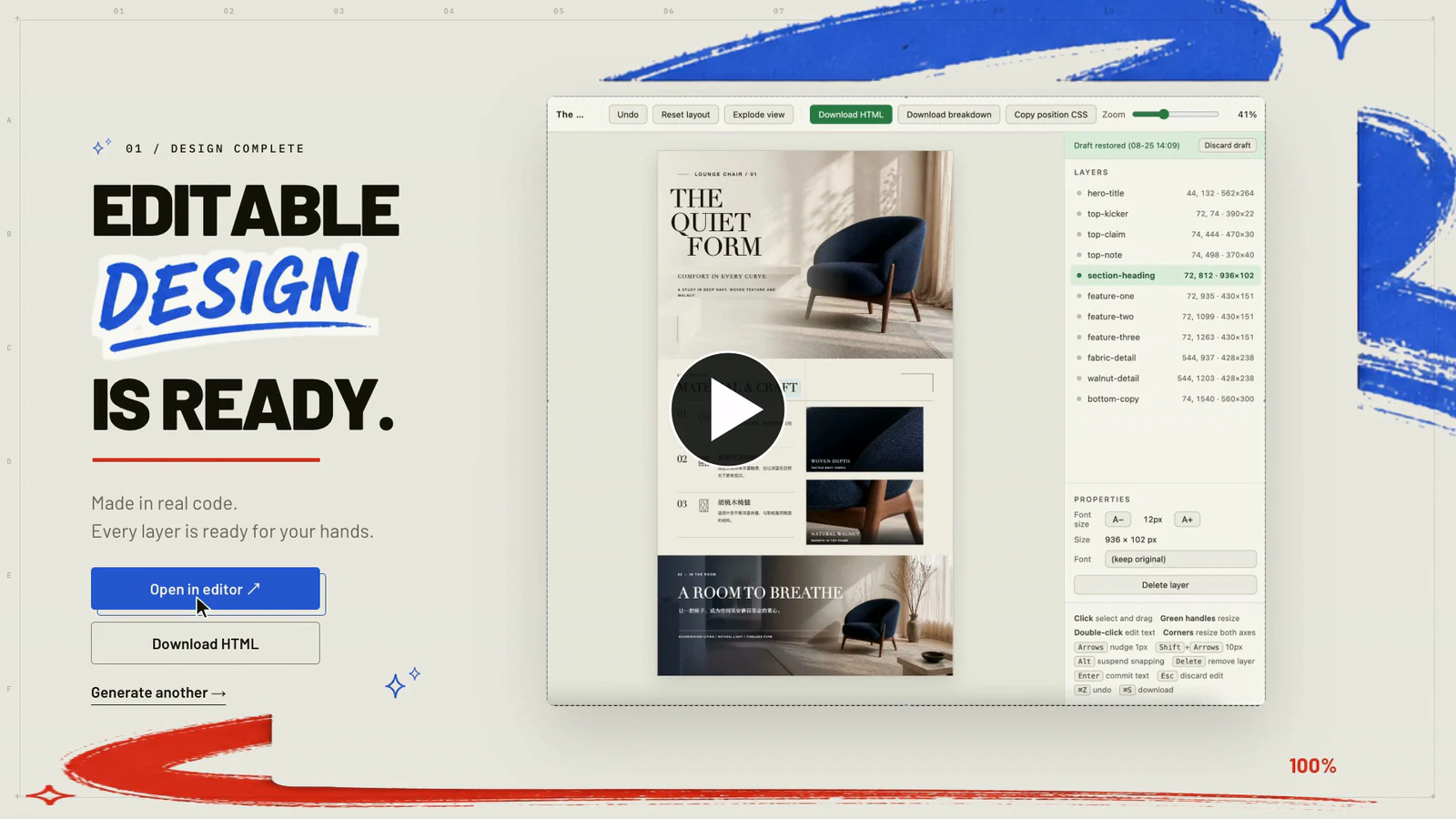
Turn a brief or method description into an editable visual design. Keep text and visual elements independently editable in HTML or PowerPoint.




News
- 2026-09-08 — 🔬 Paper Fig, developed with GPT-6: turn method descriptions into editable paper workflow diagrams in your chosen style. Install · Gallery.
- 2026-09-04 — 📢 Editable Design — Initial Release! Create editable posters, infographics, art posters, and marketing campaigns with real text, independent layers, and Agent Design Replay. 📄 Read our paper on arXiv.
Paper Fig
Generate paper workflow diagrams from method descriptions in your chosen visual style, with editable text, shapes, and images in PowerPoint.
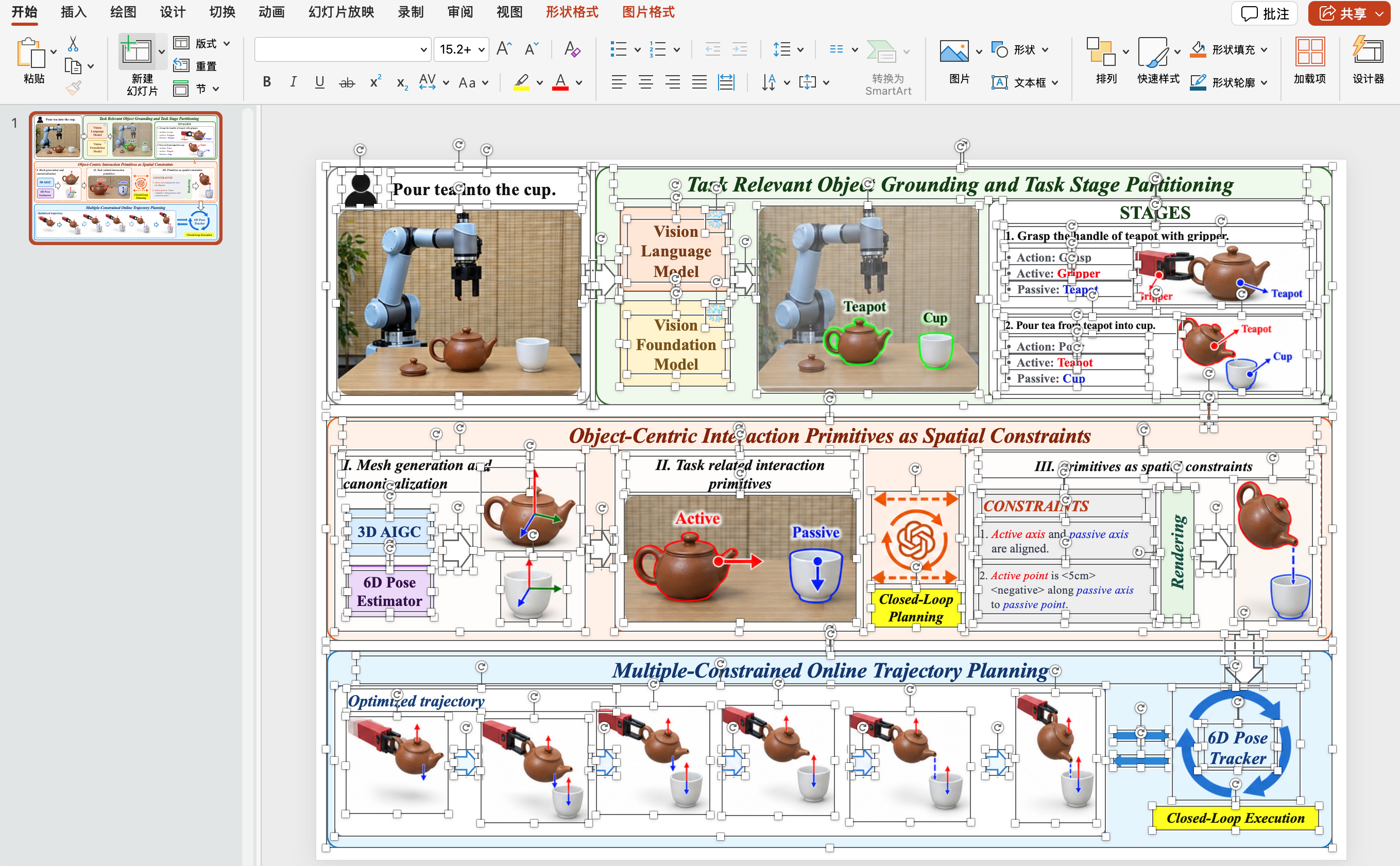
Install and use Paper Fig
Copy this request into Codex:
Install the paper-fig Skill from:
https://github.com/yejy53/Editable-Design/tree/main/skills/paper-fig
Then provide a method description and your preferred visual style:
Use $paper-fig to turn the following method description into a paper workflow diagram in my requested visual style. Deliver an editable PowerPoint.
Overview
Quick Start
Posters, infographics, and campaigns
Open a Codex task and ask Codex to install and initialize the Skill:
Install and initialize the editable-design Codex Skill from:
https://github.com/yejy53/Editable-Design/tree/main/skills/editable-design

Install its runtime dependencies and font kit, then run its doctor check.
Start a new Codex task, then describe the visual you want to create. For example:
Use $editable-design to create an editable encyclopedia-style field guide about the red panda.
The Skill will create the finished design together with its editable source: real text, independent imagery, semantic HTML layers, a visual editor, a layer breakdown, and an Agent Design Replay.
Recommended: Use high reasoning effort or above for complex diagrams and layouts.
Manual installation without Gallery media
Use a sparse, blob-filtered clone to install only the Skill without downloading the Gallery media:
git clone --depth 1 --filter=blob:none --sparse \
  https://github.com/yejy53/Editable-Design.git
cd Editable-Design
git sparse-checkout set skills/editable-design

mkdir -p ~/.codex/skills
cp -R skills/editable-design ~/.codex/skills/
npm ci --prefix ~/.codex/skills/editable-design/scripts
~/.codex/skills/editable-design/scripts/install-font-kit.sh
~/.codex/skills/editable-design/scripts/doctor.sh
For Paper Fig instead, select skills/paper-fig in the sparse checkout and follow its installation guide.
Optional: Editable PowerPoint export
For a one-step Codex installation, ask:
Install the html-to-pptx Codex Skill from:
https://github.com/yejy53/Editable-Design/tree/main/skills/html-to-pptx

Use it to convert my compatible HTML into an editable PowerPoint file.
Codex installs the Skill from that subdirectory. Its first conversion automatically prepares an isolated Python environment and Playwright Chromium; the user does not need to run dependency commands.
Choose a Skill
| Skill |
Use it for |
Outputs |
paper-fig |
Generate paper workflow and architecture diagrams from method descriptions |
Editable PPTX |
editable-design |
Posters, infographics, and marketing campaigns |
HTML, PNG, visual editor, layer breakdown, Agent Design Replay |
html-to-pptx |
Converting an existing compatible HTML design |
Editable PPTX |
Install only the Skill you need. Paper Fig does not depend on either of the other Skills. See the Toolkit guide for detailed setup and packaging.
Design principles behind Editable Visual Design
- Coding-agent-driven design. One persistent agent plans, builds, renders, and repairs the artifact. Agent Design Replay exposes the HTML workflow's creation path.
- Visual direction with editable structure. The agent plans a visual composition, then builds it with editable text, layout, and independent image assets.
- Local editing and verification. Text and structural elements remain independently editable. Checks cover rendering and format-specific contracts; the output still needs human review for scientific accuracy.
Gallery
Three Paper Fig results, followed by thirteen visual-design examples. Click a figure to view the full-resolution PNG.
Research method pipelines and architecture diagrams generated with paper-fig. The reference cases come from PaperGallery and the original papers credited below. These are qualitative examples, not a model-performance benchmark.
OmniManip — Object-Centric Manipulation
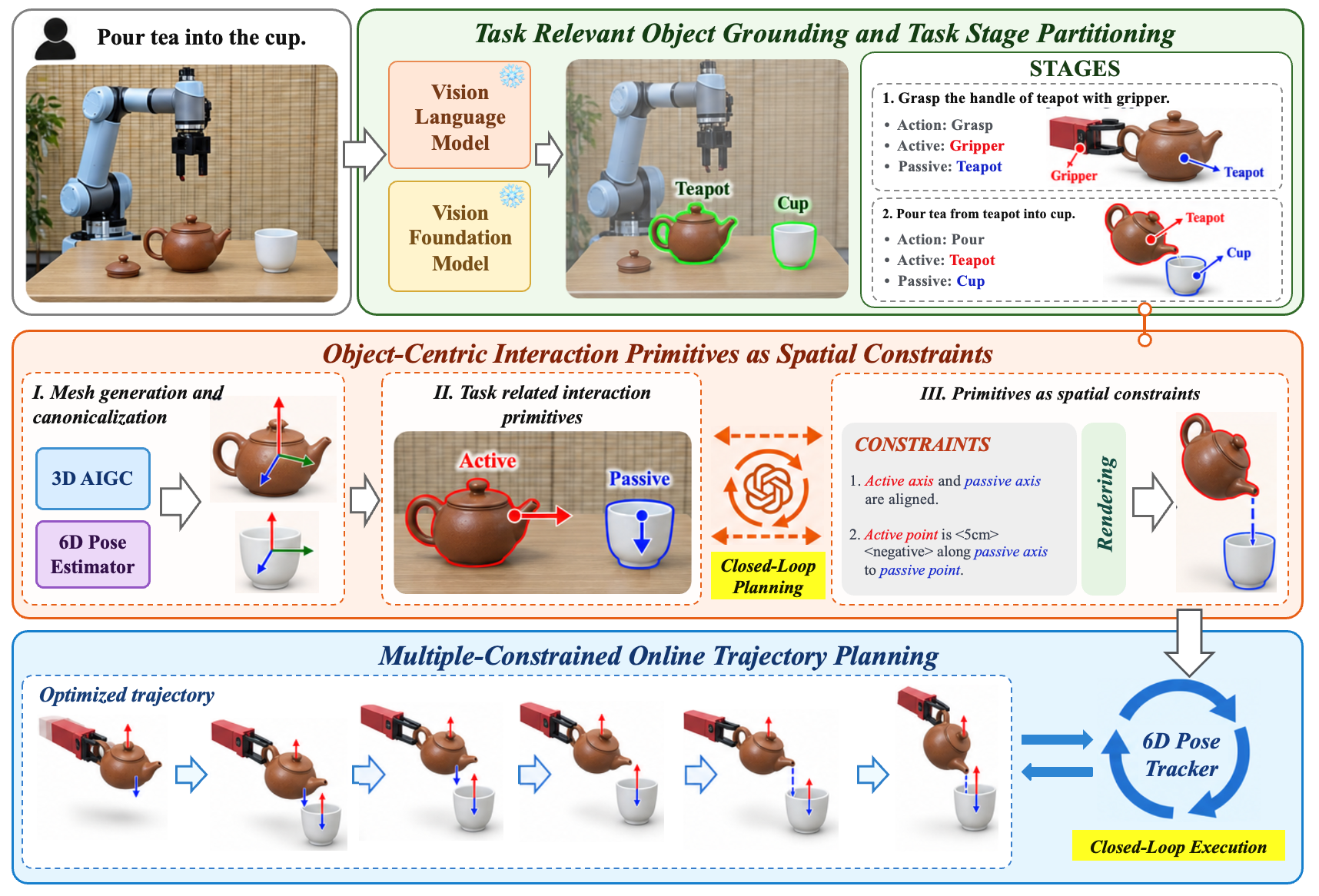
Generated with Paper Fig · Reference: PaperGallery · Original paper
Compact3D — Gaussian Compression
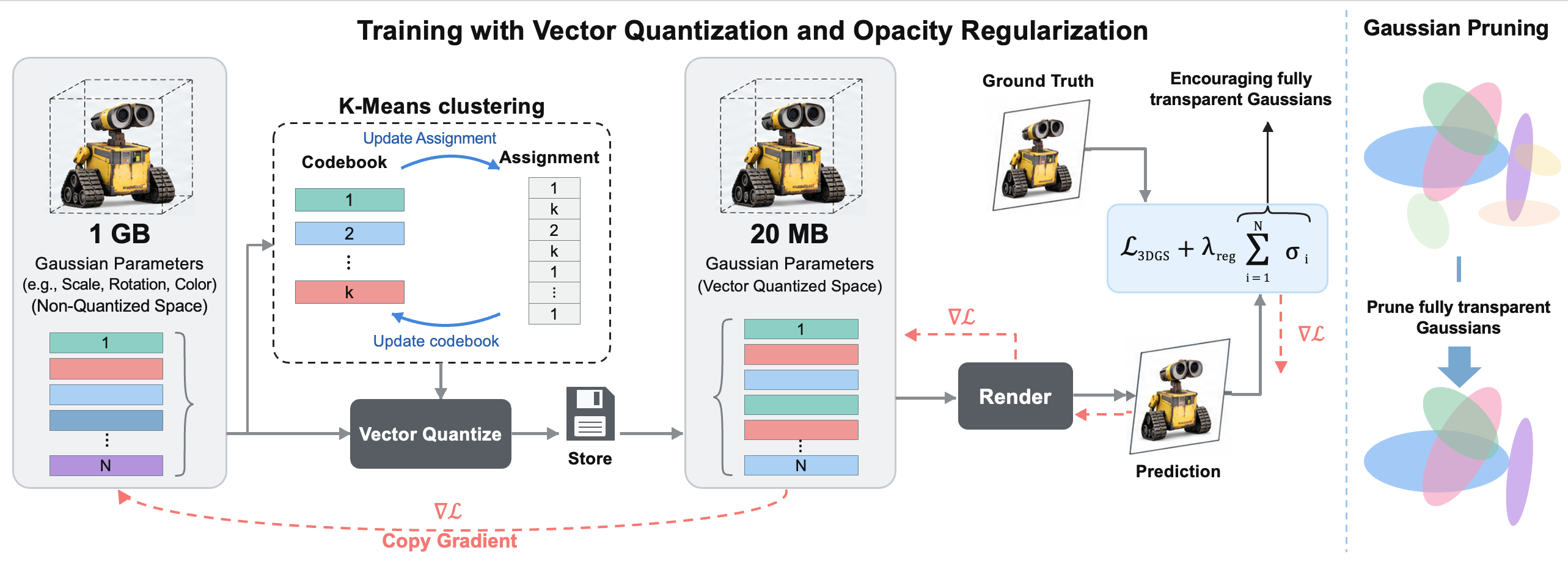
Generated with Paper Fig · Reference: PaperGallery · Original paper
ICEdit — In-Context Image Editing
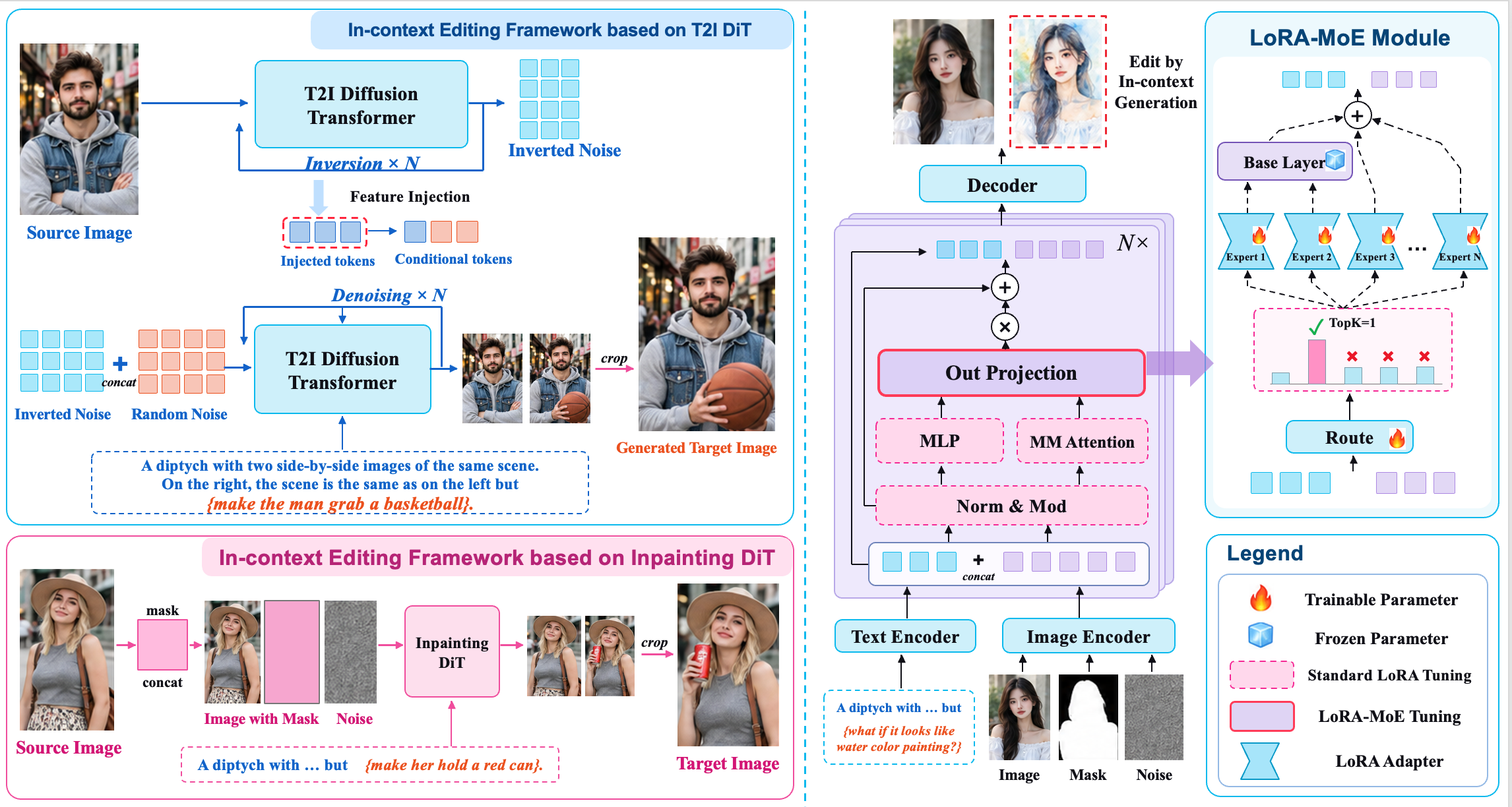
Generated with Paper Fig · Reference: PaperGallery · Original paper
Source attribution and reuse notes
Campaigns
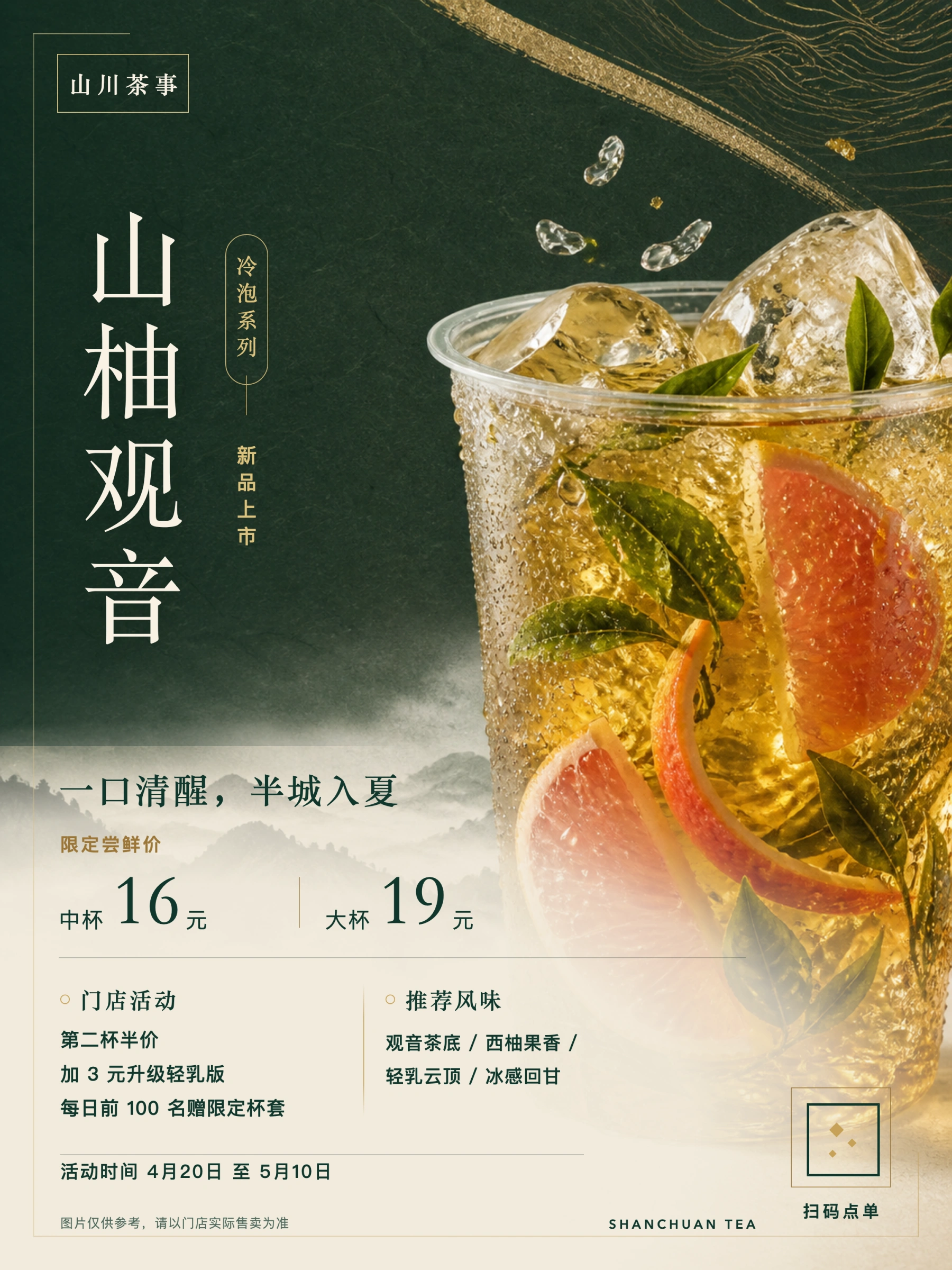
山柚观音
🖼️ final-coding-design.png
|
|
Prompt:
Design a 3:4 vertical New Chinese light-luxury tea-launch poster in dark green, off-white, and gold, with rice-paper texture, restrained negative space, landscape accents, and modern layout. Hero: an appealing cold-brew tea with leaves, citrus, ice, and gold foil. Display exactly: "山川茶事" / "山柚观音" / "冷泡系列" / "新品上市"; "一口清醒,半城入夏" / "限定尝鲜价"; "中杯 16 元" / "大杯 19 元"; "门店活动" / "第二杯半价" / "加 3 元升级轻乳版" / "每日前 100 名赠限定杯套"; "推荐风味" / "观音茶底 / 西柚果香 / 轻乳云顶 / 冰感回甘"; "活动时间 4月20日 至 5月10日" / "扫码点单" / "SHANCHUAN TEA". Fine print: "图片仅供参考,请以门店实际售卖为准". Use clear promotional hierarchy, refined Chinese typography, and accurate small text, numbers, prices, and modules; avoid cheap e-commerce styling.
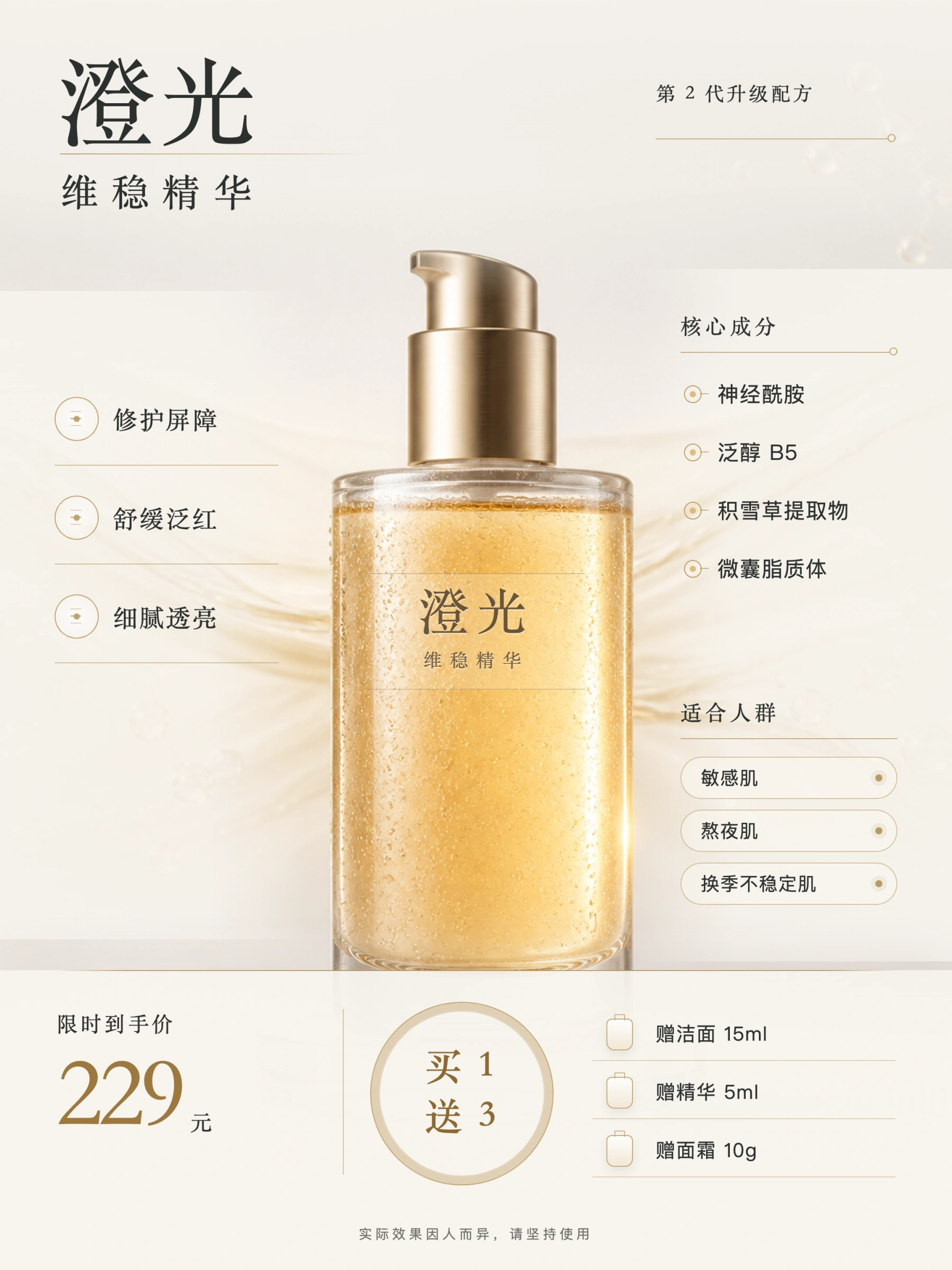
澄光维稳精华
🖼️ final-coding-design.png
|
|
Prompt:
Create a high-end skincare e-commerce hero poster for "澄光维稳精华" ("Clarifying Stabilizing Essence"). The style should be clean, light-luxury, and strongly science-skincare oriented. In the center, place a semi-transparent frosted-glass essence bottle filled with golden liquid and subtle water-droplet reflections. Use an off-white to warm gray gradient background with liquid-flow elements and microscopic molecular-structure decoration.
The poster must include the following exact Chinese copy:
"澄光"
Show full prompt
Create a high-end skincare e-commerce hero poster for "澄光维稳精华" ("Clarifying Stabilizing Essence"). The style should be clean, light-luxury, and strongly science-skincare oriented. In the center, place a semi-transparent frosted-glass essence bottle filled with golden liquid and subtle water-droplet reflections. Use an off-white to warm gray gradient background with liquid-flow elements and microscopic molecular-structure decoration.

The poster must include the following exact Chinese copy:
"澄光"
"维稳精华"
"修护屏障"
"舒缓泛红"
"细腻透亮"
"第 2 代升级配方"
"核心成分"
"神经酰胺"
"泛醇 B5"
"积雪草提取物"
"微囊脂质体"
"适合人群"
"敏感肌"
"熬夜肌"
"换季不稳定肌"
"限时到手价 229 元"
"买 1 送 3"
"赠洁面 15ml"
"赠精华 5ml"
"赠面霜 10g"

Fine print:
"实际效果因人而异,请坚持使用"

Focus on product selling points, pricing hierarchy, gift-list modules, product naming, and short functional phrases. The result should feel premium and not tacky or overly live-commerce styled.
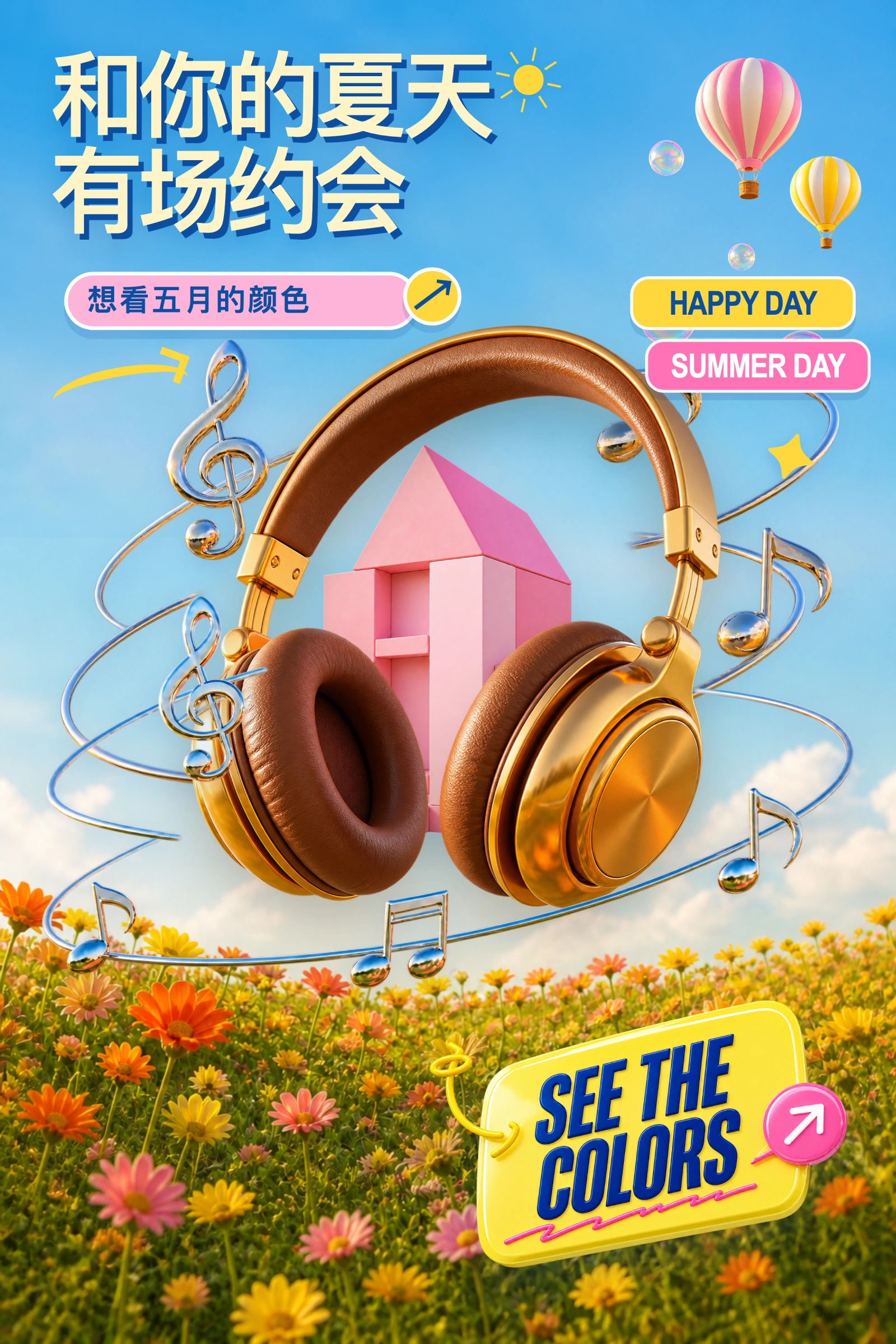
Summer Music
🖼️ final-coding-design.png
|
|
Prompt:
Create a 2:3 vertical summer music poster with a bright, dreamy, and playful 3D look. Place a floating pair of gold-and-tan headphones in the center, with a pink geometric house behind them and silver lines and musical notes swirling around the scene. Fill the lower area with green grass and orange, yellow, and pink flowers, while adding a hot-air balloon, bubbles, and yellow doodles to the blue sky. Include the text “HAPPY DAY,” “SUMMER DAY,” “SEE THE COLORS,” “和你的夏天 有场约会,” and “想看五月的颜色,” using sky blue, bright yellow, pink, and green as the main colors.
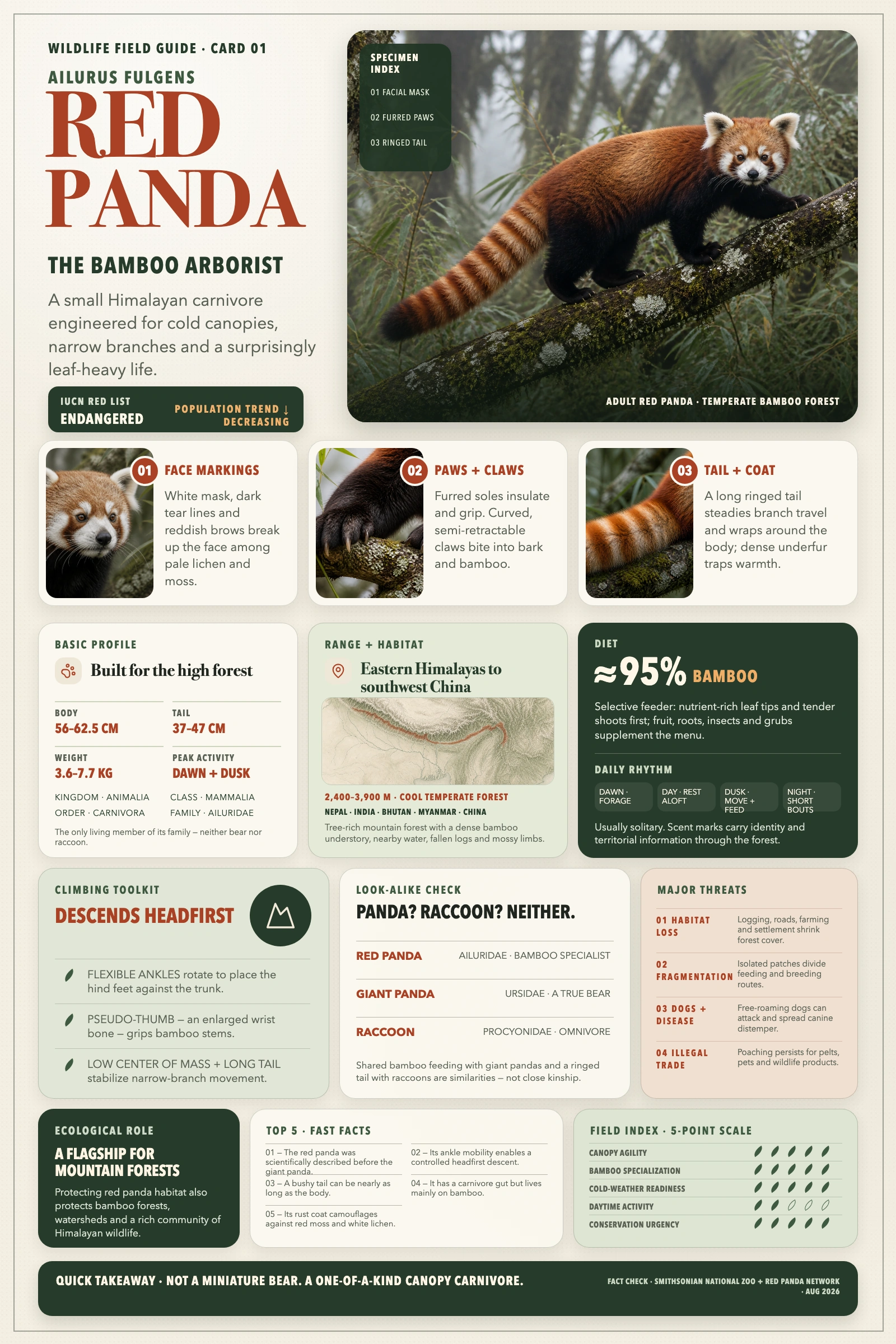
Red Panda Field Guide
🖼️ final-coding-design.png
|
|
Prompt:
Generate a high-quality vertical encyclopedia-style infographic about the red panda.
This should not be a normal animal poster or a simple illustration. It should feel like a modular wildlife field guide that combines the clarity of an encyclopedia page, the polish of a lifestyle knowledge card, and the shareability of a strong social-media explainer.
The image should include:
Show full prompt
Generate a high-quality vertical encyclopedia-style infographic about the red panda.

This should not be a normal animal poster or a simple illustration. It should feel like a modular wildlife field guide that combines the clarity of an encyclopedia page, the polish of a lifestyle knowledge card, and the shareability of a strong social-media explainer.

The image should include:
- a clear and appealing main visual of an anatomically accurate red panda in its natural forest habitat
- several enlarged detail callouts showing features such as its ringed tail, facial markings, paws, claws, and thick fur
- multiple rounded modular information sections
- strong title hierarchy and highlighted key labels
- concise but information-rich educational content
- visual scoring, quick takeaways, or a Top 5 facts module

Adapt the content sections to the red panda. Useful categories include:
basic profile, scientific classification, physical appearance, habitat and geographic distribution, diet, daily behavior, climbing adaptations, ecological role, differences from giant pandas and raccoons, conservation status, major threats, and a quick field-guide scorecard.

Visual requirements:
use a clean light background, soft forest-inspired colors, subtle shadows, refined wildlife icons, rounded information cards, and a neat editorial layout. The information density should be high but not crowded, and the final image should feel publishable, collectible, and repeatable as part of a wildlife knowledge-card series rather than an advertisement.

Do not make it look like a commercial zoo poster or an overly cute cartoon. Emphasize accurate wildlife representation, knowledge organization, modular information, and a natural-history field-guide presentation.
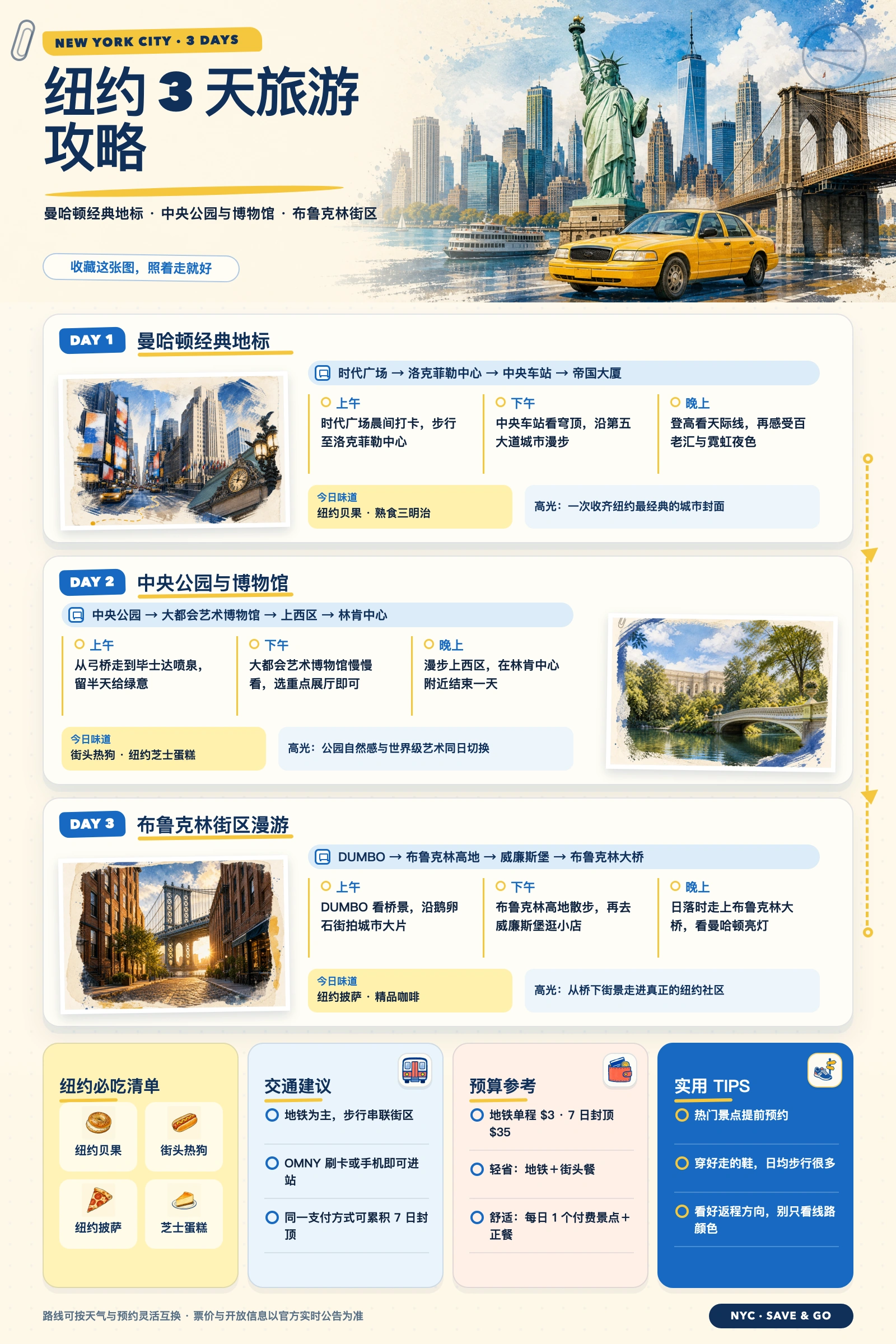
NYC 3-Day Guide
🖼️ final-coding-design.png
|
|
Prompt:
Create a vertical editorial travel infographic poster titled “纽约3天旅游攻略,” using a warm ivory paper background with navy blue, sky blue and taxi yellow accents. Divide the composition into four clear sections: a large top hero area with bold Chinese typography on the left and a watercolor-photo collage of the New York skyline, Statue of Liberty, Brooklyn Bridge, ferry and yellow taxi on the right; three stacked rounded itinerary cards for DAY 1 Manhattan landmarks, DAY 2 Central Park and museums, and DAY 3 Brooklyn and DUMBO; and a compact bottom row containing four practical cards for local food, transportation, budget and travel tips. Each daily card should include one framed watercolor city image, a pale-blue route bar, three columns labeled morning, afternoon and evening, yellow divider lines, a small food recommendation and a highlighted travel note. Alternate the image position between left and right to create rhythm, and connect the three days with a dotted yellow itinerary line along the outer edge. Use a clean modular grid, generous margins, subtle shadows, rounded corners, small friendly icons and strong typographic hierarchy. Blend polished tourism-guide design with hand-painted watercolor textures, torn brush edges and light paper grain; informative, cheerful, organized and easy to scan.
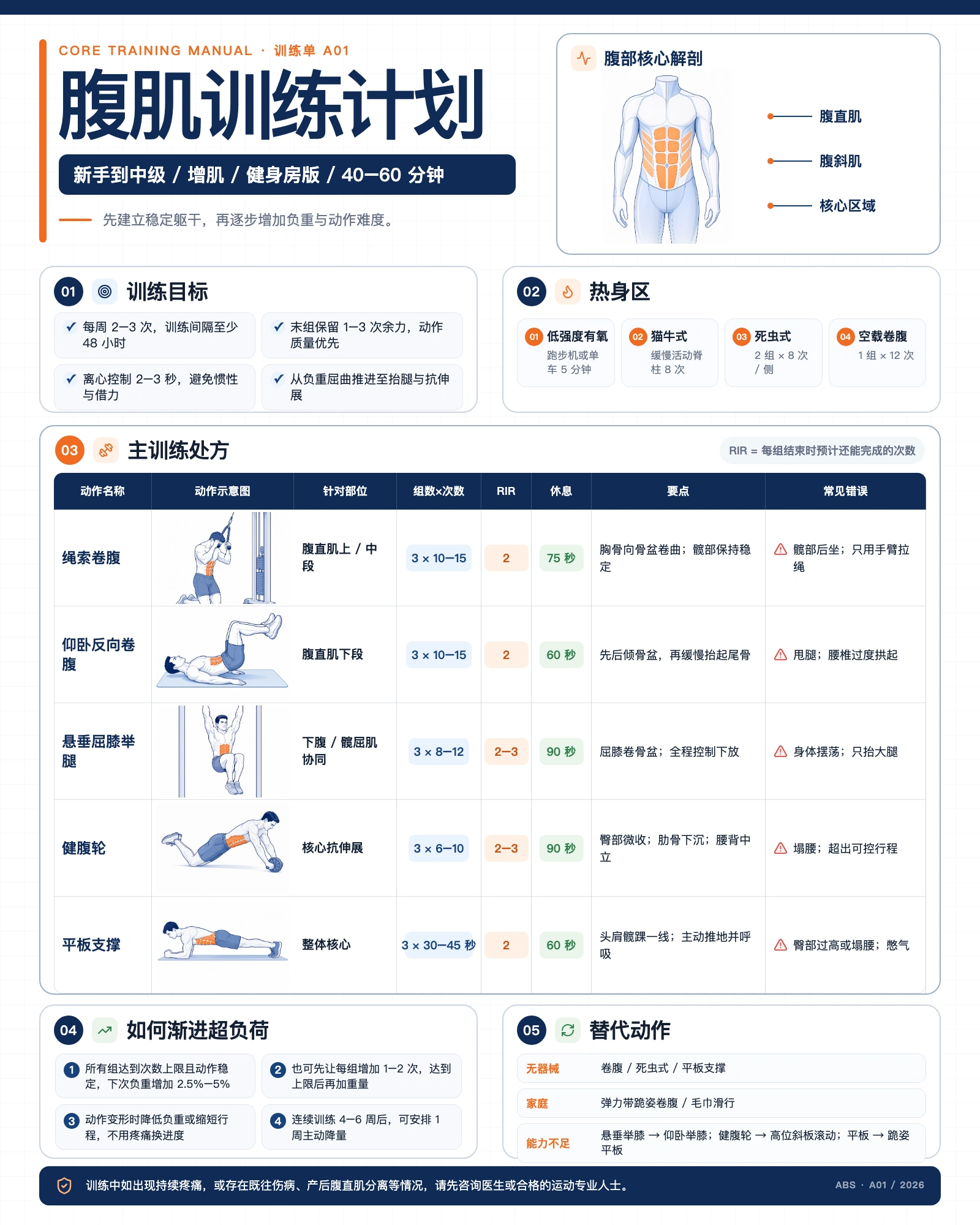
Abs Training Plan
🖼️ final-coding-design.png
|
|
Prompt:
生成一张竖版(4:5)中文健身信息图海报,主题「腹肌训练计划」。
风格:教学手册式信息图,白底,深蓝 + 橙色双主色,圆角白卡片配细边框,无衬线黑体,
信息密度高但排版整齐对齐。
Show full prompt
生成一张竖版(4:5)中文健身信息图海报,主题「腹肌训练计划」。

风格:教�


 Editable Design is a set of Codex Agent Skills that turn a brief or method description into an editable visual artifact — a poster, infographic, marketing campaign, or paper workflow diagram — keeping text and visual elements independently editable in HTML or PowerPoint.