


1.3K ·GitHub
Что это такое?
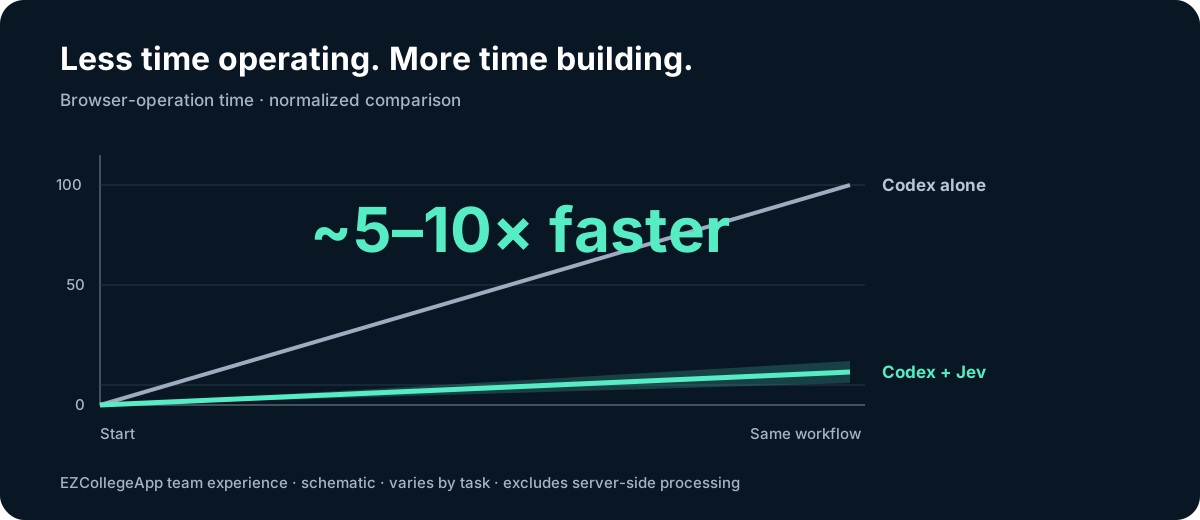
 Jev Browser Use — это скилл для Codex (а скоро и Claude Code), разделяющий браузерную автоматизацию на две роли: быстрая и дешёвая модель под названием Jev управляет кликами, навигацией, переключателями и прокруткой, а Codex занимается вводом текста, визуальной оценкой и финальной проверкой. Такое разделение, по заявлениям, ускоряет браузерные операции примерно в 5-10 раз по сравнению с одной моделью на всё.
Jev Browser Use — это скилл для Codex (а скоро и Claude Code), разделяющий браузерную автоматизацию на две роли: быстрая и дешёвая модель под названием Jev управляет кликами, навигацией, переключателями и прокруткой, а Codex занимается вводом текста, визуальной оценкой и финальной проверкой. Такое разделение, по заявлениям, ускоряет браузерные операции примерно в 5-10 раз по сравнению с одной моделью на всё.Это плагин Codex или самостоятельный скилл?Поставляется и так, и так: самостоятельный скилл, который вы устанавливаете вручную, и нативный плагин Codex, добавляемый через маркетплейс. Выберите что-то одно, чтобы избежать дублирования инструкций; оба используют один и тот же файл конфигурации Jev.
Поставляется и так, и так: самостоятельный скилл, который вы устанавливаете вручную, и нативный плагин Codex, добавляемый через маркетплейс. Выберите что-то одно, чтобы избежать дублирования инструкций; оба используют один и тот же файл конфигурации Jev.Что нужно перед установкой?Node.js 22+, Codex с подключённым к Chrome или его встроенному браузеру Computer Use, а также доступ к Jev через API-ключ TypeSafe или OpenRouter.
Node.js 22+, Codex с подключённым к Chrome или его встроенному браузеру Computer Use, а также доступ к Jev через API-ключ TypeSafe или OpenRouter.Уже работает ли это с Claude Code?Скилл уже сейчас можно установить в Claude Code, но реальное исполнение в браузере по-прежнему требует рантайма Computer Use от Codex — нативная поддержка браузера в Claude Code значится как «скоро».
Скилл уже сейчас можно установить в Claude Code, но реальное исполнение в браузере по-прежнему требует рантайма Computer Use от Codex — нативная поддержка браузера в Claude Code значится как «скоро».Тестировалось ли это вне macOS?В README подтверждено тестирование только на macOS; поведение на браузерных конфигурациях Windows или Linux не задокументировано.
В README подтверждено тестирование только на macOS; поведение на браузерных конфигурациях Windows или Linux не задокументировано.Что происходит с содержимым страницы, которое читает Jev?Jev читает текст доступности со страницы (не скриншоты) и отправляет его тому провайдеру, которого вы настроили, — TypeSafe или OpenRouter, поэтому делегируйте только те страницы, которые вам разрешено передавать этому провайдеру.
Jev читает текст доступности со страницы (не скриншоты) и отправляет его тому провайдеру, которого вы настроили, — TypeSafe или OpenRouter, поэтому делегируйте только те страницы, которые вам разрешено передавать этому провайдеру.Почему автор создал это, а не просто использовал один Codex?Во время тестирования EZCollegeApp, их продукта для поступления в колледж, проверка функции эссе означала многократное открытие оценок и прокрутку отчётов. Передав эту повторяющуюся навигацию Jev, Codex смог сосредоточиться на проверке того, действительно ли совпадают отзывы оценок и встроенные аннотации.
Во время тестирования EZCollegeApp, их продукта для поступления в колледж, проверка функции эссе означала многократное открытие оценок и прокрутку отчётов. Передав эту повторяющуюся навигацию Jev, Codex смог сосредоточиться на проверке того, действительно ли совпадают отзывы оценок и встроенные аннотации.Насколько Jev дешевле, чем гонять всё через собственные модели Codex?Jev стоит около $0.042 за 1 млн входных токенов с бесплатным выводом против $2-$10 за 1 млн входных токенов у перечисленных моделей GPT-5.6/GPT-6 — примерно в 48-238 раз дешевле для повторяющейся работы с кликами и прокруткой, которую он выполняет.
Jev стоит около $0.042 за 1 млн входных токенов с бесплатным выводом против $2-$10 за 1 млн входных токенов у перечисленных моделей GPT-5.6/GPT-6 — примерно в 48-238 раз дешевле для повторяющейся работы с кликами и прокруткой, которую он выполняет.Что такое Jev Ultrafast?Это отдельный самостоятельный проект браузерного агента от Browser Use, который также работает на модели Jev и упоминается в официальных руководствах как ещё один вариант, заслуживающий изучения.
Это отдельный самостоятельный проект браузерного агента от Browser Use, который также работает на модели Jev и упоминается в официальных руководствах как ещё один вариант, заслуживающий изучения.What are similar projects?guizang-product-video-skill, open-steps, answer-me-with-html, shuohao-skills, qwen-code, ordewell, open-pstack, evondevKit
guizang-product-video-skill, open-steps, answer-me-with-html, shuohao-skills, qwen-code, ordewell, open-pstack, evondevKitWhich topics is it in?openai-codex, agent-tools, claude-skill, computer-use, agentic, codex-skill, claude-code-skill, browser-automation, agent-orchestration, skill, skills, browser
openai-codex, agent-tools, claude-skill, computer-use, agentic, codex-skill, claude-code-skill, browser-automation, agent-orchestration, skill, skills, browser