










Что это такое?
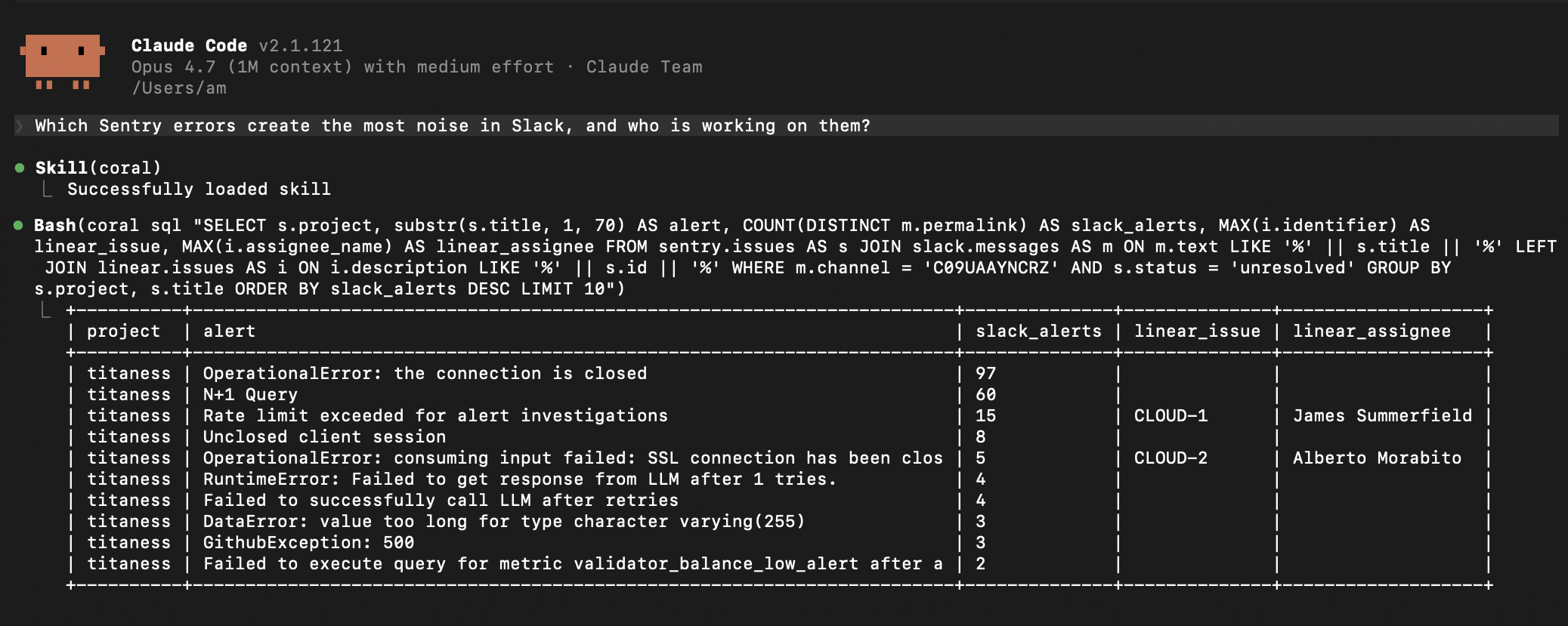
 Coral — это единый интерфейс SQL-запросов, который позволяет ИИ-агентам и разработчикам одновременно запрашивать несколько живых источников данных: API, такие как GitHub, Slack, Datadog, Stripe и Sentry, а также локальные файлы JSONL/Parquet. Всё это работает через один слой SQL, без необходимости обращаться к отдельному MCP-серверу или обёртке API каждого источника.
Coral — это единый интерфейс SQL-запросов, который позволяет ИИ-агентам и разработчикам одновременно запрашивать несколько живых источников данных: API, такие как GitHub, Slack, Datadog, Stripe и Sentry, а также локальные файлы JSONL/Parquet. Всё это работает через один слой SQL, без необходимости обращаться к отдельному MCP-серверу или обёртке API каждого источника.Это база данных, которую нужно настраивать, или слой поверх моих существующих источников?Это не база данных со своим хранилищем. Coral — слой только для чтения: он переводит SQL в живые вызовы API или чтение файлов из подключённых источников и возвращает результаты как обычные табличные строки.
Это не база данных со своим хранилищем. Coral — слой только для чтения: он переводит SQL в живые вызовы API или чтение файлов из подключённых источников и возвращает результаты как обычные табличные строки.Как запустить это и подключить мои данные?Установите Coral как настольное приложение (macOS, Linux, Windows) или как CLI, затем выполните 'coral source add github' (или другой встроенный источник), чтобы подключить его. Coral запросит необходимые учётные данные в интерактивном режиме или возьмёт их из соответствующих переменных окружения.
Установите Coral как настольное приложение (macOS, Linux, Windows) или как CLI, затем выполните 'coral source add github' (или другой встроенный источник), чтобы подключить его. Coral запросит необходимые учётные данные в интерактивном режиме или возьмёт их из соответствующих переменных окружения.Какие агенты для написания кода могут подключаться к Coral и нужны ли учётные данные для каждого источника?Coral предоставляет MCP-сервер через stdio, к которому могут подключаться Claude Code, Codex, Cursor и VS Code. Да, каждому источнику, например GitHub, Slack или Datadog, нужны свои учётные данные, которые настраиваются при его добавлении.
Coral предоставляет MCP-сервер через stdio, к которому могут подключаться Claude Code, Codex, Cursor и VS Code. Да, каждому источнику, например GitHub, Slack или Datadog, нужны свои учётные данные, которые настраиваются при его добавлении.Могу ли я записывать данные обратно через Coral или доступ только для чтения?Coral по замыслу работает только на чтение. Он создан для запросов и сопоставления существующих данных из разных источников, а не для записи или изменения данных.
Coral по замыслу работает только на чтение. Он создан для запросов и сопоставления существующих данных из разных источников, а не для записи или изменения данных.Покидают ли мои данные и учётные данные когда-нибудь мой компьютер?Нет. Всё работает локально: ваши данные, учётные данные и история использования остаются на вашем компьютере и никуда не отправляются.
Нет. Всё работает локально: ваши данные, учётные данные и история использования остаются на вашем компьютере и никуда не отправляются.Зачем использовать Coral вместо прямого подключения агентов к MCP-серверам отдельных источников?Прямые MCP-серверы отдельных источников создают слишком много вызовов инструментов, повторяют логику авторизации и постраничной навигации и плохо справляются с рассуждениями между источниками. Coral позволяет агенту написать один SQL-запрос, который объединяет данные из нескольких источников.
Прямые MCP-серверы отдельных источников создают слишком много вызовов инструментов, повторяют логику авторизации и постраничной навигации и плохо справляются с рассуждениями между источниками. Coral позволяет агенту написать один SQL-запрос, который объединяет данные из нескольких источников.Насколько лучше Coral показал себя в бенчмарках?По сравнению с прямыми MCP-серверами провайдеров (Datadog, Sentry, Linear, Slack, GitHub) на 82 реальных задачах с Claude Opus 4.6 Coral оказался точнее на 20%, экономичнее по стоимости в 2 раза и имел на 42% меньшую задержку в целом. На сложных задачах в стиле агентов для написания кода точность выросла на 31%, а стоимость снизилась в 3,4 раза.
По сравнению с прямыми MCP-серверами провайдеров (Datadog, Sentry, Linear, Slack, GitHub) на 82 реальных задачах с Claude Opus 4.6 Coral оказался точнее на 20%, экономичнее по стоимости в 2 раза и имел на 42% меньшую задержку в целом. На сложных задачах в стиле агентов для написания кода точность выросла на 31%, а стоимость снизилась в 3,4 раза.Можно ли подключать источники данных, которые не входят в комплект поставки?Да. Можно написать собственную спецификацию источника (YAML-файл, который описывает API или набор данных, а также его таблицы и столбцы) или взять спецификации от сообщества из папки 'sources/community' в репозитории.
Да. Можно написать собственную спецификацию источника (YAML-файл, который описывает API или набор данных, а также его таблицы и столбцы) или взять спецификации от сообщества из папки 'sources/community' в репозитории.Что делает 'coral search'?'coral search' находит нужные схемы и таблицы в метаданных каталога до того, как вы напишете SQL. Это помогает агентам понять, что можно запросить, не угадывая имена таблиц.
'coral search' находит нужные схемы и таблицы в метаданных каталога до того, как вы напишете SQL. Это помогает агентам понять, что можно запросить, не угадывая имена таблиц.What are similar projects?headroom, Benzi, BrowserOS, graphicle, okf-agent-memory, leviathan, Agentlas-OS, github-mcp-server
headroom, Benzi, BrowserOS, graphicle, okf-agent-memory, leviathan, Agentlas-OS, github-mcp-serverWhich topics is it in?yaml, vscode, github, sql, model-context-protocol, cursor, agentic-ai, local-first, benchmark, mcp-server, database, claude
yaml, vscode, github, sql, model-context-protocol, cursor, agentic-ai, local-first, benchmark, mcp-server, database, claude