3.1K ·GitHub
这是什么?
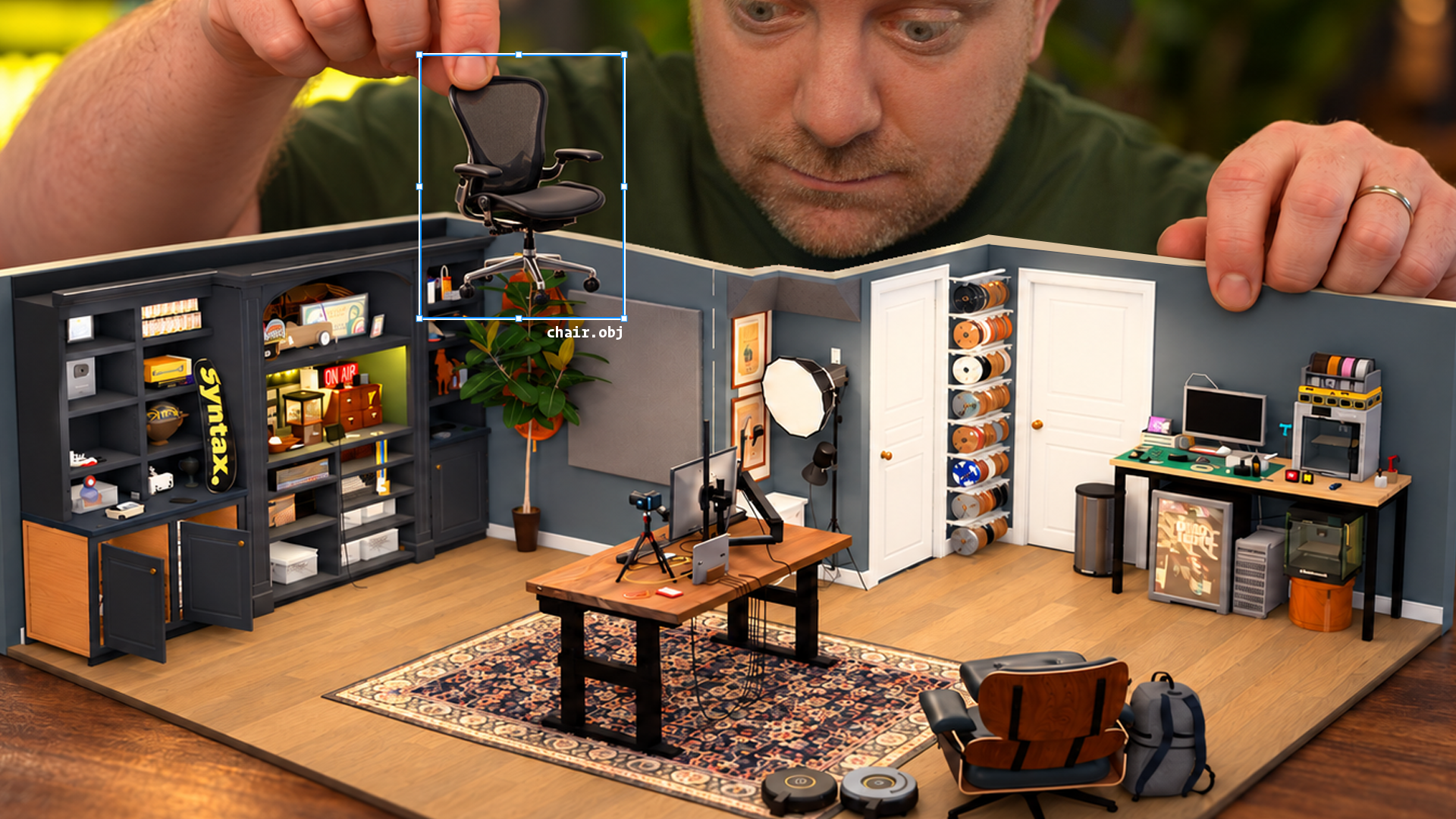
 这是一套工具,可以用 iPhone 的 LiDAR 和摄像头扫描房间,然后借助 AI 编程代理,把扫描结果转换成可编辑的 Three.js 3D 场景。
这是一个应用,还是几个部分协同工作?它包含四个部分:用于录制扫描的 iPhone 应用 3D Model Anything、Three.js 浏览器查看器、用于指导重建过程的代理技能 scan-to-threejs,以及一个办公室示例。
它包含四个部分:用于录制扫描的 iPhone 应用 3D Model Anything、Three.js 浏览器查看器、用于指导重建过程的代理技能 scan-to-threejs,以及一个办公室示例。我怎样试用自带的示例?安装 Node.js 22.12 或更高版本,然后在本地打开查看器,即可体验重建后的办公室,包括俯视洋娃娃屋、第一人称步行、俯视、线框和平铺整理等视图。例如访问 /play.html?room=office-v4&mode=fpv。
安装 Node.js 22.12 或更高版本,然后在本地打开查看器,即可体验重建后的办公室,包括俯视洋娃娃屋、第一人称步行、俯视、线框和平铺整理等视图。例如访问 /play.html?room=office-v4&mode=fpv。要扫描并处理我自己的房间,需要准备什么?扫描需要配备 LiDAR 的 iPhone 或 iPad,并需要 Xcode 来编译应用;重建辅助工具需要 Python 3,照片比对需要 Pillow,深度重建可选装 NumPy 和 Open3D。
扫描需要配备 LiDAR 的 iPhone 或 iPad,并需要 Xcode 来编译应用;重建辅助工具需要 Python 3,照片比对需要 Pillow,深度重建可选装 NumPy 和 Open3D。扫描后会自动得到成品 3D 模型吗?不会。这是一个由代理指导的反复迭代重建流程,并不是一键把扫描转换成完美模型的工具,而且目前只支持房间和室内空间。
不会。这是一个由代理指导的反复迭代重建流程,并不是一键把扫描转换成完美模型的工具,而且目前只支持房间和室内空间。这个 iPhone 应用现在已经上架 App Store 了吗?还没有。目前该应用只能在本仓库中获取源代码;上架 App Store 是一个单独的发布步骤,尚未确定。
还没有。目前该应用只能在本仓库中获取源代码;上架 App Store 是一个单独的发布步骤,尚未确定。这个仓库里包含别人扫描的房间吗?不包含。仓库只分发办公室示例;原始扫描、互联房屋布局和开发历史都已排除,并且会提醒用户自行保管好自己的扫描数据。
不包含。仓库只分发办公室示例;原始扫描、互联房屋布局和开发历史都已排除,并且会提醒用户自行保管好自己的扫描数据。授权情况如何?代码和代理技能采用 MIT 许可证,但办公室示例中的图片和纹理有单独的素材条款;第三方商标或所展示的产品不受代码许可证覆盖。
代码和代理技能采用 MIT 许可证,但办公室示例中的图片和纹理有单独的素材条款;第三方商标或所展示的产品不受代码许可证覆盖。scan-to-threejs 技能实际做什么?它会指导 AI 编程代理测量导出的扫描数据、在 Three.js 中建模房间,并将渲染视图与原始照片对比,以提高精度。
它会指导 AI 编程代理测量导出的扫描数据、在 Three.js 中建模房间,并将渲染视图与原始照片对比,以提高精度。我怎样把自己的扫描数据交给代理?通过 iPhone 应用的分享菜单,将房间导出到本地的 data/captures-in/ 文件夹,然后让支持本地技能的代理对该导出数据运行 scan-to-threejs。
通过 iPhone 应用的分享菜单,将房间导出到本地的 data/captures-in/ 文件夹,然后让支持本地技能的代理对该导出数据运行 scan-to-threejs。如果我的手机没有 LiDAR,还能用吗?没有 LiDAR 的 iPhone 和 iPad 仍然可以导入和查看已有的扫描数据,但无法进行基于 LiDAR 的扫描采集。
没有 LiDAR 的 iPhone 和 iPad 仍然可以导入和查看已有的扫描数据,但无法进行基于 LiDAR 的扫描采集。查看器的新房间应该添加到哪里?每个新房间都放入 demos/ 文件夹,并在 demos/index.ts 中注册,这样 Three.js 查看器才能加载它。
每个新房间都放入 demos/ 文件夹,并在 demos/index.ts 中注册,这样 Three.js 查看器才能加载它。有哪些类似的项目?image-to-3d-pipeline, nerfstudio, Meshroom, house-control, editor, omarchy-apple-dev, textream, SwiftUI-Agent-Skill
image-to-3d-pipeline, nerfstudio, Meshroom, house-control, editor, omarchy-apple-dev, textream, SwiftUI-Agent-Skill它属于哪些主题?scanning, photogrammetry, point-cloud, camera, 3d-reconstruction, 3d-modeling, numpy, ios-app, xcode, threejs, apple, image-processing
scanning, photogrammetry, point-cloud, camera, 3d-reconstruction, 3d-modeling, numpy, ios-app, xcode, threejs, apple, image-processing