
An AI creative workspace for images and videos: develop ideas with the right-hand Assistant, upload references, and organize and refine your work on a canvas.
Join Waitlist · Report Bug
English · 简体中文 · 日本語 · 한국어
[!IMPORTANT]
Preview release: we are iterating rapidly, and some bugs and rough edges remain. Join the community to share feedback and follow updates.
WeChat / community

✨ Features
- Work with the right-hand Assistant to develop a brief and create assets in an ongoing project.
- Upload reference material, organize files, and inspect generated images and videos on the canvas.
- Generate with model-aware aspect ratios, durations, resolutions, and reference roles.
- Use supported first-frame, first/last-frame, or reference-image modes; availability depends on the selected model.
- Refine an existing result into a new version while retaining the original.
This preview exposes OpenRouter configuration. Available models include GPT Image 2, Nano Banana variants, Seedance variants, and MiniMax H3 / H3 Max. Availability and charges depend on the provider. H3 Max currently accepts a single first frame in this application, not a first/last-frame pair. Music and voiceover controls are not included in this preview.
The application UI currently supports Chinese and English. Japanese and Korean are README translations.
🚀 Quick Start
Copy the following into a local coding assistant with terminal access. It will inspect your machine, install the required dependencies, and configure Docker for you. You may need to approve an operating-system installer or start Docker Desktop yourself.
Install the self-hosted preview of https://github.com/waooAI/waoowaoo on my computer.
Read the repository README, docs/INSTALL.md, and the selected GitHub Release first.
Use a published preview release and its prebuilt Docker images. Pin both the
application and the Codex runtime to the release's immutable image digests.
Check my OS, CPU architecture, Docker Engine/Desktop, Compose v2, Git, and flock;
install missing dependencies using the appropriate OS tools, with approval where required.
Use a new installation directory and preserve all existing containers, files, and data.
Generate unique local secrets and configure .env without printing or uploading secrets.
Follow the existing Worker bootstrap procedure; do not invent a second startup path.
Include docker/caddy/Caddyfile from the same release. Use the default Compose HTTPS entry:
SELF_HOSTED_HOST=localhost, SELF_HOSTED_HTTPS_PORT=1443; APP_HOST_PORT=13000 only redirects HTTP.
The overlay derives NEXTAUTH_URL; preserve Caddy's /data and /config named volumes.
Export only root.crt, explain its trust implications, and obtain my explicit approval
before helping me trust it on the browser's host OS (Windows trust is separate from WSL).
Never export root.key or bypass TLS checks. Verify https://localhost:1443 has no certificate
warning and the browser actually uses h2, including event streams across multiple tabs.
SSE tab concurrency is not the AI task concurrency limit.
Verify container health and that the application opens, then tell me the local URL.
Guide me to enter my OpenRouter API key in the application; do not request it in chat.
Do not start paid AI generations without my approval. If the release lacks a required
image or my platform is unsupported, explain the blocker instead of claiming success.
The release Compose setup starts Caddy automatically. After approving local certificate trust, open https://localhost:1443; port 13000 only redirects HTTP. Source development with npm run dev remains at http://localhost:3001.
The recommended distribution is prebuilt Docker images. You do not need to install Node.js, MySQL, Redis, Temporal, or FFmpeg on your host for this path; application dependencies run in containers. The complete installation instructions for your assistant and manual setup are in docs/INSTALL.md.
🔧 API Configuration
After launching, open your profile’s API configuration and add your OpenRouter API key. Provider calls are paid through your own account. Keep API keys out of chat and support logs.
Project data and media use local database and private MinIO storage; prompts and references are sent to the provider for requested AI tasks. Supported inline image references do not require a public media URL.
For manual setup, source builds, backups, and upgrades, see the installation guide.
📦 Tech Stack
- Framework: Next.js 16 + React 19
- Database: MySQL + Prisma ORM
- Durable execution: Temporal
- Transport & cache: Redis
- Media storage: Private MinIO (S3)
- Styling: Tailwind CSS v4
- Auth: NextAuth.js
📦 Preview
🤝 Contributing
This project is maintained by the core team. You are welcome to:
- 🐛 File an Issue to report bugs.
- 💡 File an Issue to suggest features.
- 🔧 Submit a Pull Request for reference — we review ideas carefully, but the team implements changes internally rather than merging external PRs directly.
License
Starting with v0.5.0-beta.1, this distribution is licensed under Elastic License 2.0. Personal use, internal business use, modification, and redistribution are permitted subject to its terms. Providing third parties with hosted or managed access to a substantial set of the software’s features requires separate permission. Earlier releases retain their original licenses; third-party components retain their respective licenses. This is source-available software, not OSI-approved open source.
Made with ❤️ by waoowaoo team
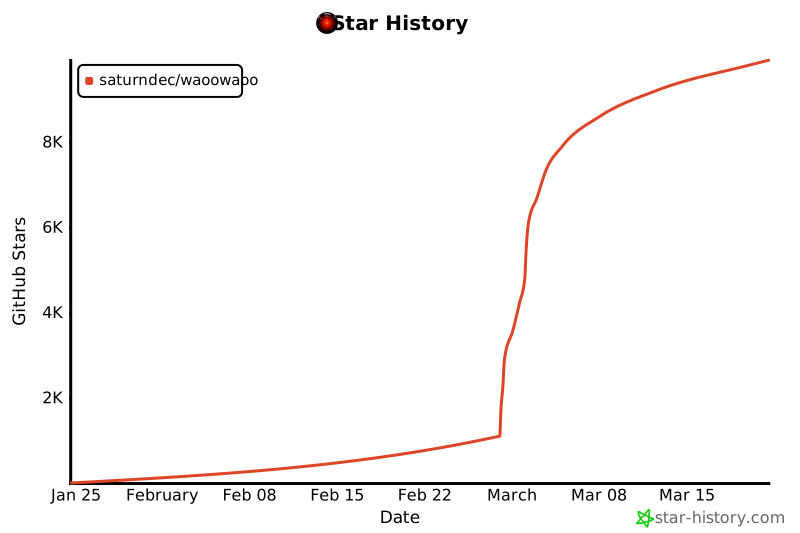
Star History

 这是一个用于可控影视制作的 AI 智能体平台,可以做短视频,也能做类似真人实拍风格的内容。它是一个创作工作区:你可以和 AI 助手一起打磨想法、上传参考素材,并在画布上生成和整理图片与视频。